1. Úvod
Děkuji za nákupasing the ICON 12-inch Bluetooth Speaker. This manual provides detailed instructions for the safe and efficient operation of your new speaker. Please read this manual thoroughly before use and retain it for future reference.
2. Obsah balení
- ICON 12-inch Bluetooth Speaker
- Napájecí kabel
- Bezdrátový mikrofon
- Dálkové ovládání
- Uživatelská příručka

Image: The ICON Bluetooth speaker shown with its included wireless microphone and remote control, highlighting the complete package contents.
3. Konec produktuview
The ICON 12-inch Bluetooth Speaker is a versatile audio system designed for various applications, offering powerful sound output and multiple connectivity options. It features a built-in rechargeable battery for portability and integrated wheels and a retractable handle for easy transport.

Obrázek: Přední strana view of the ICON 12-inch Bluetooth Speaker, showcasing its robust design and blue illuminated woofer.

Obrázek: Zadní view of the ICON 12-inch Bluetooth Speaker, displaying the main control panel and retractable handle.
Klíčové vlastnosti:
- Powerful 6000W PMPO Output
- Bluetooth Connectivity for Wireless Streaming
- USB and SD Card Playback
- 3.5mm AUX vstup
- Vestavěné FM rádio
- Vstupy pro mikrofon a kytaru
- Rechargeable Battery for Extended Playtime
- Integrated Equalizer for Sound Customization
- TWS (True Wireless Stereo) Functionality for connecting multiple speakers
- LED světelné efekty

Image: Visual representation of the ICON Bluetooth Speaker's key features, including excellent sound quality, Bluetooth compatibility, AUX input, rechargeable battery, FM radio, and equalizer.
4. Nastavení
4.1 Počáteční nabíjení
Before first use, fully charge the speaker's internal battery. Connect the power cable to the AC INPUT port on the rear panel and plug it into a standard wall outlet. The charging indicator will illuminate. Charging time may vary.
4.2 Ovládací panel Overview
Familiarize yourself with the control panel located on the rear of the speaker.
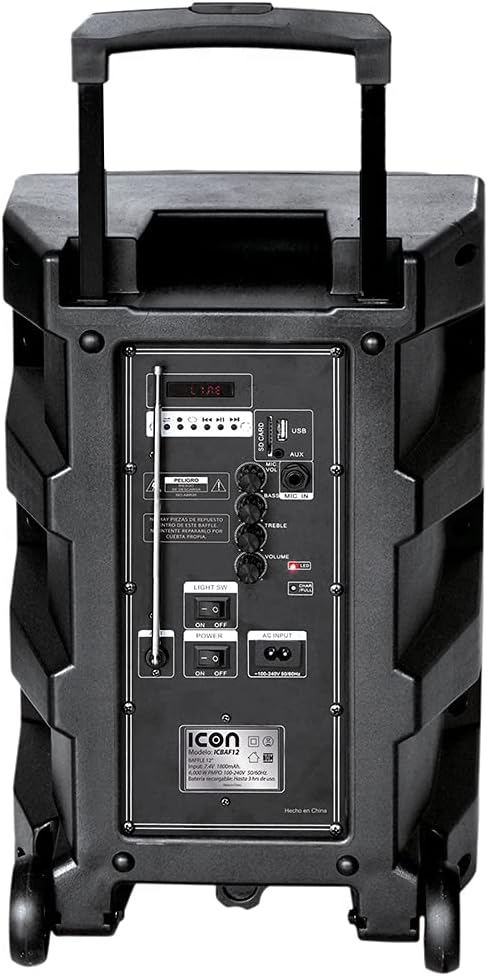
Obrázek: Podrobný view of the ICON speaker's rear control panel, showing various inputs, volume, treble, and bass controls.
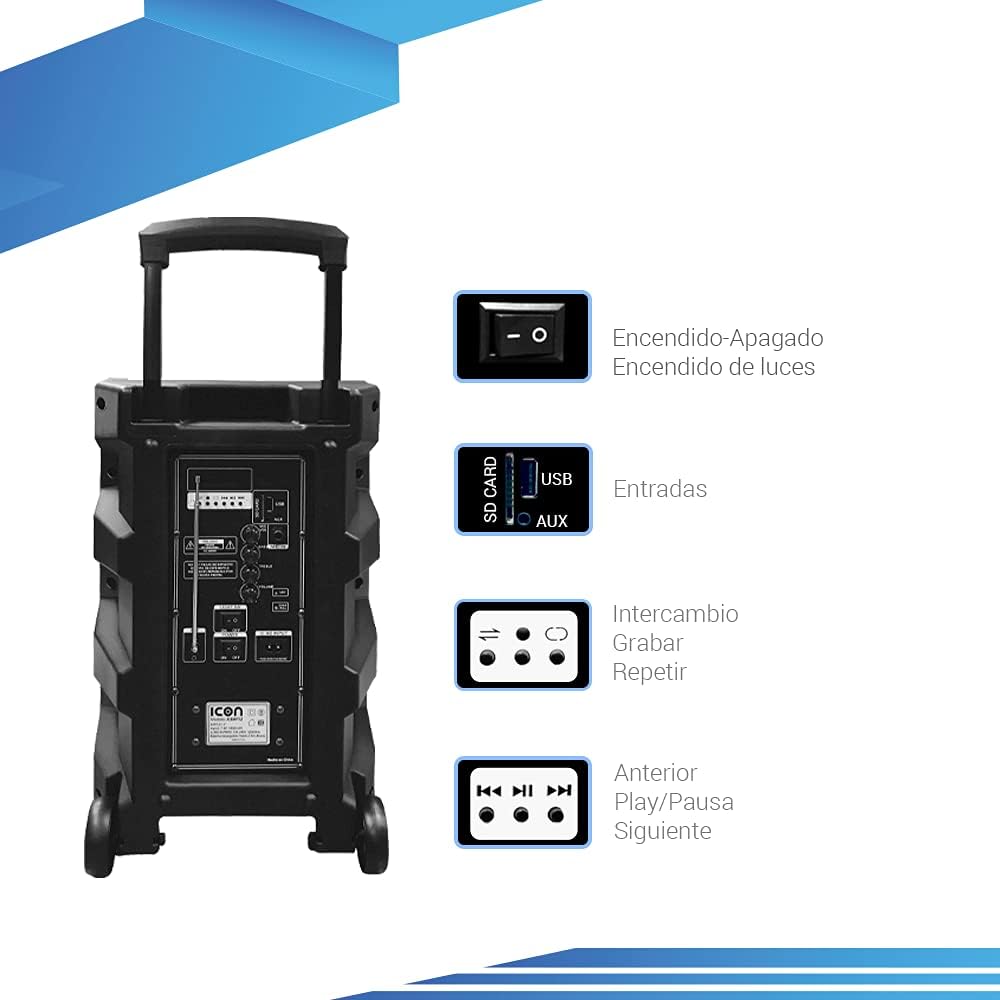
Image: Diagram illustrating key controls on the ICON speaker, including the power switch, light switch, input ports (SD Card, USB, AUX), and playback control buttons (Mode Switch, Record, Repeat, Previous, Play/Pause, Next).
- Vypínač: Turns the speaker On or Off.
- LIGHT SW: Toggles the LED light effects On or Off.
- SD CARD / USB / AUX Inputs: For connecting external media or devices.
- Přepínač MODE: Cycles through input modes (Bluetooth, USB, SD, AUX, FM).
- Tlačítko RECORD: Initiates recording (e.g., microphone input to USB/SD).
- Tlačítko REPEAT: Opakuje aktuální skladbu nebo seznam skladeb.
- PREVIOUS / PLAY/PAUSE / NEXT Buttons: Standardní ovládací prvky přehrávání médií.
- Knoflík VOLUME: Upravuje hlavní hlasitost.
- TREBLE / BASS Knobs: Upravuje vysoké a nízké frekvence.
- MIC INPUT / GUITAR INPUT: For connecting microphones and guitars.
5. Návod k obsluze
5.1 Zapnutí/vypnutí
To turn the speaker ON, flip the MOC switch to the 'ON' position. To turn it OFF, flip the switch to 'OFF'.
5.2 Párování Bluetooth
- Turn on the speaker. It will automatically enter Bluetooth pairing mode, indicated by a flashing Bluetooth icon on the display.
- Na svém mobilním zařízení (chytrý telefon, tablet, notebook) povolte Bluetooth a vyhledejte dostupná zařízení.
- Select "ICON Speaker" (or similar name) from the list of devices.
- Once paired, the speaker will emit a confirmation sound, and the Bluetooth icon will stop flashing. You can now play audio wirelessly from your device.
5.3 Přehrávání z USB/SD karty
- Vložte USB flash disk nebo SD kartu (s audio soubory MP3) files) do příslušného portu.
- The speaker will automatically switch to USB/SD mode and begin playing the first compatible track. If not, press the MODE button to select USB/SD mode.
- Použijte PŘEDCHOZÍ, PLAY/PAUSEa DALŠÍ tlačítka pro ovládání přehrávání.
5.4 Vstup AUX
Connect an external audio device (e.g., MP3 player, computer) to the AUX input using a 3.5mm audio cable. Press the MODE button until AUX mode is selected.
5.5 Provoz FM rádia
- Stiskněte tlačítko MODE tlačítko pro přepnutí do režimu FM rádia.
- Stiskněte a podržte PLAY/PAUSE tlačítko pro automatické prohledávání a ukládání dostupných FM stanic.
- Použijte PŘEDCHOZÍ a DALŠÍ tlačítka pro navigaci mezi uloženými stanicemi.
5.6 Microphone and Guitar Usage
Plug your microphone or guitar into the respective MIC VSTUP or KYTAROVÝ VSTUP jacks. Adjust the volume using the main OBJEM knob and any dedicated microphone/guitar volume controls if present.
Funkce 5.7 TWS (True Wireless Stereo)
The TWS function allows you to connect two ICON speakers wirelessly for a true stereo sound experience.
- Ujistěte se, že jsou oba reproduktory zapnuté a nejsou připojeny k žádnému zařízení Bluetooth.
- On one speaker (this will be the master), press and hold the TWS button (if available, or a combination of buttons as per specific model instructions, often the 'Mode' button or a dedicated TWS button).
- The speaker will search for another TWS-compatible speaker. Once connected, you will hear a confirmation sound.
- Now, connect your mobile device to the master speaker via Bluetooth as described in section 5.2. Audio will play through both speakers in stereo.
6. Údržba
6.1 Čištění
Otřete vnější povrch reproduktoru měkkým, suchým hadříkem. Nepoužívejte abrazivní čisticí prostředky, vosky ani rozpouštědla. Zajistěte, aby se do otvorů reproduktoru nedostaly žádné kapaliny.
6.2 Péče o baterii
- Chcete-li prodloužit životnost baterie, vyvarujte se častého úplného vybíjení.
- Recharge the battery regularly, even if the speaker is not in use for extended periods (e.g., every 3 months).
- Pokud reproduktor nepoužíváte, skladujte jej na chladném a suchém místě.
6.3 Skladování
When storing the speaker for a long time, ensure it is turned off and disconnected from the power source. Store it in a clean, dry environment away from extreme temperatures and direct sunlight.
7. Řešení problémů
| Problém | Možná příčina | Řešení |
|---|---|---|
| Reproduktor se nezapne. | Battery is depleted; Power cable not connected; Power switch is OFF. | Charge the speaker; Ensure power cable is securely connected; Flip POWER switch to ON. |
| Žádný zvuk. | Hlasitost je příliš nízká; Vybrán nesprávný vstupní režim; Zařízení není správně připojeno. | Zvyšte hlasitost; Stiskněte tlačítko MODE pro výběr správného vstupu; Znovu připojte zařízení/opětovně spárujte Bluetooth. |
| Připojení Bluetooth se nezdařilo. | Reproduktor není v režimu párování; Zařízení je příliš daleko; Rušení. | Ensure speaker is in pairing mode; Move device closer; Turn off other Bluetooth devices. |
| Zkreslený zvuk. | Příliš vysoká hlasitost; Kvalita zdroje zvuku je špatná. | Snižte hlasitost; Zkuste jiný zdroj zvuku. |
| Mikrofon nefunguje. | Microphone not plugged in correctly; Microphone volume too low; Microphone batteries dead (if wireless). | Ensure microphone is fully inserted; Adjust microphone volume; Replace microphone batteries. |
8. Specifikace
| Funkce | Specifikace |
|---|---|
| Číslo modelu | US-ICBAF12 |
| Výstupní výkon | 6000W PMPO |
| Velikost reproduktoru | 12 palců |
| Technologie připojení | Bluetooth, USB, AUX, SD Card |
| Kompatibilní zařízení | Notebook, Smartphone |
| Zdroj napájení | Rechargeable Battery, AC Input |
| Rozměry produktu (D x Š x V) | 38 x 36.5 x 54 cm |
| Hmotnost produktu | 7.62 kg |
| Speciální funkce | Bluetooth, FM Radio, Microphone Input, Guitar Input, TWS Function, LED Lights |

Image: Packaging of the ICON Bluetooth Speaker, displaying key features and product dimensions (37.5 cm x 36 cm x 54 cm).
9. Záruka a podpora
This product is covered by a limited warranty. Please refer to the warranty card included in your package for specific terms and conditions. For technical support, troubleshooting assistance, or warranty claims, please contact your retailer or the manufacturer's customer service department. Keep your purchase receipt as proof of purchase.
For more information, visit the official ICON store on Amazon: ICON Store


