THINKCAR OBD2 Car Scanner: THINKOBD100 Instruction Manual
Your essential guide to vehicle diagnostics and maintenance.
Konec produktuview
The THINKCAR THINKOBD100 is a compact and portable OBD2 car scanner designed for comprehensive vehicle diagnostics. It offers a user-friendly interface and essential functions to help you understand and resolve common engine and emission-related issues.

Image: The THINKCAR THINKOBD100 device with its OBDII cable.
Mezi klíčové vlastnosti patří:
- Full OBD2/EOBD Diagnostics: Read Codes, Erase Codes, MIL Fault Indicator Light, Live Data, EVAP System Test, On-Board Monitor Test, View Freeze Frame, O2 Sensor Test, Vehicle Info, I/M Readiness, DTC Code Look-up.
- Plug And Play: Fast scan and clear trouble codes without needing app installation or charging.
- Unmatched Compatibility: Works on most 1996 and newer US-based, 2000 EU-based, and Asian vehicles that are OBDII compliant.
- User-friendly Design: Compact, portable, with a clear TFT screen (128 x 160 pixels) and a 2.5 feet long cable.
Nastavení
The THINKOBD100 is designed for simple plug-and-play operation. It draws power directly from your vehicle's OBDII port.

Image: The THINKOBD100 device with its integrated OBDII connector.
Vyhledání portu OBDII
The OBDII (On-Board Diagnostics II) port is typically located under the dashboard on the driver's side of your vehicle. It is usually within 12 inches of the steering wheel. Some vehicles may have a protective cover over the port.
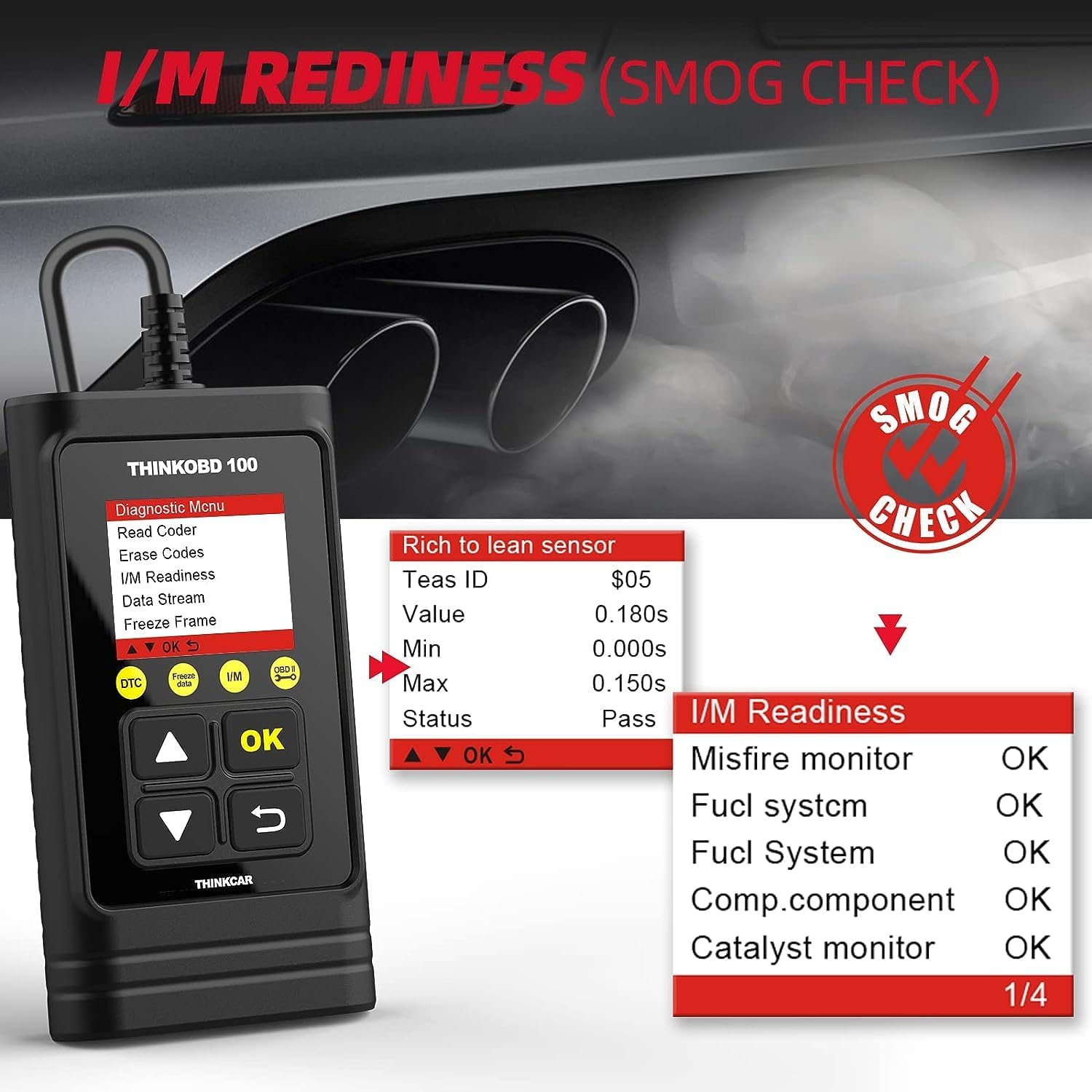
Image: Illustration showing the typical location of the OBDII port under the dashboard.
Návod k obsluze
The THINKOBD100 features a simple interface with directional buttons and an OK/Return button for navigation.
Image: Close-up of the THINKOBD100 device showing its screen and navigation buttons.
Základní navigace
- Šipky nahoru/dolů: Procházejte možnostmi nabídky.
- Tlačítko OK: Potvrzení výběru nebo vstup do menu.
- Tlačítko návratu: Návrat na předchozí obrazovku nebo ukončení funkce.
Podporované jazyky
The THINKOBD100 supports multiple languages for user convenience:
- angličtina
- francouzština
- španělština
- Němec
- ruština
- italština
- portugalština
- polština

Image: The THINKOBD100 screen displaying the language selection menu.
Diagnostické funkce
The THINKOBD100 provides a comprehensive set of OBD2 diagnostic functions:
- Read Codes: Retrieves Diagnostic Trouble Codes (DTCs) from the vehicle's computer.
- Erase Codes: Clears DTCs from the vehicle's computer and turns off the Malfunction Indicator Light (MIL).
- MIL Fault Indicator Light: Indicates when the check engine light is on.
- Live Data: Displays real-time data streams from the vehicle's sensors.
- EVAP System Test: Initiates a test of the evaporative emission control system.
- On-Board Monitor Test: Retrieves results for emission-related powertrain components and systems.
- View Freeze Frame: Shows a snapshot of the vehicle's operating conditions at the time a fault code was set.
- O2 Sensor Test: Retrieves O2 sensor monitoring test results.
- Vehicle Info: Displays vehicle identification number (VIN), calibration ID, and calibration verification number (CVN).
- I/M Readiness: Checks the readiness of the emission monitoring systems.
- DTC Code Look-up: Provides definitions for retrieved fault codes.
Image: Visual representation of all full OBD2 functions available on the THINKOBD100.
Check Engine Light (MIL)
The scanner allows you to easily read and clear Diagnostic Trouble Codes (DTCs) that trigger the Check Engine Light (MIL), helping you identify and resolve issues.
Image: Depicts the process of diagnosing and turning off the Check Engine Light using the THINKOBD100.
I/M Readiness (Smog Check)
Use the I/M Readiness function to check if your vehicle's emission systems are ready for a smog test, ensuring compliance before inspection.
Image: The I/M Readiness screen showing various system checks for smog compliance.
Vyhledávání DTC
The built-in DTC Lookup feature allows you to quickly find definitions for diagnostic trouble codes without needing to search online, saving time and effort.

Image: The DTC Lookup screen on the THINKOBD100, illustrating how to input and find code definitions.
Živý datový stream
Monitor real-time data from your vehicle's sensors, providing insights into engine performance and potential issues as they occur.
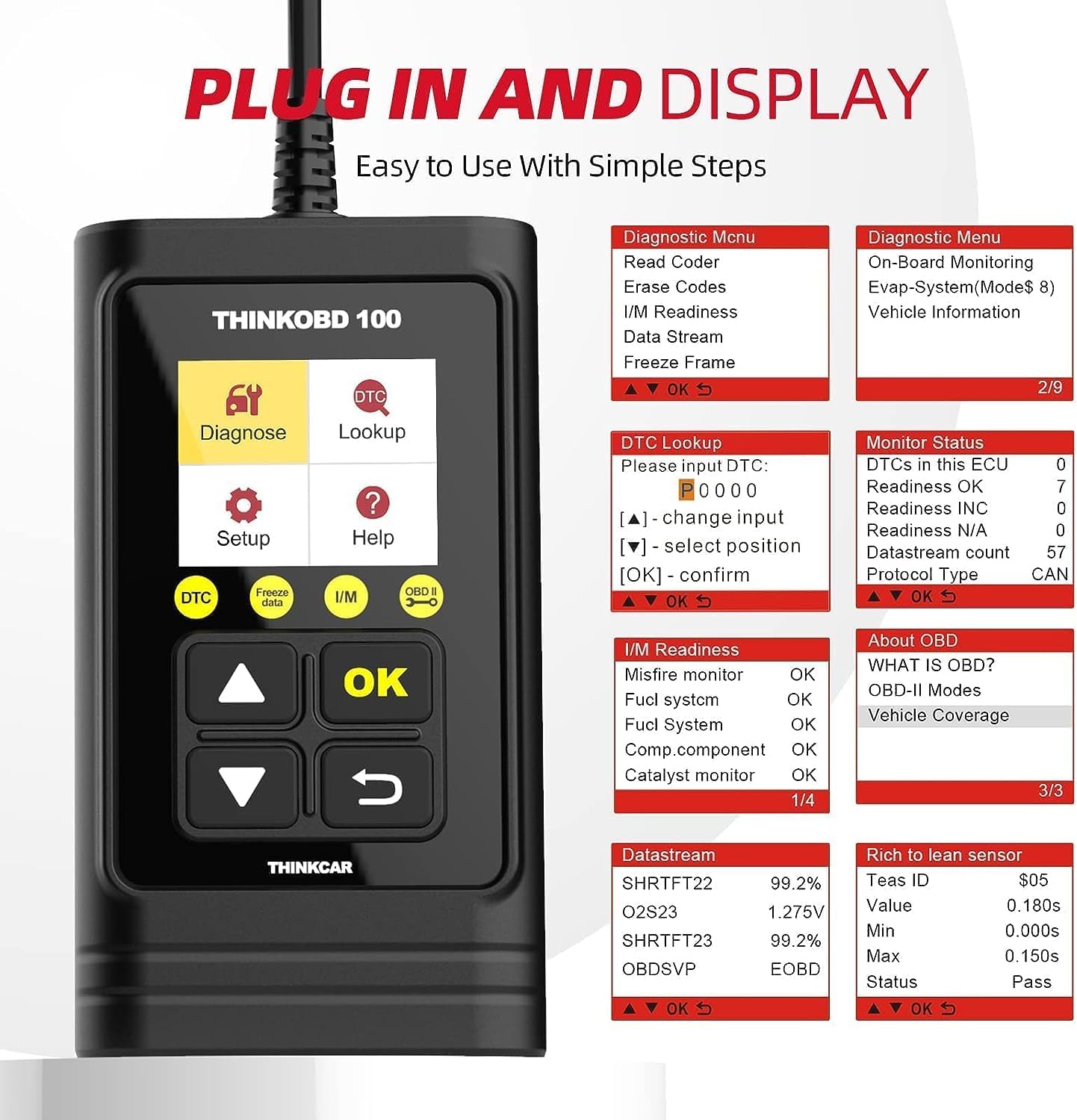
Image: The Live Data Stream screen showing various real-time sensor readings.
Údržba
The THINKOBD100 is a valuable tool for routine vehicle maintenance. By regularly checking for codes and monitoring live data, you can proactively address minor issues before they escalate into major problems.
Poznámka: If you clear a fault code directly without repairing the car and find that the fault code is still present, it indicates that the underlying hardware fault still exists. It is recommended to repair the car first and then clear the fault code.
Odstraňování problémů
Here are some common questions and troubleshooting tips for the THINKOBD100:
- Q1: Does THINKOBD 100 work on my car?
A1: THINKOBD 100 OBD2 scanner supports all vehicles after 1996 that comply with the OBDII protocol. If unsure, please verify your vehicle's compliance. - Q2: Can it be used on diesel vehicles?
A2: If your diesel car has a 12V battery, it will work. It operates only on vehicles with a 12V battery. - Q3: What should I do if I get a "Link Error"?
A3: 1) Ensure your vehicle complies with the OBDII protocol. 2) Check if your main cable is working correctly. 3) Verify your OBD2 port is functional. If the issue persists after these steps, contact support. - Q4: Why THINKOBD 100 Can’t Work on Some Japanese Cars?
A4: THINKOBD 100 does not support the JOBD protocol, which is why it cannot work with JOBD compliant cars. - Q5: Do I need to pay extra money on this check engine code reader?
A5: No, this product does not charge for any extra money. Any dollar symbol in the product's system represents a serial number.
Specifikace
| Funkce | Detail |
|---|---|
| Značka | thinkcar |
| Rozměry produktu | 3 cm D x 1 cm Š x 4 cm V |
| Operační systém | ARM System. |
| Jazyk | angličtina |
| Rozlišení displeje | 160x128 |
| Model | THINKCAR THINKOBD 100 |
| Hmotnost položky | 8 unce |
| svtage | 12 voltů |
Záruka a podpora
The THINKOBD100 comes with lifetime updates, ensuring your device stays current with the latest vehicle data and diagnostic capabilities. Updates can typically be performed by connecting the device to a PC via the provided USB cable and accessing the manufacturer's webmísto.
For any technical support or inquiries, please refer to the contact information provided in your product packaging or visit the official THINKCAR webmísto.
Oficiální videa produktů
Watch these official videos from the seller for more information and demonstrations of the THINKOBD100:
ThinkOBD 100 - What Is In It ?
Description: This video provides an unboxing and overview of the contents included with the THINKOBD100 scanner.
ThinkOBD100 - An introduction from a buyer
Description: A buyer shares their initial impressions and setup experience with the THINKOBD100.
ThinkOBD100 evaluation by Scotty
Description: A detailed evaluation of the THINKOBD100's features and performance by Scotty.
ThinkOBD 100 - The basic OBD2 diagnostic tool
Description: A concise overview highlighting the basic diagnostic capabilities of the THINKOBD100.


