Zavedení
The Lorex N861D63B is a 16-channel Network Video Recorder (NVR) designed for advanced surveillance systems. It supports 4K Ultra HD resolution, features a pre-installed 3TB hard drive, and offers smart motion detection capabilities. This NVR integrates with the Lorex Home mobile app for remote viewing and is compatible with various smart home platforms for voice control.
Mezi klíčové vlastnosti patří:
- Nahrávání v rozlišení 4K Ultra HD: Provides superior detail and definition with 3840 x 2160 resolution.
- 16 Channel Support: Připojení až 16 IP kamer.
- Předinstalovaný 3TB pevný disk: Expandable up to 10TB for extensive video storage.
- Inteligentní detekce pohybu: Identifies people and vehicles to reduce irrelevant alerts.
- Lorex Home App: Vzdálený viewing and system management from smartphones or tablets.
- Integrace chytré domácnosti: Compatible with Amazon Alexa, Google Assistant, Apple TV, and Chromecast for voice control.
- Active Deterrence Camera Compatibility: Works with cameras featuring LED warning lights and remote-triggered sirens.
Obsah balení
Ověřte, zda jsou v balení přítomny všechny položky:
- Lorex N861D63B NVR Unit
- HDMI kabel
- Napájecí adaptér
- Ethernetový kabel
- USB myš
- Stručný průvodce (úplné pokyny naleznete v tomto manuálu)
Nastavení
1. NVR přesview
Familiarize yourself with the front and rear panels of the NVR unit.
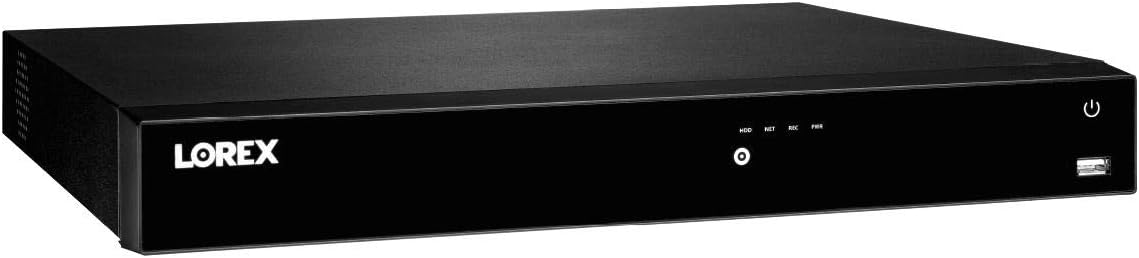
Obrázek 1: Front panel of the Lorex N861D63B NVR, showing the Lorex logo, status indicators (HDD, NET, REC, PWR), a central button, and a USB port on the right.

Obrázek 2: Rear panel of the Lorex N861D63B NVR, displaying power input, fan, 16 PoE ports, alarm I/O, VGA, RS232, HDMI, USB, Ethernet, and audio input/output ports.
2. Počáteční připojení
- Připojení displeje: Connect the NVR to a monitor using the provided HDMI cable. Alternatively, a VGA cable can be used.
- Připojení myši: Plug the USB mouse into one of the USB ports on the NVR (front or rear).
- Připojit síť: Connect the NVR to your router using the Ethernet cable. This is required for remote viewa funkce chytré domácnosti.
- Připojení kamer: Connect your IP cameras to the PoE ports on the rear of the NVR. The NVR provides power and data through these ports.
- Připojte napájení: Plug the AC power adapter into the NVR's power input and then into a power outlet. The NVR will power on automatically.
3. Průvodce prvním nastavením
Upon first power-on, the NVR will guide you through a setup wizard. Follow the on-screen prompts to:
- Vytvořte si bezpečné heslo.
- Nakonfigurujte nastavení data a času.
- Set up network parameters (usually automatic via DHCP).
- Scan and add connected cameras.
Ovládání NVR
1. Lorex Home Mobile App
The Lorex Home app allows you to view živé footage, play back recordings, and manage your NVR settings remotely.
- Stáhnout: Download the Lorex Home app from your device's app store (Aplikace Lorex Home).
- Vytvoření účtu: Create a Lorex account or log in if you already have one.
- Přidat zařízení: Follow the in-app instructions to add your NVR by scanning the QR code on the NVR or manually entering its device ID.
- Vzdálený Viewing: Once added, you can access live camera feeds and recorded video from anywhere with an internet connection.
2. Smart Motion Detection and Smart Search
The NVR supports advanced motion detection features when paired with compatible Smart IP cameras.
- Detekce osob a vozidel: Configure cameras to detect only people or vehicles, reducing irrelevant alerts.
- Push oznámení: Receive instant notifications and image screenshots on your Lorex Home app when a person or vehicle is detected.
- Chytré vyhledávání: Use the Lorex Home app or NVR interface to filter recorded motion events by area, time/date, and detection type (person or vehicle) for efficient footage review.
3. Voice Control and Smart Home Integration
Integrate your NVR with smart home platforms for convenient voice control.
- Kompatibilita: The NVR is compatible with Amazon Alexa, Google Assistant, Apple TV, and Chromecast.
- Nastavení: Refer to the specific instructions for integrating Lorex devices with your chosen smart home platform. This typically involves enabling the Lorex skill/action and linking your Lorex account.
- příkazy: Použijte k tomu hlasové příkazy view camera feeds on compatible smart displays or TVs.
4. Active Deterrence Features
If using compatible active deterrence cameras, you can control their features through the NVR or Lorex Home app.
- LED Warning Lights: Customize LED lights to activate manually, upon motion detection, or remain always on.
- Dálková siréna: Trigger a loud warning siren directly from the Lorex Home app when motion is detected.
Údržba
1. Správa pevných disků
The NVR comes with a 3TB hard drive pre-installed, supporting up to 10TB.
- Režimy nahrávání: Configure continuous, scheduled, or motion-activated recording modes via the NVR interface.
- Storage Overwrite: The NVR is typically set to overwrite the oldest recordings when the hard drive is full. Verify this setting in the NVR's storage configuration.
- Hard Drive Upgrade: If more storage is needed, consult Lorex support or the full product manual for instructions on upgrading the hard drive (up to 10TB).
2. Obecná péče
- Uchovávejte NVR v dobře větraném prostoru, aby nedošlo k přehřátí.
- Vnější povrch čistěte měkkým, suchým hadříkem. Nepoužívejte tekuté čisticí prostředky.
- Ensure power connections are secure.
Odstraňování problémů
This section provides basic troubleshooting steps. For more complex issues, refer to the Lorex support webnebo kontaktujte zákaznický servis.
- Žádný video výstup:
- Ujistěte se, že je kabel HDMI/VGA bezpečně připojen k NVR i monitoru.
- Ověřte, zda je správně vybrán vstupní zdroj monitoru.
- Restartujte NVR.
- Kamery se nezobrazují:
- Check that cameras are properly connected to the NVR's PoE ports.
- Ensure cameras are powered on (PoE ports provide power).
- Ověřte nastavení kamery v rozhraní NVR.
- No Remote Access (Lorex Home App):
- Confirm the NVR is connected to your router via Ethernet and has internet access.
- Zkontrolujte připojení k internetu na vašem mobilním zařízení.
- Ensure the NVR is correctly added to your Lorex Home account.
- Restart both the NVR and your router.
- Upozornění na falešný pohyb:
- Adjust motion detection sensitivity settings for individual cameras.
- Utilize person and vehicle detection features if available on your cameras.
- Review camera placement to minimize detection of irrelevant movement (e.g., trees, shadows).
Specifikace
| Funkce | Detail |
|---|---|
| Číslo modelu | N861D63B |
| Značka | lorex |
| Kanály | 16 |
| Rozlišení videa | Up to 4K Ultra HD (3840 x 2160) |
| Velikost pevného disku | 3 TB (předinstalováno) |
| Maximální kapacita úložiště | 10 TB |
| Technologie připojení | Ethernet, HDMI |
| Kompatibilní zařízení | Lorex IP Cameras (E581CB/CD, E861AB-E, E891AB, LNB3143/3153/3163/3321/3373/3373S/4163/4173/4421/8111/8921/8963BW/8973B, LND2750AB/3152/4750AB/4751AB, LNE3142RB/4162/4322/4422, LNE8950AB/8964ABW/8974, LNZ44P4B, LNZ3522, LNZ44P12B) |
| Hmotnost položky | 10.78 libry |
| Rozměry balení | 21.4 x 16.5 x 6.6 palce |
Záruka a podpora
For warranty information, technical support, or to access the full product manual, please visit the official Lorex website or contact Lorex customer service. The Lorex Home app also provides resources and direct access to support.
lorex Webmísto: www.lorex.com


