Zavedení
This instruction manual provides detailed information on the installation, operation, and maintenance of your Blaupunkt DENVER 212 DAB BT car radio. Please read this manual thoroughly before using the device to ensure proper functionality and to prevent damage. Keep this manual for future reference.

Image: Blaupunkt DENVER 212 DAB BT product banner.
Bezpečnostní informace
- Abyste předešli úrazu elektrickým proudem nebo poškození vozidla, zajistěte správnou instalaci kvalifikovaným odborníkem.
- Neobsluhujte zařízení způsobem, který by vás rozptyloval od řízení. Vždy upřednostňujte bezpečnost silničního provozu.
- Nevystavujte jednotku extrémním teplotám, přímému slunečnímu záření nebo vlhkosti.
- Používejte pouze schválené příslušenství a díly.
- Disconnect the vehicle's battery before installation to prevent short circuits.
Obsah balení
Ověřte, zda jsou v balení přítomny všechny položky:
- Blaupunkt DENVER 212 DAB BT Car Radio Unit
- Montážní rám
- Wiring Harness (ISO connector)
- DAB+ Antenna (if included with specific models)
- Externí mikrofon
- Disassembly Keys
- Uživatelská příručka (tento dokument)
Konec produktuview
The Blaupunkt DENVER 212 DAB BT is a 1-DIN car radio featuring DAB+ digital radio, Bluetooth hands-free calling, and media streaming. It offers a robust design and short installation depth for versatile vehicle compatibility.

Image: Front panel of the Blaupunkt DENVER 212 DAB BT, showing display, control knobs, and buttons.
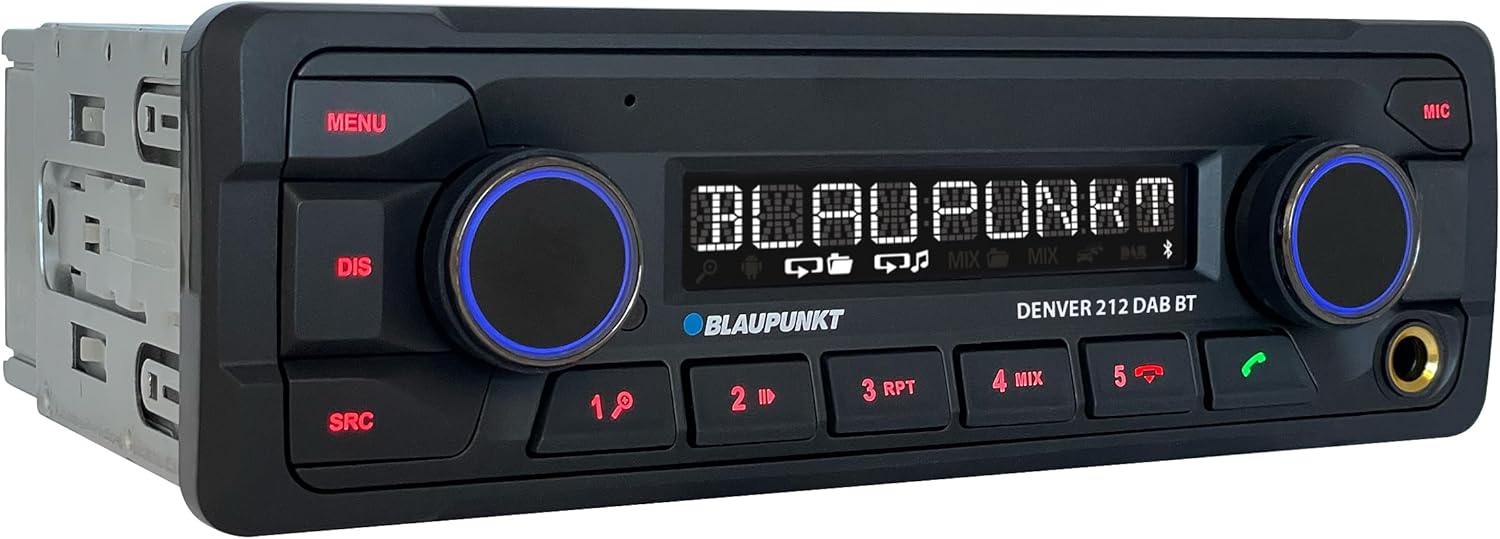
Obrázek: Úhlový view of the Blaupunkt DENVER 212 DAB BT, highlighting its compact design.
Ovládací prvky na předním panelu:
- Tlačítko MENU: Přístup k nastavením a možnostem systému.
- DIS Button: Changes display information.
- Tlačítko SRC: Selects audio source (Radio, DAB, Bluetooth, USB, AUX).
- Ovladač hlasitosti (levý): Adjusts audio volume. Press to mute/unmute.
- Selection Knob (Right): Prochází menu a vybírá možnosti.
- Přednastavená tlačítka (1–6): Store and recall radio stations, control media playback.
- Call Buttons (Green/Red): Answer/end Bluetooth calls.
- USB port: Připojte paměťová zařízení USB pro přehrávání médií.
- AUX vstup (3.5mm jack): Připojte externí zdroje zvuku.
Nastavení a instalace
Kroky instalace:
- Příprava: Odpojte záporný pól baterie vašeho vozidla.
- Montáž: Insert the supplied mounting frame into the vehicle's 1-DIN opening. Bend the tabs to secure it.
- Zapojení: Connect the wiring harness according to the diagram below. Ensure all connections are secure.
- Připojení antény: Connect the FM antenna and the DAB+ antenna (if applicable) to the corresponding inputs on the rear of the radio.
- Připojení mikrofonu: Connect the external microphone to the designated input for optimal hands-free call quality.
- Vložit jednotku: Slide the radio unit into the mounting frame until it clicks into place.
- Závěrečná kontrola: Znovu připojte baterii vozidla a otestujte jednotku.
Schéma zapojení (obecné):
| Barva drátu | Funkce |
|---|---|
| Žluť | Konstantní 12V (baterie) |
| Červený | Spínané 12V (zapalování) |
| Černý | Země |
| Modrý | Napájecí anténa / Ampliifier Remote |
| Oranžová/Bílá | Osvětlení |
| Speaker Wires (e.g., White, Grey, Green, Purple pairs) | Connect to vehicle speakers (Front Left, Front Right, Rear Left, Rear Right) |
| Vstup ovládání na volantu | Connect to vehicle's steering wheel control interface (if applicable) |
Note: Specific wire colors may vary. Always refer to your vehicle's wiring diagram and the radio's included diagram for precise connections.

Image: The Blaupunkt DENVER 212 DAB BT car radio seamlessly integrated into a vehicle's dashboard.
Návod k obsluze
1. Základní funkce:
- Zapnutí/vypnutí: Press the volume knob (left) briefly to turn the unit on. Press and hold to turn off.
- Ovládání hlasitosti: Rotate the volume knob (left) to adjust the sound level.
- Výběr zdroje: Stiskněte tlačítko SRC button repeatedly to cycle through available audio sources (FM, DAB, Bluetooth Audio, USB, AUX).
- Navigace v nabídce: Stiskněte tlačítko MENU button to enter the main menu. Use the right knob to navigate and select options.
2. Radio (FM/DAB+):
- Výběr režimu rádia: Stiskněte SRC until FM or DAB is selected.
- Automatické ladění: In FM/DAB mode, press and hold the right knob or seek buttons (if available) to automatically search for stations.
- Ruční ladění: Briefly press the right knob or seek buttons to fine-tune frequencies.
- Ukládání předvoleb: Tune to a desired station, then press and hold one of the numeric preset buttons (1-6) until you hear a confirmation beep.
- Vyvolání předvoleb: Briefly press a numeric preset button (1-6) to recall a stored station.
3. Provoz Bluetooth:
- Párování zařízení:
- Ujistěte se, že je na vašem mobilním zařízení povoleno Bluetooth.
- Select "Bluetooth" as the source on the car radio. The display will show "PAIRING".
- On your mobile device, search for Bluetooth devices and select "BLAUPUNKT DENVER".
- Pokud budete vyzváni, potvrďte párování na obou zařízeních.
- Hands-free volání:
- Přijetí hovoru: Stiskněte zelené tlačítko volání.
- Ukončení hovoru: Press the red call button.
- Uskutečnění hovoru: Dial from your phone; audio will transfer to the car radio.
- Streamování zvuku přes Bluetooth: Once paired, select "Bluetooth Audio" as the source. Play music from your mobile device, and it will stream through the car radio. Use the preset buttons (e.g., 4 for MIX, 5 for RPT) for playback control (play/pause, skip tracks).
4. USB and AUX Input:
- USB přehrávání: Insert a USB storage device into the front USB port. The unit will automatically switch to USB mode and begin playback.
- Vstup AUX: Connect an external audio device (e.g., MP3 player) to the 3.5mm AUX input jack using an audio cable. Select "AUX" as the source.
5. Sound Settings (Equalizer):
- Stiskněte tlačítko MENU button, then navigate to "AUDIO" or "EQ" settings.
- Adjust bass, treble, balance, and fader settings to your preference.
- Pre-set equalizer modes (e.g., Pop, Rock, Classic) may be available.
Video: Overview of the Blaupunkt DENVER 212 DAB BT car radio's features and basic operation.
Údržba
- Čištění: K čištění předního panelu jednotky používejte měkký, suchý hadřík. Nepoužívejte abrazivní čisticí prostředky ani rozpouštědla.
- USB port: Udržujte USB port bez prachu a nečistot.
- Aktualizace firmwaru: Zkontrolujte oficiální Blaupunkt webpravidelně navštěvujte web, abyste zjistili, zda jsou pro váš model k dispozici aktualizace firmwaru.
Odstraňování problémů
| Problém | Možná příčina | Řešení |
|---|---|---|
| Žádná síla | Blown fuse; incorrect wiring (constant/switched 12V); loose connection. | Check vehicle fuses and the radio's fuse. Verify wiring connections, especially constant and ignition power. Ensure the unit is properly seated. |
| Žádný zvuk | Příliš nízká hlasitost; aktivováno ztlumení; nesprávné zapojení reproduktorů; ampproblémy s lifikátorem. | Increase volume. Check if mute is active. Verify speaker connections. If an external ampPokud se používá záchranný zdroj, zkontrolujte jeho napájení a zapojení. |
| Špatný příjem rádia (FM/DAB) | Anténa není připojena; poškozená anténa; oblast se slabým signálem. | Ensure antenna is securely connected. Check antenna for damage. Consider a stronger antenna or signal booster if in a weak signal area. For DAB+, ensure the DAB antenna is correctly installed and positioned. |
| Problémy s připojením Bluetooth | Device not in pairing mode; incorrect wiring (ignition+ and constant+); interference. | Ensure both devices are in pairing mode. Delete previous pairings and try again. Verify that the constant 12V and switched 12V wires are correctly connected to the radio, as improper wiring can affect Bluetooth stability. Move away from other Bluetooth devices. |
| USB nebylo rozpoznáno | Nepodporováno file format; USB drive not formatted correctly; damaged USB drive. | Zajistěte zvuk files are in supported formats (e.g., MP3, WMA). Format the USB drive to FAT32. Try a different USB drive. |
Specifikace
| Funkce | Detail |
|---|---|
| Značka | BLAUPUNKT |
| Číslo modelu | Denver 212 DAB BT |
| Barva | Černý |
| Technologie připojení | Bluetooth, USB |
| Typ konektoru | 3.5mm jack, USB |
| Speciální funkce | DAB, RDS, Equalizer, Bluetooth Hands-free |
| Kompatibilní zařízení | Smartphone |
| Celkový počet portů USB | 1 |
| Režim zvukového výstupu | Stereo |
| Konfigurace kanálů prostorového zvuku | 4.0 |
| Rozměry produktu | 12 D x 17.8 Š x 5.2 V centimetrů |
| Výrobce | Blaupunkt |
| Dostupnost náhradních dílů | 1 rok |
Záruka a podpora
This Blaupunkt product comes with a manufacturer's warranty. For specific warranty terms and conditions, please refer to the warranty card included with your product or visit the official Blaupunkt website. For technical support, troubleshooting assistance, or spare parts inquiries, please contact Blaupunkt customer service through their official channels.
Náhradní díly jsou obvykle k dispozici po dobu 1 roku od data zakoupení.
Official Blaupunkt Webmísto: www.blaupunkt.com


