1. Konec produktuview
The AGEK LED Digital Wall Clock is a modern and versatile timepiece designed to enhance any living space. It features a clear LED time display, multiple color options for both the ring light and the digital display, and convenient remote control operation. Beyond telling time, it includes dual alarms, temperature display, and an automatic night mode for optimal visibility and comfort.
Mezi klíčové vlastnosti patří:
- LED time display with 12/24 hour format option.
- Dual alarms with snooze function (2-minute buzzer, 5-minute interval).
- Temperature display in Celsius (℃) or Fahrenheit (℉), range 0°C to 50°C.
- Remote control for easy setting and function adjustment.
- Three levels of brightness adjustment.
- 10 ring light colors and 11 display colors, with RGB switch light option.
- Automatic night mode setting (default 6:00 PM to 6:00 AM) for dimmed luminance.

Figure 1.1: The AGEK LED Digital Wall Clock with its vibrant ring light and clear digital display.
2. Obsah balení
Pečlivě zkontrolujte balíček, abyste se ujistili, že jsou všechny položky přítomny a nepoškozené:
- 1 x AGEK LED Digital Wall Clock Unit
- 1 x Dálkové ovládání
- 1 x USB Power Cable (approx. 3 meters)
- 1 x Uživatelská příručka (tento dokument)
Poznámka: A USB power adapter (charging brick) is not included and must be provided by the user. The clock requires continuous USB power to operate the display and lights. The internal battery only serves as memory backup for time and settings during power outages.

Obrázek 2.1: Součásti balení a rozměry produktu.
3. Nastavení a instalace
- Připojení napájení: Connect the provided USB power cable to the clock unit. Plug the other end of the USB cable into a compatible USB power adapter (not included) or a USB port (e.g., computer, power bank). The clock requires continuous power to function.
- Bateriová záloha: Insert 2 CR2 batteries (not included) into the designated battery compartment. These batteries are for memory backup only and will preserve your time and settings during a power interruption. They do not power the clock display or lights.
- Montáž na stěnu: The clock is designed for wall mounting. Use appropriate hardware (screws, anchors - not included) suitable for your wall type. Ensure the clock is securely mounted to prevent accidental falls.

Obrázek 3.1: Přample of the clock mounted in a living room. Ensure proper power connection.
4. Návod k obsluze
All functions of the AGEK LED Digital Wall Clock are primarily controlled via the included remote control. Familiarize yourself with the remote's buttons for optimal use.

Figure 4.1: The remote control is essential for adjusting clock settings.
4.1 Nastavení času a data
- Stiskněte tlačítko SOUBOR button on the remote control to enter time setting mode.
- Použijte UP a DOLŮ tlačítka pro nastavení hodiny.
- Stiskněte SOUBOR znovu pro přechod na minuty a poté upravte pomocí UP a DOLŮ.
- Pokračujte v stisknutí SOUBOR procházet nastavení roku, měsíce a dne a upravovat každé z nich pomocí UP a DOLŮ.
- Stiskněte SOUBOR ještě jednou nebo počkejte několik sekund, než se nastavení uloží a ukončí.
- Chcete-li přepnout mezi 12hodinovým a 24hodinovým formátem času, stiskněte tlačítko 12/24 tlačítko na dálkovém ovladači.
4.2 Nastavení alarmu
The clock supports dual alarms.
- Stiskněte tlačítko POPLACH button on the remote to enter Alarm 1 setting mode.
- Použití UP a DOLŮ pro nastavení požadované hodiny a minuty budíku.
- Stiskněte POPLACH znovu nastavte budík 2 podle stejných kroků.
- Chcete-li aktivovat nebo deaktivovat budík, stiskněte tlačítko POPLACH button repeatedly until the alarm icon appears or disappears on the display.
- When an alarm sounds, press any button on the remote to activate the snooze function (default 5 minutes). To turn off the alarm completely, press the POPLACH tlačítko.
4.3 Zobrazení teploty
The clock can display the ambient temperature.
- Stiskněte tlačítko ℃ / ℉ button on the remote to switch between Celsius and Fahrenheit temperature units.
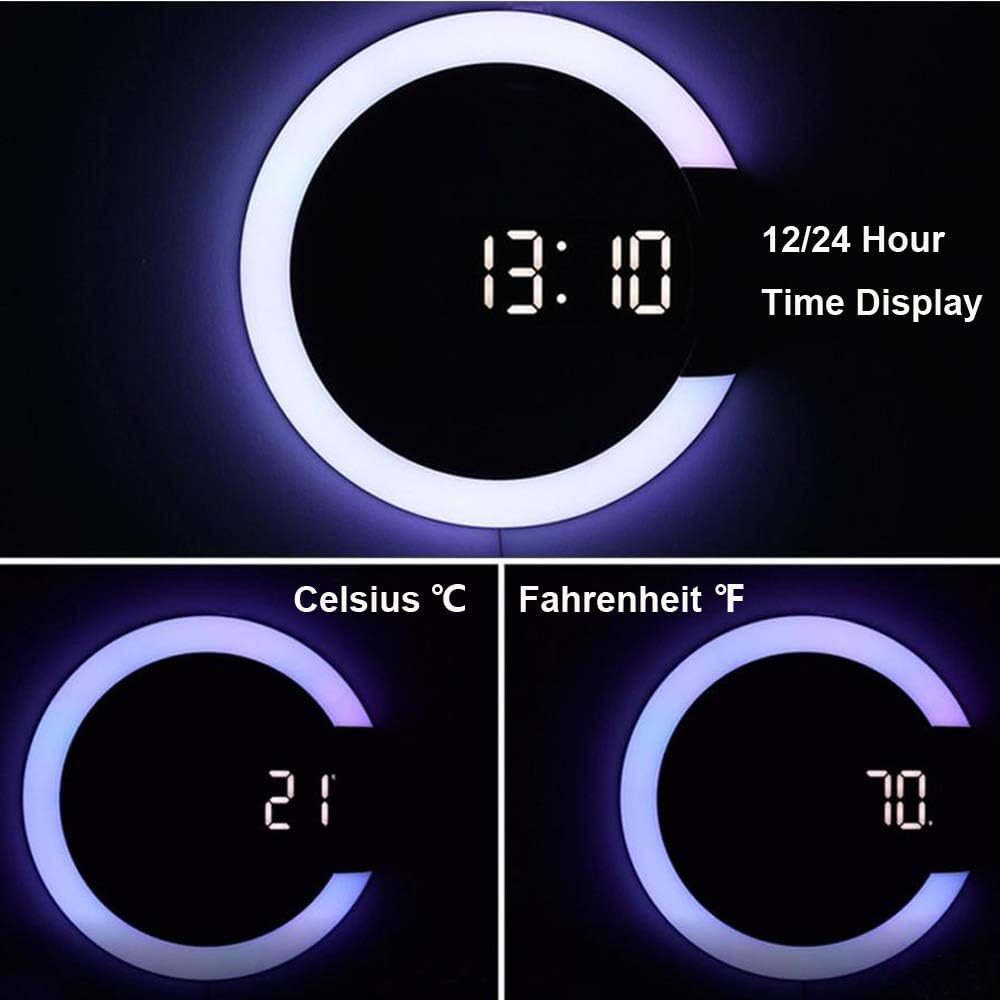
Figure 4.2: Displaying time and temperature in Celsius and Fahrenheit.
4.4 Nastavení jasu
The clock offers three levels of brightness for the LED display.
- Stiskněte tlačítko DIMMER button on the remote repeatedly to cycle through the three brightness levels.
4.5 Colorful Night Light and Display Colors
Customize the ambiance with various ring light and display colors.
- Stiskněte tlačítko LED button on the remote to cycle through 10 different ring light colors (Red, Orange, Green, Blue, Sky blue, Purple, White, RGB switch light, Turn off the RGB light).
- Stiskněte tlačítko RGB button to cycle through 11 different display colors for the digital numbers.

Obrázek 4.3: Přamples of 11 different digital display colors.

Obrázek 4.4: Přamples of 10 different ring light colors.
4.6 Noční režim
The clock features an automatic night mode to dim the display during specific hours.
- The default night mode period is 6:00 PM to 6:00 AM. During this time, the LED display will automatically dim.
- To adjust the night mode period, press the NOČNÍ REŽIM button on the remote and follow the on-screen prompts to set the start and end times.

Figure 4.5: Comparison of normal and night mode display brightness.
4.7 Video s ukázkou produktu
Video 4.1: Official product demonstration of the AGEK Digital Wall Clock, showcasinjeho vlastnosti a provoz.
5. Údržba
- Čištění: Use a soft, dry cloth to clean the clock surface. Do not use abrasive cleaners or solvents, as they may damage the finish.
- Napájení: Ensure the clock is always connected to a stable USB power source. Avoid frequent disconnections, which may require resetting time and settings if the backup battery is low or absent.
- Dálkové ovládání: Keep the remote control in a safe place. If the remote is unresponsive, check and replace its battery if necessary.
6. Řešení problémů
| Problém | Možná příčina | Řešení |
|---|---|---|
| Zobrazení hodin je vypnuté nebo bliká. | Žádné napájení nebo nestabilní napájení. | Ensure the USB cable is securely connected to a working USB power source. Try a different USB adapter or port. |
| Dálkové ovládání nereaguje. | Remote battery is dead or remote is too far. | Replace the remote control battery. Ensure you are within effective range and pointing the remote directly at the clock. |
| Čas/nastavení se resetují po výpadku napájenítage. | Záložní baterie nejsou nainstalovány nebo jsou vybité. | Install or replace the 2 CR2 backup batteries. Note that these batteries only maintain settings, not the display. |
| Automatic dimming (Night Mode) not working. | Night mode not enabled or incorrect time set. | Ensure Night Mode is activated and the start/end times are correctly configured using the remote control. |
| Displej je příliš jasný/tmavý. | Je třeba upravit úroveň jasu. | Stiskněte tlačítko DIMMER button on the remote to cycle through brightness levels. |
7. Specifikace
| Funkce | Detail |
|---|---|
| Značka | AGEK |
| Model | B082516BZ3 |
| Barva | Bílý displej |
| Typ zobrazení | Digitální |
| Speciální funkce | Remote Control, Dual Alarm Clock, Night light, Thermometer, Mirror LED |
| Rozměry produktu | 1.18"W x 12.01"H (approx. 30mm W x 305mm H) |
| Zdroj napájení | Elektrický kabel (USB) |
| Materiál | Akrylonitril-butadien-styren (plast) |
| Typ montáže | Držák na zeď |
| Hmotnost položky | 1 libra |
| Jsou vyžadovány baterie | 2 CR2 batteries (for memory backup only, not included) |
8. Záruka a podpora
For any questions, technical support, or warranty inquiries regarding your AGEK LED Digital Wall Clock, please contact the manufacturer directly through the retailer's platform or the contact information provided with your purchase. Please retain your proof of purchase for warranty claims.
Zavázali jsme se poskytovat vynikající zákaznický servis a podporu pro naše produkty.