Zavedení
This manual provides instructions for the ALLIMITY CT-90275 replacement remote control. This remote is designed to function as a direct replacement for various Toshiba TV models, offering immediate usability without complex programming. Please refer to the compatibility list to ensure your TV model is supported.
Compatible Toshiba TV Models:
- 32AV500U, 37AV500U, 26LV47, 26LV67, 37HL67S, 32HL67U, 32LV67U, 26HL47, 32HL67, 26HL67, 42HL67US, 37HL67, 42HL67, 65HM167, 57HM117, 65HM117, 37AV50U, 32HL67US
- 42HL117, 32HL17, 26AV52U, 32AV50U, 32LV67, 32HL17U, 32HL37U, 42HL17, 37HL17, 32HL37, 42HL67U, 19AV500U, 19AV501U, 19AV51U, 26AV500U, 26AV50U, 32LV17, 32LV37U, 32LV17U, 32LV37, 50HM67, 57HM167, 42AV500U, 37AV500E, 26AV500
Nastavení
The ALLIMITY CT-90275 remote control is designed for immediate use with compatible Toshiba TV models. No programming or pairing is required.
Instalace baterií
- Najděte přihrádku na baterie na zadní straně dálkového ovladače.
- Posuňte kryt přihrádky na baterie dolů a sejměte jej.
- Vložte dvě (2) alkalické baterie typu AAA a ujistěte se, že kladný (+) a záporný (-) pól odpovídají schématům uvnitř přihrádky.
- Nasaďte kryt přihrádky na baterie tak, že jej zasunete zpět na místo, dokud bezpečně nezacvakne.

Figure 1: Battery installation for the CT-90275 remote control.
Once batteries are installed, the remote is ready for operation.
Návod k obsluze
The ALLIMITY CT-90275 remote control provides full functionality for your compatible Toshiba TV. Point the remote directly at your television's infrared receiver for optimal performance.
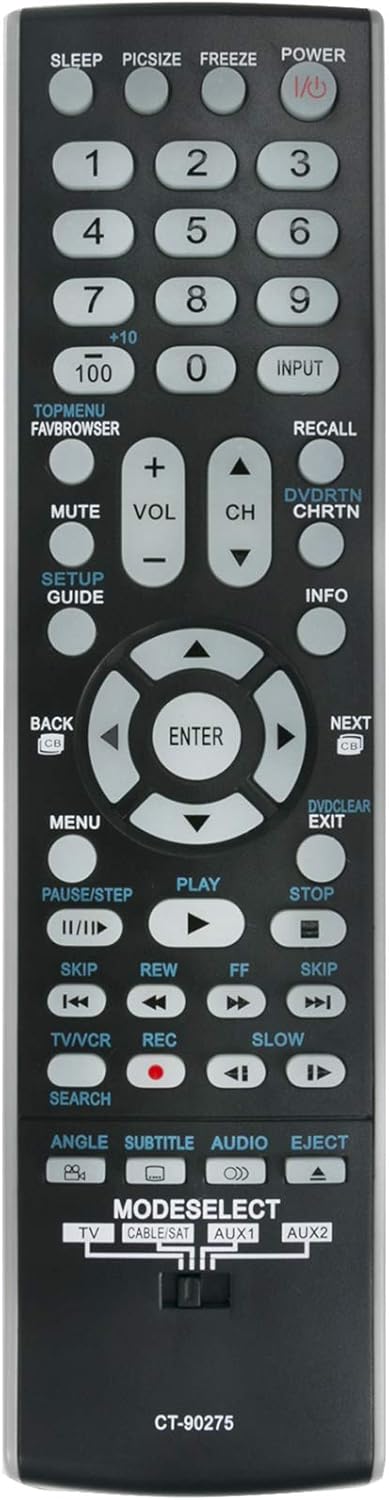
Obrázek 2: Přední strana view of the CT-90275 remote control with button layout.
Funkce kláves Overview:
- POWER (I/O): Zapíná nebo vypíná televizor.
- Number Buttons (0-9, +10, 100): Přímý výběr kanálů.
- VSTUP: Cyklicky přepíná dostupné vstupní zdroje (HDMI, AV atd.).
- VOL (+/-): Nastavuje úroveň hlasitosti.
- CH (nahoru/dolů): Mění televizní kanály.
- ZTLUMIT: Ztlumí nebo zruší ztlumení zvuku televizoru.
- JÍDELNÍ LÍSTEK: Přístup k hlavní nabídce televizoru.
- Navigation Pad (Up/Down/Left/Right/ENTER): Prochází menu a potvrzuje výběr.
- ZADNÍ: Vrátí se do předchozí nabídky nebo obrazovky.
- VÝSTUP: Opustí aktuální nabídku nebo funkci.
- PLAY, PAUSE/STEP, STOP, REW, FF, SKIP: Control playback functions for connected devices (e.g., DVD player).
- TV/VCR: Switches between TV and VCR modes (if applicable).
- REC: Initiates recording (if supported by connected device).
- MODESELECT (TV, CABLE/SAT, AUX1, AUX2): Selects the device to control. Slide the switch to the desired mode.
- SPÁT: Nastaví časovač vypnutí pro televizor.
- PICSZIZE: Upraví velikost/poměr stran obrazu.
- ZMRAZIT: Zmrazí aktuální obraz na obrazovce.
- SETUP/GUIDE: Accesses setup menu or TV guide.
- INFO: Zobrazuje informace o aktuálním programu nebo vstupu.
- DVD/RTN CHRTN: DVD functions / Channel Return.
- ODVOLÁNÍ: Recalls the last viewed kanál.
- VYHLEDÁVÁNÍ: Initiates search function.
- ANGLE, SUBTITLE, AUDIO, EJECT: Specific functions for DVD/Blu-ray players.
Údržba
Výměna baterie
When the remote control's performance degrades or it stops responding, it is likely time to replace the batteries. Follow the battery installation steps outlined in the "Setup" section. Always replace both batteries simultaneously with new AAA alkaline batteries.
Čištění
Pro čištění dálkového ovladače jemně otřete jeho povrch měkkým, suchým hadříkem. V případě odolných nečistot lehceampOtřete hadřík vodou nebo jemným neabrazivním čisticím prostředkem. Nepoužívejte agresivní chemikálie ani nadměrnou vlhkost, protože by mohly poškodit elektroniku dálkového ovladače.
Skladování
Store the remote control in a cool, dry place away from direct sunlight and extreme temperatures. If the remote will not be used for an extended period, it is recommended to remove the batteries to prevent leakage and potential damage.
Odstraňování problémů
If you experience issues with your ALLIMITY CT-90275 remote control, please refer to the following common solutions:
- Dálkové ovládání nereaguje:
- Ensure the batteries are correctly inserted with the proper polarity (+/-).
- Vyměňte staré baterie za nové alkalické baterie typu AAA.
- Zkontrolujte, zda se mezi dálkovým ovladačem a infračerveným senzorem televizoru nenacházejí nějaké překážky.
- Confirm that the TV is powered on.
- Konkrétní tlačítka nefungují:
- Verify that the "MODESELECT" switch is set to the correct device (e.g., TV).
- Some buttons may be specific to certain TV models or connected devices.
- Přerušovaný provoz:
- Slabé baterie mohou způsobit nekonzistentní výkon. Vyměňte je.
- Ensure you are within a reasonable range and line of sight to the TV.
If the issue persists after trying these steps, the remote control may be faulty or incompatible with your specific TV model, despite the general compatibility list. Please double-check your TV model against the provided list.
Specifikace
| Číslo modelu | CT-90275 |
| Značka | ALLIMITY |
| Rozměry produktu | 2 x 0.6 x 7 palce |
| Hmotnost položky | 1 unce |
| Jsou vyžadovány baterie | 2 AAA baterie |
| Technologie připojení | Infračervený (IR) |
| Kompatibilní zařízení | Television (Various Toshiba models) |
| Speciální funkce | Není vyžadováno žádné programování |
Informace o záruce
Specific warranty details for replacement remote controls can vary by retailer and purchase date. Please refer to your purchase documentation or contact the seller directly for information regarding warranty coverage and return policies.
Podpora
For further assistance or inquiries regarding the ALLIMITY CT-90275 remote control, please contact the retailer from whom the product was purchased. They can provide specific support related to your order and product. Ensure you have your order number and product details available when contacting support.


