Zavedení
Děkuji za nákupasing the Muse M-1935 DJ Bluetooth Party Speaker. This powerful audio system is designed to deliver high-quality sound with dynamic light effects, perfect for any gathering. Featuring Bluetooth connectivity, USB playback, AUX input, and a microphone jack, it offers versatile entertainment options. Please read this manual carefully before using the device to ensure proper operation and to maximize its performance.
Důležité bezpečnostní pokyny
- Přečtěte si tyto pokyny.
- Uschovejte si tyto pokyny.
- Dbejte všech varování.
- Dodržujte všechny pokyny.
- Nepoužívejte toto zařízení v blízkosti vody.
- Čistěte pouze suchým hadříkem.
- Neblokujte žádné ventilační otvory. Instalujte v souladu s pokyny výrobce.
- Neinstalujte v blízkosti zdrojů tepla, jako jsou radiátory, tepelné regulátory, kamna nebo jiná zařízení (včetně amplifikátory), které produkují teplo.
- Chraňte napájecí kabel před šlapáním nebo přiskřípnutím, zejména u zástrček, zásuvek a v místě, kde vychází z přístroje.
- Používejte pouze nástavce/příslušenství určené výrobcem.
- Odpojte toto zařízení během bouřky s blesky nebo když se delší dobu nepoužívá.
- Veškeré opravy svěřte kvalifikovanému servisnímu personálu. Servis je nutný, pokud bylo zařízení jakýmkoli způsobem poškozeno, například je poškozen napájecí kabel nebo zástrčka, pokud do zařízení vnikla tekutina nebo do něj spadly předměty, zařízení bylo vystaveno dešti nebo vlhkosti, nefunguje normálně. , nebo byla vypuštěna.
Obsah balení
Zkontrolujte prosím, zda jsou ve vašem balení obsaženy všechny níže uvedené položky:
- Muse M-1935 DJ Party Speaker
- Dálkové ovládání
- AUX IN Cable (3.5mm)
- Kabelový mikrofon
- Napájecí kabel
- Uživatelská příručka

Image showing the Muse M-1935 DJ Party Speaker along with its standard accessories: a remote control, a 3.5mm AUX input cable, and a wired microphone. These components are essential for full functionality and versatile use of the speaker system.
Konec produktuview
The Muse M-1935 DJ is a tower-type party speaker featuring a robust design and multiple connectivity options. It includes an amber LED display for clear information, integrated color lights and flash effects for dynamic visuals, and various input ports for audio playback.
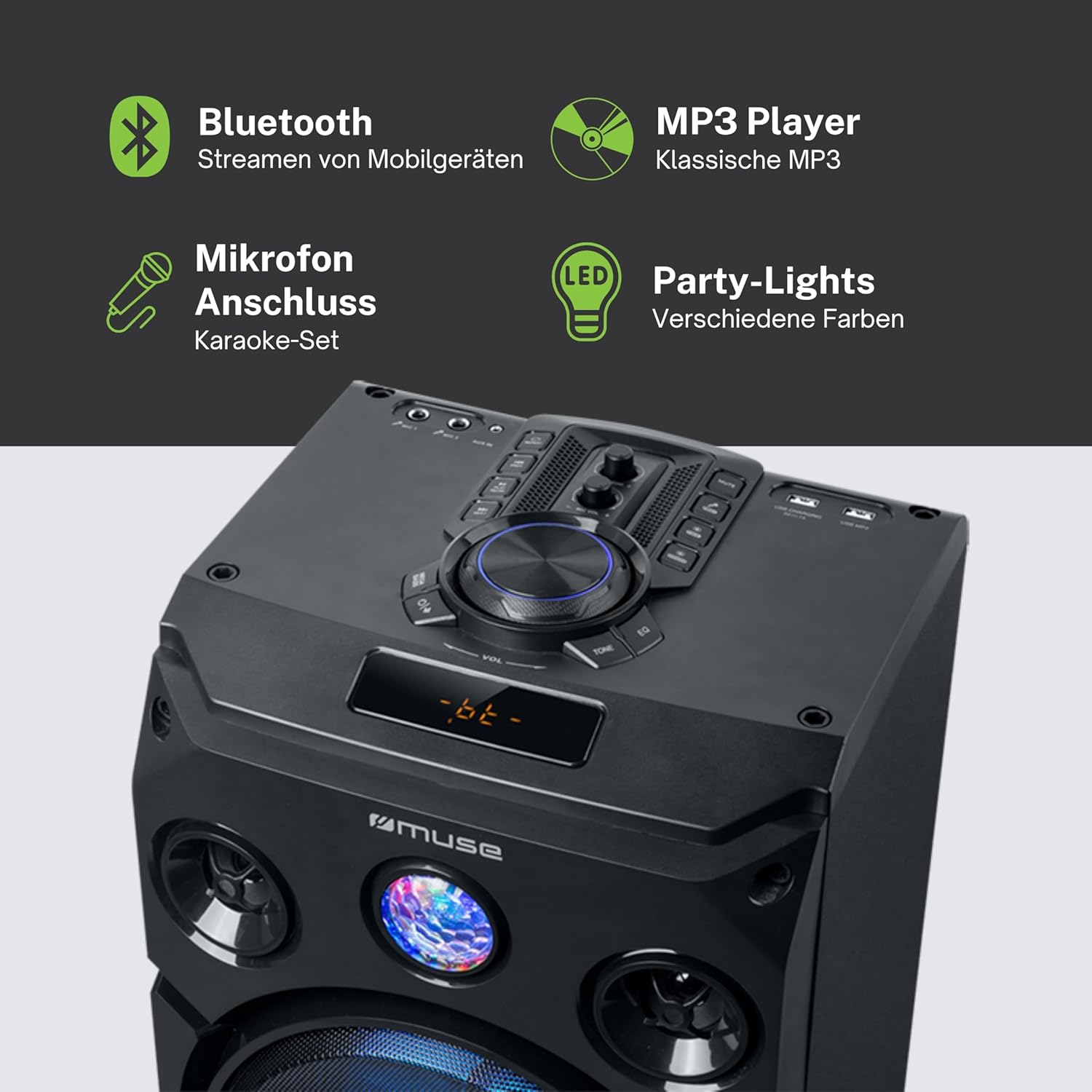
Tento obrázek poskytuje detailní view of the speaker's key features, including the control panel at the top, the amber LED display, and the integrated party lights. Icons indicate support for Bluetooth streaming, MP3 playback via USB, microphone connection for karaoke, and dynamic party light effects.
Nastavení
1. Připojení napájení
- Ujistěte se, že reproduktor je umístěn na stabilním, rovném povrchu.
- Connect the power cable to the AC IN port on the back of the speaker.
- Zapojte druhý konec napájecího kabelu do standardní zásuvky ve zdi (AC 100–240 V, 50/60 Hz).
2. Audio Connections (Optional)
- Vstup AUX: For connecting external audio devices (e.g., smartphone, tablet, MP3 player) via a 3.5mm audio cable. Insert one end of the AUX cable into the AUX IN port on the speaker and the other end into your device's headphone jack.
- USB přehrávání: Vložte USB flash disk s audio soubory ve formátu MP3 files into the USB port. The speaker will automatically detect and begin playing compatible files.
3. Připojení mikrofonu (volitelné)
- Connect the wired microphone to the MIC IN jack on the speaker. Adjust the microphone volume using the dedicated control on the speaker's panel.
Návod k obsluze
1. Zapnutí/vypnutí
- Stiskněte tlačítko MOC tlačítko na ovládacím panelu nebo dálkovém ovladači pro zapnutí nebo vypnutí reproduktoru.
2. Párování Bluetooth
- Zapněte reproduktor. LED displej zobrazí aktuální režim.
- Stiskněte tlačítko MODE button to select Bluetooth mode. The display will show "BT" and an indicator will flash, signifying it's ready for pairing.
- Na zařízení s podporou Bluetooth (chytrý telefon, tablet atd.) povolte Bluetooth a vyhledejte dostupná zařízení.
- Select "MUSE M-1935 DJ" from the list. Once paired, the speaker will emit a confirmation sound, and the Bluetooth indicator will stop flashing.
- Nyní můžete bezdrátově streamovat zvuk ze zařízení do reproduktoru.
3. Přehrávání z USB
- Insert a USB flash drive into the USB port. The speaker will automatically switch to USB mode and begin playing MP3 files.
- Použijte PLAY/PAUSE, DALŠÍa PŘEDCHOZÍ tlačítka pro ovládání přehrávání.
4. Vstup AUX
- Connect your external audio device to the AUX IN port using the provided 3.5mm cable.
- Stiskněte tlačítko MODE button to select AUX mode. Audio will now play through the speaker.
5. Provoz rádia FM
- Stiskněte tlačítko MODE tlačítko pro výběr režimu FM rádia.
- Stiskněte a podržte PLAY/PAUSE button to initiate an automatic scan for FM stations. The speaker will save found stations as presets (up to 60 presets).
- Použijte DALŠÍ a PŘEDCHOZÍ tlačítka pro procházení uloženými stanicemi.
6. Použití mikrofonu
- Ensure the microphone is connected to the MIC IN jack.
- Adjust the microphone volume using the dedicated MIC VOL knob on the control panel.
7. Light Effects Control
- The speaker features integrated color lights and flash effects. Use the SVĚTLO button on the control panel or remote to cycle through different light modes or turn them off.
8. Ovládání hlasitosti a tónů
- Upravte hlavní hlasitost pomocí velkého OBJEM knoflík.
- Použijte BASS a ZTROJNÁSOBIT controls (if available) to fine-tune the audio output.

This diagram visually represents the diverse functionalities of the speaker, such as dynamic color and flash lighting, the clear amber LED display, USB connectivity for MP3 playback and charging, built-in FM radio with extensive preset memory, and a versatile AUX input for external devices.
Údržba
- Čištění: Disconnect the power before cleaning. Use a soft, dry cloth to wipe the exterior of the speaker. Do not use liquid cleaners or aerosol sprays.
- Skladování: Pokud reproduktor delší dobu nepoužíváte, skladujte jej na chladném a suchém místě, mimo dosah přímého slunečního záření a extrémních teplot.
- Péče o baterie: The speaker contains a Lithium-ion battery. For optimal battery life, avoid fully discharging the battery frequently and store the unit with a partial charge if not used for long periods.
Odstraňování problémů
| Problém | Možná příčina | Řešení |
|---|---|---|
| Žádná síla | Power cable not connected; Power outlet faulty; Speaker turned off. | Ensure power cable is securely connected. Try a different power outlet. Press the POWER button to turn on the speaker. |
| Žádný zvuk | Volume too low; Incorrect input mode selected; Audio cable not connected properly (AUX); Bluetooth not paired. | Increase volume. Select the correct input mode (Bluetooth, AUX, USB, FM). Check audio cable connections. Re-pair Bluetooth device. |
| Párování Bluetooth se nezdařilo | Reproduktor není v režimu párování; Zařízení je příliš daleko; Rušení. | Ensure speaker is in Bluetooth pairing mode. Move device closer to speaker (within 10m). Avoid obstacles and other wireless devices. |
| Přehrávání z USB nefunguje | USB disk není správně naformátován; Nekompatibilní file typy; USB disk poškozený. | Ujistěte se, že USB disk je naformátován ve formátu FAT32. Pouze MP3 fileJsou podporovány. Zkuste jiný USB disk. |
| Mikrofon nefunguje | Mikrofon není připojen; hlasitost mikrofonu je příliš nízká. | Ensure microphone is securely plugged into MIC IN. Increase the MIC VOL knob. |
Specifikace
| Funkce | Specifikace |
|---|---|
| Číslo modelu | M-1935 DJ |
| Výstupní výkon | 400 wattů |
| Typ reproduktoru | Věž |
| Technologie připojení | Bluetooth, USB, AUX |
| Zvukový vstup | Microphone jacks, AUX IN (3.5mm) |
| Speciální funkce | Bluetooth, Color Lights, Flash Effects, Amber LED Display, FM Radio (60 presets), USB Charging |
| Zdroj napájení | Electric Cable, Built-in Lithium-ion Battery |
| Materiál | Plast |
| Barva | Černý |
| Rozměry produktu (D x Š x V) | 83.5 x 26.5 x 28.7 cm |
| Hmotnost položky | 9.05 kg |
| Výrobce | MÚZA |
| Země původu | Belgie |

This technical drawing provides precise measurements of the Muse M-1935 DJ speaker, indicating its height (835mm), width (287mm), and depth (265mm). These dimensions are crucial for planning placement and transportation.
Záruka a podpora
Záruka výrobce
The Muse M-1935 DJ Party Speaker comes with a three-year warranty against manufacturing defects. Please retain your proof of purchase for warranty claims. This warranty covers defects in materials and workmanship under normal use. It does not cover damage caused by misuse, accidents, unauthorized modifications, or normal wear and tear.
Dostupnost náhradních dílů
Spare parts for this product are guaranteed to be available for 2 years from the date of purchase within the EU.
Zákaznická podpora
For technical assistance, warranty service, or general inquiries, please contact Muse customer support. Refer to the official Muse webNejnovější kontaktní informace naleznete na webových stránkách nebo v dokumentaci k nákupu.


