1. Úvod a konecview
The Escort EDM 1111A is a versatile digital multimeter designed for accurate measurement of various electrical parameters. This device is essential for electricians, technicians, and hobbyists for testing circuits, components, and power sources. It features a clear digital display and a rotary dial for selecting different measurement functions.

The Escort EDM 1111A Digital Multimeter with red and black test leads connected, ready for use.
Mezi klíčové funkce patří:
- DC svtage (DCV) measurement
- AC svtage (ACV) measurement
- DC Current (DCA) measurement
- AC Current (ACA) measurement
- Měření odporu (Ω).
- Capacitance (CX) measurement
- Diode and Transistor (hFE) testing
2. Nastavení
2.1 Instalace baterie
The Escort EDM 1111A requires a DC 9V 006P battery for operation. To install or replace the battery:
- Ujistěte se, že je multimetr VYPNUTÝ.
- Najděte přihrádku na baterie na zadní straně jednotky.
- Carefully slide open or unscrew the battery cover.
- Insert a new 9V 006P battery, observing the correct polarity (+/-).
- Bezpečně nasaďte kryt baterie.

Zadní část view of the Escort EDM 1111A Digital Multimeter, showing the battery compartment cover and the product label.
2.2 Připojení měřicích kabelů
The multimeter comes with two test leads, typically one red (positive) and one black (negative/common). Proper connection is crucial for accurate and safe measurements.
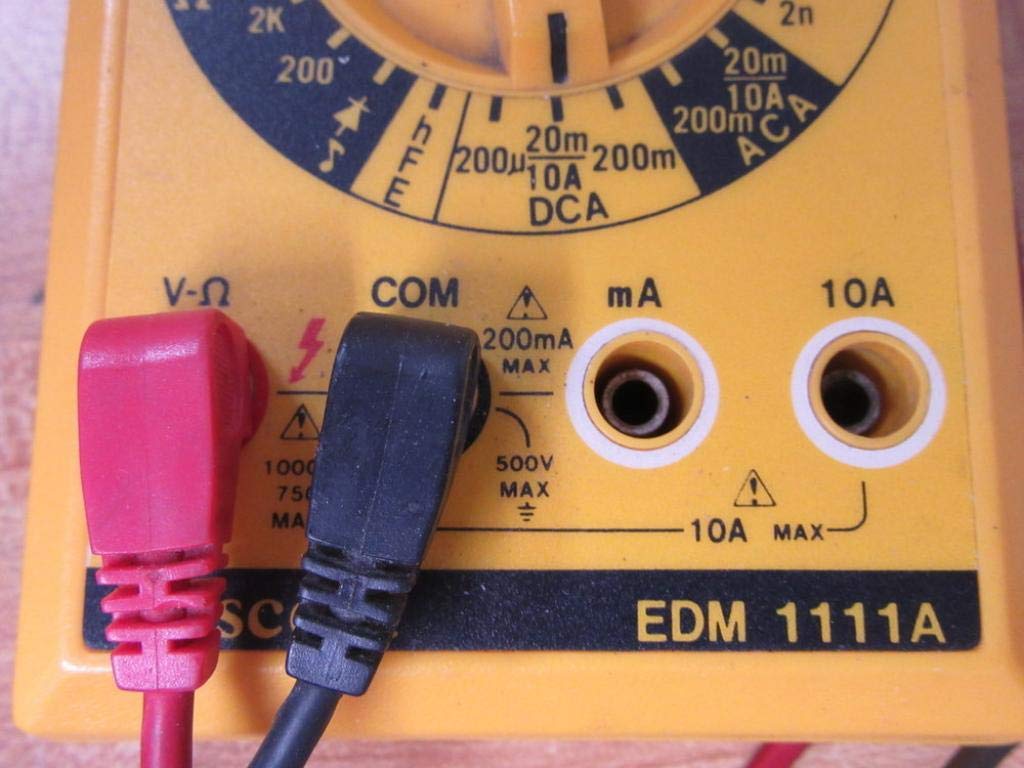
- Pro většinu objemůtage, resistance, and low current measurements, connect the black lead to the 'COM' (Common) jack.
- Connect the red lead to the 'V-Ω-mA' jack for voltage, odpor a miliampaktuální měření.
- Pro měření vysokého proudu (až 10 A) připojte červený vodič ke zdířce „10 A“. Always ensure the correct jack is used to prevent damage to the meter or circuit.

A closer look at the input jacks (V-Ω, COM, mA, 10A) and the lower portion of the rotary dial, indicating current measurement ranges.

The red and black test probes (leads) used with the Escort EDM 1111A Digital Multimeter, featuring pointed tips for electrical contact.
3. Návod k obsluze
Before taking any measurements, ensure the test leads are correctly connected and the rotary dial is set to the appropriate function and range.

Detailní view of the rotary selector dial on the Escort EDM 1111A Digital Multimeter, displaying various measurement functions such as DCV, ACV, Ω, DCA, ACA, and CX.
3.1 Měření DC Voltage (DCV)
- Set the rotary dial to the desired DCV range (e.g., 200m, 2, 20, 200, 1000). Choose a range higher than the expected voltage.
- Connect the red lead to the positive (+) side of the circuit and the black lead to the negative (-) side.
- Přečtěte si svtage hodnota na displeji.
3.2 Měření AC Voltage (ACV)
- Set the rotary dial to the desired ACV range (e.g., 200m, 2, 20, 200, 750). Choose a range higher than the expected voltage.
- Připojte měřicí vodiče k AC napětítagzdroj. Polarita nehraje roli u střídavého proudu.tage.
- Přečtěte si svtage hodnota na displeji.
3.3 Měření odporu (Ω)
- Před měřením odporu se ujistěte, že je obvod nebo součástka bez napětí.
- Set the rotary dial to the desired Ω range (e.g., 200, 2K, 20K, 200K, 2M, 20M, 200M).
- Připojte měřicí vodiče k měřené součástce.
- Odečtěte hodnotu odporu na displeji.
3.4 Measuring DC Current (DCA)
- Ujistěte se, že je obvod bez napětí.
- Set the rotary dial to the desired DCA range (e.g., 200µ, 2m, 20m, 200m, 10A).
- Důležité: For currents up to 200mA, use the 'V-Ω-mA' jack for the red lead. For currents up to 10A, use the '10A' jack.
- Přerušte obvod a zapojte multimetr sériově se zátěží. Multimetrem musí protékat proud.
- Znovu zapněte obvod a odečtěte hodnotu proudu.
3.5 Measuring AC Current (ACA)
- Ujistěte se, že je obvod bez napětí.
- Set the rotary dial to the desired ACA range (e.g., 200µ, 2m, 20m, 200m, 10A).
- Důležité: For currents up to 200mA, use the 'V-Ω-mA' jack for the red lead. For currents up to 10A, use the '10A' jack.
- Přerušte obvod a zapojte multimetr sériově se zátěží.
- Znovu zapněte obvod a odečtěte hodnotu proudu.
3.6 Measuring Capacitance (CX)
- Před testováním se ujistěte, že je kondenzátor zcela vybitý.
- Set the rotary dial to the CX range (e.g., 2n, 20n, 200n, 2µ, 20µ).
- Připojte měřicí vodiče ke svorkám kondenzátoru.
- Odečtěte hodnotu kapacity na displeji.
3.7 Diode and Transistor (hFE) Testing
Refer to the specific markings on the dial for diode and transistor testing functions. Typically, diode test mode allows checking the forward voltage drop of a diode, and hFE mode is used for measuring the DC current gain of transistors.
4. Údržba
4.1 Výměna baterie
Replace the 9V 006P battery when the low battery indicator appears on the display or if the multimeter fails to power on. Follow the instructions in Section 2.1.
4.2 Čištění
K čištění multimetru použijte měkkýamp hadříkem. Nepoužívejte abrazivní čisticí prostředky ani rozpouštědla, protože by mohly poškodit casing or display. Ensure the device is turned off and disconnected from any circuits before cleaning.
4.3 Skladování
When not in use for extended periods, store the multimeter in a cool, dry place, away from direct sunlight and extreme temperatures. Consider removing the battery to prevent leakage, which could damage the internal components.
5. Řešení problémů
| Problém | Možná příčina | Řešení |
|---|---|---|
| Žádný displej nebo tlumený displej | Vybitá nebo vybitá baterie | Replace the 9V 006P battery. |
| Nesprávné údaje | Incorrect range selected Poor lead connection Poškozené měřicí kabely Incorrect input jack used | Vyberte vhodný rozsah. Ensure leads are firmly connected. Inspect and replace damaged leads. Verify leads are in the correct V-Ω-mA or 10A jack. |
| Zobrazuje se „OL“ (přetížení) | Measurement exceeds selected range | Přepněte na vyšší rozsah. |
| Žádný pípnutí pro signalizaci kontinuity | Funkce kontinuity není vybrána Otevřený okruh | Ensure dial is on continuity/diode test. Check the circuit for breaks. |
6. Specifikace
| Parametr | Hodnota |
|---|---|
| Model | EDM 1111A |
| Rozměry produktu (D x Š x V) | 8 x 4 x 2 palce |
| Hmotnost položky | 1.84 libry |
| Zdroj napájení | DC 9V 006P Battery |
| Typ měření | Multimetr |
| Výrobce | Doprovod |
| Datum první dostupnosti | 21. listopadu 2019 |
| DC svtage Rozsahy | 200mV, 2V, 20V, 200V, 1000V |
| AC svtage Rozsahy | 200mV, 2V, 20V, 200V, 750V |
| Rozsahy stejnosměrného proudu | 200µA, 2mA, 20mA, 200mA, 10A |
| Rozsahy střídavého proudu | 200µA, 2mA, 20mA, 200mA, 10A |
| Rozsahy odporu | 200Ω, 2KΩ, 20KΩ, 200KΩ, 2MΩ, 20MΩ, 200MΩ |
| Capacitance Ranges | 2nF, 20nF, 200nF, 2µF, 20µF |
7. Informace o záruce
For specific warranty details regarding your Escort EDM 1111A Digital Multimeter, please refer to the documentation provided at the time of purchase or contact the manufacturer directly. Warranty terms typically cover defects in materials and workmanship under normal use.
8. Zákaznická podpora
If you encounter any issues or have questions not covered in this manual, please contact Escort customer support. Have your product model number (EDM 1111A) and serial number (if applicable, found on the back label) ready when contacting support for faster assistance.
The product label on the back of the Escort EDM 1111A, indicating 'DIGITAL MULTIMETER DC 9V 006P BATTERY', serial number, and 'MADE IN TAIWAN R.O.C.'.


