1. Úvod
This manual provides essential information for setting up, operating, maintaining, and troubleshooting your Dell Latitude 7390 laptop. The Dell Latitude 7390 is a business-class laptop designed for productivity and reliability, featuring an Intel Core i5-8350U processor, 8GB RAM, and a 256GB SSD, running Windows 10 Pro.
Pro zajištění správného používání a maximalizaci životnosti vašeho zařízení si prosím pečlivě přečtěte tento návod k obsluze.
2. Nastavení
2.1 Vybalení a úvodní kontrola
Carefully remove the laptop and all accessories from the packaging. Verify that all components are present and undamaged. The package should include the Dell Latitude 7390 laptop, a power adapter, and documentation.
2.2 Připojení napájecího adaptéru
Connect the power adapter to the power connector on the laptop and then plug the power cable into a wall outlet. The battery will begin charging automatically.

Figure 2.2.1: Dell Latitude 7390 laptop with the screen open, displaying the keyboard and touchpad. This view is typical during initial setup and operation.
2.3 Počáteční spuštění a nastavení operačního systému
Press the power button to turn on the laptop. Follow the on-screen instructions to complete the Windows 10 Pro setup, including language selection, network connection, user account creation, and privacy settings.
3. Ovládání notebooku
3.1 Základní navigace
Utilize the keyboard for typing and the touchpad for cursor control. The touchpad supports multi-touch gestures for scrolling, zooming, and other functions. Refer to Windows 10 documentation for detailed gesture information.
3.2 Připojení periferních zařízení
The Latitude 7390 features various ports for connecting external devices:
- USB porty: Pro připojení zařízení USB, jako jsou myši, klávesnice a externí úložiště.
- Port HDMI: Pro připojení k externím displejům nebo projektorům.
- Ethernetový port: Pro kabelová síťová připojení.
- Audio jack: Pro sluchátka nebo externí reproduktory.
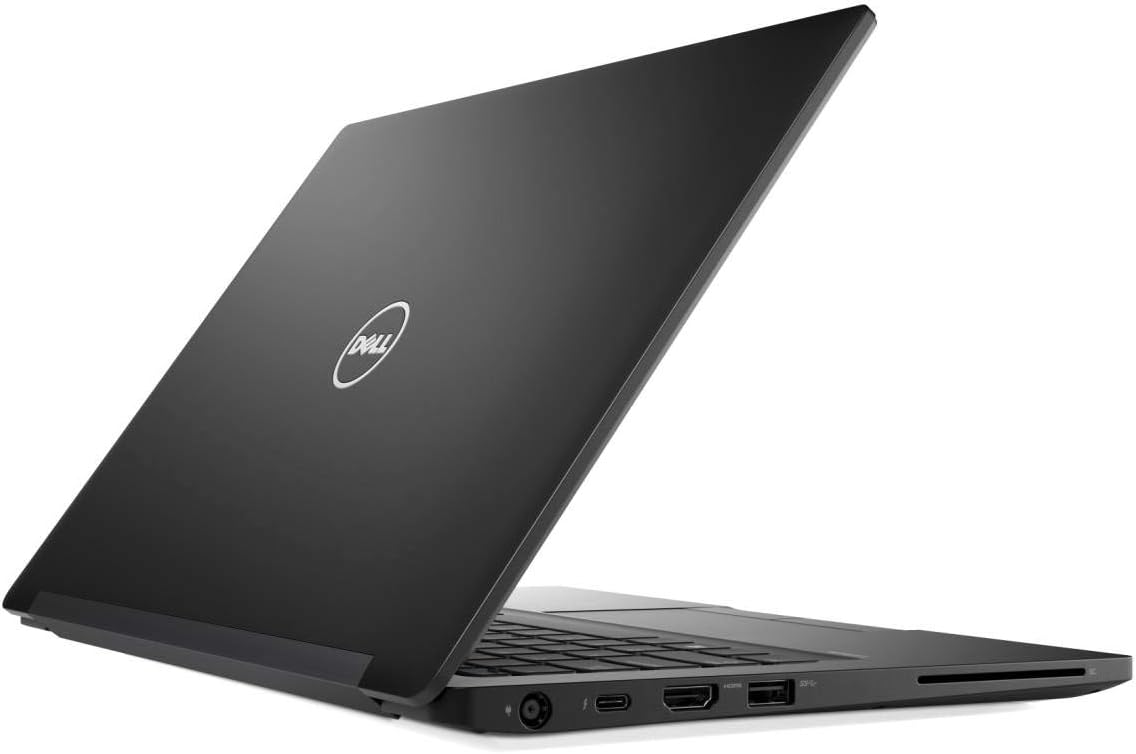
Obrázek 3.2.1: Strana view of the Dell Latitude 7390 laptop, highlighting the various input/output ports available for connecting peripherals.
3.3 Řízení spotřeby
To conserve battery life, you can put the laptop into sleep mode by closing the lid or selecting "Sleep" from the power options in the Start Menu. To shut down the laptop completely, select "Shut down" from the power options.
4. Údržba
4.1 Čištění notebooku
Použijte měkký hadřík, který nepouští vlákna dampened with water or a specialized screen cleaner to clean the display. For the keyboard and chassis, use a soft cloth. Avoid harsh chemicals or abrasive materials.
4.2 Péče o baterii
To prolong battery life, avoid extreme temperatures and do not leave the laptop constantly plugged in at 100% charge for extended periods. Periodically allow the battery to discharge partially before recharging.
4.3 Aktualizace softwaru
Regularly check for and install Windows updates and Dell driver updates to ensure optimal performance and security. These updates can be found in Windows Settings and on the Dell support webmísto.
4.4 Zálohování dat
Doporučuje se pravidelně zálohovat důležitá data na externí disk nebo cloudové úložiště, abyste předešli jejich ztrátě.
5. Řešení problémů
5.1 Bez napájení
- Ensure the power adapter is securely connected to both the laptop and a working wall outlet.
- Zkontrolujte, zda je zásuvka funkční, zapojením jiného zařízení.
- Pokud je k dispozici, vyzkoušejte jiný napájecí adaptér.
5.2 Problémy se zobrazením
- If the screen is blank, try pressing the Fn key and the display toggle key (often F8 or F10) to switch display outputs.
- Ujistěte se, že jsou externí monitory správně připojeny a zapnuté.
- Restartujte notebook.
5.3 Peripheral Not Recognized
- Zkuste připojit periferní zařízení k jinému USB portu.
- Restartujte notebook.
- Ensure the peripheral has the necessary drivers installed.
5.4 Pomalý výkon
- Zavřete nepotřebné aplikace běžící na pozadí.
- Zkontrolujte a nainstalujte všechny čekající aktualizace systému Windows nebo ovladačů.
- Spusťte antivirovou a malwarovou kontrolu.
- Ensure there is sufficient free space on the primary drive.
6. Specifikace
Below are the key technical specifications for the Dell Latitude 7390:
| Funkce | Specifikace |
|---|---|
| Značka | Dell |
| Číslo modelu | 7390 |
| Operační systém | Windows 10 Pro |
| Velikost obrazovky | 13.3 palce |
| Rozlišení obrazovky | 1366 x 768 pixelů |
| Procesor | Intel Core i5-8350U (1.7GHz) |
| Velikost nainstalované paměti RAM | 8 GB |
| Flash Memory Size (Storage) | 256 GB |
| Hmotnost položky | 3 libry |
| Vstup lidského rozhraní | Keyboard, Touch Pad, Touchscreen |
| Hardwarové rozhraní | Ethernet |
| svtage | 240 voltů |
7. Záruka a podpora
7.1 Záruka na produkt
Your Dell Latitude 7390 laptop is covered by Dell's standard limited hardware warranty. The specific terms and duration of your warranty may vary based on your region and purchase agreement. Please refer to the warranty documentation included with your product or visit the official Dell support webstránky pro podrobné informace.
7.2 Technická podpora
Pro technickou pomoc, stažení ovladačů nebo další řešení problémů navštivte oficiální web podpory Dell. website. You will need your laptop's Service Tag, which can typically be found on a sticker on the bottom of the laptop or accessed through the BIOS/UEFI settings.
Podpora společnosti Dell Webmísto: www.dell.com/support


