1. Úvod
Thank you for choosing the FLEXISPOT EN2 Electric Height Adjustable Standing Desk. This manual provides essential information for the safe and efficient assembly, operation, and maintenance of your new desk. Please read these instructions carefully before use and retain them for future reference.
2. Bezpečnostní informace
- This desk is designed to support a maximum weight of 176 lbs (79.8 kg). Exceeding this limit may result in damage or injury.
- During assembly, an electric drill may be required, which is not included in the package.
- The product will be delivered in two separate packages and may be shipped separately.
- The 5-year and 2-year warranties cover different components of the desk. Refer to the Warranty section for details.
- The height adjustment motor operates quietly, under 50 dB, at a speed of 0.6 inches (1.5 cm) per second.
- Each desk leg has undergone testing, enduring 20,000 lift cycles.
- To ensure proper assembly and stability, please follow the assembly instructions carefully.
3. Obsah balení
Před zahájením montáže se ujistěte, že jsou všechny součásti přítomny a nepoškozené. Balení obsahuje:
- Whole-piece desktop (48 x 30 inches)
- Desk frame (legs and crossbar)
- 6-button digital controller with 4 memory presets
- Removable desktop power outlet (3 AC outlets, 2 USB charging ports)
- Cable management device
- Assembly hardware and tools (Allen wrench included, Phillips head screwdriver required but not included)
- Návod k použití
Note: The desktop and desk frame may arrive in separate packages.

Image: All components of the FLEXISPOT EN2 desk laid out for assembly, including the desktop, frame parts, and hardware.
4. Nastavení
4.1 Montáž
Follow the detailed instructions provided in the included assembly guide. Ensure all screws are tightened securely. An electric drill may be helpful for certain steps, but is not supplied.
4.2 Initial Placement & Leveling
Place the assembled desk in your desired location. The feet are adjustable to ensure the desk is level on uneven surfaces.

Image: Close-up of the adjustable feet on the desk's base, allowing for leveling on various floor types.
4.3 Připojení napájení
Connect the desk's power cable to a suitable wall outlet. The removable desktop power outlet can be clipped to the back or side of your desk for convenient access.
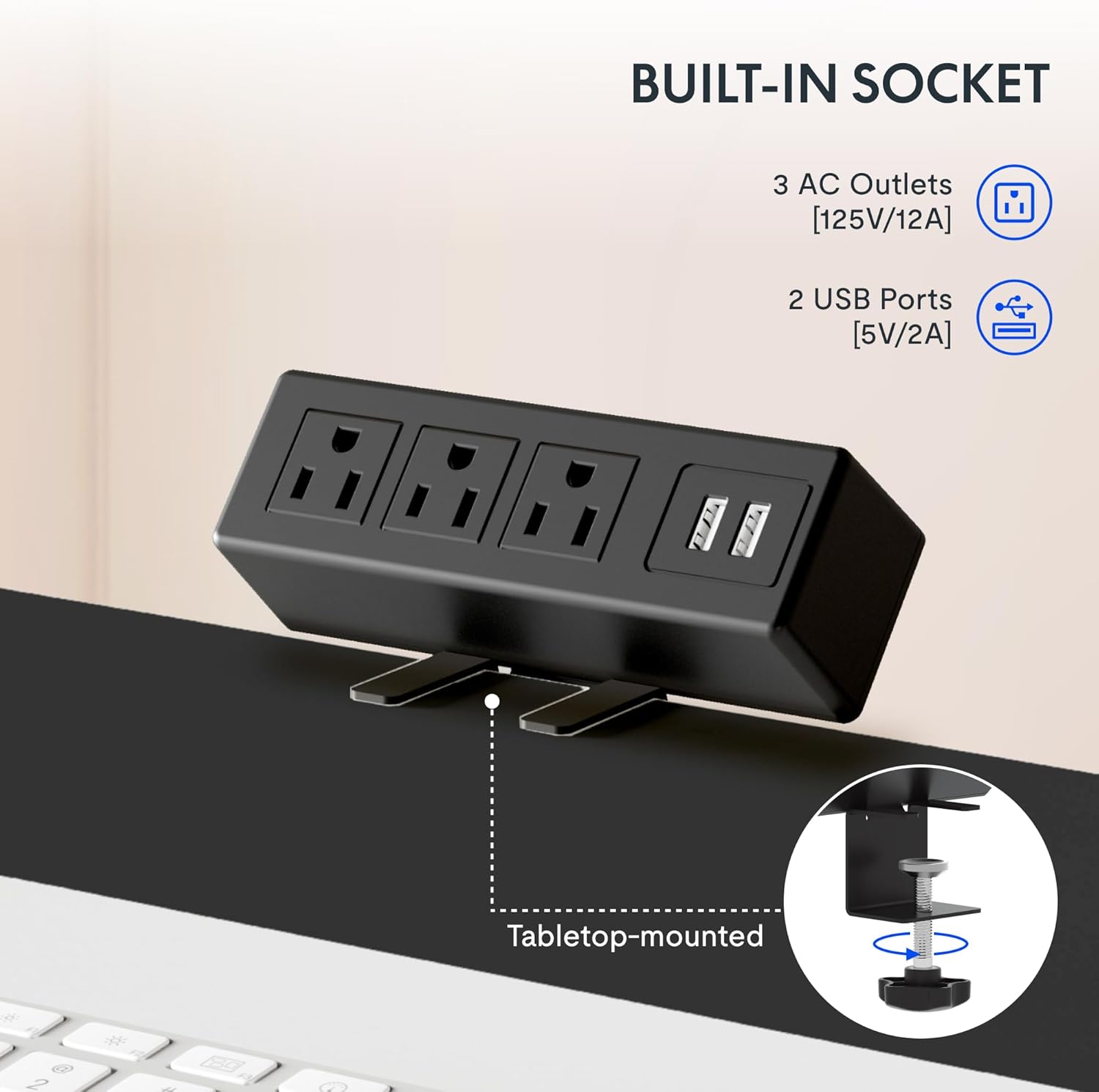
Image: The removable desktop power outlet, featuring three AC outlets and two USB ports, shown clamped to the desk edge.
4.4 Správa kabelů
Utilize the included cable management device to organize and tidy up your workspace. This helps prevent cable clutter and ensures a clean aesthetic.

Image: A cable management tray installed beneath the desk, designed to hold and organize power cords and other cables.
4.5 Volitelné příslušenství
The desk includes hooks that can be installed on the sides for hanging headphones or other items.

Image: A black hook attached to the side of the desk, suitable for hanging headphones or other accessories.
4.6 Instalační video
For a visual guide on frame installation, please refer to the official FLEXISPOT installation video:
Video: Official FLEXISPOT Standing Desk Frame Installation Guide. This video demonstrates the step-by-step process of assembling the desk frame.
5. Návod k obsluze
5.1 Nastavení výšky
The desk features a 6-button digital controller for smooth and quiet height adjustments. Use the up (▲) and down (▼) arrow buttons to manually adjust the desk height.

Image: Close-up of the 6-button digital controller, showing the LED display, up/down arrows, and four programmable height setting buttons.
5.2 Předvolby paměti
The controller includes four programmable memory presets (1, 2, 3, 4). To save a desired height:
- Nastavte stůl do požadované výšky pomocí šipek nahoru/dolů.
- Press the 'M' button (often indicated by a person icon or 'M').
- Immediately press one of the number buttons (1, 2, 3, or 4) to save the current height to that preset.
Pro vyvolání uložené výšky jednoduše stiskněte odpovídající číselné tlačítko. Stůl se automaticky přesune do naprogramované polohy.
5.3 Desktop Power Outlet
The integrated power outlet provides convenient access to power for your devices. It includes 3 standard AC outlets (125V/12A) and 2 USB charging ports (5V/2A).

Obrázek: Podrobný view of the desktop power outlet, highlighting the three AC sockets and two USB charging ports.
6. Údržba
To ensure the longevity and optimal performance of your FLEXISPOT EN2 desk, follow these maintenance guidelines:
- Čištění: Otřete pracovní plochu a rám měkkým hadříkemamp hadříkem. Nepoužívejte agresivní chemikálie ani abrazivní čisticí prostředky, které by mohly poškodit povrchovou úpravu.
- Inspekce: Pravidelně kontrolujte všechny šrouby a spoje, zda jsou pevně utažené. V případě potřeby je dotáhněte.
- Správa kabelů: Regularly inspect cables for any signs of wear or damage. Ensure cables are neatly managed to prevent snagging during height adjustments.
- Hmotnostní limit: Nepřekračujte maximální nosnost 79.8 kg (176 liber).
7. Řešení problémů
If you encounter any issues with your FLEXISPOT EN2 desk, please refer to the troubleshooting section in the comprehensive manual (if available) or contact customer support. Common issues may include:
- Stůl se nedá výškově nastavit.
- Error codes on the digital display.
- Neobvyklé zvuky během provozu.
Note: A slight 0-1 inch tolerance in desktop size is normal due to manual measurement.
8. Specifikace
| Funkce | Detail |
|---|---|
| Značka | FLEXISPOT |
| Číslo modelu | EN2 |
| Rozměry pracovní plochy | 48"W x 30"D (121.9 cm x 76.2 cm) |
| Materiál pro stolní počítače | Engineered Wood (FSC-Certified) |
| Materiál rámu | Legovaná ocel |
| Barva | Černý vršek + černý rám |
| Rozsah nastavení výšky | 28.1" až 45.7" (71.4 cm až 116.1 cm) |
| Zvedací mechanismus | Elektrický |
| Maximální nosnost | 176 lb (79.8 kg) |
| Úroveň hluku | Méně než 50 dB |
| Typ ovládání | 6-button digital controller with 4 memory presets |
| Zásuvka napájení | 3x AC (125 V/12 A), 2x USB (5 V/2 A) |
| Montáž Vyžadována | Ano |
9. Záruka a podpora
9.1 Informace o záruce
FLEXISPOT provides the following warranty coverage for the EN2 Standing Desk:
- 5-letá záruka: Zahrnuje rámy, motory a další mechanická zařízení.
- 2-letá záruka: Zahrnuje ovladače, spínače a elektroniku.
Uschovejte si prosím doklad o koupi pro uplatnění záruky.
9.2 Zákaznická podpora
For any questions, technical assistance, or warranty claims, please contact FLEXISPOT customer support. Refer to your product packaging or the official FLEXISPOT webstránky s nejaktuálnějšími kontaktními informacemi.


