1. Úvod
Welcome to the user manual for your BenQ MX525A DLP Video Projector. This document provides essential information for the safe and efficient operation, setup, and maintenance of your projector. Please read this manual thoroughly before using the device.
The BenQ MX525A is designed for clear and vibrant presentations, featuring a bright 3300 ANSI lumens display, XGA (1024 x 768) resolution, and a remarkable 13,000:1 contrast ratio. It is also 3D-Ready and offers versatile connectivity with HDMI and VGA inputs.
2. Bezpečnostní pokyny
Pro zajištění bezpečného provozu a zabránění poškození projektoru dodržujte prosím následující bezpečnostní pokyny:
- Napájení: Use only the power cord and adapter supplied with the projector. Ensure the power outlet meets the specified voltage požadavky.
- Větrání: Neblokujte větrací otvory. Zajistěte dostatečný prostor kolem projektoru pro správné proudění vzduchu, abyste zabránili přehřátí.
- Umístění: Place the projector on a stable, level surface. Avoid placing it in direct sunlight, near heat sources, or in environments with high humidity or excessive dust.
- Zacházení: Do not drop or subject the projector to strong impacts. Avoid looking directly into the lens when the lamp je zapnutý, protože jasné světlo může způsobit poškození očí.
- Čištění: Před čištěním odpojte napájecí kabel. Použijte měkký, suchý hadřík. Nepoužívejte tekuté ani aerosolové čisticí prostředky.
- Servis: Nepokoušejte se projektor opravovat sami. Veškerý servis svěřte kvalifikovanému servisnímu personálu.
3. Konec produktuview
Familiarize yourself with the main components of your BenQ MX525A projector.
3.1 Front and Angled View
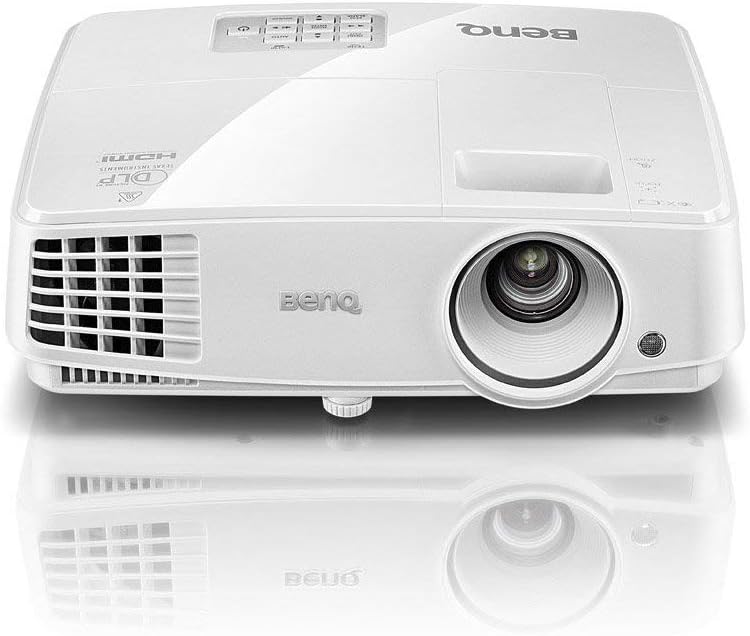
Figure 1: Front-top angled view of the BenQ MX525A DLP Projector. This image shows the projector's lens, front ventilation, and the BenQ logo on the top casing.
3.2 Strana View with Ventilation
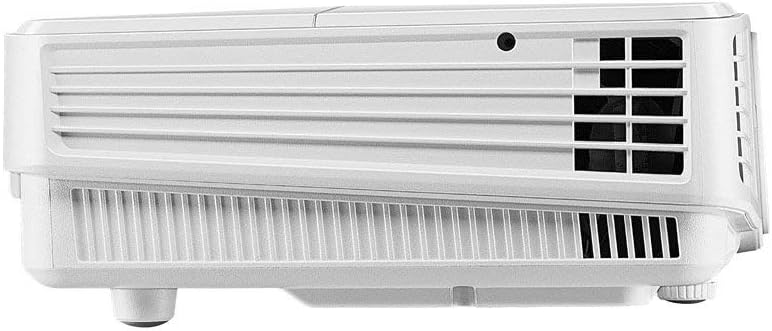
Obrázek 2: Strana view of the BenQ MX525A DLP Projector, highlighting the ventilation grilles essential for heat dissipation.
3.3 Nahoru View s ovládacím panelem

Obrázek 3: Nahoře view of the BenQ MX525A DLP Projector, displaying the integrated control panel buttons for navigation and settings, along with the focus and zoom rings.
4. Nastavení
4.1 Vybalení
Carefully remove the projector and all accessories from the packaging. Retain the original packaging for future transport or storage.
4.2 Umístění
Position the projector on a flat, stable surface. Ensure the projection path is clear of obstructions. Adjust the projector's height and angle using the adjustable feet to achieve the desired image position on your screen or wall.
4.3 Připojení napájení
- Připojte napájecí kabel k napájecí zásuvce projektoru.
- Zapojte druhý konec napájecího kabelu do uzemněné elektrické zásuvky.
4.4 Připojení zdrojů videa
The BenQ MX525A supports multiple input sources:
- HDMI: For high-definition digital video and audio. Connect an HDMI cable from your source device (e.g., laptop, Blu-ray player) to the HDMI port on the projector.
- VGA (x2): For analog video input. Connect a VGA cable from your computer to one of the VGA ports on the projector.
5. Ovládání projektoru
5.1 Zapnutí/vypnutí
- Zapnutí: Press the power button on the projector's control panel or remote control. The power indicator light will turn green.
- Vypnutí: Press the power button again. A confirmation message may appear. Press the power button a second time to confirm shutdown. The power indicator will turn red.
5.2 Nastavení zaostření a zoomu
Use the focus and zoom rings located around the lens (refer to Figure 3) to adjust the image clarity and size:
- Zoom Ring: Rotate to increase or decrease the image size.
- Zaostřovací kroužek: Rotate until the projected image appears sharp and clear.
5.3 Výběr vstupního zdroje
Press the 'Source' button on the control panel or remote control to cycle through available input sources (HDMI, VGA1, VGA2). Alternatively, use the menu to select the desired input.
5.4 Úpravy obrazu
Access the projector's OSD (On-Screen Display) menu to fine-tune picture settings:
- Jas: Upravuje celkovou světlost nebo tmavost obrazu.
- Kontrast: Řídí rozdíl mezi nejsvětlejšími a nejtmavšími částmi obrazu.
- Barva: Upravuje intenzitu barev.
- Poměr stran: Select the appropriate aspect ratio (e.g., 4:3, 16:9) to match your content.
5.5 3D funkce
The BenQ MX525A is 3D-Ready. To enjoy 3D content, you will need compatible 3D glasses and a 3D-enabled source device. Refer to your 3D source device's manual for specific setup instructions.
5.6 SmartEco Power Saving Technology
Projektor je vybaven technologií SmartEco, která dynamicky upravujeamp power to conserve energy and extend lamp life up to 10,000 hours. This mode is automatically engaged to optimize power consumption based on content brightness.
6. Údržba
Pravidelná údržba pomáhá zajistit optimální výkon a prodlužuje životnost projektoru.
6.1 Čištění objektivu
K jemnému otření čočky projektoru použijte měkký hadřík bez žmolků, speciálně určený pro optické čočky. Nepoužívejte abrazivní materiály ani agresivní chemikálie.
6.2 lamp Nahrazení
Projektor lamp has a life of up to 10,000 hours. When the lamp dosáhne konce své životnosti, zobrazí se varovná zpráva a lamp indicator light may flash. Refer to the full service manual for detailed lamp replacement instructions or contact qualified service personnel.
6.3 Čištění filtru
Periodically check and clean the air filter to prevent dust buildup, which can affect performance and cause overheating. Consult the full service manual for instructions on accessing and cleaning the air filter.
7. Řešení problémů
Pokud se s projektorem setkáte s problémy, podívejte se na následující běžné problémy a jejich řešení:
| Problém | Možná příčina | Řešení |
|---|---|---|
| Na obrazovce není žádný obraz | Napájecí kabel odpojen, nesprávný vstupní zdroj, lamp problém | Zkontrolujte připojení napájení, vyberte správný vstupní zdroj, zkontrolujte lamp indikátor stavu |
| Dim or blurry image | Out of focus, low brightness setting, dirty lens | Adjust focus/zoom rings, increase brightness in OSD, clean the lens |
| Projektor se přehřívá | Blocked ventilation, dirty air filter | Ensure clear space around vents, clean air filter |
| Žádný zvuk | Volume too low, incorrect audio input, mute enabled | Adjust volume, check audio cable connection, disable mute function |
8. Specifikace
Detailed technical specifications for the BenQ MX525A DLP Video Projector:
- Technologie displeje: DLP
- Nativní rozlišení: XGA (1024 x 768)
- Jas: 3300 ANSI Lumens
- Kontrastní poměr: 13,000:1
- Lamp Život: Až 10,000 hodin (režim SmartEco)
- Konektivita: HDMI, VGA (x2)
- Speciální vlastnosti: 3D-Ready, Portable, SmartEco Power Saving Technology
- Rozměry produktu: 8.7 x 3.7 x 11.1 palce
- Hmotnost položky: 6.29 libry
- Datum první dostupnosti: 13. listopadu 2019
9. Záruka a podpora
The BenQ MX525A DLP Video Projector comes with a 1letá záruka na díly a práciTato záruka se vztahuje na výrobní vady a zajišťuje, že váš výrobek bude při běžném používání fungovat dle určení.
For technical support, warranty claims, or further assistance, please visit the official BenQ support website or contact their customer service department. Refer to your product packaging or the BenQ webstránky s nejaktuálnějšími kontaktními informacemi.


