1. Konec produktuview
The MOUNTUP MU0006 Triple Monitor Stand Mount is designed to enhance your workspace by providing a versatile and ergonomic solution for mounting up to three computer screens. Featuring gas spring arms, this mount allows for dynamic adjustment of monitor position, including height, tilt, swivel, and rotation, ensuring optimal viewing angles and reducing desk clutter. It supports various installation methods to suit different desk types.

2. Obsah balení
Před zahájením instalace se prosím ujistěte, že jsou všechny komponenty přítomny.
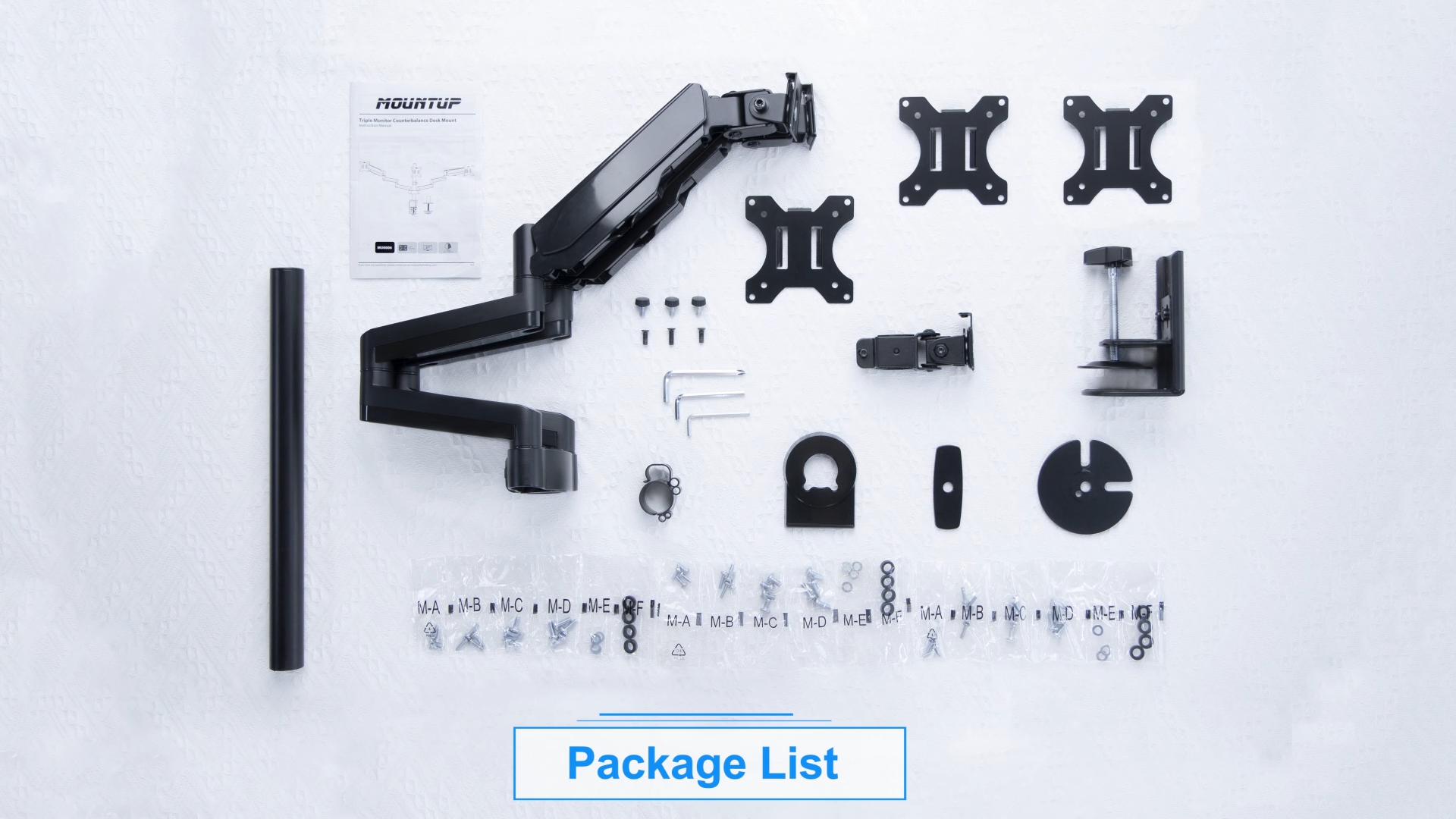
- Main Pole and Base
- Gas Spring Monitor Arms (x2)
- VESA Plates (x3)
- C-třamp and Grommet Mounting Hardware
- Klipy pro správu kabelů
- Required Tools (Allen keys, screws)
- Uživatelská příručka (tento dokument)
3. Kompatibilita
This monitor stand is designed for universal compatibility with most flat or curved LCD computer screens. Ensure your monitors and desk meet the following criteria:
- Velikost monitoru: Up to 27 inches (including 17, 19, 20, 21, 21.5, 22, 23, 24, 25, 27 inches).
- Nosnost: Each arm holds 4.4-19.8 lbs (2-9 kg).
- Vzory VESA: 75x75mm a 100x100mm.
- Tloušťka desky (C-clamp): 0.39''-3.15'' (10-80mm).
- Desk Thickness (Grommet Mount): 0.39''-1.97'' (10-50mm).
- Průměr otvoru pro průchodku: 0.39''-1.97'' (10-50mm).


⚠️ Important: Do not install on tempered glass table tops.
4. Nastavení a instalace
Follow these steps for proper assembly and installation of your MOUNTUP Triple Monitor Stand.
4.1 Mounting Options (C-clamp / Průchodka)
Držák nabízí dva způsoby instalace: C-clamp for desk edges or grommet mount for desks with existing holes.

4.2 Arm and Monitor Attachment
Once the main pole is securely mounted, attach the gas spring arms and then your monitors. The quick-release VESA plate simplifies monitor attachment.
5. Obsluha a seřízení
The gas spring arms allow for fluid and dynamic adjustments to achieve your preferred ergonomic setup.
5.1 Nastavení napětí plynové pružiny
Adjust the gas spring tension to match your monitor's weight. If the arm rises too easily, turn clockwise to reduce tension. If it falls, turn counter-clockwise to increase tension. Ensure the arm is in a horizontal position during adjustment.

5.2 Naklápění, otáčení a rotace
The monitor arms offer extensive movement capabilities:
- Náklon: ±35° (nahoru/dolů)
- Otočný: ±90° (left/right) at the monitor head, 270° at the first joint, and 360° at the pole joint.
- Otáčení: 360° (na výšku až na šířku)

5.3 Nastavení výšky
The center screen can be height adjusted along the main pole. The gas spring arms allow for dynamic height adjustments for the side monitors.
5.4 Správa kabelů
Integrated cable management clips help keep your cables organized and out of sight, contributing to a cleaner workspace.

6. Multiple Screen Setups
The flexible design of the MOUNTUP MU0006 allows for various monitor configurations to suit your specific needs, whether for work, gaming, or content creation.


7. Údržba
To ensure the longevity and optimal performance of your MOUNTUP Triple Monitor Stand, follow these simple maintenance guidelines:
- Čištění: Otřete držák měkkým hadříkemamp hadříkem. Nepoužívejte abrazivní čisticí prostředky ani rozpouštědla, která by mohla poškodit povrchovou úpravu.
- Kontrola těsnosti: Periodically check all bolts and screws to ensure they are securely tightened, especially after initial installation and significant adjustments.
- Plynová pružina: The gas spring is designed for long-term use and generally requires no maintenance. If you notice a change in tension, refer to the adjustment section.
8. Řešení problémů
Běžné problémy a jejich řešení naleznete v oficiálním průvodci řešením problémů:
Stáhnout průvodce řešením problémů (PDF)
If you encounter problems not covered in the guide, please contact customer support.
9. Specifikace
| Funkce | Detail |
|---|---|
| Rozměry produktu | 15.75 x 12.99 x 6.69 palce |
| Hmotnost položky | 14.73 libry |
| Číslo modelu položky | MU0006 |
| Typ montáže | Tabletop Mount with C-clamp nebo průchodka |
| Typ pohybu | Articulating, Swivel, Tilt, Rotate |
| Značka | MONTÁŽ |
| Materiál | Legovaná ocel |
| Maximální kompatibilní velikost | 27 palce |
| Minimální kompatibilní velikost | 17 palce |
| Maximální úhel náklonu | 35 stupňů |
10. Záruka a zákaznická podpora
The MOUNTUP Triple Monitor Stand Mount (MU0006) is backed by MOUNTUP's 3-year support. For any pre-purchase questions, installation assistance, or warranty claims, please contact MOUNTUP customer support directly.
Související dokumenty - MU0006
 |
MOUNTUP Triple Monitor Desk Mount: Instruction Manual Comprehensive instruction manual for the MOUNTUP Triple Monitor Desk Mount, detailing assembly, installation, and adjustment for up to three monitors. Learn how to safely set up your workspace with this gas spring monitor arm. |
 |
Návod k obsluze stolního držáku MOUNTUP pro trojitý monitor s protizávažím Návod k obsluze pro stolní držák MOUNTUP pro tři monitory (MU-AHP-D63H_US1.0) s podrobným popisem postupů montáže, instalace a nastavení až pro tři monitory. Je kompatibilní s normou VESA a má nastavitelná ramena s plynovými pružinami. |
 |
Návod k použití pro držák na stůl pro jeden monitor MOUNTUP Komplexní návod k obsluze držáku na stůl MOUNTUP pro jeden monitor, který podrobně popisuje montáž, instalaci, nastavení a údržbu monitorů kompatibilních s VESA. |
 |
Návod k obsluze prémiového stojanu pro jeden monitor - MOUNTUP Y100-US2.0 Podrobný návod k obsluze stojanu pro jeden monitor MOUNTUP Premium (model Y100-US2.0), který zahrnuje bezpečnost, obsah balení, kroky montáže, nastavení a rozměry. Podporuje VESA 75x75 mm a 100x100 mm s nosností 4.4-33 kg. |
 |
Návod k použití pro držák na stůl pro dva monitory MOUNTUP Komplexní návod k obsluze stolního držáku MOUNTUP pro dva monitory s podrobným popisem montáže a možností instalace (viz...amp a průchodka), upevnění monitoru, nastavení a údržba monitorů kompatibilních s VESA. |
 |
Instalační příručka stojanu pro dva monitory MOUNTUP (MU0005) Komplexní návod k instalaci stojanu pro dva monitory MOUNTUP MU0005 s nastavením plynové pružiny, kompatibilitou s VESA a možnostmi dvojité montáže (viz...amp/průchodka). |