Zavedení
This manual provides detailed instructions for the setup, operation, and maintenance of your HORI PS4 Onyx Plus Wireless Controller. Please read this manual thoroughly before use to ensure proper functionality and longevity of your device.
Konec produktuview
The HORI PS4 Onyx Plus Wireless Controller is designed for use with the PlayStation 4 console, offering wireless connectivity and a range of features for an enhanced gaming experience.
Klíčové vlastnosti
- Bezdrátové připojení: Connects wirelessly to the PS4 console.
- Adjustable Triggers: Customizable trigger pressure.
- Dvě analogové páčky: Pro přesné ovládání.
- Vestavěný mikrofon: For online chat and voice commands.
- Multifunkční: Various buttons and features for diverse gameplay.
Rozložení ovladače
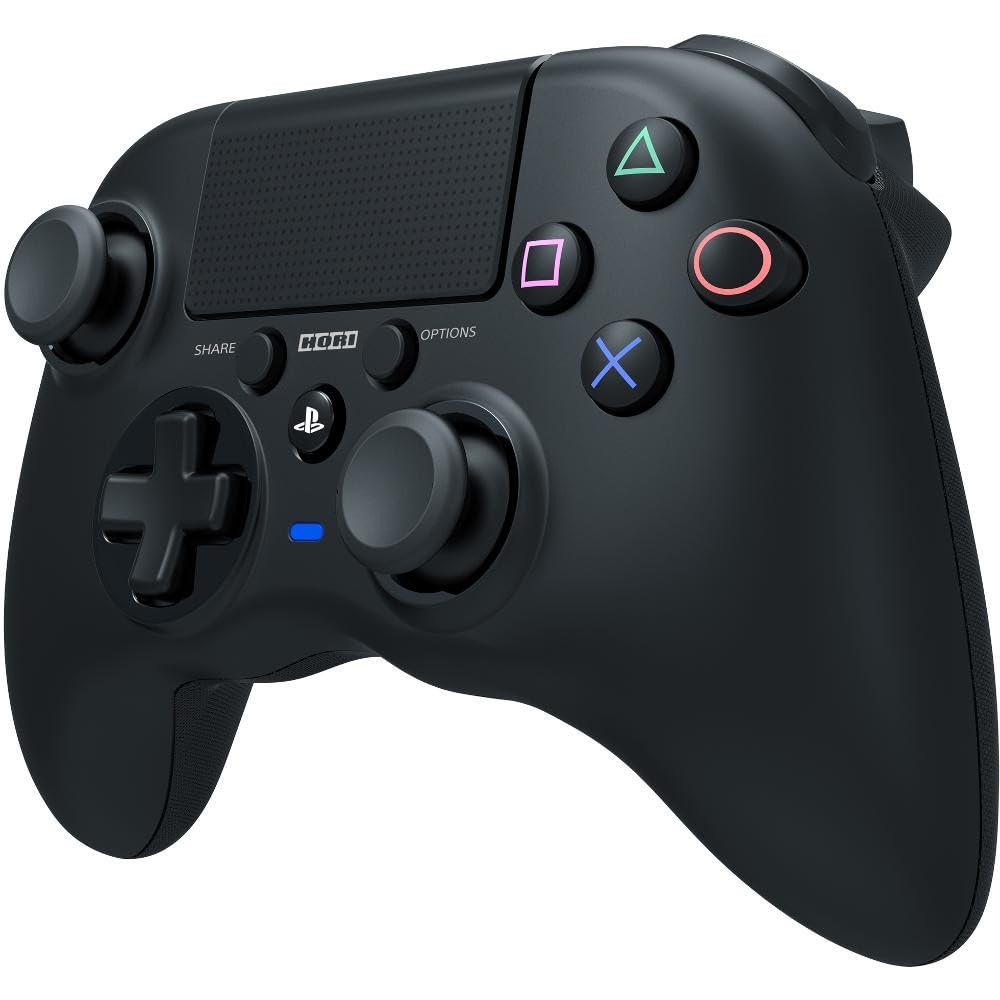
Obrázek: Přední strana view of the HORI PS4 Onyx Plus Wireless Controller. It features two analog sticks, a D-pad, four action buttons (Triangle, Circle, Cross, Square), Share and Options buttons, a PS button, a touchpad, and a light bar. The controller is black with textured grips.
Nastavení a počáteční připojení
Nabíjení ovladače
The controller includes a built-in rechargeable battery. Before first use, fully charge the controller using a standard USB charging cable. Connect the cable to the controller's charging port and a powered USB port on your PS4 console or a USB wall adapter. The light bar on the controller will indicate charging status.
Spárování s PlayStation 4
- Ujistěte se, že je vaše konzole PlayStation 4 zapnutá.
- S vypnutým ovladačem stiskněte a podržte tlačítko Tlačítko PS a Tlačítko SDÍLET simultaneously until the light bar begins to flash rapidly.
- On your PS4 console, navigate to Nastavení > Zařízení > Zařízení Bluetooth.
- Select the "HORI Onyx Plus" controller from the list of available devices.
- Once paired, the light bar will glow a solid color, indicating a successful connection.
Note: Some versions of this controller may require a USB wireless dongle for connection. If direct Bluetooth pairing is unsuccessful, refer to any included quick start guide for dongle-specific instructions.
Obsluha ovladače
Základní ovládací prvky
The HORI PS4 Onyx Plus Wireless Controller features standard PlayStation button layouts:
- Analogové páčky: Used for movement and camera control. Push the sticks in for L3/R3 functions.
- D-Pad: For directional input in menus and certain games.
- Akční tlačítka (trojúhelník, kruh, kříž, čtverec): Provádějte herní akce.
- Tlačítko SDÍLET: Access sharing options (screenshots, video clips).
- Tlačítko MOŽNOSTI: Pause games or access in-game menus.
- Tlačítko PS: Access the PS4 Home screen, switch users, or power off the console.
- Touchpad: Functions as a clickable button and a touch-sensitive surface for specific game interactions.
Adjustable Triggers
The L2 and R2 triggers feature adjustable pressure. Consult your game's settings or the controller's specific software (if available) for customization options. This allows users to fine-tune trigger sensitivity for different game genres.
Vestavěný mikrofon
The integrated microphone allows for voice chat in online multiplayer games and voice commands for the PS4 system. Ensure your PS4 audio settings are configured to use the controller's microphone.
Údržba a péče
Čištění
K čištění ovladače použijte měkký, suchý hadřík. V případě odolných nečistot lehceamphadřík vodou. Nepoužívejte agresivní chemikálie, rozpouštědla ani abrazivní materiály, protože by mohly poškodit povrchovou úpravu a vnitřní součásti ovladače.
Péče o baterie
- Abyste prodloužili životnost baterie, vyhněte se častému úplnému vybíjení.
- Pokud regulátor delší dobu nepoužíváte, skladujte jej na chladném a suchém místě.
- Nevystavujte regulátor extrémním teplotám.
Odstraňování problémů
Problémy s připojením
- Ovladač se nepřipojuje: Ensure the controller is charged. Re-attempt the pairing process as described in the "Pairing with PlayStation 4" section. Move closer to the PS4 console to rule out range issues.
- Přerušované připojení: Check for potential interference from other wireless devices. Ensure the controller is fully charged. If using a dongle, ensure it is securely plugged into the PS4.
Citlivost touchpadu
Some users may find the touchpad to be highly sensitive. If accidental inputs occur, adjust your grip or check in-game settings for touchpad sensitivity options. There is no physical adjustment for touchpad sensitivity on the controller itself.
Indikace životnosti baterie
The controller does not display battery life on the PS4 system menu. The light bar will indicate charging status, and the controller will power off when the battery is depleted.
Controller Not Turning On Console
This controller may not support turning on the PS4 console directly from a powered-off state. Power on the console manually before connecting the controller.
Specifikace
| Funkce | Detail |
|---|---|
| Číslo modelu | PS4-149E |
| Konektivita | Bezdrátový |
| Rozměry (D x Š x V) | 2.76 x 6.3 x 7.09 palce |
| Hmotnost | 8.1 unce |
| Baterie | 1A baterie (součástí balení) |
| První k dispozici | 30. ledna 2022 |
Záruka a podpora
Záruka na produkt
For information regarding the product warranty, please refer to the warranty card included with your purchase or visit the official HORI webZáruční podmínky se mohou lišit v závislosti na regionu.
Zákaznická podpora
If you encounter any issues not covered in this manual or require further assistance, please contact HORI customer support. You can find contact information on the official HORI webwebu nebo prostřednictvím prodejce, u kterého jste produkt zakoupili.
Visit the HORI Store on Amazon pro více informací o produktu a zdroje podpory.


