1. Úvod
The Steinel XLED CAM 1 SC is an advanced outdoor LED floodlight integrated with a high-definition surveillance camera and an intercom system. Designed for enhanced security and convenience, this device allows you to monitor your property, communicate with visitors, and control lighting via a dedicated smartphone application. It features a 180° infrared motion detector, night vision capabilities, and a dimmable main light and night light function.

Figure 1.1: Steinel XLED CAM 1 SC product overview with app interface.
2. Bezpečnostní informace
Před instalací a provozem si pečlivě přečtěte tyto bezpečnostní pokyny. Nedodržení těchto pokynů může vést k úrazu elektrickým proudem, požáru nebo vážnému zranění.
- Elektrická bezpečnost: Installation must be performed by a qualified electrician in accordance with national wiring regulations. Ensure the power supply is disconnected before installation or maintenance.
- svtage: This product operates on 230 Volts AC. Verify your power supply matches this requirement.
- Venkovní použití: The product has an IP44 rating, indicating protection against solid objects larger than 1mm and splashing water from any direction. It is suitable for outdoor use but should not be submerged in water.
- Montáž: Mount the device securely on a stable surface as per the installation guidelines.
- Teplota: Do not operate the device outside its specified operating temperature range.
3. Obsah balení
Ověřte, zda jsou v balení přítomny všechny komponenty:
- Steinel XLED CAM 1 SC LED Floodlight with Camera and Intercom
- Ochranný kryt
- Montážní materiál (šrouby, hmoždinky)
- 8GB Micro SD karta
- Uživatelská příručka (tento dokument)
4. Nastavení a instalace
4.1 Fyzická instalace
The XLED CAM 1 SC is designed for wall mounting. Refer to the technical drawing for precise dimensions and mounting points.

Figure 4.1: Technical dimensions for installation (dimensions in mm).
- Vyberte umístění: Select a suitable outdoor location for wall mounting, ensuring clear line of sight for the camera and optimal coverage for the motion sensor.
- Odpojit napájení: Před zahájením jakýchkoli elektrických prací se ujistěte, že je hlavní přívod proudu do prostoru instalace vypnut jističem.
- Montáž: Use the provided mounting material to securely attach the floodlight to the wall. Ensure the device is level.
- Elektrické připojení: Connect the floodlight to a 230V AC power supply. Follow local electrical codes and diagrams provided in the full installation guide.
- Vložte SD kartu: Locate the Micro SD card slot (usually near the camera lens) and insert the included 8GB Micro SD card for video recording.
4.2 Nastavení aplikace a připojení k Wi-Fi
The XLED CAM 1 SC requires the free "Cam light" app for full functionality. A stable Wi-Fi connection (minimum 2 Mbps, 2.4 GHz) is essential.

Figure 4.2: Wi-Fi connection and app download.
- Stáhnout aplikaci: Download the "Cam light" app from the Apple App Store or Google Play Store.
- Zapnutí: Restore power to the floodlight. The device will enter pairing mode.
- Připojení k Wi-Fi: Open the app and follow the on-screen instructions to connect your XLED CAM 1 SC to your home 2.4 GHz Wi-Fi network. Ensure your Wi-Fi signal is strong at the installation location.
- Párování zařízení: Complete the device pairing process within the app. This may involve scanning a QR code or following specific prompts.
5. Návod k obsluze
Control and manage your XLED CAM 1 SC primarily through the "Cam light" smartphone app.

Figure 5.1: "Cam light" app interface.
5.1 Ovládání osvětlení
- Hlavní světlo: Turn the main LED floodlight on/off or set schedules via the app.
- Noční světlo: Activate a dimmable night light function for continuous low-level illumination.
- Nastavení jasu: Adjust the brightness of both the main and night lights through the app settings.
5.2 Camera and Surveillance
- Žít View: Access real-time HD video streaming from the camera through the app.
- Detekce pohybu: The integrated 180° infrared sensor detects movement up to 10 meters. Configure sensitivity and detection zones in the app. When motion is detected, the light can activate, and the camera will record.
- Noční vidění: The camera provides clear images even in low-light conditions or at night.
- Záznam: Videos are automatically recorded to the 8GB Micro SD card upon motion detection. You can also manually initiate recording or capture screenshots from the live view.
- Nastavení kamery: The camera lens can be rotated and pivoted manually to optimize the viewúhel natočení po instalaci.

Figure 5.2: 180° Infrared Motion Sensor Detection Range.
5.3 Funkce interkomu
Use the two-way audio intercom feature to communicate with visitors or deter unwanted guests.
- Mluvit: Press the microphone icon in the app's live view to speak through the floodlight's speaker.
- Poslouchat: Listen to audio from the floodlight's microphone through your smartphone.
5.4 Upozornění a alarmy
Configure push notifications or alarm tones in the app to be alerted when motion is detected.
6. Údržba
To ensure optimal performance and longevity of your Steinel XLED CAM 1 SC, follow these maintenance guidelines:
- Čištění: Regularly clean the light and camera lens with a soft, damp hadříkem. Nepoužívejte abrazivní čisticí prostředky ani rozpouštědla. Před čištěním se ujistěte, že je přístroj vypnutý.
- Inspekce: Pravidelně kontrolujte upevnění a elektrické spoje, zda nevykazují známky opotřebení nebo poškození.
- Aktualizace softwaru: Keep the "Cam light" app updated to the latest version to ensure compatibility and access to new features or security enhancements.
- SD karta: The 8GB Micro SD card will eventually fill up. The system typically overwrites the oldest recordings. If you need to save specific footage, download it to your device or computer. Consider formatting the SD card periodically via the app settings to maintain performance.
7. Řešení problémů
If you encounter issues with your XLED CAM 1 SC, refer to the following common problems and solutions:
| Problém | Možná příčina | Řešení |
|---|---|---|
| Světlo se nerozsvítí. | No power supply; faulty wiring; light sensor issue. | Check circuit breaker. Verify electrical connections. Ensure ambient light conditions are suitable for sensor activation. |
| Kamera živě view is black or frozen. | No Wi-Fi connection; app issue; camera malfunction. | Check Wi-Fi signal strength. Restart the app. Power cycle the floodlight. |
| Detekce pohybu nefunguje. | Incorrect sensitivity settings; obstructed sensor; outside detection range. | Adjust motion sensitivity in the app. Clear any obstructions. Ensure movement is within the 10m range and 180° field. |
| Intercom audio is unclear or not working. | Poor Wi-Fi connection; microphone/speaker obstruction; app settings. | Improve Wi-Fi signal. Check for debris blocking microphone/speaker. Verify app audio settings. |
| Nelze se připojit k Wi-Fi. | Nesprávné heslo k Wi-Fi; vybrána síť 5 GHz; slabý signál. | Ensure correct 2.4 GHz Wi-Fi network and password. Move router closer or use a Wi-Fi extender. |
For persistent issues, contact Steinel customer support.
8. Specifikace
| Funkce | Specifikace |
|---|---|
| Číslo modelu | 065294 |
| Rozměry (D x Š x V) | 16.7 x 21 x 27.5 cm |
| Hmotnost | 1.47 kg |
| Napájení | 230 voltů AC |
| Spotřeba energie | 21 wattů |
| Světelný tok | 2310 lm |
| Teplota barev | 3000K (teplá bílá) |
| Index podání barev (CRI) | 80 |
| Average Lifespan (LED) | 50,000 hodiny |
| Hodnocení ochrany proti vniknutí (IP). | IP44 |
| Typ snímače pohybu | Infračervený |
| Úhel detekce pohybového senzoru | 180° |
| Motion Sensor Max. Range | 10 m |
| Konektivita | 2.4 GHz Wi-Fi |
| Zahrnuté úložiště | 8GB Micro SD karta |
| Třída energetické účinnosti | E |
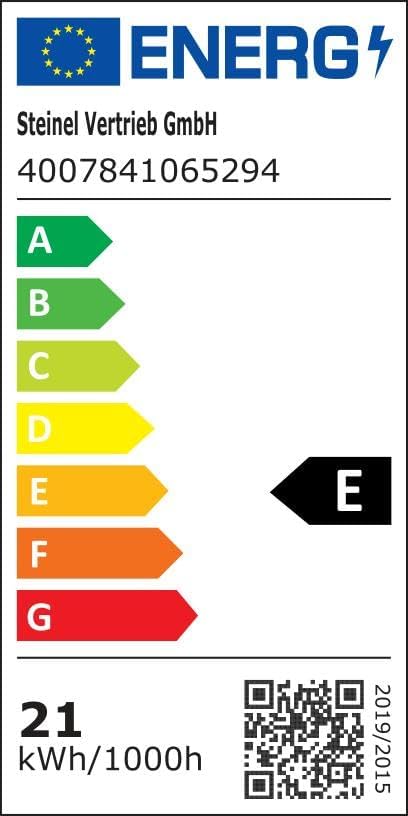
Obrázek 8.1: Štítek energetické účinnosti. Více informací naleznete na Databáze EPREL.

Obrázek 8.2: Klíčové vlastnostiview. Scan the QR code for an Rozšířená realita view produktu.
9. Záruka a podpora
Steinel products are manufactured to high quality standards. For warranty information, please refer to the specific terms and conditions provided at the time of purchase or visit the official Steinel website. Information regarding spare parts availability and guaranteed software updates is not explicitly provided in this manual.
For technical support, troubleshooting assistance beyond this manual, or warranty claims, please contact Steinel customer service or your local distributor. You can find contact information on the official Steinel webna webu nebo prostřednictvím vašeho nákupního místa.
Navštivte Steinel Brand Store pro více produktů a informací.


