1. Úvod
Thank you for choosing the LoraTap Smart Roller Shutter Switch. This device allows you to control your motorized roller shutters, blinds, or curtains via Wi-Fi using a smartphone application, an RF remote control, or voice commands through smart assistants like Amazon Alexa and Google Home. It also features a programmable timer function for automated operation. Please read this manual thoroughly before installation and use to ensure proper functionality and safety.
2. Bezpečnostní informace
- Elektrická instalace: Instalaci by měl provádět pouze kvalifikovaný elektrikář nebo osoba s důkladnými znalostmi elektroinstalace.
- Odpojení napájení: Před prováděním jakýchkoli elektrických prací vždy odpojte napájení jističem.
- svtage: Zajistěte provozní objtage of your motor matches the switch's specifications (240 Volts).
- Kompatibilita motoru: This switch is compatible only with 4-wire motors (Live, Neutral, Up, Down). A neutral wire is required for operation.
- Kapacita zatížení: Do not exceed the maximum load capacity of 600 Watts.
- Pouze pro vnitřní použití: Toto zařízení je určeno pro použití v suchých vnitřních prostorách.
3. Obsah balení
- LoraTap Smart Roller Shutter Switch (Model HU-XI-179)
- RF Remote Control (battery included)
- Montážní šrouby
- Svorkovnice
- Uživatelská příručka
4. Specifikace
| Reference modelu | HU-XI-179 |
| Značka | Lora Tap |
| Barva | Bílý |
| Materiál | Tvrzené sklo |
| Provozní svtage | 240 voltů |
| Aktuální hodnocení | 10 A |
| Maximální zátěžový výkon | 600 wattů |
| Typ přepínače | Touch, 1-way |
| Provozní režim | ON-ON-OFF |
| Konektivita | Wi-Fi (2.4GHz only), RF |
| Kompatibilita motoru | 4-wire motors (Live, Neutral, Up, Down) |
| Rozměry (spínač) | 86 mm x 86 mm x 30 mm (přibližně) |
| Baterie (dálkový) | 1 C Lithium metal (included) |
5. Nastavení
5.1. Electrical Installation and Wiring
Důležité: Ensure power is disconnected at the main circuit breaker before starting any wiring. This switch requires a neutral wire for operation.

Obrázek 5.1: Schéma zapojení
Follow this wiring diagram carefully for correct installation. The switch requires connection to a 4-wire motor (Live, Neutral, Up, Down).
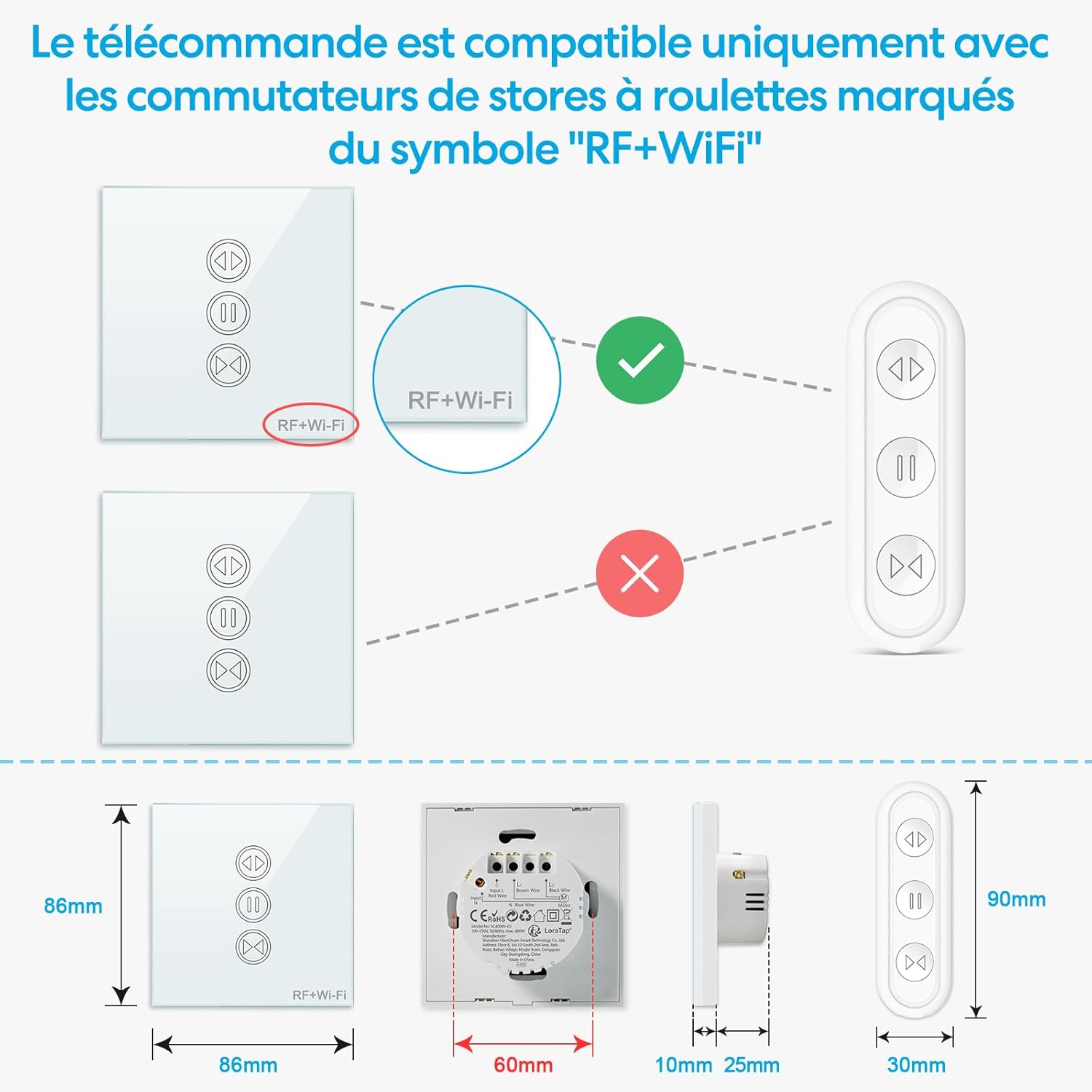
Figure 5.2: Motor Compatibility Note
This switch is compatible only with motors that have 4 wires (Live, Neutral, Up, Down). A neutral wire is essential for operation. Maximum load capacity is 600W.
- Vypněte hlavní napájení jističem.
- Odstraňte stávající vypínač (pokud existuje).
- Connect the wires to the LoraTap switch according to the wiring diagram (Figure 5.1):
- L (Input Live): Connect to your household live wire.
- N (Input Neutral): Connect to your household neutral wire.
- L1 (Output Up): Connect to the motor's 'Up' wire.
- L2 (Output Down): Connect to the motor's 'Down' wire.
- N (Output Neutral): Connect to the motor's neutral wire.
- Mount the switch securely into the wall box.
- Obnovte napájení na jističi.
5.2. Wi-Fi Network Requirements
The LoraTap Smart Roller Shutter Switch operates on a 2.4GHz Wi-Fi network. It is not compatible with 5GHz Wi-Fi networks or combined 2.4GHz/5GHz networks unless your router allows for separate 2.4GHz configuration.

Figure 5.3: Wi-Fi Signal Range
For optimal Wi-Fi performance, ensure the switch is installed within 10 meters of your 2.4GHz Wi-Fi router.
5.3. App Pairing (Smart Life / Tuya App)
To enable smart control features, you need to pair the switch with the Smart Life or Tuya app.

Obrázek 5.4: Snadný proces párování
Follow these steps to pair your switch with the Smart Life or Tuya app.
- Stáhněte si aplikaci „Smart Life“ nebo „Tuya Smart“ z App Storu (iOS) nebo Obchodu Google Play (Android).
- Zaregistrujte se nebo se přihlaste ke svému účtu.
- Ujistěte se, že je váš smartphone připojen k síti Wi-Fi s frekvencí 2.4 GHz.
- On the app's home screen, tap the "+" icon (or "Add Device").
- Select "Curtain Switch" or similar device type from the list.
- Follow the in-app instructions to put the switch into pairing mode (usually by pressing and holding a button on the switch until an indicator light flashes rapidly).
- Ověřte, zda kontrolka v aplikaci rychle bliká.
- Zadejte heslo k síti Wi-Fi 2.4 GHz.
- Wait for the device to connect. Once successfully added, you can rename the device.
6. Návod k obsluze
6.1. Manuální dotykové ovládání
The switch features a responsive touch panel for direct control.

Figure 6.1: Touch Panel and RF Remote Control
Operate the switch using the responsive touch panel directly or via the included RF remote control.
- Šipka nahoru: Touch to open the roller shutter.
- Šipka dolů: Touch to close the roller shutter.
- Tlačítko Pozastavit: Touch to stop the roller shutter at its current position.
6.2. Rádiové dálkové ovládání
The included RF remote control provides convenient wireless operation.

Figure 6.2: Remote Compatibility and Dimensions
The RF remote is compatible only with LoraTap switches featuring the 'RF+Wi-Fi' marking. Dimensions of the switch and remote are provided for installation planning.
- The remote is typically pre-paired with the switch. If not, refer to the pairing instructions in the remote's separate manual or contact support.
- Use the Up, Down, and Pause buttons on the remote to control the roller shutter.
6.3. Ovládání aplikací (Smart Life / Tuya App)
After successful pairing, you can control your roller shutters from anywhere using the app.

Figure 6.3: Remote Control via App
Control your roller shutters remotely from anywhere using the Smart Life or Tuya application on your smartphone.
- Open the Smart Life or Tuya app and select your roller shutter switch.
- Use the virtual buttons to open, close, or pause the roller shutter.
- Partial Opening/Closing: The updated switch allows you to set the motor's running time in the app to achieve partial opening or closing (e.g., 30% or 50%). Adjust this setting in the device's control interface within the app.
6.4. Hlasové ovládání (Alexa / Google Home)
Integrate your switch with Amazon Alexa or Google Home for hands-free control.

Obrázek 6.4: Integrace hlasového ovládání
Integrate with Amazon Alexa or Google Home for convenient voice control of your roller shutters.
- In the Smart Life/Tuya app, go to the device settings and link your Amazon Alexa or Google Home account.
- Discover new devices in your Alexa or Google Home app.
- Používejte hlasové příkazy, jako například:
"Alexa, open [Device Name]"
"Hey Google, close [Device Name]"
"Alexa, stop [Device Name]"
6.5. Funkce časovače
Automate your roller shutters by setting schedules in the app.

Figure 6.5: Timer Function Setup
Set custom schedules and timers through the app to automatically open or close your roller shutters at specific times.
- In the Smart Life/Tuya app, select your device and navigate to the "Schedule" or "Timer" section.
- Add new schedules, specifying the time, action (open/close), and repetition days.
7. Údržba
- Čištění: Wipe the glass panel with a soft, dry cloth. Do not use abrasive cleaners or solvents.
- Spojení: Pravidelně kontrolujte těsnost elektrických spojů, zejména po počáteční instalaci.
- Aktualizace firmwaru: Keep the Smart Life/Tuya app updated to receive the latest features and security patches for your device.
- Dálková baterie: Replace the remote control battery (Type C Lithium metal) when its performance degrades.
8. Řešení problémů
- Přepínač nereaguje:
- Zkontrolujte, zda je zapnutý hlavní zdroj napájení.
- Zkontrolujte, zda jsou všechna zapojení kabeláže bezpečná a správná dle schématu.
- Ensure the motor is a 4-wire type and a neutral wire is connected.
- Problémy s připojením Wi-Fi:
- Ověřte, zda vaše Wi-Fi síť používá frekvenci 2.4 GHz. Přepínač nepodporuje frekvenci 5 GHz.
- Ensure the switch is within 10 meters of your Wi-Fi router.
- Check your Wi-Fi password for accuracy during pairing.
- Try restarting your Wi-Fi router and the switch.
- If pairing fails, try resetting the switch (refer to app instructions for specific reset procedure, usually holding a button for several seconds until indicator flashes differently).
- RF dálkové ovládání nefunguje:
- Zkontrolujte baterii v dálkovém ovladači a v případě potřeby ji vyměňte.
- Ensure the switch has the "RF+Wi-Fi" marking for compatibility.
- If the remote was previously working, it might need re-pairing. Refer to the remote's manual for pairing instructions.
- Hlasové ovládání nefunguje:
- Verify that the Smart Life/Tuya account is correctly linked to your Alexa or Google Home account.
- Ensure the device is discovered and enabled in your smart assistant app.
- Use the exact device name configured in the Smart Life/Tuya app.
9. Záruka a podpora
The LoraTap Smart Roller Shutter Switch comes with a 3-letá záruka from the date of purchase. This warranty covers manufacturing defects and ensures the product is free from defects in materials and workmanship under normal use.
For technical support, troubleshooting assistance, or warranty claims, please contact LoraTap customer service through the retailer where you purchased the product or visit the official LoraTap webstránky pro kontaktní informace.
certifikace: This product is CE and RoHS certified, ensuring compliance with European safety, health, and environmental protection requirements.


