1. Úvod
Thank you for choosing the Tbest Motorcycle DVR Dash Cam. This device is designed to record your rides in Full HD, providing crucial evidence in case of incidents and capturing memorable moments. This manual provides detailed instructions for installation, operation, and maintenance to ensure optimal performance and longevity of your device.
2. Konec produktuview
2.1 Komponenty
The Tbest Motorcycle DVR Dash Cam system includes the main display unit and two external cameras for front and rear recording.

Image 2.1: Main DVR unit and two camera modules.
2.2 Klíčové vlastnosti
- 3.0palcový LCD displej: Poskytuje jasné view of recordings and menu options.
- 1080P Full HD Recording: Captures high-resolution video from both front and rear cameras.
- Systém duálního fotoaparátu: Simultaneous recording from front and rear perspectives.
- 130° široký Viewúhel: Each camera offers a broad field of view zachytit větší část silnice.
- G-senzor: Automatically detects sudden impacts or collisions and locks the current video file aby se zabránilo přepisování.
- Nahrávání ve smyčce: Continuously records by overwriting the oldest unlocked files, když je paměťová karta plná.
- Sledování parkování: Records automatically if an impact is detected while the motorcycle is parked.

Image 2.2: The 3-inch LCD display, showing a clear image with 1280x720 resolution.

Image 2.3: Illustration of the 130-degree wide-angle lens capturing a broad view.
3. Nastavení
3.1 Instalace paměťové karty
- Ujistěte se, že je zařízení vypnuté.
- Locate the memory card slot on the main DVR unit.
- Insert a Class 10 or higher MicroSD card (up to 32GB recommended for optimal performance, as larger cards may not be fully supported) into the slot until it clicks into place.
- Chcete-li kartu vyjmout, jemně ji zatlačte, dokud nevyskočí.
3.2 Camera and Main Unit Mounting
The cameras and main unit are designed for adhesive mounting. Choose locations that provide clear views and are secure from vibrations.
- Přední kamera: Mount the front camera in a position that provides an unobstructed view of the road ahead, typically near the headlight or on the front fairing.
- Zadní kamera: Namontujte zadní kameru pro zachycení view behind your motorcycle, often near the license plate or rear fender.
- Main DVR Unit: Secure the main unit in a location accessible for operation and viewing, such as on the handlebars or dashboard, using the provided adhesive mount.
- Route all cables carefully, ensuring they do not interfere with steering or moving parts, and are protected from heat and moisture.
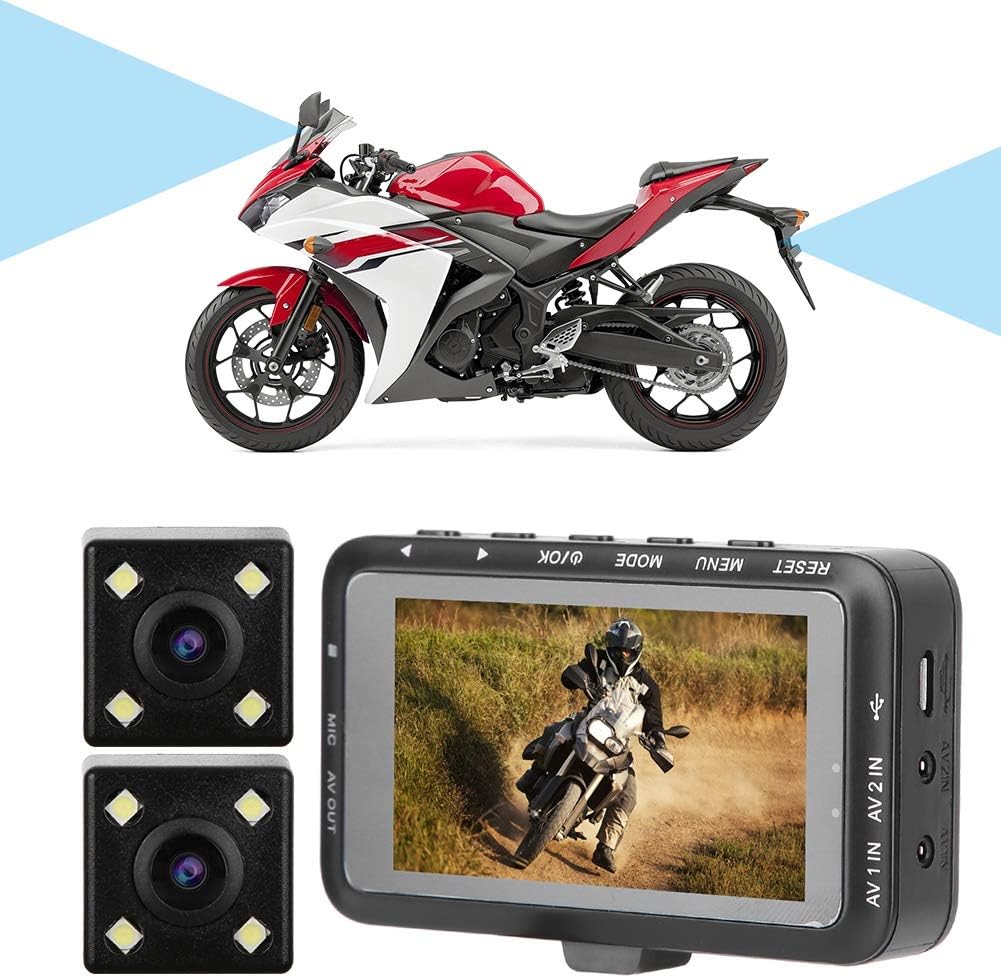
Obrázek 3.1: Příkladample of the DVR system installed on a motorcycle.
3.3 Připojení napájení
Connect the power cable to your motorcycle's power source according to the provided wiring diagram (if applicable) or consult a professional for installation. Ensure a stable power supply to prevent data loss.
4. Návod k obsluze
4.1 Základní ovládací prvky
The main unit features several buttons for control:
- RESETOVÁNÍ: Obnoví tovární nastavení zařízení. K zatlačení použijte tenký předmět.
- JÍDELNÍ LÍSTEK: Přístup k nabídce nastavení systému.
- REŽIM: Přepíná mezi režimem nahrávání videa, fotografování a přehrávání.
- OK / Power: Confirms selections in the menu, starts/stops recording, or powers the device on/off.
- Šipky nahoru/dolů: Navigates through menu options or playback files.
4.2 Zapnutí/vypnutí
- Zapnutí: The device typically powers on automatically when the motorcycle ignition is turned on. Alternatively, press and hold the OK tlačítko.
- Vypnout: The device usually powers off automatically when the ignition is turned off. Alternatively, press and hold the OK tlačítko.
4.3 Nahrávání videa
- Upon powering on, the device will typically start recording automatically. A recording indicator (e.g., a flashing red dot) will appear on the screen.
- To manually start/stop recording, press the OK tlačítko.
4.4 Nahrávání ve smyčce
The device records video in continuous loops (e.g., 1, 3, or 5-minute segments). When the memory card is full, the oldest unlocked video filese automaticky přepisují novými nahrávkami. Tím je zajištěno nepřetržité nahrávání bez ručního zásahu.

Image 4.1: Visual representation of the loop recording function.
4.5 G-senzor a nouzový zámek
The built-in G-Sensor detects sudden acceleration, braking, or impacts. When triggered, it automatically locks the current video segment, preventing it from being overwritten by loop recording. These locked filejsou uloženy v samostatné složce na paměťové kartě.
4.6 Monitorování parkování
When enabled, parking monitoring uses the G-Sensor to detect impacts while the motorcycle is parked and the DVR is off. If an impact is detected, the device will automatically power on and record a short video segment, then power off again. This feature requires a continuous power supply or a dedicated hardwire kit (not included).

Image 4.2: Emergency lock and parking monitoring features in action.
4.7 Nastavení nabídky
Stiskněte tlačítko MENU button to access system settings. Use the Up/Down arrows to navigate and OK to select. Common settings include:
- Video Resolution (e.g., 1080P, 720P)
- Délka nahrávání ve smyčce
- Citlivost G-senzoru
- Datum/čas svamp
- Parking Monitor On/Off
- Formátovat paměťovou kartu
5. Údržba
- Čištění: Use a soft, dry cloth to clean the main unit screen and camera lenses. Avoid abrasive cleaners or solvents.
- Paměťová karta: Regularly format the memory card (at least once a month) to prevent data corruption and ensure smooth operation. Back up important files before formatting. Replace the memory card if you experience frequent errors or slow performance.
- Správa kabelů: Periodically check all cables for wear, damage, or loose connections. Secure any loose cables to prevent interference or damage.
- Ochrana životního prostředí: While designed for outdoor use, avoid prolonged exposure to extreme temperatures, direct sunlight when parked, or heavy rain without proper protection.
6. Řešení problémů
- Zařízení se nezapíná: Check power connections. Ensure the ignition is on if connected to the motorcycle's power.
- Nenahrává se: Ensure a memory card is inserted and formatted. Check if the memory card is full (if loop recording is off or locked files occupy too much space).
- Špatná kvalita videa: Clean camera lenses. Ensure cameras are securely mounted and not vibrating excessively. Check video resolution settings.
- Chyba paměťové karty: Reformat the memory card. If the issue persists, try a different Class 10 (or higher) MicroSD card, preferably 32GB or smaller, as larger capacities may not be fully compatible.
- Tlačítka nereagují: Zkuste stisknout RESETOVAT tlačítko tenkým předmětem.
7. Specifikace
| Funkce | Detail |
|---|---|
| Značka | Tbest |
| Model | B07X11T56X |
| Typ zobrazení | 3.0palcový LCD |
| Rozlišení záznamu videa | 1080p Full HD |
| Viewúhel | 130 Degrees (per camera) |
| Kontrolní metoda | Buttons (Touch functionality not explicitly detailed in product info, but listed as 'Touch' in spec. Prioritizing physical buttons as primary control based on image.) |
| Typ montáže | Adhezivní držák |
| Zahrnuté komponenty | Memory Card (Note: Capacity may vary, 32GB recommended) |
| Hmotnost položky | 13.4 unce |
| Rozměry balení | 7.4 x 5.2 x 3.2 palce |
8. Záruka a podpora
For warranty information, technical support, or service inquiries, please refer to the documentation included with your purchase or contact Tbest customer service through their official channels. Keep your purchase receipt as proof of purchase.