1. Úvod
This manual provides detailed instructions for the setup, operation, and maintenance of your Targus M610 AKM610AP Wireless Mouse and Keyboard Combo. This combo offers a reliable 2.4GHz wireless connection, a full-sized keyboard, and a high-definition 1600 DPI optical mouse for efficient and comfortable use.

Figure 1: Targus M610 AKM610AP Wireless Mouse and Keyboard Combo. This image shows the full-sized black wireless keyboard and the matching black wireless mouse.
2. Obsah balení
Ověřte, zda jsou v balení přítomny všechny položky:
- Targus Wireless Keyboard
- Bezdrátová myš Targus
- USB přijímač
- 1 AA Battery (for mouse, included)

Figure 2: The wireless mouse shown alongside its compact USB receiver. The receiver enables wireless connectivity for both the mouse and keyboard.
3. Pokyny k nastavení
Follow these steps to set up your Targus Wireless Mouse and Keyboard Combo:
- Nainstalujte baterie:
- For the mouse: Open the battery compartment cover on the underside of the mouse. Insert the provided AA battery, ensuring correct polarity (+/-). Close the cover.
- For the keyboard: Open the battery compartment cover on the underside of the keyboard. Insert the required batteries (typically AAA, not included for keyboard based on JSON). Ensure correct polarity (+/-). Close the cover.
- Připojte USB přijímač:
Locate an available USB port on your computer. Insert the USB receiver firmly into the USB port. Your computer should automatically detect and install the necessary drivers. This is a plug-and-play device, requiring no additional software installation.

Obrázek 3: Detailní záběr view of the compact USB receiver, which facilitates the wireless connection for both the keyboard and mouse.
- Zapnutí:
Ensure the power switch on both the mouse and keyboard (if present) is in the "ON" position. The devices should now be ready for use.
4. Návod k obsluze
4.1. Použití klávesnice
The Targus M610 keyboard features a full-sized layout for comfortable typing.
- Standardní psaní: Pro zadávání textu použijte alfanumerické klávesy.
- Funkční klávesy (F1–F12): These keys may have secondary multimedia functions (e.g., volume control, media playback) accessible by pressing the Fn klíč současně.
- Numerická klávesnice: The dedicated numeric keypad on the right provides quick entry for numbers and calculations.
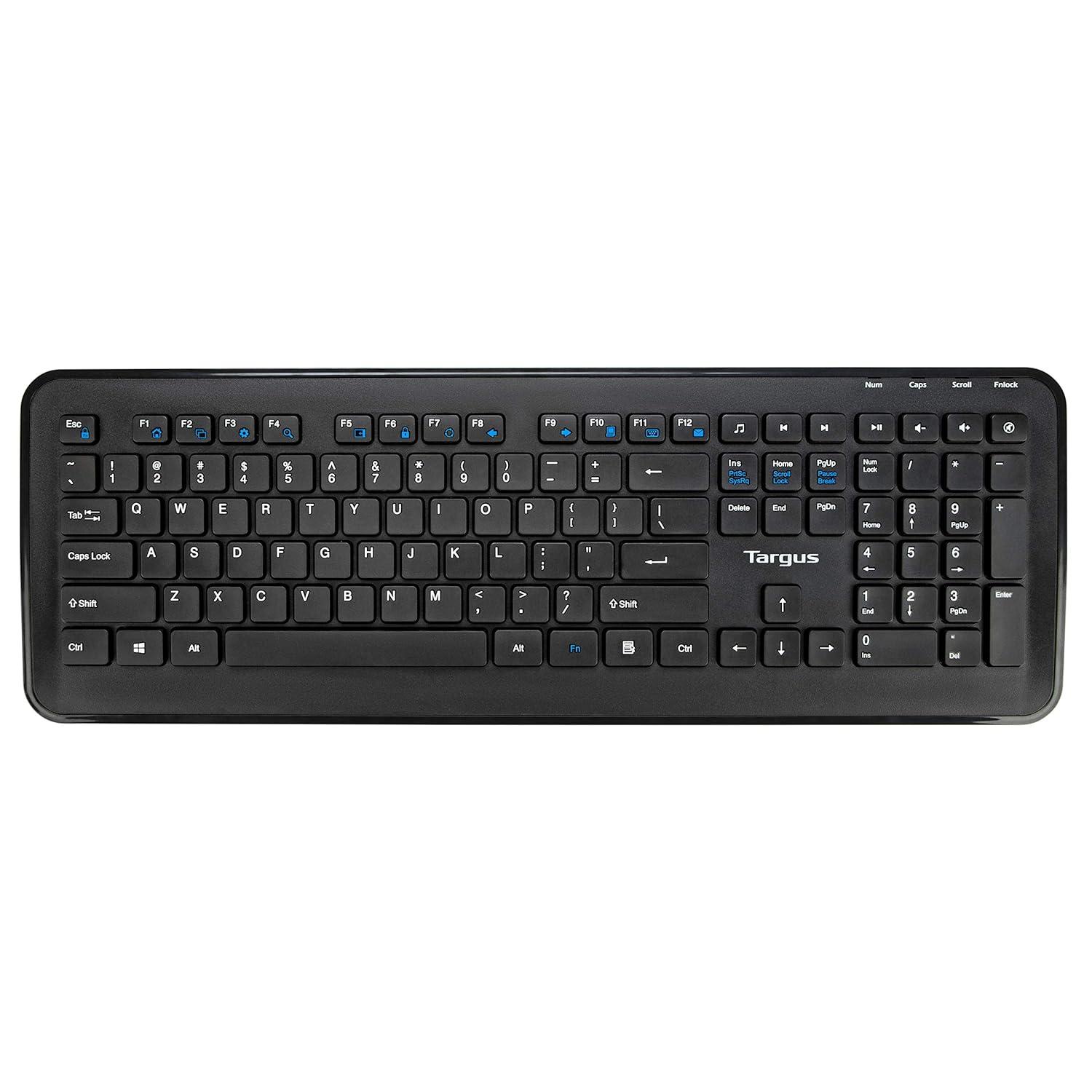
Obrázek 4: Shora dolů view of the full-sized Targus wireless keyboard, highlighting its layout and function keys.
4.2. Použití myši
The Targus M610 mouse is equipped with a high-definition 1600 DPI optical sensor for precise tracking.
- Left-Click Button: Primární výběr a aktivace.
- Right-Click Button: Zpřístupňuje kontextové nabídky.
- Rolovací kolečko: Vertikální procházení dokumentů a web pages. Can also function as a middle-click button.
- DPI Sensor: The 1600 DPI optical sensor provides accurate and responsive cursor movement.

Obrázek 5: Nahoře view of the Targus wireless mouse, showing the left and right click buttons and the scroll wheel.
5. Údržba a péče
To ensure the longevity and optimal performance of your Targus Wireless Combo, follow these maintenance guidelines:
- Čištění: K čištění povrchů klávesnice a myši používejte měkký, suchý hadřík. V případě odolných nečistot lehceampOtřete hadřík vodou nebo jemným čisticím roztokem. Vyhněte se agresivním chemikáliím nebo abrazivním materiálům.
- Výměna baterie: Replace batteries when performance degrades or the low battery indicator (if present) illuminates. Always use fresh, high-quality batteries of the specified type (AA for mouse, typically AAA for keyboard).
- Skladování: When not in use for extended periods, store the combo in a cool, dry place. Consider removing batteries to prevent leakage.
- Vyhněte se tekutinám: Keep the keyboard and mouse away from liquids to prevent damage to internal components.
6. Řešení problémů
If you encounter issues with your Targus Wireless Combo, refer to the following common solutions:
| Problém | Řešení |
|---|---|
| Klávesnice nebo myš nereaguje. |
|
| Intermittent connection or lag. |
|
| Kurzor myši se pohybuje nepravidelně nebo se nepohybuje plynule. |
|
7. Specifikace
Detailed technical specifications for the Targus M610 AKM610AP Wireless Mouse and Keyboard Combo:
| Funkce | Detail |
|---|---|
| Značka | Targus |
| Číslo modelu | AKM610AP |
| Technologie připojení | 2.4GHz Wireless, USB Receiver |
| Barva | Černý |
| Senzor myši | Optický senzor 1600 DPI |
| Typ klávesnice | Full-sized with Multimedia Keys |
| Kompatibilní zařízení | Personal Computer, Laptop, Television, Projector |
| Zdroj napájení | Napájení z baterie |
| Jsou vyžadovány baterie | 1 AA battery (for mouse, included) |
| Rozměry produktu (klávesnice) | Approximately 45.5 cm (Width) x 15.7 cm (Height) |
| Product Dimensions (Mouse) | Přibližně 6.6 cm (délka) x 3.8 cm (šířka) x 1.1 cm (výška) |
| Hmotnost položky | 611 g (total combo weight) |

Figure 6: Diagram illustrating the approximate dimensions of the Targus wireless keyboard, including its width and height, and highlighting the 12 multimedia keys.

Figure 7: Diagram illustrating the approximate dimensions of the Targus wireless mouse (length, width, height) and indicating the high-precision nano receiver.
8. Záruka a podpora
The Targus M610 AKM610AP Wireless Mouse and Keyboard Combo comes with a 3-letá záruka.
For warranty claims, technical support, or further assistance, please contact Targus customer service through their official webnebo prodejce, u kterého byl produkt zakoupen. Uschovejte si doklad o koupi pro ověření záruky.
For more information, visit the official Targus webmísto: www.targus.com


