1. Úvod
Děkuji za nákupasing the LOVCUBE 15 Inch Digital Photo Frame L15N. This manual provides essential information for setting up, operating, and maintaining your digital photo frame. Please read these instructions carefully before use to ensure optimal performance and longevity of your device.
The LOVCUBE L15N features a 15-inch HD IPS display, motion sensor, and supports various media formats for photos, videos, and music. It is designed for ease of use, allowing you to display your cherished memories with minimal setup.
2. Konec produktuview
2.1 Obsah balení
- LOVCUBE 15 Inch Digital Photo Frame
- Remote Control (requires 1 CR2 battery, typically included)
- Napájecí adaptér
- Stojan na plochu
- Wall-mounting Brackets and Screws
- Uživatelská příručka
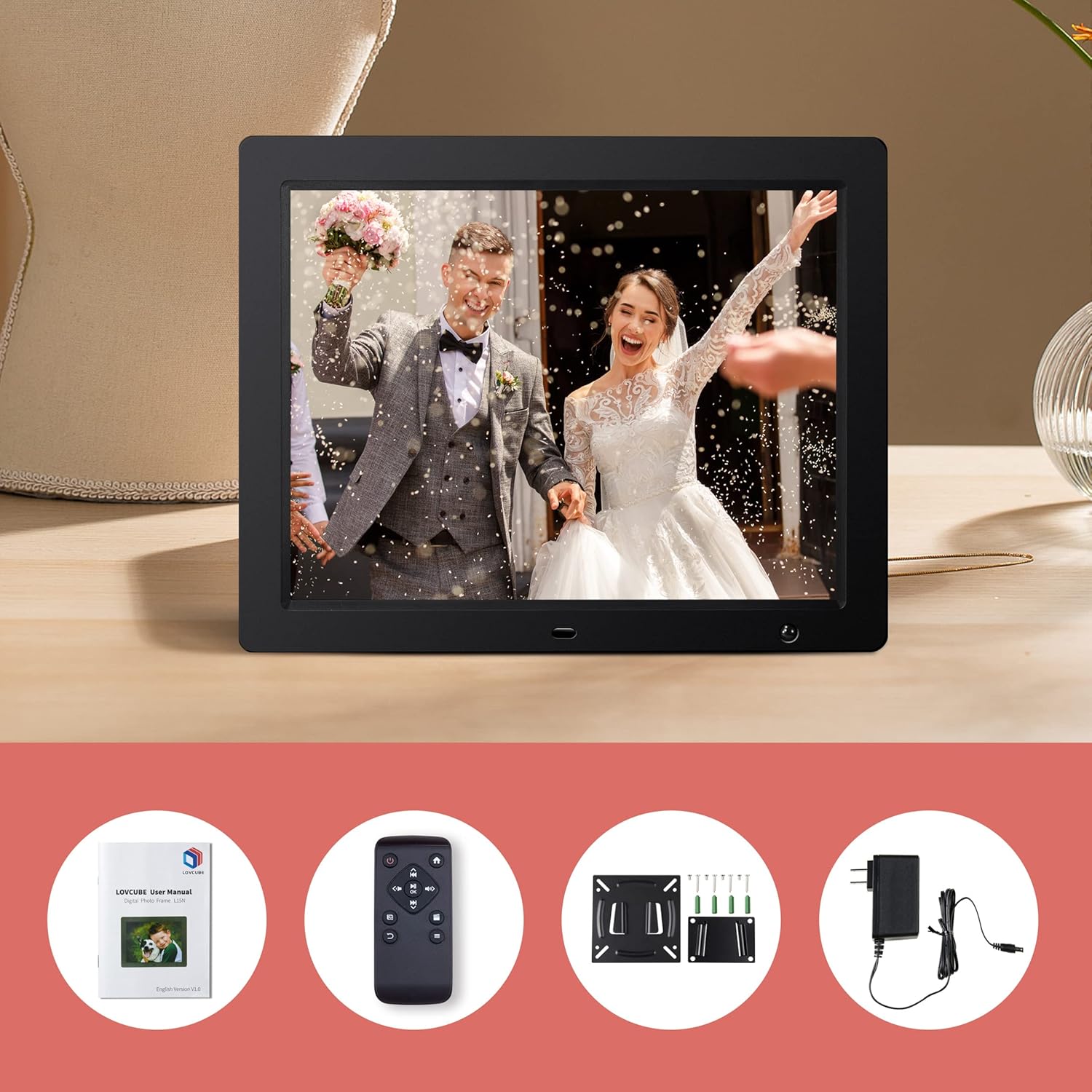
Image: Package contents of the LOVCUBE digital photo frame.
2.2 Klíčové vlastnosti
- 15palcový HD IPS displej: 1024x768 resolution with a 4:3 aspect ratio and 178° wide viewing angle for clear and vibrant images.
- Pohybový senzor: Built-in high-sensitivity motion sensor to conserve energy by turning the screen on/off automatically.
- Přehrávání médií: Supports photos, 1080p Full HD videos, and background music playback.
- Breakpoint Play: Resumes playback of photos, music, or videos from the last viewed point.
- Slideshow Options: Customizable slideshow effects, transition times, and playback order (random or sequential).
- Více funkcí: Includes clock, alarm, calendar, and auto power on/off scheduling.
- Konektivita: Features USB and SD card slots for easy media input (supports up to 32GB).
- Všestranné umístění: Comes with a desktop stand and wall-mounting brackets.
2.3 Porty a ovládací prvky
Familiarize yourself with the ports and controls located on the back and sides of the frame.
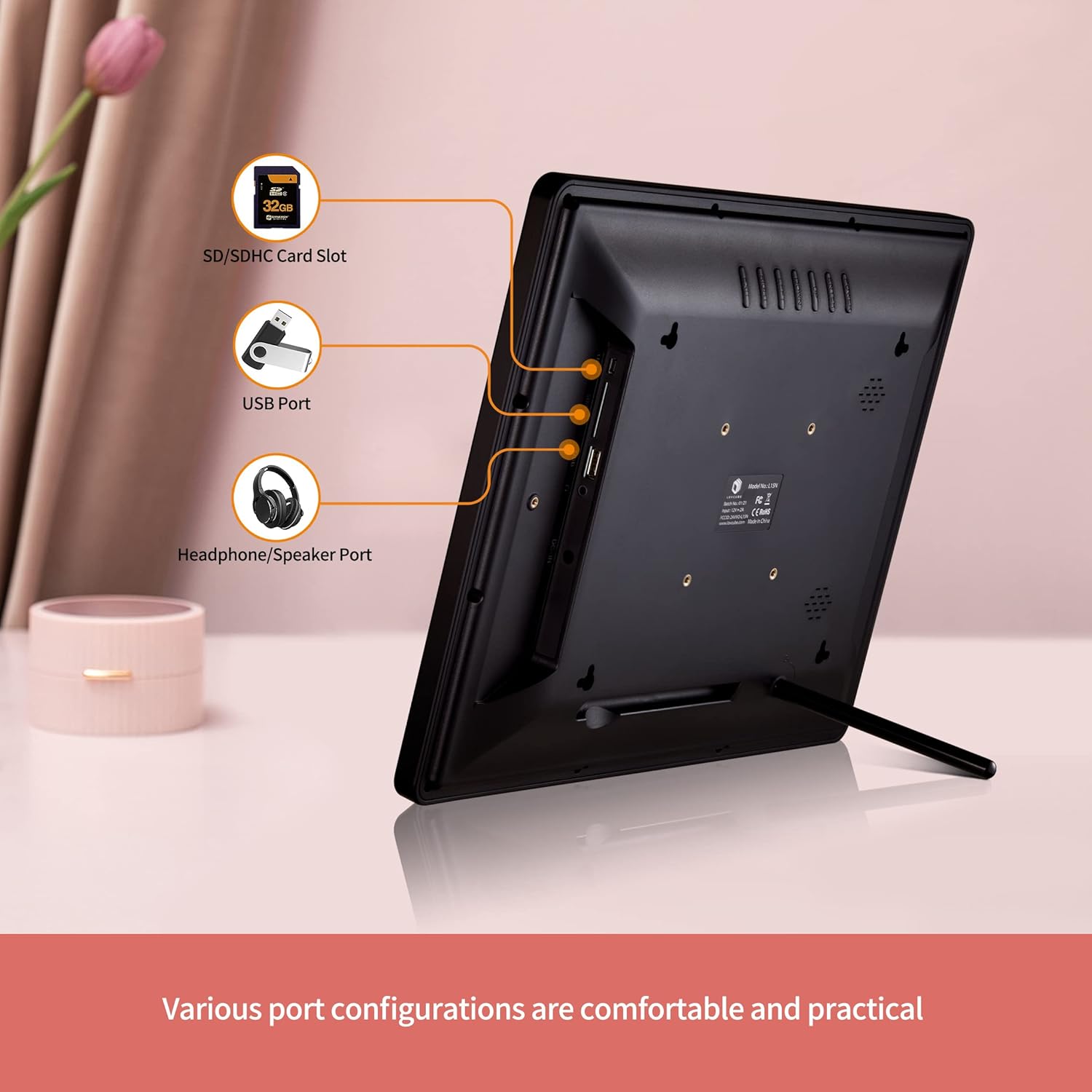
Obrázek: Zadní view of the digital photo frame with labeled ports.
- Slot pro kartu SD/SDHC: Insert your SD or SDHC memory card here.
- USB port: Connect a USB flash drive for media playback.
- Headphone/Speaker Port: Připojte externí sluchátka nebo reproduktory.
- DC IN: Zde připojte napájecí adaptér.
- Vypínač: Turns the frame on or off.
- Navigační tlačítka: For menu navigation (Up, Down, Left, Right, Enter).
- Tlačítko nabídky: Vstup do hlavní nabídky.
- Tlačítko Konec: Návrat na předchozí obrazovku nebo opuštění nabídky.
3. Nastavení
3.1 Vybalení a umístění
- Opatrně vyjměte všechny součásti z obalu.
- Choose a suitable location for your digital photo frame.
- For Desktop Use: Attach the included desktop stand to the back of the frame.
- Pro montáž na stěnu: Use the provided wall-mounting brackets and screws to securely mount the frame on a wall. Ensure the wall can support the weight of the frame.

Image: Wall hanging method diagram.
3.2 Připojení napájení
- Connect the power adapter to the DC IN port on the frame.
- Zapojte napájecí adaptér do standardní elektrické zásuvky.
3.3 Vkládání médií
The frame supports SD/SDHC cards and USB flash drives up to 32GB. No software installation is required.
- Insert your SD card into the SD/SDHC card slot or your USB flash drive into the USB port. Ensure it is inserted correctly.
- The frame will automatically detect the media and begin playing content.

Image: Plug and play functionality with a USB stick.
3.4 Nastavení dálkového ovládání
The remote control requires one CR2 battery. Ensure the battery is correctly installed according to the polarity markings.
4. Návod k obsluze
4.1 Základní navigace
Use the remote control or the buttons on the back of the frame to navigate the menus.
- Vypínač: Press to turn the frame on or off.
- Tlačítko nabídky: Press to access the main menu options (Photo, Music, Video, Calendar, Settings).
- Tlačítka se šipkami: Use to move between menu items or adjust settings.
- Tlačítko Enter: Potvrďte výběr.
- Tlačítko Konec: Go back to the previous screen or exit the current function.

Image: Using the remote control to operate the digital photo frame.
4.2 Photo Slideshow
- Z hlavní nabídky vyberte Fotografie.
- The frame will start a slideshow of all photos on the inserted media.
- In the settings menu, you can customize:
- Slideshow Effects: Choose from various transition styles.
- Čas přechodu: Set the duration each photo is displayed.
- Režim přehrávání: Select random or sequential playback.
- Hudba na pozadí: Enable music to play during the slideshow.

Image: Slideshow mode with background music.
4.3 Video and Music Playback
- Z hlavní nabídky vyberte Video or Hudba.
- Procházejte svým files and select the desired video or music track to play.
- The frame supports 1080p FHD video playback.
4.4 Pohybový senzor
The built-in motion sensor helps save energy by automatically turning the screen on when motion is detected and off when no motion is present for a set period.
- Přístup k Nastavení menu.
- Vyhledejte Pohybový senzor volba.
- Enable or disable the motion sensor and adjust its sensitivity or delay time as needed.

Image: Motion sensor functionality.
4.5 Hodiny, kalendář a budík
The frame can display the current time and date, and function as an alarm clock.
- Z hlavní nabídky vyberte Kalendář na view datum a čas.
- V Nastavení menu, you can set the time, date, and configure alarms.

Image: Digital photo frame displaying clock and calendar.
4.6 Auto Power On/Off
Schedule specific times for the frame to automatically power on and off.
- Přejít na Nastavení menu.
- Najděte Automatické zapnutí/vypnutí volba.
- Set your desired power on and power off times.
4.7 Nastavení jazyka
The frame supports multiple languages.
- Přístup k Nastavení menu.
- Vyberte Jazyk option and choose your preferred language.
5. Údržba
5.1 Čištění rámu
- Před čištěním vždy odpojte rám ze zásuvky.
- Use a soft, dry cloth to wipe the screen and frame.
- Pro odolné skvrny na obrazovce lehceampOpláchněte hadřík vodou nebo roztokem na čištění obrazovky. Vyhněte se agresivním chemikáliím.
5.2 Safe Media Removal
To prevent data corruption, always ensure the frame is not actively reading or writing to the SD card or USB drive before removing it. It is recommended to power off the frame before removing media.
6. Řešení problémů
- Bez napájení: Ujistěte se, že je napájecí adaptér bezpečně připojen k rámu i k funkční elektrické zásuvce.
- Žádný displej/prázdná obrazovka: Check if the frame is powered on. Verify that an SD card or USB drive with compatible media is inserted correctly. The motion sensor might have turned the screen off; try moving in front of the frame or pressing a button on the remote.
- Dálkové ovládání nereaguje: Check the CR2 battery in the remote control and replace if necessary. Ensure there is a clear line of sight between the remote and the frame's IR receiver.
- Media Not Recognized: Ensure the SD card or USB drive is formatted correctly (FAT32 is generally recommended) and its capacity does not exceed 32GB. Reinsert the media.
- Problémy s přehráváním videa: Zajistěte video files are in a supported format and resolution (up to 1080p FHD). Some high-bitrate 1080p videos may not play smoothly.
- Images Appear Distorted: Ensure your images have a resolution compatible with the frame's 1024x768 display and 4:3 aspect ratio for best results.
7. Specifikace
| Funkce | Detail |
|---|---|
| Číslo modelu | WH00004D |
| Velikost obrazovky | 15 palce |
| Typ zobrazení | HD IPS |
| Rezoluce | 1024 x 768 pixelů |
| Poměr stran | 4:3 |
| Viewúhel | 178° |
| Podporovaná média | SD/SDHC Card (up to 32GB), USB Flash Drive (up to 32GB) |
| přehrávání videa | Up to 1080p FHD |
| Konektivita | USB |
| Speciální funkce | Motion Sensor, Breakpoint Play, Clock, Calendar, Alarm, Auto Power On/Off |
| Baterie dálkového ovládání | 1 x CR2 (součástí balení) |
| Přibližná hmotnost položky | 5.92 libry |
8. Záruka a podpora
8.1 Informace o záruce
LOVCUBE provides a Záruka 12 měsíců for each unit from the date of purchase. This warranty covers manufacturing defects and ensures your product functions as intended under normal use.
8.2 Zákaznická podpora
For any questions, technical assistance, or warranty claims, please contact LOVCUBE customer service. We offer 24hodinový poprodejní servis abychom vám pomohli.
Please refer to the contact information provided with your purchase or visit the official LOVCUBE webstránky pro podrobnosti o podpoře.


