1. Konec produktuview
The Baseus D02 Bluetooth Headphones (Model NGD02-01) offer a versatile audio experience with both wireless Bluetooth and wired 3.5mm jack connectivity. Designed for comfort and portability, these over-ear headphones provide clear sound for music playback.
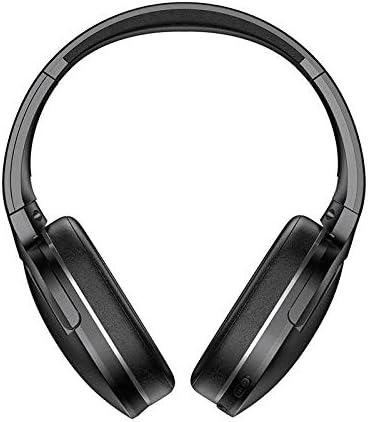
Obrázek 1.1: Přední strana view of the Baseus D02 Bluetooth Headphones, showcasinjejich design přes uši.
2. Obsah balení
Zkontrolujte prosím balení, zda neobsahuje následující položky:
- Baseus D02 Bluetooth Headphones
- USB nabíjecí kabel
- 3.5mm audio kabel
- Uživatelská příručka (tento dokument)
- Náušníky (předinstalované nebo jako náhradní)
- Headband (part of the headphone structure)
3. Nastavení a připojení
3.1 Nabíjení sluchátek
Before first use, fully charge the headphones. Connect the provided USB charging cable to the Micro USB charging port on the headphones and the other end to a USB power adapter (not included) or a computer's USB port.
- The indicator light will typically be red during charging.
- The indicator light will turn blue or off when charging is complete.
A full charge usually takes approximately 2 hours.
3.2 Párování Bluetooth
- Ujistěte se, že jsou sluchátka vypnutá.
- Press and hold the Power/Multi-Function Button (MFB) for approximately 3-5 seconds until the indicator light flashes red and blue alternately. This indicates pairing mode.
- Na svém zařízení (chytrý telefon, tablet, počítač) povolte Bluetooth a vyhledejte dostupná zařízení.
- Select "Baseus D02" from the list of found devices.
- Po připojení bude kontrolka obvykle pomalu modře blikat nebo zůstane svítit trvale modře.
- Pokud budete vyzváni k zadání hesla, zadejte „0000“.
Sluchátka se po zapnutí automaticky pokusí znovu připojit k poslednímu spárovanému zařízení.
3.3 Kabelové připojení (3.5mm audio konektor)
To use the headphones in wired mode, connect one end of the 3.5mm audio cable to the 3.5mm audio port on the headphones and the other end to your audio source's 3.5mm jack. The headphones can be used in wired mode even if the battery is depleted.

Obrázek 3.1: Detailní view of the headphone's controls, including the power switch, 3.5mm audio port, Micro USB charging port, and volume/MFB buttons.
4. Návod k obsluze
4.1 Zapnutí/vypnutí
- Zapnutí: Slide the power switch to the "ON" position. The indicator light will flash blue.
- Vypnout: Slide the power switch to the "OFF" position. The indicator light will turn off.
4.2 Přehrávání hudby
- Přehrát/pozastavit: Short press the Multi-Function Button (MFB).
- Další skladba: Dlouze stiskněte tlačítko „Hlasitost +“.
- Předchozí skladba: Dlouze stiskněte tlačítko „Hlasitost -“.
4.3 Ovládání hlasitosti
- Zvýšit hlasitost: Krátce stiskněte tlačítko „Hlasitost +“.
- Snížit hlasitost: Krátce stiskněte tlačítko „Hlasitost -“.
Note: As per product specifications, these headphones do not include a microphone. Therefore, call management features are not available directly through the headphones.
5. Údržba a péče
Správná údržba zajistí dlouhou životnost a optimální výkon vašich sluchátek.
- Čištění: K čištění sluchátek používejte měkký, suchý hadřík, který nepouští vlákna. Nepoužívejte abrazivní čisticí prostředky, alkohol ani chemická rozpouštědla.
- Skladování: Pokud sluchátka nepoužíváte, skladujte je na chladném a suchém místě mimo dosah přímého slunečního záření a extrémních teplot. Sluchátka jsou skládací pro kompaktní skladování.
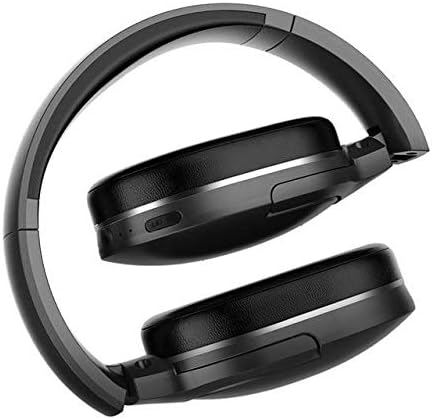
Image 5.1: The Baseus D02 Bluetooth Headphones shown in their folded configuration, ideal for travel and compact storage.
- Péče o baterie: Abyste prodloužili životnost baterie, vyvarujte se častého úplného vybíjení sluchátek. Pravidelně je nabíjejte, i když je nepoužíváte neustále.
- Vyhněte se vodě: Tato sluchátka nejsou vodotěsná. Zabraňte vystavení vodě nebo nadměrné vlhkosti.
6. Řešení problémů
| Problém | Možná příčina | Řešení |
|---|---|---|
| Nelze zapnout | Slabá baterie | Plně nabijte sluchátka. |
| Nelze spárovat přes Bluetooth | Sluchátka nejsou v režimu párování; Bluetooth na zařízení vypnuto; příliš daleko od zařízení. | Ensure headphones are in pairing mode (flashing red/blue). Enable Bluetooth on your device. Move headphones closer to the device (within 10 meters). Try restarting both devices. |
| Žádný zvuk | Volume too low; incorrect audio source selected; headphones not connected properly (wired or wireless). | Increase volume on both headphones and connected device. Check Bluetooth connection or 3.5mm cable connection. Ensure the correct audio output is selected on your device. |
| Špatná kvalita zvuku | Weak Bluetooth signal; interference; low-quality audio source. | Move closer to the Bluetooth device. Avoid obstacles between headphones and device. Try a different audio source. |
7. Specifikace
| Funkce | Detail |
|---|---|
| Značka | Baseus |
| Číslo modelu | NGD02-01 |
| Typ | Sluchátka přes uši |
| Konektivita | Bluetooth (bezdrátové), 3.5mm jack (kabelové) |
| Bezdrátové komunikační technologie | Bluetooth |
| Jack pro sluchátka | Zásuvka 3.5 mm |
| Typ ovládání | Volume Control, Multi-Function Button (MFB) |
| Mikrofon v ceně | Žádný |
| Zrušení šumu | Žádný |
| Barva | Černý |
| Materiál | Plast |
| Zdroj napájení | Napájení z baterie |
| Rozměry balení | 19.8 x 13.6 x 9 cm |
| Hmotnost položky | 180.98 g |
8. Záruka a podpora
For warranty information, please refer to the documentation provided with your purchase or contact your retailer. For further support or inquiries, please visit the official Baseus webnebo kontaktujte jejich zákaznický servis.
You can find more information about Baseus products at the Obchod Baseus na Amazonu.


