1. Úvod
The NEDIS VEXT3470AT HDMI Audio Extractor allows you to separate audio signals from an HDMI source and output them to an audio system, while simultaneously passing the video signal to a display. This device is designed to integrate modern HDMI sources with audio systems that may not have HDMI inputs, providing both digital (Toslink) and analog (L/R stereo) audio outputs.
It supports 3D video and amplifies the digital video signal for reliable transmission.
2. Bezpečnostní informace
- Před použitím si pozorně přečtěte tyto pokyny.
- Udržujte zařízení mimo dosah vody, vlhkosti a extrémních teplot.
- Nepokoušejte se zařízení otevírat ani opravovat sami. Veškerý servis svěřte kvalifikovanému personálu.
- Používejte pouze dodaný napájecí adaptér. Použití nesprávného adaptéru může poškodit zařízení a vést ke ztrátě záruky.
- Zajistěte dostatečné větrání kolem zařízení, aby nedošlo k přehřátí.
- Odpojte napájecí adaptér během bouřek nebo pokud jej nebudete delší dobu používat.
3. Obsah balení
Zkontrolujte prosím obsah balení, abyste se ujistili, že jsou všechny položky přítomny a v dobrém stavu:
- NEDIS VEXT3470AT HDMI Audio Extractor
- Napájecí adaptér
- Uživatelská příručka (tento dokument)
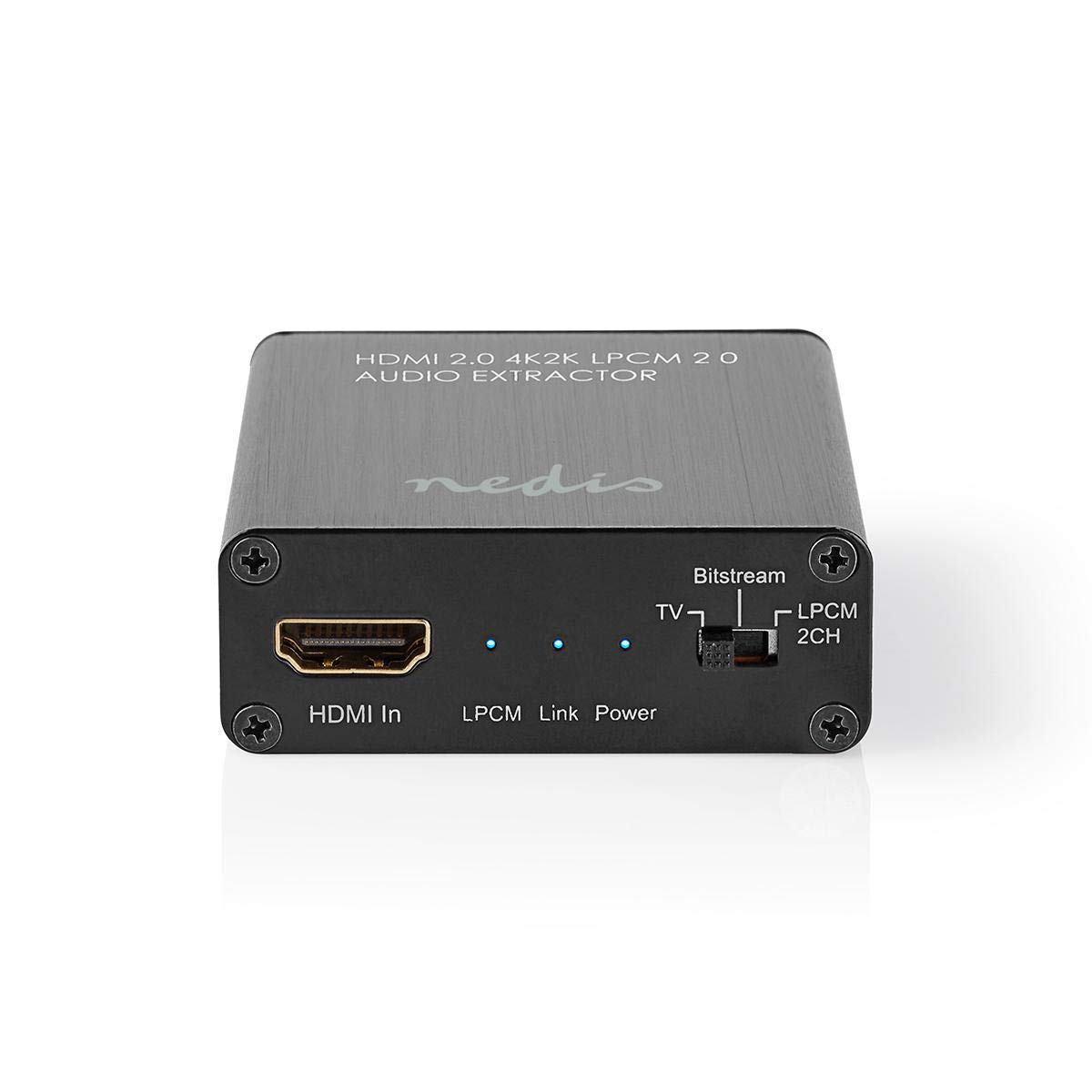
Image: The NEDIS VEXT3470AT HDMI Audio Extractor unit shown alongside its power adapter.
4. Konec produktuview
Familiarize yourself with the ports and indicators on the HDMI Audio Extractor:
4.1 Input Side
Image: Close-up of the input side of the audio extractor, showing the HDMI In port, LPCM, Link, and Power indicator LEDs, and the Audio Mode Switch.
- Vstup HDMI: Connect your HDMI source device (e.g., DVD/Blu-ray player, game console).
- LPCM LED: Indicates when LPCM audio format is detected.
- Link LED: Indicates an active HDMI connection.
- LED napájení: Svítí, když je zařízení zapnuté.
- Audio Mode Switch:
- Bitový proud: For multi-channel audio formats like Dolby Digital or DTS.
- TELEVIZE: Passes audio directly from the HDMI source to the TV.
- LPCM 2CH: For 2-channel stereo audio output via L/R analog and Toslink.
4.2 Output Side

Image: Close-up of the output side of the audio extractor, showing the 5V/DC power input, Optical (Toslink) audio output, HDMI Out port, and L/R analog audio outputs.
- 5V/DC: Vstupní port napájení. Sem připojte dodaný napájecí adaptér.
- Optický: Digital audio output (Toslink). Connect to an audio receiver or soundbar.
- HDMI výstup: Připojte se k televizoru nebo displeji.
- L/R: Analog stereo audio output. Connect to an amplifier or stereo system using RCA cables.
5. Pokyny k nastavení
Follow these steps to connect your HDMI Audio Extractor:
- Vypínací zařízení: Ensure all devices (HDMI source, TV, audio system) are powered off before making connections.
- Připojení zdroje HDMI: Connect an HDMI cable from your source device (e.g., Blu-ray player) to the Vstup HDMI port on the audio extractor.
- Připojení displeje: Připojte další kabel HDMI z HDMI výstup port on the audio extractor to your TV or display.
- Připojení audiosystému:
- For digital audio, connect an optical Toslink cable from the Optický port on the extractor to your audio receiver or soundbar.
- For analog stereo audio, connect RCA cables from the L/R ports on the extractor to your stereo amplifier nebo aktivní reproduktory.
- Připojte napájení: Zapojte dodaný napájecí adaptér do 5V/DC port on the extractor, then plug the adapter into a power outlet. The Power LED should illuminate.
- Zapnutí zařízení: Power on your TV/display, audio system, and then your HDMI source device.
6. Návod k obsluze
Once connected, operate the device as follows:
- Vyberte režim zvuku: Použijte Přepínač zvukového režimu on the input side to select the desired audio output format:
- Bitový proud: For multi-channel audio (e.g., Dolby Digital, DTS) to be passed through the Optical output. Your audio receiver must support these formats.
- TELEVIZE: Passes the audio directly to the TV via HDMI. Audio extraction via Optical/L/R may be limited or unavailable in this mode, depending on the source and TV capabilities.
- LPCM 2CH: Converts multi-channel audio to 2-channel LPCM for output via Optical and L/R analog ports. This is suitable for stereo systems or when your receiver does not support Bitstream formats.
- Ověření indikátorů:
- The Power LED by měl být zapnutý.
- The Link LED should be on when an active HDMI signal is detected from the source.
- The LPCM LED will illuminate if the audio signal is in LPCM format.
- Adjust Audio System: Ensure your audio receiver or soundbar is set to the correct input (Optical or Analog L/R) and volume.
7. Údržba
To ensure the longevity and optimal performance of your HDMI Audio Extractor:
- Čištění: K čištění zařízení používejte měkký, suchý hadřík. Nepoužívejte tekuté čisticí prostředky ani aerosoly.
- Skladování: Pokud zařízení nepoužíváte, skladujte jej na chladném a suchém místě.
- Zacházení: Zabraňte pádu zařízení nebo jeho vystavení silným nárazům.
8. Řešení problémů
Pokud narazíte na problémy, podívejte se na následujícího průvodce řešením problémů:
| Problém | Možná příčina / řešení |
|---|---|
| Žádný video výstup |
|
| Žádný výstup zvuku |
|
| LED napájení nesvítí |
|
| Intermittent Audio/Video |
|
9. Specifikace
Key technical specifications for the NEDIS VEXT3470AT HDMI Audio Extractor:
- Číslo modelu: VEXT3470AT
- Značka: NEDIS
- Vstup: 1x HDMI
- výstup: 1x HDMI, 1x Optical (Toslink), 1x L/R Stereo (RCA)
- Verze HDMI: Compatible with HDMI 2.0 (implied by 4K2K support in product name)
- Rozlišení videa: Up to 4K (4K2K)
- Podpora 3D: Ano
- Zvukové formáty: LPCM 2.0, Bitstream (Dolby Digital, DTS pass-through)
- Napájení: 5V DC (přes přiložený adaptér)
- Rozměry (D x Š x V): Přibližně 7.7 x 6.4 x 2.3 cm
- Hmotnost: 240 gramů
- Barva: Anthracite (Black)
- Země původu: Čína
10. Záruka a podpora
NEDIS products are manufactured to high quality standards. In the unlikely event of a defect during the warranty period, please contact your retailer for support. The warranty period is subject to local consumer laws and regulations.
For technical assistance or further inquiries, please refer to the support information provided by your retailer or visit the official NEDIS webmísto.


