1. Úvod
Thank you for choosing the Kungfuking Surge Protector Power Strip with USB Ports. This device is designed to provide convenient power access and surge protection for your electronic devices. It features two AC outlets and two USB ports, along with a 6.56 ft extension cord and a flat plug for versatile placement. This manual provides essential information for safe installation, operation, and maintenance of your power strip.

Figure 1: Kungfuking Surge Protector Power Strip (Model: Kungfuking 2AC+2USB)
2. Důležité bezpečnostní pokyny
Před použitím tohoto výrobku si prosím přečtěte a pochopte všechny bezpečnostní pokyny. Nedodržení těchto pokynů může vést k úrazu elektrickým proudem, požáru nebo vážnému zranění.
- NE exceed the electrical ratings of 120V, 12A, 60Hz, and 2.1A for USB ports.
- NE use in wet environments or near water.
- NE disassemble or modify the device.
- NE use with aquariums or other water-related products.
- NE zapojte do jiného přemístitelného napájecího kohoutku.
- NE use if the cord or plug is damaged.
- Uchovávejte mimo dosah dětí.
- Ujistěte se, že je zástrčka zcela zasunuta do zásuvky ve zdi.
- Tento výrobek je určen pouze pro vnitřní použití.
3. Vlastnosti produktu
The Kungfuking Surge Protector Power Strip is designed for convenience and safety, offering multiple power options in a compact form factor.
- 2 AC zásuvky: Provides standard power for electronic devices.
- 2 porty USB-A: Delivers 5V/2.1A for charging smartphones, tablets, and other USB-powered devices.
- Prodlužovací kabel 6.56 metry: Offers flexibility in placement, reaching distant outlets.
- Design ploché zástrčky: Minimizes obstruction and allows furniture to be placed closer to the wall.
- Přepěťová ochrana: Chrání připojená zařízení před přepětím a špičkami.
- Odolná konstrukce: Built with fireproof ABS+PC materials for enhanced safety.
- Montovatelné provedení: Can be easily mounted on or under desks, walls, or other surfaces.

Obrázek 2: Klíčové vlastnosti a specifikace

Figure 3: All-in-One Charging Station in use
4. Nastavení a instalace
The power strip can be installed in various locations to suit your needs. Mounting screws are included for secure installation.
4.1 Možnosti montáže
The power strip offers flexible mounting options:
- Under Desk/Table: Mount horizontally or vertically under a desk or table to keep surfaces clear.
- Montáž na stěnu: Secure to a wall for convenient access, such as near a TV or bedside.
- Side of Cabinets/Headboards: Install vertically on the side of furniture for discreet power access.

Figure 4: Installation Options and Dimensions
4.2 kroky instalace
- Vyberte umístění: Select a flat, stable surface for mounting, ensuring it is within reach of a wall outlet and your devices.
- Označit otvory pro šrouby: Place the power strip in the desired position and mark the locations for the mounting screws using a pencil.
- Vyvrtejte pilotní otvory (volitelné): For wood surfaces, you may pre-drill small pilot holes to prevent wood splitting.
- Secure the Power Strip: Use the provided screws to firmly attach the power strip to the surface. Ensure it is securely fastened before use.
- Připojení k napájení: Plug the power strip's flat plug into a standard 120V wall outlet. The flat plug design allows for placement behind furniture.
4.3 Přample Instalace
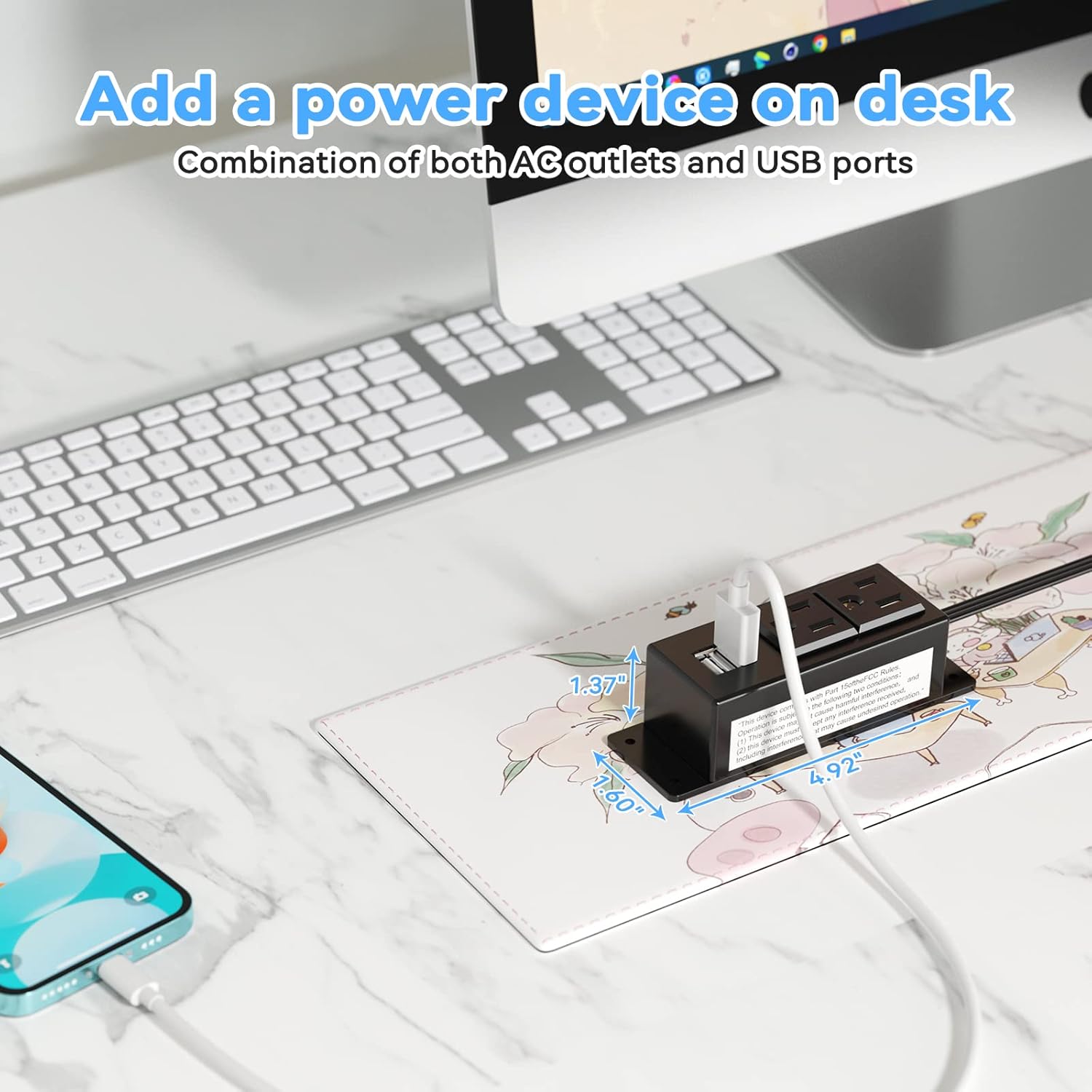
Figure 5: Desk Surface Installation

Figure 6: Under-Desk Installation

Figure 7: Wall-Mounted for TV

Figure 8: Nightstand Installation

Figure 9: Kitchen Cabinet Installation

Figure 10: Flat Plug for Space-Saving Placement
5. Návod k obsluze
Using your Kungfuking Surge Protector Power Strip is straightforward:
- Zapojte do zásuvky ve zdi: Ensure the power strip's flat plug is securely connected to a grounded 120V AC wall outlet.
- Připojení klimatizačních zařízení: Insert the power cords of your electronic devices into the two AC outlets.
- Připojení USB zařízení: Plug your USB charging cables into the two USB-A ports to charge compatible devices.
- Zapnutí: The power strip is designed for continuous operation once plugged in. There is no on/off switch.
- Využití monitoru: Avoid overloading the power strip by ensuring the total power consumption of connected devices does not exceed the rated capacity (12A, 120V).
6. Řešení problémů
If you encounter issues with your power strip, refer to the following common problems and solutions:
| Problém | Možná příčina | Řešení |
|---|---|---|
| Žádné napájení ze zásuvek střídavého proudu ani z portů USB. |
|
|
| USB zařízení se nenabíjejí. |
|
|
| Power strip feels hot. |
|
|
7. Specifikace
| Funkce | Detail |
|---|---|
| Model | Kungfuking 2AC+2USB |
| AC zásuvky | 2 |
| USB porty | 2 (USB-A) |
| Vstupní objemtage | 120V AC |
| Jmenovitý proud AC | 12A |
| Frekvence | 60 Hz |
| USB výstup | 5V / 2.1A (Total) |
| Délka kabelu | 6.56 stop (2 metrů) |
| Typ zástrčky | Plochá zástrčka |
| Materiál | Ohnivzdorné ABS+PC |
| Rozměry (přibližně) | 4.92 x 3.74 x 1.37 palce (D x Š x V) |
| Hmotnost (přibližně) | 10.5 unce |
| Speciální funkce | Surge Protection, Mountable Design |
8. Údržba
Proper maintenance ensures the longevity and safe operation of your power strip:
- Čištění: Disconnect the power strip from the wall outlet before cleaning. Use a dry, soft cloth to wipe the exterior. Do not use liquid cleaners or sprays.
- Inspekce: Periodically inspect the power cord, plug, and housing for any signs of damage, such as cuts, fraying, or cracks. If damage is found, discontinue use immediately.
- Skladování: When not in use for extended periods, store the power strip in a cool, dry place away from direct sunlight and moisture.
9. Záruka a podpora
Kungfuking products are designed for reliability and performance. For warranty information, technical support, or any questions regarding your product, please refer to the contact information provided at the point of purchase or visit the official Kungfuking webmísto.
Uschovejte si prosím doklad o koupi pro uplatnění záruky.