1. Úvod
Thank you for choosing the ÍPEGA KP-CA144 Wi-Fi IP Camera. This manual provides detailed instructions for the installation, operation, and maintenance of your security camera. Please read this manual thoroughly before use to ensure proper functionality and safety.
2. Konec produktuview
The ÍPEGA KP-CA144 is a wireless IP camera designed for surveillance, featuring Wi-Fi connectivity, 720p video resolution, and advanced night vision capabilities, including full-color night vision. It is suitable for wall mounting and offers a night vision range of up to 30 meters.

Obrázek 2.1: Přední view of the ÍPEGA KP-CA144 Wi-Fi IP Camera, showing the lens and LED array.
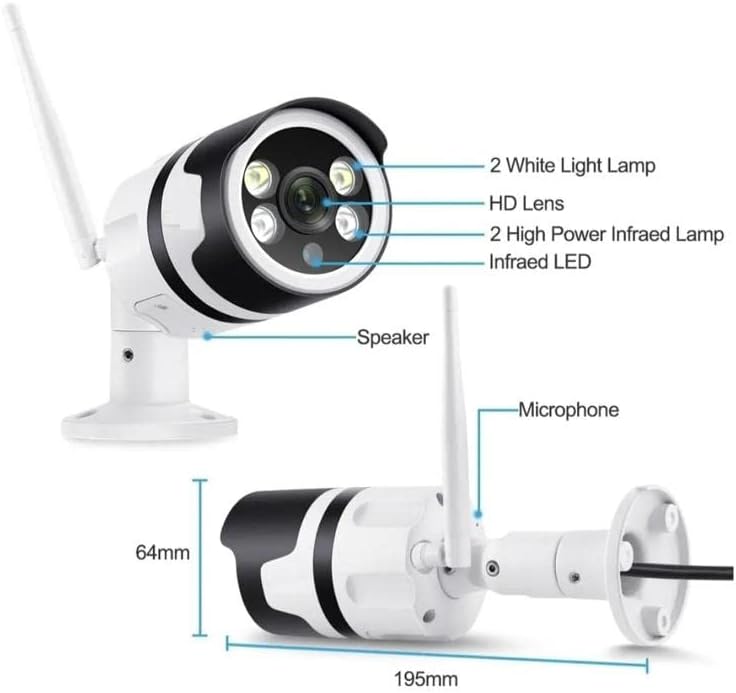
Obrázek 2.2: Detailed diagram of the camera components. This image highlights the 2 White Light Lamps, HD Lens, 2 High Power Infrared Lamps, Infrared LED, Speaker, and Microphone. Dimensions are also indicated: 195mm length and 64mm height.
Mezi klíčové komponenty patří:
- Objektiv HD: Captures video at 720p resolution.
- Bílé světlo Lamps (x2): Zajistěte osvětlení pro plnobarevné noční vidění.
- High Power Infrared Lamps (x2): Enhance infrared night vision.
- Infračervená LED: Přídavné infračervené osvětlení.
- Reproduktor: Pro obousměrnou audio komunikaci.
- Mikrofon: Pro zvukový vstup během obousměrné komunikace.
- Wi-Fi anténa: Pro bezdrátové síťové připojení.
3. Průvodce nastavením
3.1 Rozbalení
Opatrně vyjměte všechny součásti z obalu. Zkontrolujte, zda jsou všechny položky přítomny:
- ÍPEGA KP-CA144 Wi-Fi IP Camera
- Napájecí adaptér
- Montážní šrouby a kotvy
- Uživatelská příručka (tento dokument)
3.2 Montáž fotoaparátu
Kamera je určena k montáži na zeď. Vyberte vhodné místo, které poskytuje požadovaný viewúhlu a je v dosahu vaší sítě Wi-Fi a elektrické zásuvky.
- Označte si na zdi body pro vrtání pomocí základny kamery jako šablony.
- Vyvrtejte otvory v označených bodech. V případě potřeby vložte hmoždinky do zdi.
- Připevněte základnu kamery ke zdi pomocí dodaných šroubů.
- Podle potřeby upravte úhel kamery.
3.3 Zapnutí
Connect the power adapter to the camera's power input port and then plug the adapter into a standard electrical outlet. The camera will initiate its startup sequence, which may include an indicator light flashing.
3.4 Síťové připojení (Wi-Fi)
To connect the camera to your Wi-Fi network, you will need to download the dedicated mobile application. Refer to the packaging or a quick start guide for the app name and QR code.
- Download and install the camera's companion app on your smartphone.
- Vytvořte si účet a přihlaste se.
- Follow the in-app instructions to add a new device. This typically involves scanning a QR code on the camera or using an audio pairing method.
- Vyberte svou síť Wi-Fi 2.4 GHz a po zobrazení výzvy zadejte heslo.
- Wait for the camera to connect to the network. A confirmation message or indicator light change will signify a successful connection.
4. Návod k obsluze
4.1 Živě View
Once connected, open the mobile app and select your camera from the device list to access the live video feed. You can view foo v reálném časetage z vašeho fotoaparátu.
4.2 Nahrávání
The camera supports continuous recording or motion-activated recording. Recording settings can be configured within the mobile application. Ensure a compatible microSD card (not included) is inserted for local storage, or subscribe to cloud storage services if available.
4.3 Přehrávání
Nahráno footage can be accessed and played back through the mobile app. Navigate to the playback section, select the desired date and time, and review nahrávky.
4.4 Noční vidění
The ÍPEGA KP-CA144 features advanced night vision with a range of up to 30 meters. It supports both infrared (black and white) and full-color night vision, utilizing its white light lamps for illumination in low-light conditions.

Obrázek 4.1: Comparison illustrating the difference between Full-Color Mode and Infrared Mode night vision. Full-Color Mode provides vivid, colored images in low light, while Infrared Mode offers clear black and white images.
The night vision mode can typically be set to automatic, infrared, or full-color within the camera's app settings.
4.5 Obousměrný zvuk
Utilize the built-in speaker and microphone for two-way audio communication. Through the mobile app, you can speak through the camera and hear audio from the camera's vicinity.
5. Údržba
Pravidelná údržba zajistí optimální výkon a dlouhou životnost vašeho fotoaparátu.
- Čištění: Jemně otřete objektiv a tělo fotoaparátu měkkým, suchým hadříkem. Nepoužívejte agresivní chemikálie ani abrazivní materiály.
- Aktualizace firmwaru: Periodically check the mobile app for available firmware updates. Keeping the firmware updated ensures the latest features and security patches.
- Stabilita sítě: Ujistěte se, že vaše síť Wi-Fi je stabilní a poskytuje kameře dostatečný signál pro nerušený provoz.
6. Řešení problémů
If you encounter issues with your ÍPEGA KP-CA144 camera, refer to the following common problems and solutions:
| Problém | Možná příčina | Řešení |
|---|---|---|
| Fotoaparát je offline | No power; Wi-Fi signal weak or disconnected; incorrect Wi-Fi password. | Check power connection; move camera closer to router or use a Wi-Fi extender; re-enter Wi-Fi password in app. |
| Žádný kanál videa | Camera offline; app issue; network congestion. | Ensure camera is online; restart the app; check internet connection. |
| Špatná kvalita obrazu | Znečištěný objektiv; špatné světelné podmínky; šířka pásma sítě. | Clean the lens; ensure adequate lighting or enable night vision; check network speed. |
| Noční vidění nefunguje | Night vision mode disabled; IR/white lights obstructed. | Enable automatic or specific night vision mode in app; ensure no obstructions in front of lights. |
Pokud problém přetrvává, kontaktujte prosím zákaznickou podporu.
7. Specifikace
| Funkce | Specifikace |
|---|---|
| Model | KP-CA144 |
| Značka | ÍPEGA |
| Rozlišení záznamu videa | 720p |
| Technologie bezdrátové komunikace | Wi-Fi (2.4 GHz) |
| Form Factor | Kulka |
| Rozsah nočního vidění | 30 metrů |
| Lamp Typ | Infrared, LED (White Light) |
| Speciální funkce | Night Vision (Full-Color & Infrared), Two-Way Audio |
| Typ montáže | Držák na zeď |
| Rozměry (přibližně) | 195 mm (délka) x 64 mm (výška) |
| EAN | 7898652412134 |
8. Záruka a podpora
For warranty information and technical support, please refer to the documentation provided with your purchase or visit the official ÍPEGA webUschovejte si doklad o koupi pro případ reklamace.


