
1. Úvod
This user manual provides detailed instructions for the installation, configuration, and operation of your Jennov 5.0MP PTZ Outdoor WiFi Security Camera. Please read this manual thoroughly before using the product to ensure proper functionality and safety. Keep this manual for future reference.
Vlastnosti produktu Overview:
- Rozlišení 5.0 megapixelů: Poskytuje jasné a detailní videozáznamytage.
- 5násobný optický zoom: Allows for detailed magnification of distant objects without loss of clarity.
- Pan/Tilt/Zoom (PTZ) Functionality: Offers a 355° horizontal rotation and 100° vertical tilt for comprehensive area coverage.
- Obousměrný zvuk: Vestavěný mikrofon a reproduktor umožňují komunikaci v reálném čase.
- Vylepšené noční vidění: Equipped with infrared LEDs for clear monitoring up to 65ft in low-light conditions.
- Detekce pohybu a upozornění: Configurable motion detection zones and sensitivity with push notifications and email alerts.
- Stupeň odolnosti proti povětrnostním vlivům IP66: Odolný kovový casing designed to withstand various outdoor weather conditions.
- 64GB SD karta v ceně: Provides local storage for continuous 24/7 recording.
- Vzdálený přístup: Monitor and control the camera from your smartphone, tablet, or PC.
2. Obsah balení
Ověřte, zda jsou v balení přítomny všechny níže uvedené položky. Pokud některé položky chybí nebo jsou poškozené, kontaktujte prosím zákaznickou podporu.
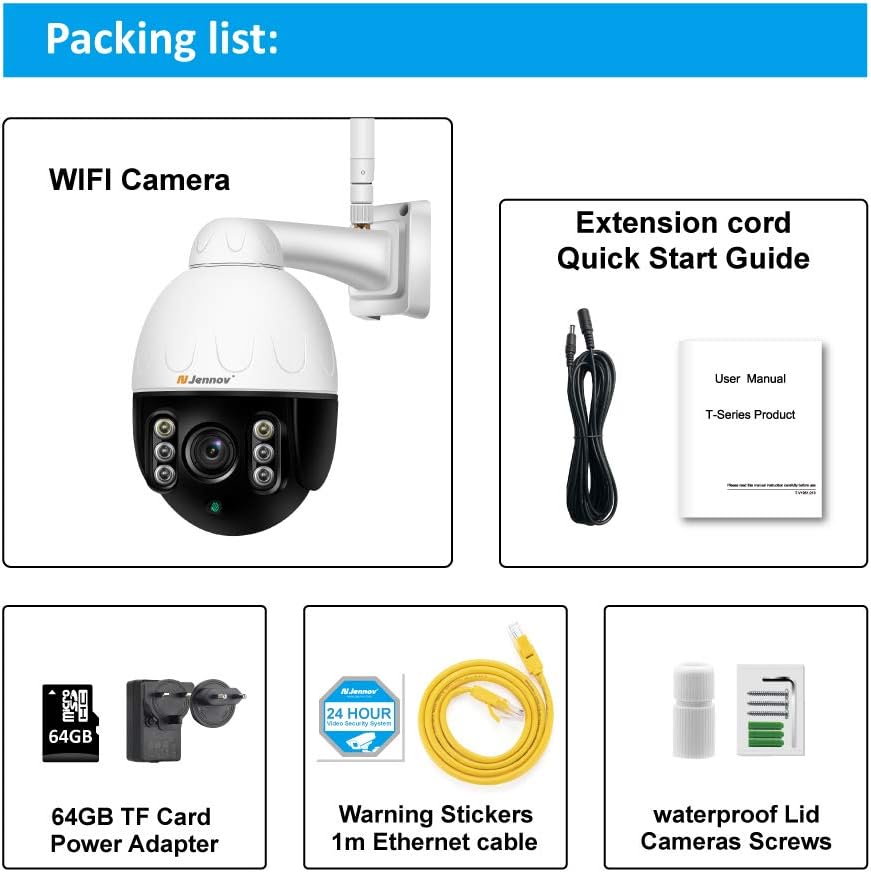
Image: Visual representation of the Jennov PTZ Camera and its included accessories.
- Jennov 5.0MP PTZ WiFi Camera (1 unit)
- 12V1A Power Adapter (1 unit)
- 3.3ft Ethernet Cable (1 unit)
- Montážní šrouby (sada)
- Waterproof Cap for Ethernet connection (1 unit)
- Warning Label (1 unit)
- 64GB Micro SD karta (předinstalovaná)
- Stručný průvodce / Uživatelská příručka
3. Pokyny k nastavení
3.1 Fyzická instalace
- Vyberte umístění: Select a suitable outdoor location for mounting the camera. Ensure it has a clear line of sight to the area you wish to monitor and is within range of your 2.4GHz Wi-Fi network. The camera is designed for wall or ceiling mounting.
- Montáž kamery: Use the provided mounting screws to securely attach the camera bracket to the chosen surface. Ensure the camera is positioned correctly for optimal viewúhel.
- Připojte napájení: Connect the 12V1A power adapter to the camera's power input and plug it into a power outlet.
- Ethernetové připojení (volitelné): For a more stable connection, you can use the provided Ethernet cable to connect the camera directly to your router. Use the waterproof cap to protect the Ethernet port if installed outdoors.
3.2 Instalace aplikace a počáteční nastavení
- Stáhněte si aplikaci: Hledat the recommended camera application (e.g., 'HiCam' or similar as per quick start guide) on your smartphone's app store (iOS or Android) and install it.
- Zaregistrujte si účet: Otevřete aplikaci a podle pokynů na obrazovce zaregistrujte nový uživatelský účet.
- Přidat fotoaparát: Power on the camera. In the app, select 'Add Device' or '+' icon. Follow the prompts to connect the camera to your home 2.4GHz Wi-Fi network. Ensure your phone is also connected to the 2.4GHz network during setup.
- Konfigurace nastavení: Once connected, you can rename the camera, set a password, and adjust initial video settings.
4. Návod k obsluze
4.1 Živě View a ovládání PTZ
Access the live video feed through the mobile app or PC client.

Image: A smartphone screen displaying the camera's live feed with pan and tilt controls, indicating 355° horizontal and 100° vertical rotation.
- Pan/Tilt: Use the directional controls within the app to rotate the camera horizontally (355°) and vertically (100°) to adjust the viewúhel.
- Optický zoom: Utilize the zoom controls (often a pinch-to-zoom gesture or dedicated buttons) to activate the 5X optical zoom for closer inspection of details.
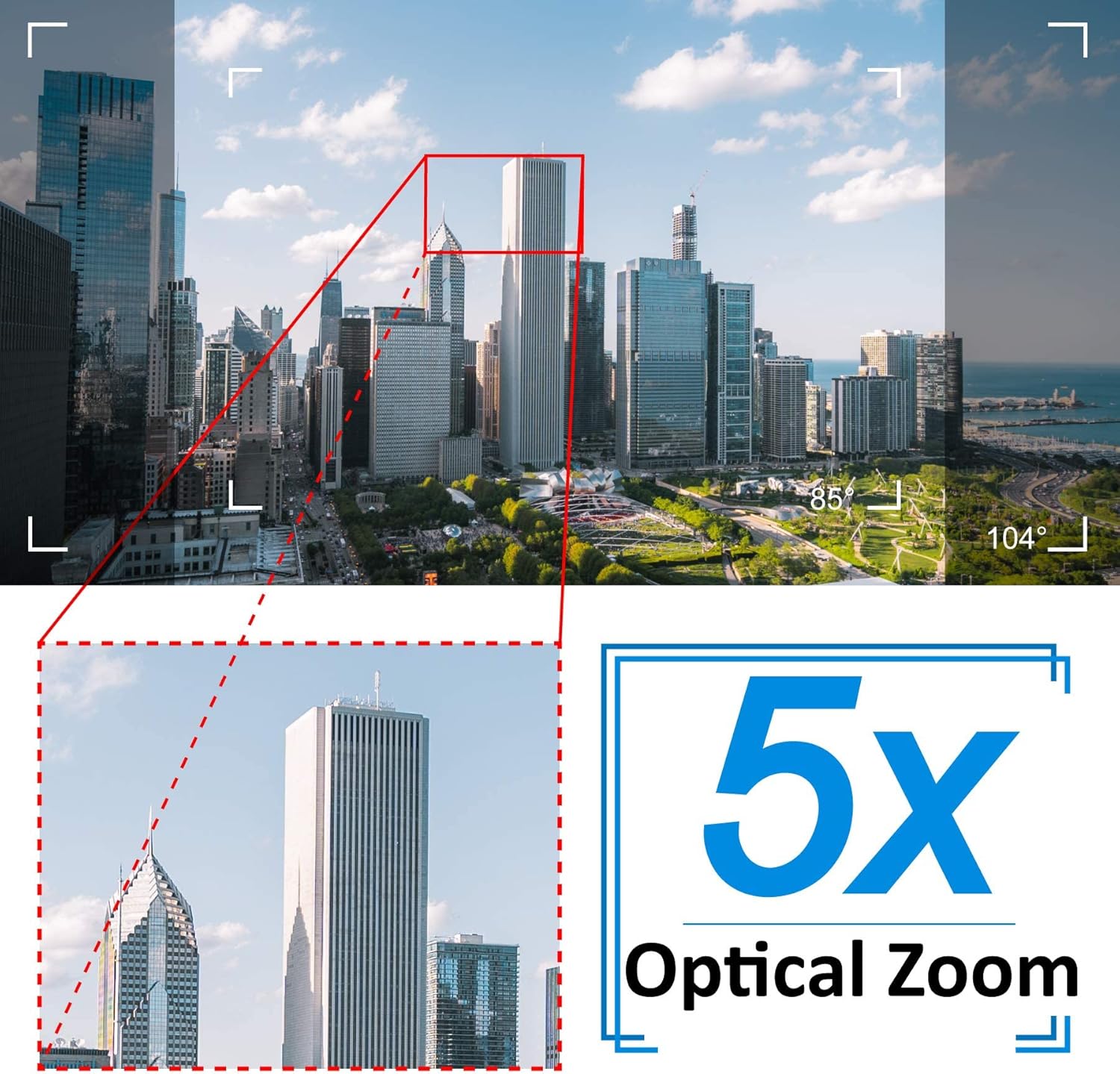
Image: A cityscape view demonstrating the 5X optical zoom feature, highlighting the ability to magnify distant objects clearly.
4.2 Obousměrný zvuk
The camera supports two-way audio communication.

Image: A person interacting with the camera's two-way audio feature via a smartphone, showing speech bubbles for communication.
- Poslouchat: Tap the speaker icon in the app to hear audio from the camera's location.
- Mluvit: Press and hold the microphone icon to speak through the camera's speaker. Release to stop speaking.
4.3 Noční vidění
Kamera se za zhoršených světelných podmínek automaticky přepne do režimu nočního vidění.

Obrázek: Srovnání zobrazující denní dobu view of a house and its clear night vision equivalent captured by the 5MP 1920P camera.
- The integrated IR-Cut filter and infrared LEDs provide clear black-and-white video up to 65ft (20 meters) in complete darkness.
4.4 Detekce pohybu a upozornění
Configure motion detection settings to receive alerts for suspicious activity.

Image: A visual representation of the camera's human detection, email alert, and app notification features, with highlighted detection zones.
- Nastavení detekční zóny: V nastavení aplikace definujte konkrétní oblasti v záběru kamery view pro detekci pohybu.
- Upravit citlivost: Modify the motion detection sensitivity to minimize false alarms.
- Konfigurace upozornění: Enable push notifications to your smartphone and/or email alerts with snapshots when motion is detected.
4.5 Nahrávání a ukládání
The camera comes with a pre-installed 64GB SD card for local storage.
- Nepřetržité nahrávání: The camera supports 24/7 continuous recording to the SD card.
- Nahrávání ve smyčce: When the SD card is full, new recordings will automatically overwrite the oldest footage.
- Přehrávání: Přístup zaznamenán footage through the app's playback function.
5. Údržba
Pravidelná údržba zajistí optimální výkon a dlouhou životnost vaší bezpečnostní kamery.

Image: The Jennov PTZ camera shown outdoors in various weather conditions (rain, snow, sun, wind), emphasizing its IP66 weatherproof rating.
- Čištění: Pravidelně čistěte objektiv fotoaparátu měkkým hadříkemamp cloth to remove dust, dirt, or water spots that may affect image quality. Do not use harsh chemicals.
- Zkontrolujte připojení: Regularly inspect power and Ethernet cable connections for any signs of wear or damage. Ensure waterproof caps are securely in place.
- Aktualizace firmwaru: Check the app regularly for available firmware updates. Keeping the camera's firmware updated can improve performance and security.
- Ochrana životního prostředí: While the camera is IP66 weatherproof, extreme conditions (e.g., direct lightning strikes, prolonged submersion) should be avoided.
6. Řešení problémů
Pokud se s fotoaparátem setkáte s problémy, podívejte se na následující běžné problémy a jejich řešení.
| Problém | Možná příčina | Řešení |
|---|---|---|
| Fotoaparát se nedaří připojit k Wi-Fi. | Nesprávné heslo k Wi-Fi; Kamera je příliš daleko od routeru; Podporuje pouze Wi-Fi 2.4 GHz. | Verify password. Move camera closer to router. Ensure your router is broadcasting a 2.4GHz network and your phone is connected to it during setup. |
| Žádný obraz nebo černá obrazovka v živém přenosu view. | Power issue; Network disconnection; Camera malfunction. | Check power connection. Verify Wi-Fi/Ethernet connection. Restart camera and router. |
| Noční vidění je nejasné. | Dirty lens; Obstruction; Insufficient IR illumination. | Clean the camera lens. Ensure no objects are blocking the IR LEDs. |
| Motion detection alerts are too frequent or not triggered. | Sensitivity too high/low; Detection zone not configured correctly. | Adjust motion detection sensitivity in the app. Redefine the detection zone to focus on critical areas. |
| Obousměrný zvuk nefunguje. | Microphone/speaker muted; App permissions; Network latency. | Check mute settings in the app. Ensure the app has microphone permissions on your phone. Verify stable network connection. |
7. Specifikace
Detailed technical specifications for the Jennov 5.0MP PTZ Outdoor WiFi Security Camera.
| Funkce | Specifikace |
|---|---|
| Číslo modelu | JE-P22HT55-5X-FAS-64-UK |
| Efektivní rozlišení videa | 5 MP (1920p) |
| Optický zoom | 5X (2.7-13.5mm autofocus lens) |
| Úhel Pan / Tilt | Horizontální: 355°, Vertikální: 100° |
| Bezdrátová technologie | Wi-Fi (pouze 2.4 GHz) |
| Rozsah nočního vidění | Up to 65ft (20 meters) with Infrared LED |
| Hodnocení odolnosti vůči povětrnostním vlivům | IP66 |
| Skladování | 64GB Micro SD karta (předinstalovaná) |
| Napájení | 12V1A DC (24 Watts) |
| Materiál | Kov Casing |
| Rozměry (D x Š x V) | 21.5 x 19.5 x 11.5 cm |
| Hmotnost | 1.2 kg |
| Kompatibilní zařízení | Android/iOS Smartphones, Tablets, PCs |
| Typ instalace | Držák na stěnu, držák na strop |
8. Záruka a podpora
For warranty information and technical support, please refer to the official Jennov website or contact their customer service directly. Details regarding warranty periods and support channels are typically provided with your purchase documentation or on the manufacturer's product page.
Uschovejte si prosím doklad o koupi pro případné reklamace.


