1. Úvod
This manual provides detailed instructions for the VTech Kidi Star Karaoke Machine, Model 80-165835. This interactive karaoke system is designed to provide an engaging musical experience with features such as Music Magic mode, voice-changing effects, built-in songs and games, and a colorful disco light. Please read this manual thoroughly before use to ensure proper operation and to maximize your enjoyment of the product.
2. Bezpečnostní informace
- Bezpečnost baterie: Requires 4 AA batteries (included). Ensure correct polarity when inserting batteries. Do not mix old and new batteries, or different types of batteries. Remove exhausted batteries promptly.
- Dohled dospělých: Recommended for assembly and initial setup.
- Nebezpečí udušení: Obsahuje malé části. Není vhodné pro děti do 3 let.
- Elektrická bezpečnost: Use only the provided audio cable for connecting external devices. Do not attempt to modify or repair the unit.
- Umístění: Umístěte jednotku na stabilní, rovný povrch, aby se nepřevrátila.
3. Obsah balení
Zkontrolujte prosím, zda jsou v balení přítomny všechny položky:
- VTech Kidi Star Karaoke Machine (Main Unit)
- Adjustable Stand (multiple sections)
- Microphone with cord
- Audio Cable (3.5mm jack)
- 4 AA baterie
- Návod k použití (tento dokument)
4. Nastavení
4.1 Instalace baterie
- Vyhledejte přihrádku na baterie na spodní straně hlavní jednotky.
- Pomocí šroubováku otevřete kryt prostoru pro baterie.
- Vložte 4 nové baterie typu AA a dbejte na správnou polaritu (+/-).
- Vraťte zpět kryt a utáhněte šroub.
4.2 Assembly of the Stand and Microphone
- Connect the base of the stand to the lowest pole section.
- Attach the remaining pole sections, adjusting the height as desired.
- Secure the main karaoke unit onto the top of the assembled stand.
- Plug the microphone into the designated port on the main unit.
- Před použitím se ujistěte, že jsou všechna připojení zabezpečená.

Figure 1: Fully assembled VTech Kidi Star Karaoke Machine.
5. Návod k obsluze
5.1 Zapnutí/vypnutí
Stiskněte tlačítko Tlačítko napájení (usually marked with a circle and a vertical line) located on the main unit to turn the machine on or off.

Figure 2: Control panel with various buttons and screen.
5.2 Music Magic Mode
Aktivovat Music Magic Mode to reduce the main vocal track of built-in songs or songs played from an external device. This allows you to sing along as the lead vocalist.

Figure 3: The Music Magic button for vocal reduction.
5.3 Připojení externích zařízení
Use the included audio cable to connect your MP3 player or smartphone to the karaoke machine. Plug one end into the device's headphone jack and the other into the AUX-in port on the karaoke machine. You can then play your own music through the machine's speaker.

Figure 4: Connecting an external device via audio cable.
5.4 Efekty měniče hlasu
The machine includes five different voice-changing effects. Press the Tlačítko pro změnu hlasu to cycle through effects such as robot, echo, and more, adding fun variations to your singing.
5.5 Built-in Songs and Games
The Kidi Star Karaoke Machine features eight original built-in songs and six interactive games. Use the navigation buttons and the tlačítko OK to select and play songs or games from the main menu.
5.6 Funkce nahrávání
Record your performances for up to five minutes using the built-in recorder. Press the Tlačítko nahrávání to start and stop recording. You can then play back your recorded tracks.
5.7 Disco Light Operation
The integrated disco light can be twisted 180 degrees to project colorful light patterns onto walls and ceilings, enhancing the karaoke experience. The lights activate automatically when the unit is on or can be controlled via a dedicated button.
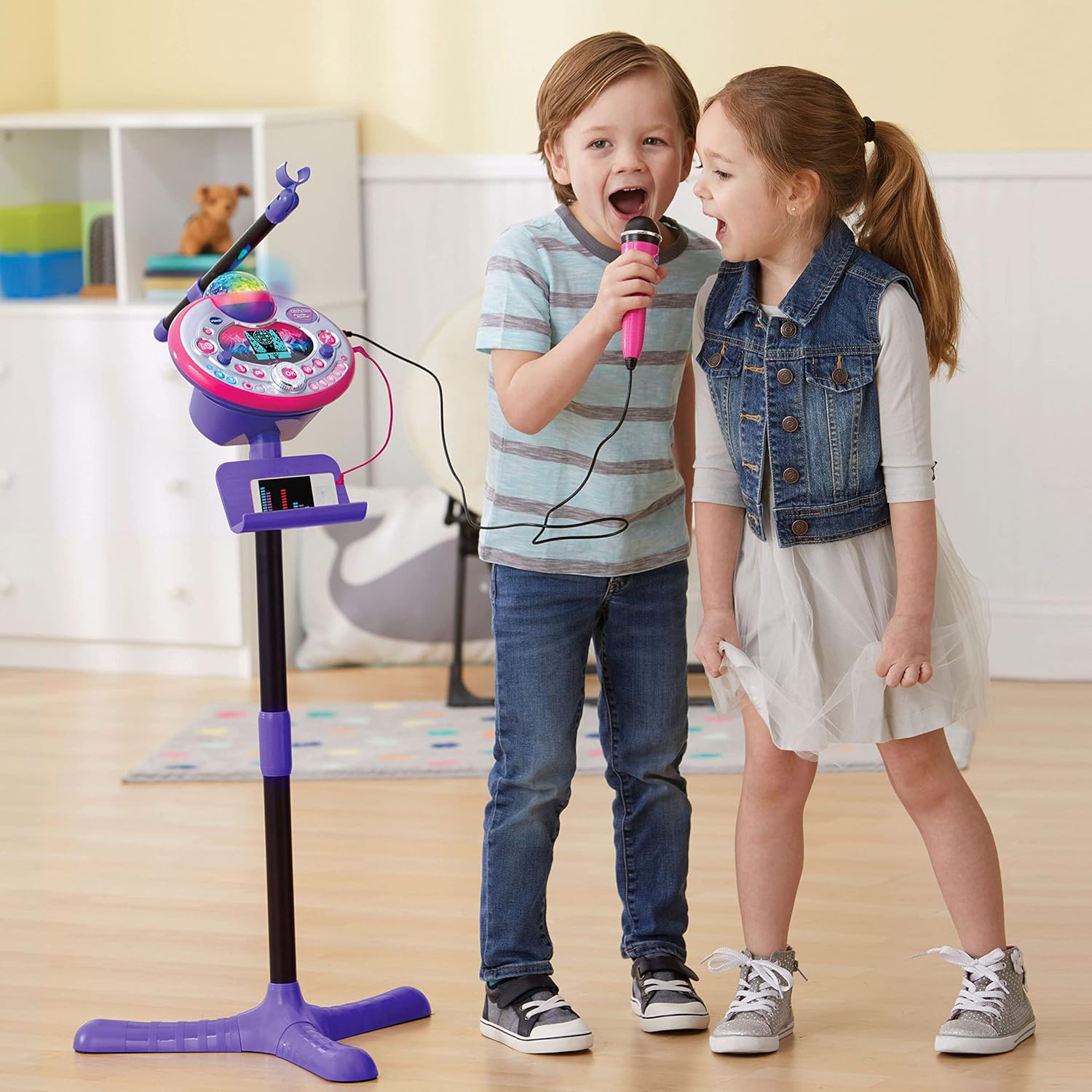
Figure 5: Disco light in action, projecting colorful patterns.
5.8 Audience Sounds
Engage the audience sound effects, such as applause, cheering, and laughter, by pressing the dedicated buttons. This feature simulates a live performance atmosphere.
6. Údržba
- Čištění: Otřete jednotku jemným damp tkanina. Nepoužívejte agresivní chemikálie nebo abrazivní čisticí prostředky.
- Skladování: Pokud karaoke zařízení nepoužíváte, skladujte ho na chladném a suchém místě mimo dosah přímého slunečního záření.
- Péče o baterie: Pokud nebudete přístroj delší dobu používat, vyjměte baterie, abyste zabránili jejich vytečení.
7. Řešení problémů
| Problém | Možná příčina | Řešení |
|---|---|---|
| Jednotka se nezapne. | Baterie jsou slabé nebo nesprávně vložené. | Vyměňte baterie za nové, dbejte přitom na správnou polaritu. |
| Žádný zvuk z mikrofonu. | Microphone not securely plugged in; volume too low. | Ensure microphone is fully inserted. Adjust microphone volume. |
| External device audio is not playing. | Audio cable not connected properly; device volume too low. | Check audio cable connections. Increase volume on both the external device and the karaoke machine. |
| Diskotékové světlo nefunguje. | Light feature is turned off or unit is in a low-power state. | Ensure the light button is pressed or the unit is powered on. Check batteries. |
8. Specifikace
- Číslo modelu: 80-165835
- Značka: VTech
- Barva: Růžová/fialová
- Materiál: Plast
- Zdroj napájení: 4 AA baterií (součástí balení)
- Konektivita: Pomocný (3.5mm jack)
- Kompatibilní zařízení: Chytrý telefon, MP3 přehrávač
- Speciální vlastnosti: Voice Changer, Disco Light, Built-in Recorder, Audience Sounds, Music Magic Mode, Built-in Songs & Games
- Rozměry produktu: Approximately 127.94 x 37.01 x 42.42 cm (assembled)
- Hmotnost položky: Přibližně 1.34 kg
9. Záruka a podpora
Informace o záruce a zákaznické podpoře získáte od oficiálního zástupce společnosti VTech. webnebo se obraťte na jejich zákaznický servis. Uschovejte si účtenku jako doklad o koupi pro případné reklamace.
VTech Webmísto: www.vtechkids.com


