1. Konec produktuview
The Bluedio Hi(Hurricane) Wireless Earbuds feature advanced Bluetooth 5.0 technology, 13mm dynamic speakers, and intelligent face recognition for music control. This manual provides essential information for setup, operation, and maintenance.

Figure 1: Package Contents and Overview Diagram
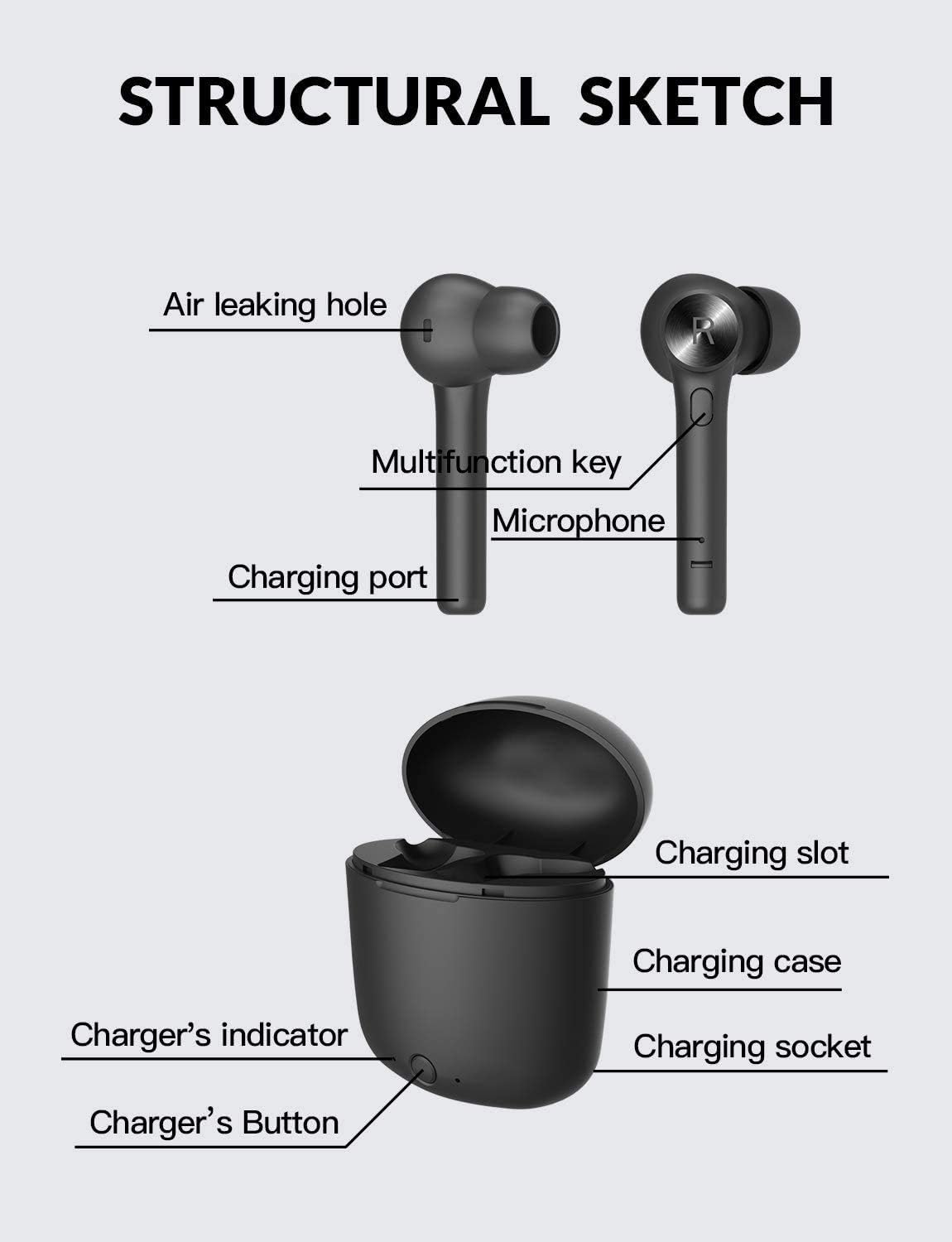
Figure 2: Structural Sketch of Earbuds and Charging Case
2. Nastavení
2.1 Počáteční nabíjení
Before first use, ensure the charging case and earbuds are fully charged. Connect the provided USB-C cable to the charging case and a power source. The charger's indicator light will show charging status.
2.2 Párování s vaším zařízením
The Bluedio Hi(Hurricane) earbuds offer one-step pairing for convenience.
- Ensure Bluetooth is vypnuto na vašem mobilním telefonu.
- Otevřete nabíjecí pouzdro.
- Long-press the multi-function button on both the left and right earbuds simultaneously until they power on.
- Zapněte na svém mobilním telefonu Bluetooth.
- Hledat available devices and select "Hi" to connect. The two earbuds will automatically pair with your phone.
Video: Bluedio Hi True Wireless Earbuds - Demonstrates product features and basic operation.
3. Návod k obsluze
3.1 Přehrávání hudby a hovory
The earbuds feature a multi-function button for various controls:
- Přehrát/pozastavit: Jednou stiskněte multifunkční tlačítko.
- Další skladba: Dvakrát stiskněte multifunkční tlačítko na pravém sluchátku.
- Předchozí skladba: Dvakrát stiskněte multifunkční tlačítko na levém sluchátku.
- Přijmout/ukončit hovor: Během příchozího nebo aktivního hovoru stiskněte multifunkční tlačítko jednou.
- Odmítnout hovor: Během příchozího hovoru dlouze stiskněte multifunkční tlačítko.
3.2 Face Recognition Technology
The earbuds incorporate face recognition technology for intelligent music control:
- When you take down the PRÁVO earbud from your head, the music will automatically pause.
- When you wear the PRÁVO earbud, the music will continue to play.
3.3 Výdrž baterie a nabíjení
The earbuds provide approximately 5 hours of playtime on a single charge. The portable charging case holds roughly 4 full charges, extending total playtime to about 20 hours.
- Nabíjení sluchátek: Approximately 1 hour to fully charge from empty.
- Nabíjení pouzdra: Approximately 2 hours to fully charge the case.
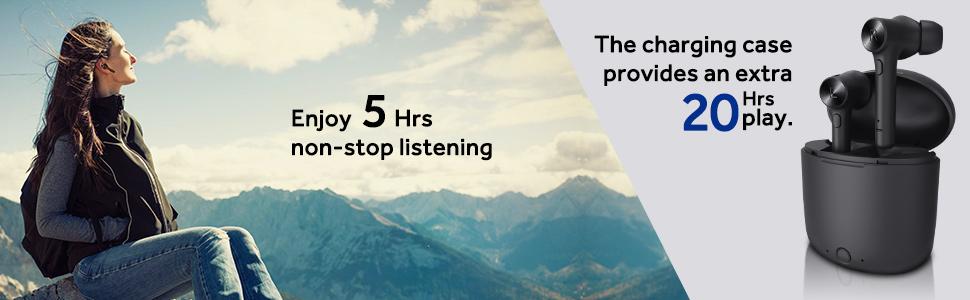
Figure 3: Extended Playtime with Charging Case
4. Údržba
4.1 Čištění
Regularly clean the earbuds and charging case with a soft, dry cloth. Avoid using liquids or abrasive cleaners. Ensure the charging contacts on both the earbuds and case are free from dust and debris.
4.2 Skladování
Pokud sluchátka nepoužíváte, uložte je do nabíjecího pouzdra, aby byla chráněna a zůstala nabitá. Skladujte na chladném a suchém místě mimo dosah extrémních teplot.
5. Řešení problémů
5.1 Only One Earbud Has Sound or Connects
If only one earbud has sound or connects, you may need to reset and manually re-pair the earbuds. Follow these steps:
- Ensure Bluetooth is vypnuto na vašem mobilním telefonu.
- Long-press the multi-function button on both earbuds for 10 seconds to turn them on. Then, press the multi-function button on each earbud three times quickly. Both earbuds will turn off automatically.
- Place both earbuds back into the charging case. Close the cover.
- Press the power button on the charging box to activate charging. Meanwhile, clear any previous pairing records of "Hi" from your phone's Bluetooth settings.
- Restart the earbuds by taking them out of the case and turn on Bluetooth on your phone to search for "Hi" and pair again.
5.2 Problémy s nabíjením
If the earbuds or case are not charging:
- Ujistěte se, že je nabíjecí kabel bezpečně připojen k pouzdru i ke zdroji napájení.
- Ověřte, zda je zdroj napájení aktivní.
- Check the charging contacts on the earbuds and inside the case for any obstructions or dirt.
- Ensure the charging case button is pressed to initiate charging for the earbuds if they do not start automatically.
6. Specifikace
| Funkce | Detail |
|---|---|
| Název modelu | Hi(Hurricane) |
| Verze Bluetooth | 5.0 |
| Technologie připojení | Bluetooth |
| Technologie bezdrátové komunikace | Bluetooth |
| Typ zvukového ovladače | Dynamický ovladač |
| Velikost zvukového ovladače | 13 milimetrů |
| Frekvenční odezva | 20000 Hz |
| Impedance | 16 ohmů |
| Kontrola hluku | Aktivní potlačení hluku |
| Umístění uší | V uchu |
| Form Factor | V uchu |
| Speciální funkce | Face Recognition Technology, Microphone Included |
| Typ ovládání | Ovládání tlačítkem |
| Úroveň odolnosti proti vodě | Vodě odolný |
| Sluchátka Playtime | 5 hodiny |
| Celková doba přehrávání (s pouzdrem) | 20 hodiny |
| Nabíjecí port | USB-C (implied from video) |
7. Záruka a podpora
7.1 Informace o záruce
Please refer to the official Bluedio website or your purchase documentation for detailed warranty information regarding your Bluedio Hi(Hurricane) Wireless Earbuds. Keep your proof of purchase for warranty claims.
7.2 Zákaznická podpora
For further assistance, technical support, or product inquiries, please visit the official Bluedio Store on Amazon: Bluedio Store.


