1. Úvod
The AIYIMA DAC-A2 is a versatile Digital-to-Analog Converter (DAC) and headphone amplifier designed to enhance your audio experience. It features multiple digital input options and provides both RCA line-out and a 3.5mm headphone output, along with adjustable bass and treble controls for personalized sound. This manual provides detailed instructions for setup, operation, and maintenance of your DAC-A2.

Figure 1: AIYIMA DAC-A2 Headphone Ampživotaschopnější DAC
2. Klíčové vlastnosti
- Integrovaný DAC a sluchátkový převodník Amplifier: Built-in Hi-Fi headphone amplifier chip capable of driving 16ohm to 200ohm headphones.
- Advanced Chipset: Utilizes SA9023+CS8416+97220+NE5532 for optimal audio performance.
- Multiple Digital Inputs: Supports PC-USB, Optical, and Coaxial S/PDIF inputs, compatible with most home audio systems, PCs, and Macs.
- Versatile Outputs: Features RCA line-out for connecting to powered speakers or external amplifiers, and a 3.5mm headphone output.
- High-Resolution Audio: PC-USB input supports up to 24Bit/96KHz; Optical/Coaxial inputs support up to 24Bit/192kHz.
- Tone Controls: Independent bass and treble controls to customize your audio output.
- Compact and Portable: DC 5V power input allows for a portable and professional desktop audio device.

Figure 2: Internal Chipset and Features Overview
3. Obsah balení
Zkontrolujte prosím balení, zda neobsahuje následující položky:
- AIYIMA DAC-A2 Unit
- USB kabel (typ A až typ B)
- Optical Cable (Toslink)
- DC 5V Power Cable (USB-C for power)
- Uživatelská příručka
4. Ovládací prvky a rozhraní

Obrázek 3: Rozložení předního a zadního panelu
4.1 Přední panel
- Vstupní přepínač: Toggle between USB, Optical (OPT), and Coaxial (COA) inputs.
- 3.5mm sluchátkový výstup: Sem připojte sluchátka.
- Ovladač basů: Adjust the low-frequency response.
- Knoflík pro ovládání výšek: Adjust the high-frequency response.
- Knoflík ovládání hlasitosti: Adjust the overall output volume. This knob also acts as the power switch (push to turn on/off) and has a power indicator light.
4.2 Zadní panel
- Vstup DC 5V: Connect the provided DC 5V power cable.
- Audio výstup RCA (L/P): Connect to powered speakers or an external ampživější.
- Coaxial Input (COA): Connect a coaxial digital audio source.
- Optický vstup (OPT): Connect an optical digital audio source.
- Vstup pro PC-USB: Connect to your computer for USB audio.
5. Nastavení a připojení
Follow these steps to connect your AIYIMA DAC-A2 to your audio system:
- Připojení napájení: Connect the provided DC 5V power cable to the "DC 5V" input on the rear panel of the DAC-A2. Connect the other end to a suitable 5V power source (e.g., a USB wall adapter, not included). Ensure the power indicator light on the front panel illuminates when the volume knob is pressed to turn on.
- Připojení vstupního zdroje: Vyberte jednu z následujících metod zadávání:
- PC-USB: Connect the provided USB cable from your computer's USB port to the "PC-USB" input on the DAC-A2.
- Optický: Connect an optical cable from your audio source (e.g., TV, game console) to the "OPTICAL" input.
- Koaxiální: Connect a coaxial cable from your audio source to the "COAXIAL" input.
- Výstupní připojení: Choose one of the following output methods:
- RCA výstup: Connect RCA cables from the "AUDIO OUT" (L/R) ports on the DAC-A2 to your powered speakers or an external ampvstup od lifiera.
- 3.5mm sluchátkový výstup: Zapojte sluchátka do 3.5mm konektoru jack na předním panelu. Note: The headphone output takes priority. If headphones are connected, sound will be routed to them and not the RCA outputs.
- Vyberte vstup: Use the input switch on the front panel to select the desired audio source (USB, OPT, or COA).
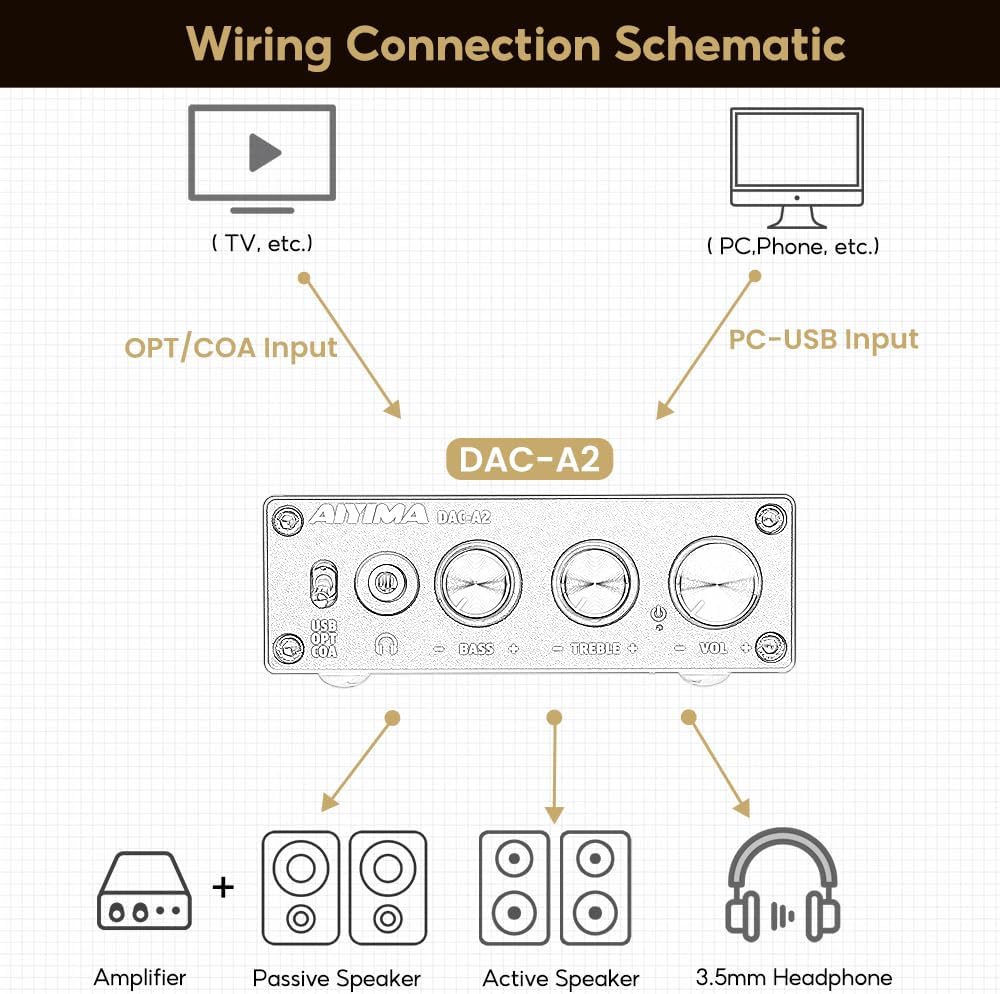
Obrázek 4: Schéma zapojení
Video 1: Demonstrates connecting the AIYIMA DAC-A2 to a laptop and an amplifier, showing the audio output to speakers and headphones. It illustrates switching between PC-USB input and adjusting volume, bass, and treble controls.
6. Návod k obsluze
- Zapnutí/vypnutí: Press the Volume Control Knob to turn the unit on or off. The power indicator light will illuminate when on.
- Výběr vstupu: Use the Input Switch (USB/OPT/COA) on the front panel to select your active audio source.
- Nastavení hlasitosti: Rotate the Volume Control Knob clockwise to increase volume and counter-clockwise to decrease it.
- Nastavení basů: Rotate the Bass Control Knob to increase or decrease the bass frequencies according to your preference.
- Nastavení výšek: Rotate the Treble Control Knob to increase or decrease the treble frequencies according to your preference.

Figure 5: Adjustable Bass and Treble Controls
Video 2: Shows the AIYIMA DAC-A2 in a desktop setup, demonstrating the connection of headphones and the adjustment of volume, bass, and treble controls for an enhanced audio experience.
7. Specifikace

Obrázek 6: Rozměry produktu
| Funkce | Specifikace |
|---|---|
| Značka | AIYIMA |
| Číslo modelu | DAC-A2 |
| Čipová sada | SA9023+CS8416+97220+NE5532 |
| PC-USB vstup Sampsazba ling | 24 bitů / 96 kHz |
| Optický/koaxiální vstup Sampsazba ling | 24bit/192kHz |
| Rozsah impedance sluchátek | 16ohm to 200ohm |
| Maximální objem dodávkytage | 5 voltů |
| Minimální zásoba svtage | 5 V (DC) |
| Typ rozhraní | Coaxial, USB, Optical |
| Počet kanálů | 1 |
| Rozměry produktu (D x Š) | 98 cm D x 73 cm Š (přibližně 3.86 mm x 2.89 mm) |
| Hmotnost položky | 14.8 unce (přibližně 420 g) |
8. Řešení problémů
If you encounter issues with your DAC-A2, please refer to the following common problems and solutions:
- Žádný zvukový výstup:
- Ensure the DAC-A2 is powered on and the power indicator is lit.
- Verify that the correct input source (USB, OPT, COA) is selected using the front panel switch.
- Check all cable connections (input and output) are secure.
- If using headphones, ensure they are fully plugged into the 3.5mm jack. Remember the headphone output has priority over RCA.
- Adjust the volume knob on the DAC-A2 and ensure your connected speakers/amplifier also have their volume turned up.
- For PC-USB input, check your computer's sound settings to ensure the DAC-A2 is selected as the default playback device.
- Zkreslený nebo špatná kvalita zvuku:
- Ujistěte se, že jsou všechny kabely správně připojeny a nejsou poškozeny.
- Zkontrolujte zdroj zvuku, zda nemá problémy s kvalitou.
- Adjust the Bass and Treble controls to see if they are set to extreme levels causing distortion.
- Ensure the power supply is stable and providing sufficient 5V power. An unstable power supply can cause noise.
- Přerušovaný zvuk:
- Zkontrolujte, zda nejsou uvolněné kabelové spoje.
- Ensure the power supply is consistent.
- If using PC-USB, try a different USB port on your computer or a different USB cable.
9. Údržba
- Čištění: K čištění vnější strany jednotky používejte měkký, suchý hadřík. Nepoužívejte tekuté čisticí prostředky ani rozpouštědla.
- Skladování: Přístroj skladujte na chladném a suchém místě mimo dosah přímého slunečního záření a extrémních teplot.
- Zacházení: Zabraňte pádu jednotky na zem nebo jejímu vystavení silným nárazům.
- Větrání: Zajistěte dostatečné větrání kolem jednotky, aby se zabránilo přehřátí.
10. Záruka a podpora
AIYIMA products are designed for reliability and performance. For warranty information, technical support, or service inquiries, please refer to the contact information provided with your purchase or visit the official AIYIMA webstránky. Uschovejte si prosím doklad o koupi pro případ reklamace.
11. Důležité bezpečnostní informace
- Do not expose this unit to rain, moisture, or extreme temperatures.
- Neotevírejte casing. Uvnitř nejsou žádné součásti, které by mohl uživatel opravit. Veškerý servis svěřte kvalifikovanému personálu.
- Use only the specified power supply (DC 5V).
- Neumisťujte jednotku do blízkosti zdrojů tepla nebo na přímé sluneční světlo.
- Uchovávejte mimo dosah dětí.


