Zavedení
Thank you for choosing the NEDIS Wi-Fi Smart Fan Heater. This manual provides essential information for the safe and efficient operation of your new device. Please read these instructions carefully before use and retain them for future reference. Proper use and maintenance will ensure optimal performance and longevity of the product.
Bezpečnostní pokyny
Abyste snížili riziko požáru, úrazu elektrickým proudem nebo zranění, vždy dodržujte tato základní bezpečnostní opatření:
- Před použitím tohoto ohřívače si přečtěte všechny pokyny.
- Nepoužívejte tento ohřívač v bezprostřední blízkosti vany, sprchy nebo bazénu.
- Nezakrývejte topné těleso. Zakrývání topného tělesa může způsobit přehřátí a požár.
- Keep combustible materials such as furniture, pillows, bedding, papers, clothes, and curtains at least 1 meter (3 feet) from the front of the heater and keep them away from the sides and rear.
- Pokud ohřívač nepoužíváte, vždy jej odpojte.
- Neprovozujte žádný ohřívač s poškozeným kabelem nebo zástrčkou nebo po nesprávném fungování ohřívače, pádu nebo jakémukoli poškození.
- Neveďte kabel pod koberec. Nezakrývejte kabel kluznými koberci, běhouny nebo podobnými kryty. Kabel umístěte mimo dopravní oblast a tam, kde o něj nikdo nezakopne.
- Mimořádná opatrnost je nutná, pokud je jakékoli ohřívač používáno dětmi nebo invalidy nebo v jejich blízkosti a kdykoli je ohřívač ponechán v provozu a bez dozoru.
- This heater is equipped with a tip-over protection switch that automatically shuts off the heater if it is accidentally knocked over.
- Ujistěte se, že je ohřívač umístěn na stabilním rovném povrchu.
- Pouze pro vnitřní použití.
Konec produktuview
Familiarize yourself with the main components of your NEDIS Wi-Fi Smart Fan Heater.
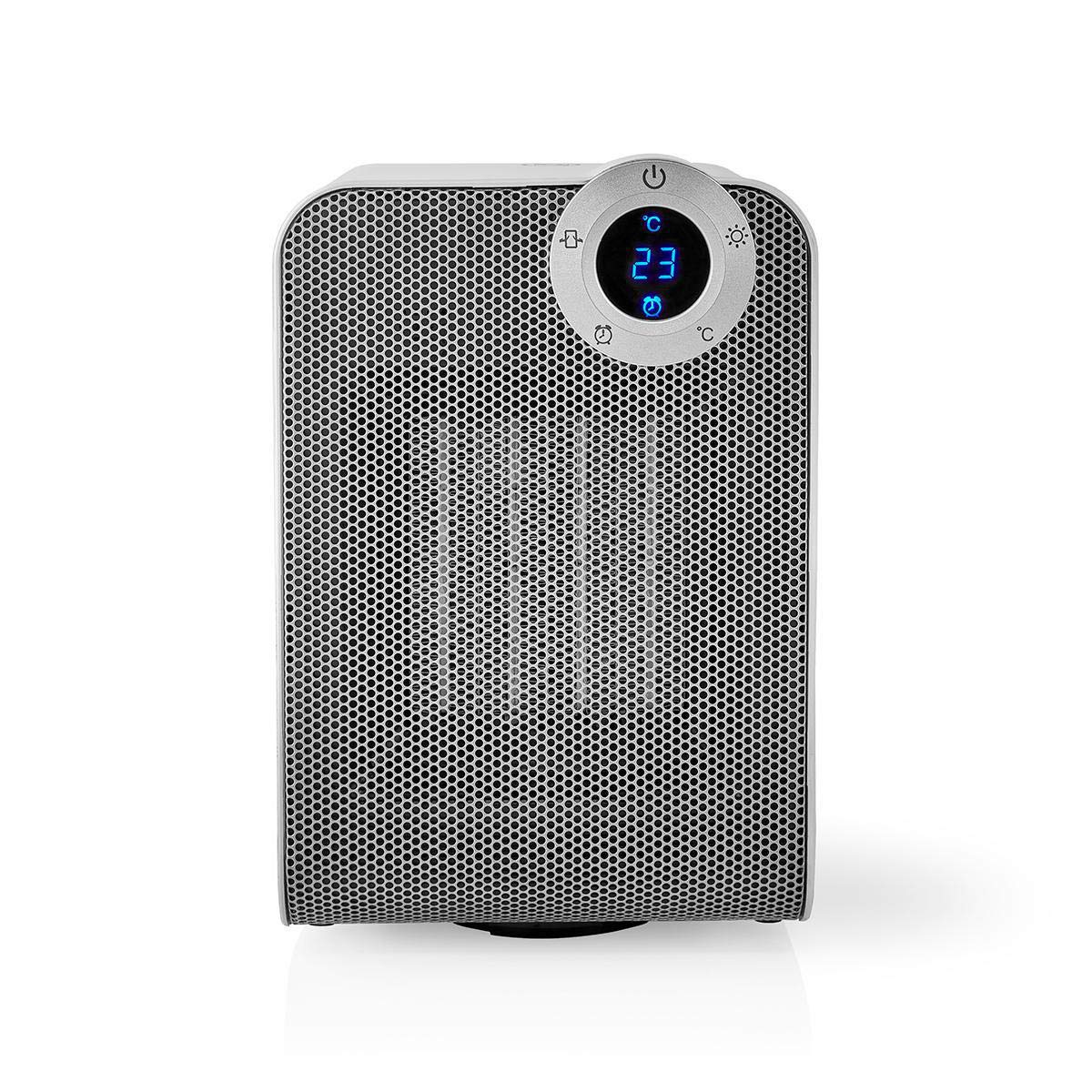
The front panel features a digital display that shows the current temperature and settings. Surrounding the display are touch-sensitive buttons for power, mode selection, oscillation, and timer functions.

The rear of the heater includes the main power switch (often a rocker switch) and the air intake grille. Ensure this area is not obstructed for proper airflow.

The compact design of the heater allows for easy placement in various indoor settings.
Nastavení
Vybalování
- Opatrně vyjměte ohřívač z obalu.
- Zkontrolujte, zda nedošlo k poškození během přepravy. V případě poškození zařízení nepoužívejte a kontaktujte zákaznickou podporu.
- Uschovejte si obal pro budoucí skladování nebo přepravu.
Umístění
- Umístěte ohřívač na pevný, rovný povrch.
- Ensure there is at least 1 meter (3 feet) of clear space around the heater to allow for proper air circulation and to prevent fire hazards.
- Do not place the heater near curtains, drapes, or other loose fabrics that could block the air intake or outlet.
- Ujistěte se, že napájecí kabel není přiskřípnutý ani umístěn pod těžkými předměty.
Počáteční zapnutí
- Plug the heater into a suitable electrical outlet (220-240V AC, 50/60Hz).
- Flip the main power switch on the back of the unit to the 'ON' position.
- The digital display on the front will illuminate, indicating the heater is in standby mode.
Wi-Fi Connection & App Setup
The NEDIS Wi-Fi Smart Fan Heater can be controlled via the Nedis SmartLife app, offering advanced features and remote control.
- Stáhněte si Nedis SmartLife aplikaci z App Storu (iOS) nebo Obchodu Google Play (Android).
- Zaregistrujte si nový účet nebo se přihlaste, pokud již nějaký máte.
- Ujistěte se, že je váš smartphone připojen k síti Wi-Fi 2.4 GHz.
- V aplikaci klepněte na ikonu „+“ pro přidání nového zařízení.
- Follow the on-screen instructions in the app to connect your heater to your Wi-Fi network. This usually involves putting the heater into pairing mode (refer to the app for specific instructions, often by pressing and holding a button on the heater).
- Once connected, you can control the heater from anywhere using the app.
Návod k obsluze
Ruční ovládání
The heater can be operated directly using the touch buttons on the front panel:
- Vypínač: Stisknutím zapnete nebo vypnete topení.
- Tlačítko režimu: Cycle through heating modes (e.g., High Heat 1800W, Low Heat 900W, Fan Only).
- Nastavení teploty: Use the '+' and '-' buttons (or similar) to set the desired temperature. The heater will operate at 1800W for rapid heating and automatically switch to 900W once the set temperature is approached.
- Tlačítko oscilace: Press to activate or deactivate the horizontal oscillation feature, distributing heat across a wider area.
- Tlačítko časovače: Set a timer for the heater to automatically turn off after a specified duration.
SmartLife App Control
Once connected to the Nedis SmartLife app, you can access advanced control features:
- Dálkové zapnutí/vypnutí: Ovládejte topení odkudkoli.
- Nastavení teploty: Precisely set and monitor the room temperature.
- Výběr režimu: Choose between different heating levels or fan-only mode.
- Ovládání oscilace: Zapněte nebo vypněte funkci oscilace.
- Plánování: Create custom heating schedules for different times of the day or week.
- Funkce časovače: Set a countdown timer for automatic shutdown.
Hlasové ovládání
The heater supports voice control through popular smart assistants. To enable this, link your Nedis SmartLife account with your preferred voice assistant (Google Home or Amazon Alexa) via their respective apps. Once linked, you can use voice commands such as:
- "Hey Google, turn on the heater."
- "Alexa, set the heater to 22 degrees."
- "Hey Google, turn off the heater."
Údržba
Čištění
Pravidelné čištění pomáhá udržovat účinnost ohřívače a prodlužuje jeho životnost.
- Před čištěním vždy odpojte ohřívač ze zásuvky a nechte jej zcela vychladnout.
- Vnější povrchy otřete měkkým, damp tkanina. Nepoužívejte abrazivní čisticí prostředky nebo rozpouštědla.
- K odstranění prachu z mřížek sání a výfuku vzduchu použijte vysavač s kartáčovým nástavcem.
- Zajistěte, aby se do vnitřku ohřívače nedostala voda.
Skladování
Pokud se delší dobu nepoužívá:
- Unplug the heater and clean it as described above.
- Store the heater in its original packaging or a suitable box to protect it from dust and damage.
- Keep it in a cool, dry place, away from direct sunlight and moisture.
Odstraňování problémů
Pokud narazíte na problémy s ohřívačem, podívejte se na následující běžné problémy a jejich řešení:
| Problém | Možná příčina | Řešení |
|---|---|---|
| Ohřívač se nezapne. | No power, main switch off, tip-over switch activated. | Check power outlet, ensure main switch is ON, place heater upright on a stable surface. |
| Žádný tepelný výkon. | Nesprávný režim, nastavení termostatu příliš nízké. | Select a heating mode (High/Low), increase the thermostat setting above the current room temperature. |
| Připojení k Wi-Fi selhalo. | Incorrect Wi-Fi password, 5GHz network, distance from router. | Verify Wi-Fi password, ensure you are on a 2.4GHz network, move heater closer to the router, try re-pairing. |
| Topení se neočekávaně vypne. | Overheating protection, tip-over protection, timer activated. | Ensure heater is not covered, clear obstructions, place upright, check timer settings. Allow to cool before restarting. |
Specifikace
| Funkce | Specifikace |
|---|---|
| Číslo modelu | WIFIFNH20CWT |
| Zdroj napájení | Elektrický kabel |
| Výkon | 1800W (vysoký), 900W (nízký) |
| Způsob vytápění | Proudění |
| Rozměry (D x Š x V) | 16.5 x 14.5 x 25 cm |
| Hmotnost položky | 1.8 kg |
| Barva | Bílá / stříbrná |
| Speciální funkce | On/Off Timer, Oscillation, Tip-over Protection, Thermostat, Wi-Fi, App Control, Voice Control (Alexa, Google Home) |
| Typ instalace | Montáž na podlahu |
| Doporučené použití | Indoor, Home, Study Room |
| Jsou vyžadovány baterie | Žádný |
Záruka a podpora
Your NEDIS Wi-Fi Smart Fan Heater is covered by a manufacturer's warranty. Please refer to the warranty card included with your purchase for specific terms and conditions, including the warranty period and coverage details.
For technical support, troubleshooting assistance, or warranty claims, please contact NEDIS customer service. Contact information can typically be found on the product packaging, the NEDIS webwebu nebo na vašem nákupním dokladu.


