Konec produktuview
The Pritech Universal TV Remote Control is designed as an ideal replacement for your old or faulty remote. This convenient control allows you to operate your television as if it were the original remote. Simply insert the batteries, and it's ready to use.
Klíčové vlastnosti:
- Perfect replacement for your existing TV remote.
- Guaranteed to work with all TV brands.
- Made from durable ABS material.
- Features soft plastic buttons for comfortable use.
- Lehký a ergonomický design.
- Operating range of up to 10 meters.

Image: Pritech Universal Remote Control highlighting its compatibility with LG, high performance, 8-meter range, comfortable design, and quick access buttons.
Nastavení a instalace
The Pritech Universal Remote Control is designed for immediate use without complex setup. Follow these simple steps to begin using your remote.
1. Instalace baterie
The remote requires AAA batteries (not supplied). Ensure correct polarity when inserting the batteries.
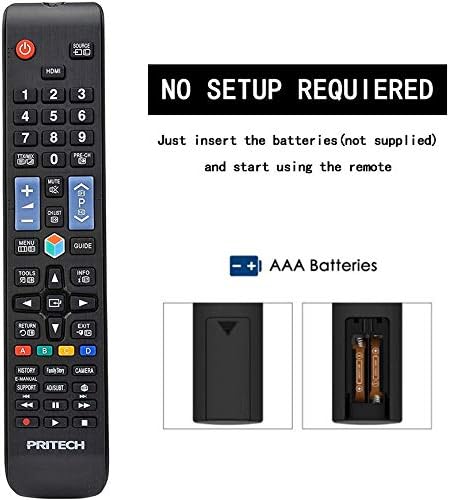
Image: A diagram illustrating the "NO SETUP REQUIRED" feature and the location for AAA battery insertion in the remote control.
- Sejměte kryt baterie: Gently slide down the battery cover located on the back of the remote control.
- Vložte baterie: Insert two AAA batteries, ensuring the positive (+) and negative (-) ends align with the markings inside the battery compartment.
- Vyměňte kryt baterie: Zasuňte kryt baterie zpět na místo, dokud bezpečně nezapadne.

Image: A four-panel visual guide demonstrating the steps for battery installation: 1. Removing the battery cover, 2. Distinguishing positive and negative electrodes, 3. Snapping batteries into place, and 4. Ready to control your TV.
2. První použití
Once batteries are installed, the remote is ready to operate your LG compatible television. No programming or code entry is typically required.
Návod k obsluze
This universal remote control provides all the essential functions of your original LG TV remote. Familiarize yourself with the button layout for optimal use.

Obrázek: Jasná přední strana view of the Pritech Universal Remote Control, showing all buttons and their labels, including power, input, channel, volume, navigation, and smart TV functions.
Společné funkce:
- Tlačítko napájení (●): Zapíná nebo vypíná televizor.
- Vstup/zdroj: Switches between different video inputs (HDMI, AV, etc.).
- Kanál nahoru/dolů (▲/▼): Mění televizní kanály.
- Zvýšení/snížení hlasitosti (+/-): Nastavuje hlasitost zvuku.
- Ztlumit: Ztiší zvuk televizoru.
- Číselná tlačítka (0-9): Zadejte přímo čísla kanálů.
- Navigační tlačítko (nahoru, dolů, vlevo, vpravo, OK): Používá se k navigaci v nabídkách a potvrzování výběrů.
- Tlačítko Domů: Přístup k hlavnímu chytrému centru nebo domovské obrazovce televizoru.
- Zpět/Výstup: Návrat na předchozí obrazovku nebo opuštění nabídky.
- Smart/My Apps: Direct access to smart TV features and installed applications.
For specific functions related to your LG TV model, refer to your television's user manual in conjunction with this remote control.
Údržba a péče
To ensure the longevity and optimal performance of your Pritech Universal Remote Control, follow these maintenance guidelines:
- Čištění: Use a soft, dry cloth to clean the remote. For stubborn dirt, slightly dampen the cloth with water or a mild cleaning solution. Avoid abrasive cleaners or solvents.
- Výměna baterie: Vyměňte baterie, když dálkový ovladač reaguje pomalu nebo přestane fungovat. Vždy vyměňujte obě baterie najednou.
- Skladování: Dálkový ovladač skladujte na chladném a suchém místě mimo dosah přímého slunečního záření a extrémních teplot.
- Vyhněte se kapkám: While designed to be durable, avoid dropping the remote, as this can damage internal components.
- Expozice tekutin: Keep the remote away from liquids. If it gets wet, remove batteries immediately and allow it to dry completely before reinserting them.
Odstraňování problémů
If you encounter issues with your Pritech Universal Remote Control, try the following troubleshooting steps:
| Problém | Možná příčina | Řešení |
|---|---|---|
| Dálkový ovladač nereaguje. | Vybité nebo nesprávně vložené baterie. Překážka mezi dálkovým ovladačem a televizorem. Dálkový ovladač je mimo dosah. | Check battery polarity and replace batteries if necessary. Ensure a clear line of sight to the TV's IR receiver. Move closer to the TV (within 10 meters). |
| Some buttons not working. | Dirt or debris under buttons. Internal malfunction. | Clean the remote surface. If problem persists, contact customer support. |
| Dálkové ovládání funguje přerušovaně. | Nízká kapacita baterie. Rušení. | Replace batteries. Remove any potential sources of infrared interference. |
| Remote does not control TV. | Not compatible with TV model (despite being universal). | While designed for broad compatibility, some specific TV models might not be fully supported. Verify compatibility or contact Pritech support. |
Specifikace
| Funkce | Detail |
|---|---|
| Značka | PRITECH |
| Model | Universal Remote Control (Compatible with LG) |
| Barva | Black (Compatible with LG design) |
| Technologie připojení | Infračervený |
| Kompatibilní zařízení | Television (specifically designed for LG compatibility) |
| Maximální dosah | 10 metrů |
| Materiál | ABS plast |
| Zdroj napájení | 2 x AAA baterie (nejsou součástí balení) |
| ASIN | B07SRPZYWC |
| Výrobce | Pritech |
Záruka a podpora
Pritech offers a 2-letá záruka on this universal remote control. This warranty covers manufacturing defects and ensures the product functions as described.
For warranty claims, technical support, or further assistance, please contact Pritech customer service through their official webnebo prodejce, u kterého byl produkt zakoupen. Uschovejte si doklad o koupi pro ověření záruky.
Note: The warranty does not cover damage caused by misuse, accidents, unauthorized modifications, or normal wear and tear.


