1. Úvod
The WiMiUS H7 Trail Game Camera is designed for outdoor wildlife observation, security monitoring, and hunting applications. It features 16MP still image capture, 1080P video recording, night vision capabilities, and motion activation. This manual provides detailed instructions for setting up, operating, and maintaining your camera to ensure optimal performance.
2. Konec produktuview
Familiarize yourself with the main components of your WiMiUS H7 Trail Game Camera.
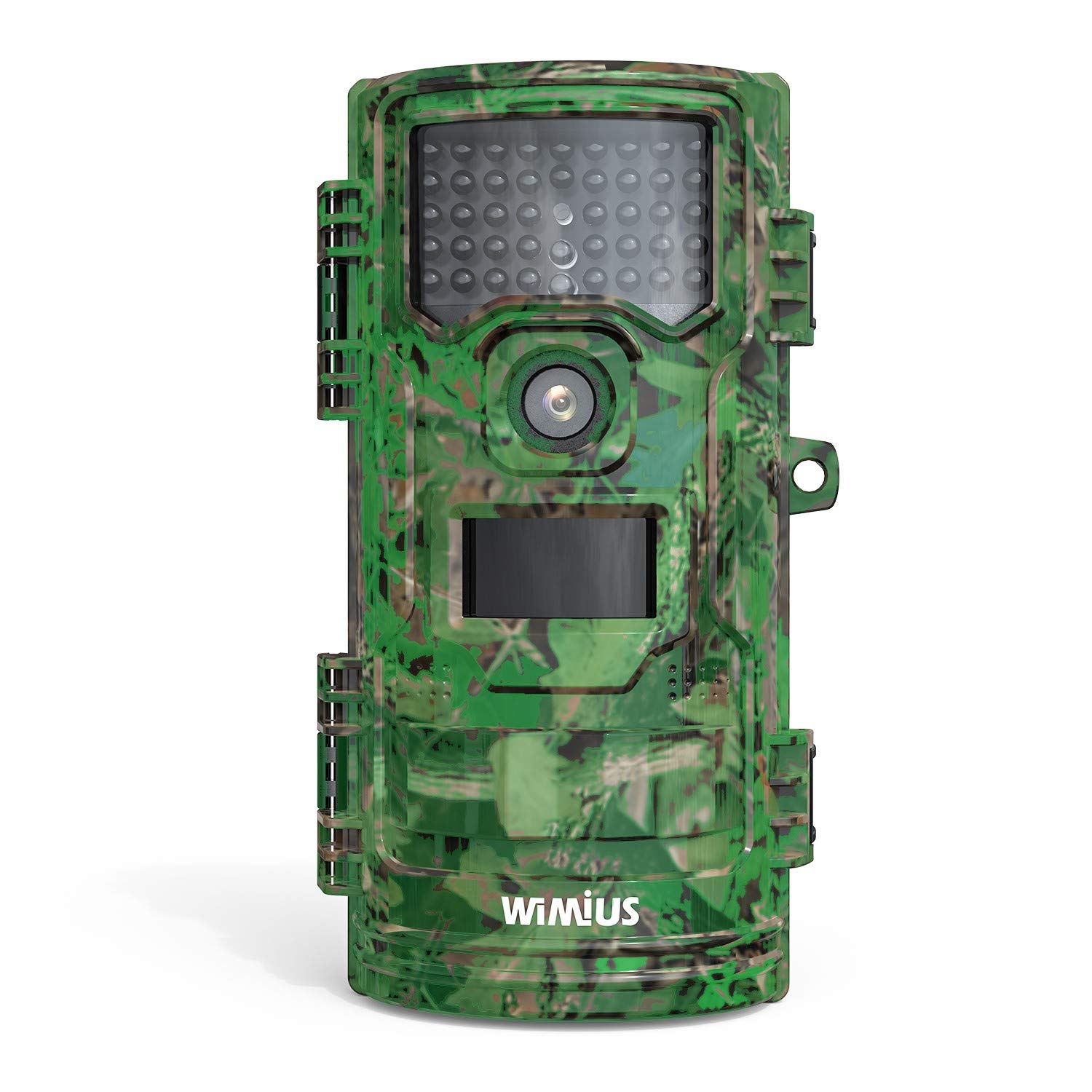
Obrázek 1: Přední view of the WiMiUS H7 Trail Game Camera. This image displays the front of the WiMiUS H7 Trail Game Camera, featuring a camouflage design. Visible components include the main camera lens, the Passive Infrared (PIR) motion sensor, and the array of infrared LEDs for night vision. The camera's robust casing is designed for outdoor use.
Klíčové komponenty:
- Hlavní objektiv: Captures photos and videos.
- PIR Motion Sensor: Detekuje pohyb pro spuštění nahrávání.
- IR LED: Zajišťují osvětlení pro noční vidění bez viditelného světla.
- 2.4palcový LCD displej: Pro navigaci v menu, úpravu nastavení a přehrávání.
- Ovládací tlačítka: Menu, Up, Down, OK for navigation.
- Přihrádka na baterie: Pojme 8 AA baterií.
- Slot pro kartu Micro SD: For storage of captured media.
- Montážní body: For strap, tripod, or wall mount.
3. Nastavení
3.1 Instalace baterie
- Open the camera's front cover latches.
- Vyhledejte přihrádku na baterii na zadní straně fotoaparátu.
- Insert 8 new AA batteries (not included), ensuring correct polarity (+/-).
- Bezpečně zavřete kryt prostoru pro baterie.
3.2 Instalace karty Micro SD
- With the camera open, locate the Micro SD card slot.
- Vložte kartu Micro SD (až 32 GB, není součástí balení) do slotu, dokud nezacvakne.
- It is recommended to format the Micro SD card before first use (see Section 3.4).
3.3 Montáž fotoaparátu
The camera offers several mounting options:
- Popruh: Use the included strap to attach the camera to a tree or post.
- Stativ: The camera has a standard tripod screw mount on the bottom.
- Montáž na stěnu: Utilize the provided mount for fixed installations.
3.4 Initial Settings (Test Mode)
Slide the power switch from "Off" to "Test" to access the camera's menu and settings on the LCD screen.
- Jazyk: Vyberte preferovaný jazyk (např. angličtinu).
- Datum a čas: Nastavte aktuální datum a čas.
- režim: Choose between Photo, Video, or Photo+Video.
- Interval PIR: Adjust the delay between motion detections (e.g., 5 sec, 10 sec, 30 sec, 1 min).
- PIR Level: Set motion sensor sensitivity (Low, Middle, High).
- Capture Num: Number of photos taken per trigger (1, 2, 3).
- Délka videa: Duration of video recording per trigger (e.g., 10 sec, 30 sec, 1 min).
- Velikost videa: Select video resolution (e.g., 1080P 30fps, 720P 30fps).
- Velikost fotografie: Select photo resolution (e.g., 16M, 12M, 8M).
- Pohotovostní režim: Normal or Super.
- IR LED: Adjust infrared LED power (High, Middle, Low).
- Záznam zvuku: Povolit nebo zakázat nahrávání zvuku u videí.
- Časosběr: Set intervals for time-lapse photography.
- Nastavení časovače: Definujte konkrétní provozní hodiny pro kameru.
- Bezpečnostní kód: Nastavte heslo pro ochranu přístupu ke kameře.
- Formát: Select "Yes" to format the Micro SD card. This will erase all data on the card.
- Výchozí: Restore camera settings to factory defaults.
4. Ovládání fotoaparátu
4.1 Activating Recording
- After configuring settings in "Test" mode, slide the power switch to the "On" position.
- A red LED will flash, indicating a 15-second countdown. This allows you to close the camera and position it without triggering immediate recording.
- Once the countdown finishes, the camera enters active monitoring mode. It will automatically capture photos or videos based on your settings when motion is detected.
4.2 Viewnahrávky
Můžete view captured media directly on the camera or on a computer.
- Před kamerou: Switch the camera to "Test" mode. Use the navigation buttons to browse and play back photos and videos on the LCD screen.
- V počítači: Remove the Micro SD card from the camera and insert it into a computer's card reader. The media files pak lze přistupovat a viewvyd.
5. Údržba
- Čištění: Gently clean the camera lens, PIR sensor, and IR LEDs with a soft, dry cloth. Avoid abrasive materials or harsh chemicals.
- Kontrola baterie: Regularly check battery levels, especially before extended deployment. Replace all batteries simultaneously to ensure consistent power.
- Správa SD karet: Periodically format the Micro SD card to maintain optimal performance and prevent data corruption. Back up important files před formátováním.
- Vodotěsné těsnění: Ensure the rubber seals around the battery compartment and camera housing are clean and properly seated to maintain waterproof integrity.
- Skladování: When not in use, store the camera in a cool, dry place, away from direct sunlight and extreme temperatures. Remove batteries for long-term storage.
6. Řešení problémů
Běžné problémy a řešení:
- Kamera se nezapíná:
Řešení: Check if batteries are inserted correctly with proper polarity. Ensure batteries have sufficient charge. Try new batteries. - Nebyly pořízeny žádné fotografie/videa:
Řešení: Verify the Micro SD card is inserted correctly and has available space. Format the SD card. Check PIR sensor sensitivity and interval settings. Ensure the camera is in "On" mode, not "Test" or "Off". - Špatná kvalita obrazu/videa:
Řešení: Clean the camera lens. Adjust photo/video resolution settings. Ensure the camera is stable and not subject to excessive movement. For night images, ensure IR LEDs are not obstructed. - Nadměrné vybíjení baterie:
Řešení: Use high-quality alkaline or rechargeable AA batteries. Reduce PIR sensitivity or increase PIR interval. Ensure the camera is not constantly triggered by environmental factors (e.g., swaying branches). - Incorrect Date/Time Stamp:
Řešení: Re-enter the correct date and time in the settings menu.
7. Specifikace
| Efektivní rozlišení | 16 MP (Maximum 20 MP) |
| Rozlišení záznamu videa | 1080p |
| Velikost obrazovky | 2.4 palce |
| Úroveň odolnosti proti vodě | Vodotěsný (IP54) |
| Zdroj napájení | 8 AA Batteries (4 AA minimum required) |
| Typ paměti Flash | Micro SD (až 32 GB) |
| Speciální funkce | Pohybový senzor, noční vidění |
| Provozní teplota | Až 60 stupňů Celsia |
| Technologie připojení | Bezdrátové (Wi-Fi) |
| Číslo modelu položky | CEX107 |
8. Záruka a podpora
8.1 Informace o záruce
Your WiMiUS H7 Trail Game Camera is covered by a limited warranty against defects in materials and workmanship. Please refer to the warranty card included with your purchase or visit the official WiMiUS webkonkrétní podmínky.
8.2 Zákaznická podpora
For technical assistance, troubleshooting, or warranty claims, please contact WiMiUS customer support through their official website or the contact information provided with your product packaging. When contacting support, please have your model number (H7 or CEX107) and purchase details ready.