Zavedení
Děkuji za nákupasing the Artlii Stone Full HD 1080P Projector. This manual provides essential information for setting up, operating, and maintaining your projector to ensure optimal performance and longevity. Please read this manual thoroughly before using the product and keep it for future reference.
The Artlii Stone projector delivers a native 1080P resolution, supporting 4K content, with 7200L brightness and an 8000:1 contrast ratio. It features a 75%-100% zooming function, a 300-inch projection screen capability, and a HIFI level built-in speaker. Connectivity options include dual HDMI, VGA, and USB inputs, making it versatile for various home theater and presentation needs.
Bezpečnostní informace
To prevent fire or electric shock, do not expose this appliance to rain or moisture. To avoid electric shock, do not open the cabinet. Refer servicing to qualified personnel only.
- Nedívejte se přímo do objektivu projektoru, když je zapnutýamp je zapnuto.
- Zajistěte dostatečné větrání kolem projektoru. Neblokujte větrací otvory.
- Používejte pouze napájecí adaptér dodaný s projektorem.
- Chraňte projektor před vodou nebo jinými tekutinami.
- Během bouřek nebo pokud jej delší dobu nepoužíváte, odpojte projektor ze zásuvky.
- Do not attempt to repair this product yourself. Contact qualified service personnel for assistance.
Obsah balení
Ověřte, zda je v balení obsaženo vše:

The image displays the Artlii Stone projector along with its standard accessories. These include the projector unit, a remote control (batteries not included), a power cable, an AV cable, an HDMI cable, and the instruction manual.
- Artlii Stone Projector
- Napájecí kabel
- Dálkové ovládání (baterie nejsou součástí balení)
- AV kabel
- HDMI kabel
- Návod k použití
Konec produktuview
Familiarize yourself with the main components and ports of your Artlii Stone projector.

Tento obrázek ukazuje přední a horní část view of the Artlii Stone projector, highlighting its sleek design, the main projection lens, and the focus/keystone adjustment dials located on the top surface.

The rear panel of the Artlii Stone projector is displayed, detailing the various connectivity ports. These include an SD Card slot, two HDMI ports, a USB port, and a VGA port, along with an audio output jack.
Klíčové komponenty:
- Projekční čočka: Vysílá obraz na obrazovku.
- Zaostřovací kroužek: Upravuje jasnost promítaného obrazu.
- Korekce lichoběžníkového zkreslení: Opravuje lichoběžníkové zkreslení obrazu.
- Ovládací panel: Tlačítka pro základní navigaci a nastavení.
- Vstupní porty: HDMI (x2), USB, VGA, Audio Output, Micro SD.
- Větrací otvory: Pro odvod tepla.
- Vestavěný reproduktor: Poskytuje zvukový výstup.
Nastavení
1. Placement and Projection Size
Position the projector on a stable, flat surface. The distance from the projector to the screen will determine the size of the projected image. Refer to the diagram below for recommended projection distances and corresponding screen sizes.

This diagram illustrates the relationship between projection distance and screen size. For example, a distance of 1.7m yields a 50-inch screen, 2.6m for an 80-inch screen, and up to 9.2m for a 300-inch screen.
- Minimum Projection Distance: 2 meters (approx. 50 inches)
- Maximum Projection Distance: 9 meters (approx. 300 inches)
2. Připojení napájení
Connect the supplied power cable to the projector's power input port and then plug the other end into a wall outlet (AC 90-240V, 50-60Hz).
3. Připojení vstupních zařízení
The Artlii Stone projector supports various input sources. Choose the appropriate cable and port for your device.

This image illustrates the wide range of devices compatible with the Artlii Stone projector. It shows connections for game consoles, Blu-ray/DVD players, home cinema systems, TV boxes, iPads/Tablets, streaming devices (like Roku, Chromecast), USB drives, and SD cards.
- HDMI: Connect Blu-ray players, game consoles, laptops, TV sticks, etc., using an HDMI cable. The projector has two HDMI ports.
- USB: Vložte USB flash disk pro přehrávání médií files přímo.
- VGA: Connect older computers or laptops using a VGA cable.
- Micro SD: Vložte kartu Micro SD pro přehrávání médií files.
- AV: Use the supplied AV cable to connect devices with RCA outputs.
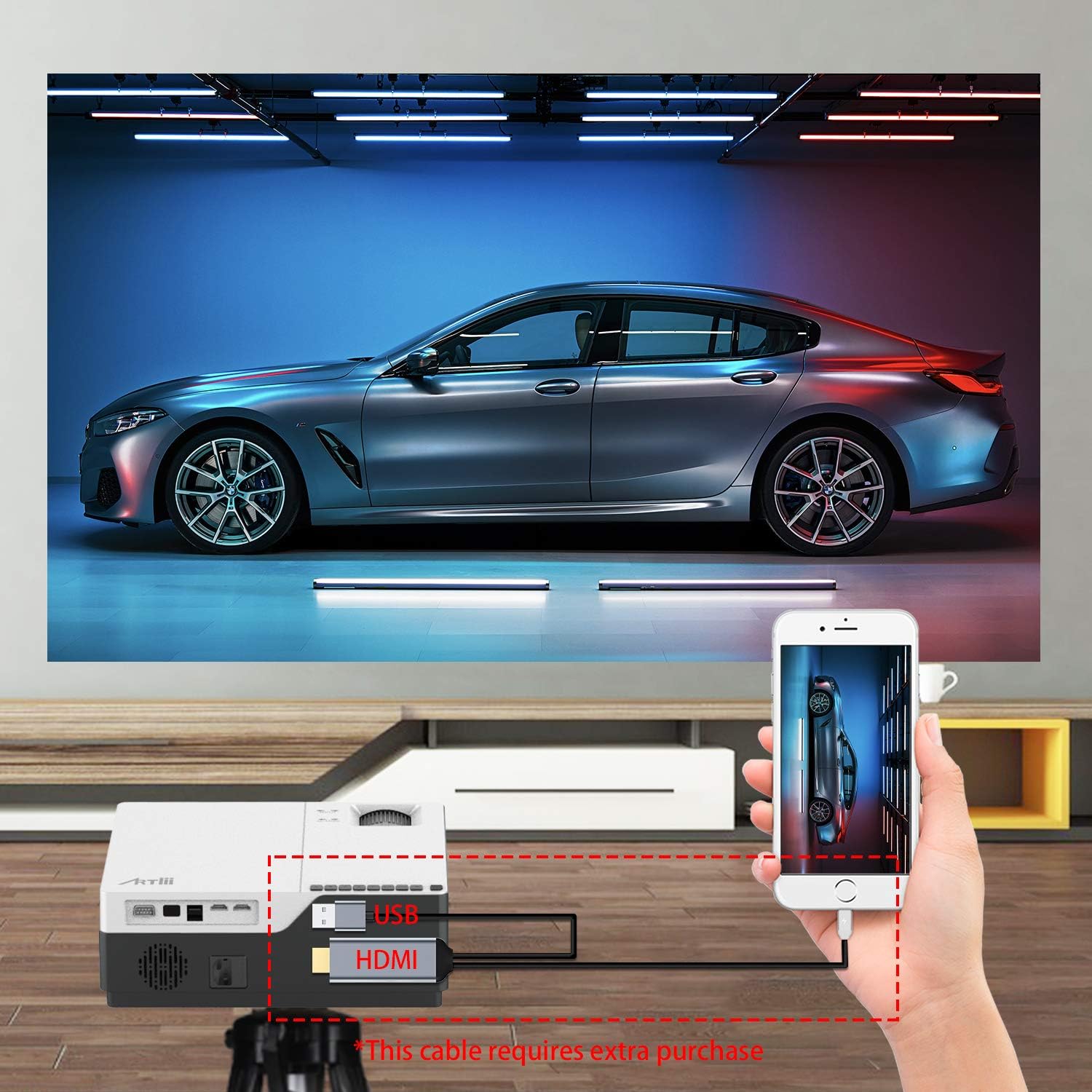
This image demonstrates connecting a smartphone to the projector. Note that an additional cable (not included) may be required for smartphone connectivity, typically an MHL to HDMI adapter or a USB-C to HDMI adapter, depending on the phone model.
4. Zaostření a korekce lichoběžníkového zkreslení
After powering on and selecting an input source, adjust the image for clarity and shape.
- Soustředit: Otáčejte zaostřovacím kroužkem na objektivu projektoru, dokud se obraz nezobrazí ostrý a jasný.
- Korekce lichoběžníkového zkreslení: If the projected image appears trapezoidal (wider at the top or bottom), use the keystone correction dial to adjust it into a perfect rectangle. The projector supports ±15 degrees keystone correction.
Provozní
1. Zapnutí/vypnutí
- Zapnutí: Stiskněte tlačítko napájení na projektoru nebo na dálkovém ovladači.
- Vypnout: Znovu stiskněte tlačítko napájení. Projektor se přepne do pohotovostního režimu.
2. Navigace v menu
Use the buttons on the projector's control panel or the remote control to navigate the on-screen menu. Select input sources, adjust picture settings (brightness, contrast, color), and sound settings.
3. Funkce zoomu
The Artlii Stone projector features a digital zoom function, allowing you to adjust the screen size without moving the projector.

This image illustrates the projector's zoom capability, allowing the user to reduce the screen size from 100% down to 75% using the remote control, providing flexibility in screen fitting without physical repositioning.
- Nastavení zoomu je možné nastavit prostřednictvím nabídky projektoru.
- Adjust the zoom factor between 75% and 100% to fit your screen or wall.
4. Zvukový výstup
The projector has a built-in HIFI level speaker. For external audio, connect speakers or a sound system to the Audio Output port.
Údržba
- Čištění objektivu: K jemnému otření čočky projektoru použijte měkký hadřík bez žmolků, speciálně určený pro optické čočky. Nepoužívejte abrazivní čisticí prostředky ani hadříky.
- Odstranění prachu: Regularly clean the projector's exterior with a soft, dry cloth. Use a small brush or compressed air to clear dust from ventilation openings.
- Skladování: Pokud projektor delší dobu nepoužíváte, skladujte jej na chladném a suchém místě, chráněném před prachem a extrémními teplotami.
Odstraňování problémů
| Problém | Možná příčina | Řešení |
|---|---|---|
| Na obrazovce není žádný obraz | Power cable loose; Incorrect input source; Device not connected properly. | Check power connection; Select correct input source (HDMI, USB, VGA); Ensure device is connected securely. |
| Obraz je rozmazaný | Není nastavené zaostření; Projektor je příliš blízko/daleko od promítací plochy. | Nastavení zaostřovacího kroužku; Nastavení projekční vzdálenosti. |
| Obrázek je lichoběžníkový | Lichoběžníkové zkreslení nebylo upraveno. | Upravte kolečko pro korekci lichoběžníkového zkreslení. |
| Žádný zvuk | Příliš nízká hlasitost; Ztlumeno; Externí reproduktory nejsou připojeny/napájeny. | Zvyšte hlasitost; Zapněte zvuk; Zkontrolujte připojení a napájení externích reproduktorů. |
| Dálkové ovládání nefunguje | Vybité/nesprávně vložené baterie; Překážka mezi dálkovým ovladačem a projektorem. | Vyměňte baterie; Zajistěte nerušený výhled na infračervený přijímač. |
Specifikace
| Funkce | Detail |
|---|---|
| Operační systém | Linux |
| Projekční technologie | TFT LCD |
| Projekční vzdálenost | 2-9 m |
| Velikost projekce | 50-300 palců |
| Nativní rozlišení | 1920x1080 pixelů (Full HD) |
| Lamp Typ | LED |
| LED diodaamp Život | 55,000 hodin |
| Poměr házení | 1.35 |
| Kontrastní poměr | 8000:1 |
| Faktor zvětšení | 75–100 % |
| Korekce lichoběžníkového zkreslení | ±15 stupňů |
| Režim projekce | Front projection, Rear projection, Lifting |
| Materiál | Kov + ABS |
| Vestavěný reproduktor | Ano |
| Vstupní objemtage | AC 90-240V, 50-60Hz |
| Konektory | HDMI x2, USB, Audio Output, Micro SD |
| Hmotnost | 5.7 lb (2.59 kg) |
| Rozměr (D x Š x V) | 9.1 x 12.1 x 4.1 palce (23.1 x 30.7 x 10.4 cm) |
Poznámka: Specifikace se mohou změnit bez předchozího upozornění.
Záruka a podpora
The Artlii Stone Projector comes with a comprehensive warranty and support:
- Money Back Policy: 1-month 100% Money Back Policy.
- Factory Policy: 1-year factory policy.
- certifikace: FCC, RoHS, and CE certified.
- Local Maintenance: Artlii provides a local maintenance center with professional engineers to assist you.
For any inquiries or technical assistance, please refer to the contact information provided on the Artlii official webwebu nebo v dokumentaci k nákupu.


