1. Úvod
This manual provides essential information for the safe and effective operation, setup, and maintenance of your KERN DB 50-2 Digital Torque Meter. Please read this manual thoroughly before using the device and keep it for future reference.
The KERN DB 50-2 is designed for precise torque testing of various tools, including torque wrenches, electric manual screwdrivers, and cordless screwdrivers. It features a robust metal housing suitable for demanding industrial environments.
2. Bezpečnostní informace
Vždy dodržujte následující bezpečnostní opatření, abyste předešli zranění a poškození zařízení:
- Během provozu se ujistěte, že je zařízení umístěno na stabilním a rovném povrchu.
- Do not exceed the maximum measuring range of 50 Nm.
- Nevystavujte zařízení extrémním teplotám, vlhkosti nebo korozivním látkám.
- Nepokoušejte se zařízení rozebírat ani opravovat sami. Obraťte se na kvalifikovaný servisní personál.
- Udržujte zařízení čisté a bez prachu a nečistot.
3. Konec produktuview
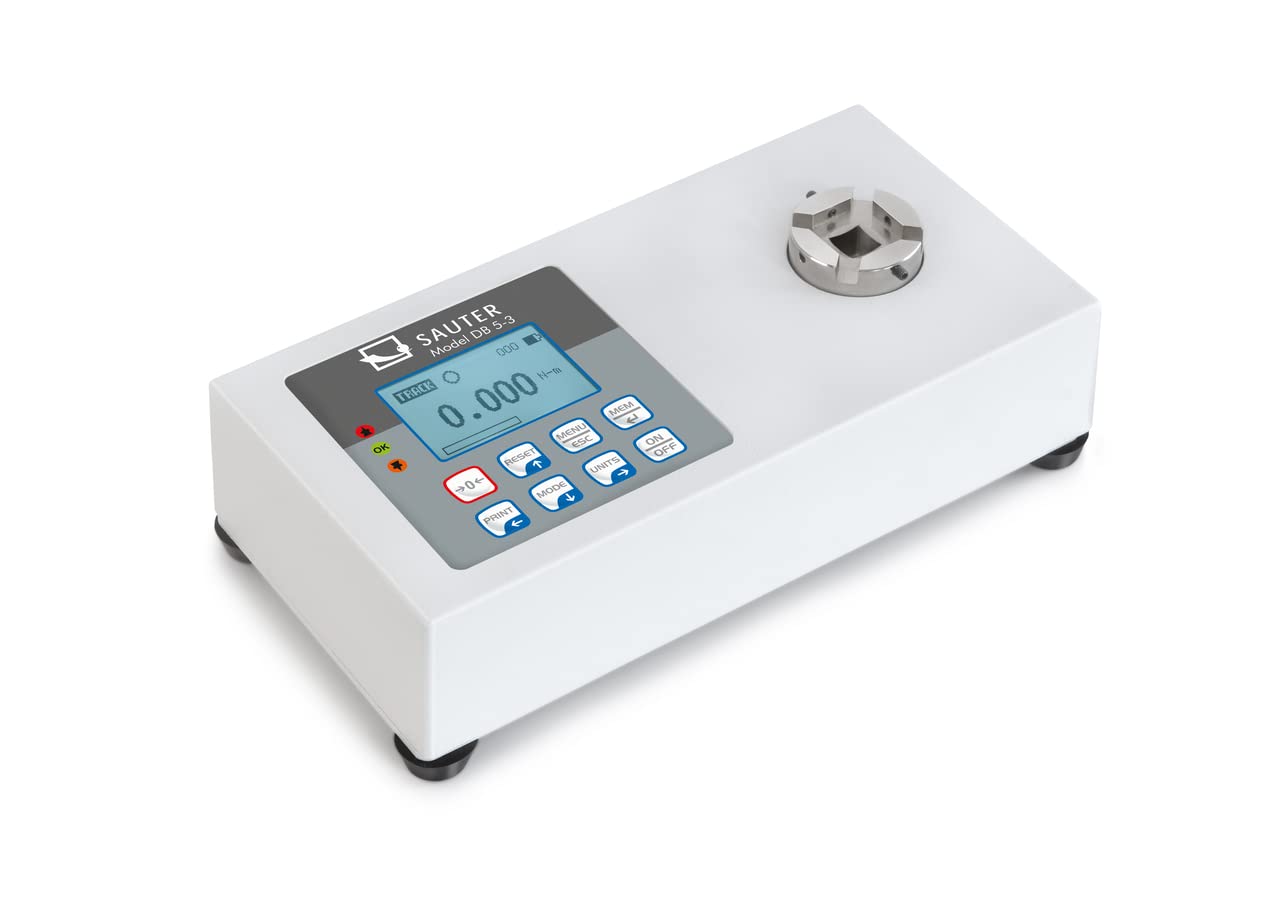
The KERN DB 50-2 Digital Torque Meter is equipped with several features to ensure accurate and convenient torque measurement:
- Rotary Transducer System: Enables dynamic testing of electric screwdrivers.
- Kovové pouzdro: Provides durability for rugged environmental conditions.
- Displej kapacity: A visual strip indicates the remaining measurement range.
- Backlit Graphic LCD Display: Zajišťuje jasnou čitelnost za různých světelných podmínek.
- Protiskluzové gumové nožičky: Zajišťuje stabilitu během používání.
- Sturdy Mounting Plate: For solid mounting.
- Datová rozhraní: USB and RS-232 are included for data transfer.
- Interní datová paměť: Ukládá až 500 naměřených datových bodů.
- Funkce Peak Hold: Captures and displays the maximum torque value.
- Funkce stopy: Provides continuous measurement display.
- Obousměrné měření: Can be used in both clockwise and counter-clockwise directions.
- Tolerance Range (Limit Function): Allows programming of upper and lower limit values with acoustic and optical signals for measurement process support.
- Funkce automatického vypnutí: Šetří výdrž baterie.
4. Nastavení
- Rozbalení: Carefully remove the torque meter and all accessories from the packaging. Inspect for any signs of damage.
- Umístění: Place the device on a stable, vibration-free surface. Ensure adequate space for operation and connection of tools.
- Připojení napájení: Connect the appropriate power adapter (if applicable) or ensure batteries are correctly installed.
- Montáž (volitelné): If using the sturdy mounting plate, secure the device firmly to a workbench or designated testing station.
- Počáteční zapnutí: Stiskněte tlačítko ON/OFF button to power on the device. The display should illuminate and show the initial measurement screen.
5. Provoz
5.1 Základní měření
- Zapnutí: Stiskněte tlačítko ON/OFF tlačítko.
- Nulování: Ensure no load is applied to the transducer and press the RESETOVAT tlačítko pro vynulování displeje.
- Vyberte jednotku: Stiskněte tlačítko JEDNOTKY button to cycle through available measurement units (e.g., N-m, lbf-ft).
- Použitý točivý moment: Carefully apply torque to the transducer using the tool to be tested. The display will show the real-time torque value.
- Měření odečtu: For peak hold, the maximum value will be displayed. For track mode, the value updates continuously.
5.2 Peak Hold and Track Function
The device supports both Peak Hold and Track functions. Use the MODE tlačítko pro přepínání mezi těmito režimy.
- Peak Hold: Displays and holds the maximum torque value reached during a measurement cycle.
- Dráha: Displays the torque value in real-time as it is applied.
5.3 Tolerance Range (Limit Function)
To set upper and lower tolerance limits:
- Enter the menu by pressing MENU/ESC.
- Navigate to the "Limits" or "Tolerance" setting using the arrow buttons.
- Set the desired upper and lower torque values.
- Confirm settings. During measurement, an acoustic and optical signal will indicate if the applied torque is within, above, or below the set limits.
5.4 Ukládání a přenos dat
The device can store up to 500 measurement data points internally. To access and transfer data:
- Stiskněte tlačítko MEM tlačítko pro review uložená data.
- Connect the device to a PC using the provided USB or RS-232 interface cable.
- Use optional software (not included) to transfer the memory content to the PC for analysis and archiving.
6. Údržba
- Čištění: Otřete zařízení měkkým, damp tkanina. Nepoužívejte abrazivní čisticí prostředky nebo rozpouštědla.
- Skladování: When not in use, store the torque meter in its robust carrying case in a dry, dust-free environment.
- Kalibrace: Regular calibration by authorized service personnel is recommended to maintain measurement accuracy. Refer to the manufacturer's guidelines for calibration intervals.
- Výměna baterie: If the device uses batteries, replace them as indicated by the low battery warning on the display. Ensure correct polarity.
7. Řešení problémů
Tato část se zabývá běžnými problémy, se kterými se můžete setkat. V případě problémů, které zde nejsou uvedeny, kontaktujte zákaznickou podporu.
| Problém | Možná příčina | Řešení |
|---|---|---|
| Zařízení se nezapne. | Žádné napájení, vybité baterie nebo vadný napájecí adaptér. | Check power connection, replace batteries, or try a different power source. |
| Nepřesné údaje. | Device not zeroed, overload, or needs calibration. | Press RESET button, ensure load is within range, or schedule calibration. |
| Displej zobrazuje chybovou zprávu. | Overload, internal fault, or incorrect operation. | Refer to specific error codes in a more detailed manual (if available) or contact support. Remove load and restart. |
8. Specifikace
- Model: KERN DB 50-2
- Rozsah měření: 50 Nm
- Rozměry produktu: 3.94 x 7.87 x 1.97 palce
- Hmotnost produktu: 7.39 libry
- Výrobce: KERN & SOHN GmbH
- Datová rozhraní: USB, RS-232
- Vnitřní paměť: Up to 500 measurement data points
9. Obsah krabice
Po rozbalení byste měli najít následující položky:
- KERN DB 50-2 Digital Torque Meter (Torque Gauge)
- Rotační převodník
- Robustní přepravní pouzdro
- Montážní deska
- USB kabel
- Kabel RS-232
- Uživatelská příručka (tento dokument)
10. Záruka a podpora
For warranty information, technical support, or service inquiries, please contact KERN & SOHN GmbH directly or your authorized dealer. Keep your purchase receipt as proof of purchase.
Manufacturer: KERN & SOHN GmbH
For the most up-to-date support information, please visit the official KERN webmísto.


