Konec produktuview
The MUSE MT-201 is a retro-style portable turntable designed for playing vinyl records, streaming music via Bluetooth, and digitizing your vinyl collection to USB. It features built-in stereo speakers, an AUX input for external devices, and RCA output for connecting to an external ampzvlhčovač nebo reproduktory.
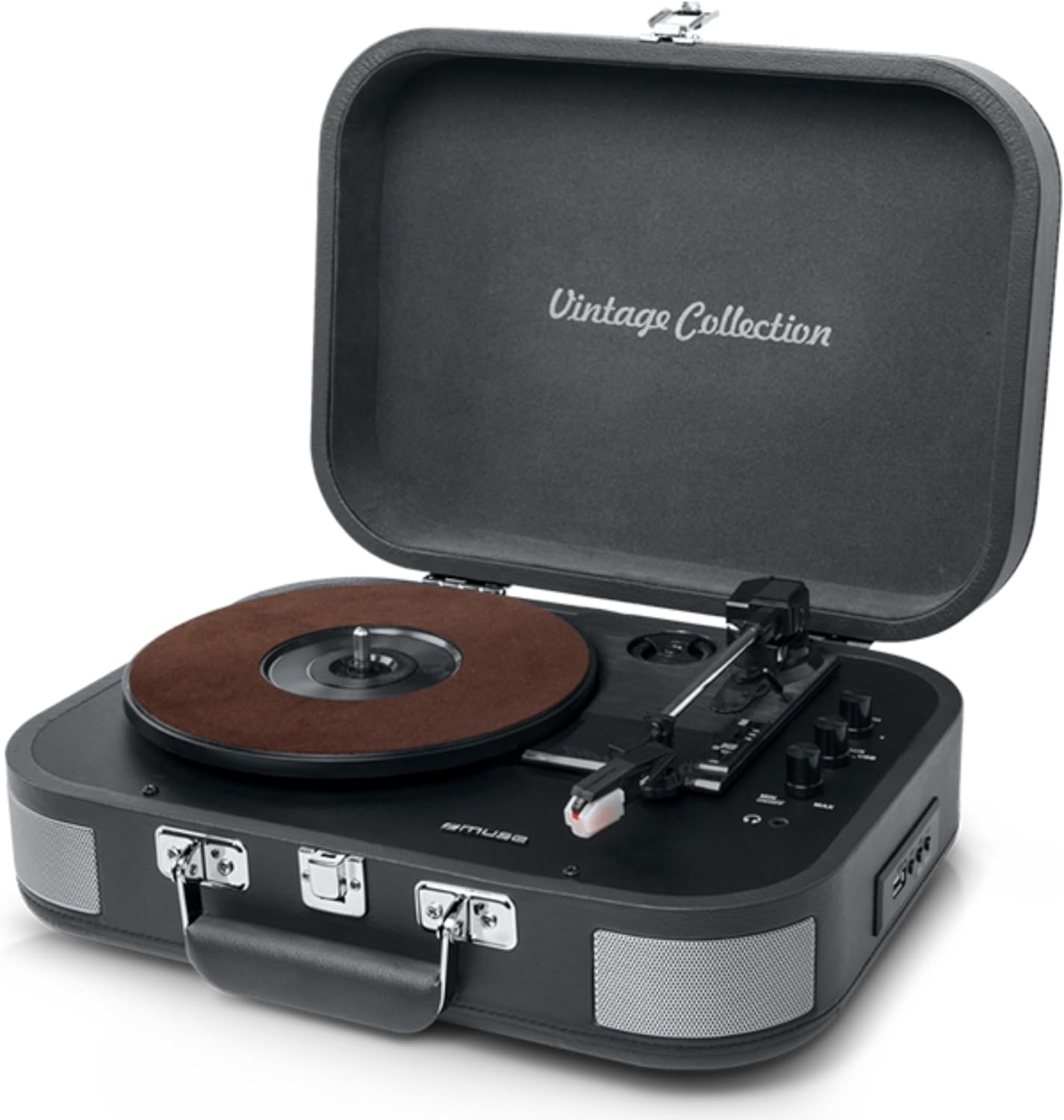
Figure 1: The MUSE MT-201 Retro Turntable in its open position, showcasing the record platter, tonearm, and control knobs. The case features a 'Vintage Collection' inscription on the lid.

Figure 2: The MT-201 turntable placed on a wooden surface in a home environment, highlighting its compact and portable design. The lid is open, ready for record playback.
Klíčové vlastnosti
- 3rychlostní gramofon: Podporuje desky s rychlostí přehrávání 33, 45 a 78 otáček za minutu.
- Funkce automatického zastavení: Automatically stops playback at the end of a record.
- Bluetooth připojení: Streamujte hudbu bezdrátově z kompatibilních zařízení.
- USB Playback & Recording: Přehrát MP3 files from a USB stick or digitize vinyl records directly to USB without a PC.
- Vstup AUX: Připojte externí zdroje zvuku, jako jsou MP3 přehrávače.
- RCA výstup: Připojte k externímu amplifiers or powered speakers for enhanced audio.
- Sluchátkový jack: Pro soukromý poslech.
- Vestavěné stereo reproduktory: Integrované reproduktory pro okamžité přehrávání.
- Přenosný design: Housed in a briefcase-style cabinet for easy transport.

Figure 3: An infographic highlighting key features such as stereo playback (33/45/78 RPM), Bluetooth streaming, vintage wood casing, and automatic shut-off for safety.

Figure 4: This image emphasizes the vintage design of the turntable, showing it both closed as a portable case and open for playback, illustrating its blend of classic aesthetics with modern functionality.
Obsah balení
Zkontrolujte prosím, zda jsou v balení přítomny všechny položky:
- MUSE MT-201 Turntable
- AC adaptér
- Additional Stylus (x1pc)
- Adaptér 45 RPM
- Návod k použití
Nastavení
- Rozbalení: Opatrně vyjměte gramofon z obalu. Obal si uschovejte pro budoucí přepravu nebo skladování.
- Umístění: Umístěte gramofon na stabilní, rovný povrch mimo dosah přímého slunečního záření, zdrojů tepla a nadměrného prachu či vibrací.
- Připojení napájení: Connect the supplied AC adapter to the DC IN jack on the back of the turntable and then plug the adapter into a standard wall outlet.
- Lid Opening: Otevřete víko otočného talíře.
- Ochrana stylusu: Remove the stylus protective cap from the needle before use.
Návod k obsluze
Přehrávání vinylových desek
- Zapnutí: Turn the POWER/VOLUME knob clockwise to power on the unit and adjust the volume.
- Vyberte režim: Set the FUNCTION switch to PHONO mode.
- Vyberte rychlost: Place a record on the platter. Select the appropriate speed (33, 45, or 78 RPM) using the SPEED selector switch. Use the 45 RPM adapter for 7-inch singles.
- Spustit přehrávání: Gently lift the tonearm using the cue lever and position the stylus over the desired track on the record. Lower the tonearm slowly onto the record.
- Automatické zastavení: The turntable features an auto-stop function that will automatically stop the platter rotation when the record finishes. To disable this, set the AUTO STOP switch to OFF.
- Ukončit přehrávání: At the end of the record, lift the tonearm, return it to the tonearm rest, and lower the cue lever.
Připojení Bluetooth
- Vyberte režim: Set the FUNCTION switch to BT (Bluetooth) mode. The Bluetooth indicator will flash.
- Párování: Enable Bluetooth on your mobile device (smartphone, tablet, etc.) and search for the device named "MUSE MT-201".
- Připojit: Select "MUSE MT-201" from the list of available devices. Once connected, the Bluetooth indicator will stop flashing and remain solid.
- Přehrávání: You can now play music from your Bluetooth device through the turntable's speakers.
USB přehrávání a nahrávání
- USB přehrávání: Insert a USB flash drive into the USB port. Set the FUNCTION switch to USB mode. The unit will automatically detect and play compatible audio file(např. MP3).
- Nahrávání vinylu na USB: While playing a vinyl record, press the REC button to start recording. The recording indicator will light up. Press REC again to stop recording. The recorded audio will be saved as an MP3 file na USB disku.
Vstup AUX
- Připojit zařízení: Connect an external audio device (e.g., MP3 player, smartphone) to the AUX IN jack using a 3.5mm audio cable (not supplied).
- Vyberte režim: Set the FUNCTION switch to AUX mode.
- Přehrávání: Přehrávejte zvuk z připojeného zařízení. Zvuk bude vycházet z reproduktorů gramofonu.
Audio Outputs (RCA and Headphone)
- RCA výstup: Use RCA cables (not supplied) to connect the RCA OUT jacks on the back of the turntable to the audio input of an external amplifier or powered speakers. This bypasses the internal speakers.
- Sluchátkový jack: Plug 3.5mm headphones into the PHONES jack for private listening. The internal speakers will be muted when headphones are connected.
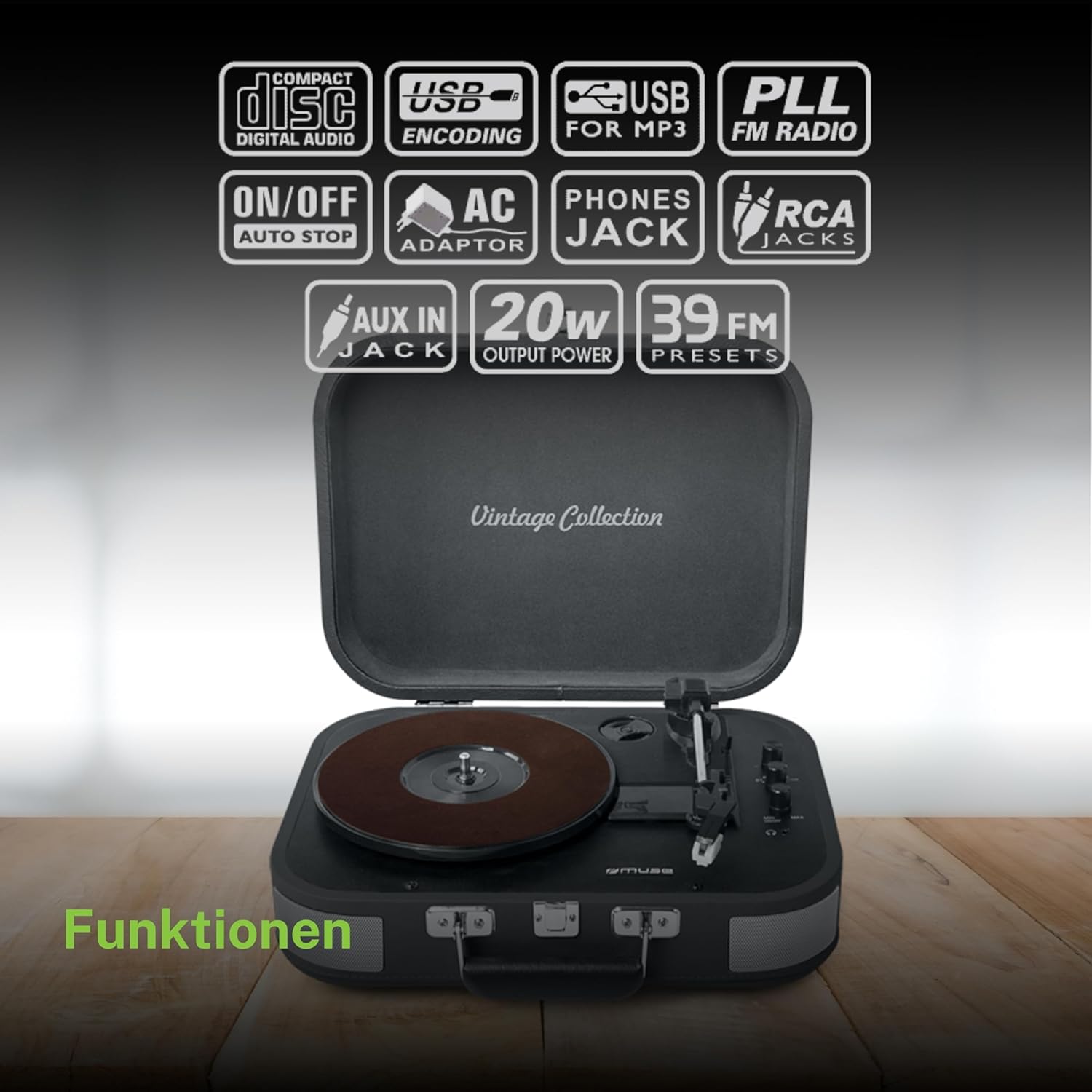
Obrázek 5: Overview of the various functions and connectivity options, including Compact Disc Digital Audio (though not a CD player, likely indicating digital audio compatibility), USB encoding for MP3, USB for MP3, PLL FM Radio (though not explicitly listed in features, may be a generic icon), ON/OFF Auto Stop, AC Adaptor, Phones Jack, RCA Jacks, AUX In Jack, 20W Output Power, and 39 FM Presets (again, FM radio not explicitly listed for this model).
Údržba
- Čištění skříně: Wipe the cabinet with a soft, slightly damp hadříkem. Nepoužívejte abrazivní čisticí prostředky, vosky ani rozpouštědla.
- Čištění stylusu: Use a soft brush to gently clean the stylus from back to front. Avoid touching the stylus with your fingers.
- Péče o záznamy: Udržujte své desky čisté a bez prachu. Skladujte je svisle v obalech, abyste zabránili jejich deformaci.
- Výměna stylusu: The stylus has a limited lifespan. If sound quality deteriorates, replace the stylus with a new one (an additional stylus is included in the package).
Odstraňování problémů
| Problém | Možná příčina | Řešení |
|---|---|---|
| Žádná síla | Napájecí adaptér není připojen nebo je zásuvka vadná. | Ujistěte se, že je síťový adaptér bezpečně zapojený do zařízení a do funkční zásuvky. |
| Žádný zvuk z reproduktorů | Volume too low; Function mode incorrect; Headphones connected; RCA output connected. | Increase volume; Select correct function (PHONO, BT, USB, AUX); Disconnect headphones; Disconnect RCA cables if using internal speakers. |
| Přeskakování záznamu | Dirty or scratched record; Stylus worn out; Turntable not level; Excessive vibration. | Clean record; Replace stylus; Place turntable on a stable, level surface; Avoid placing near vibrating objects. |
| Bluetooth se nepřipojuje | Turntable not in BT mode; Device too far; Device already connected to another unit. | Set function to BT; Ensure device is within range (approx. 10m); Disconnect from other Bluetooth devices. |
| Nahrávání na USB nefunguje | USB drive full or incompatible format; Record not playing. | Ensure USB drive has sufficient space and is formatted correctly (FAT32); Ensure record is playing when REC button is pressed. |
Technické specifikace
| Funkce | Specifikace |
|---|---|
| Název modelu | MT-201 DG |
| Značka | MÚZA |
| Technologie připojení | USB, Bluetooth, AUX, RCA |
| Maximální rychlost otáčení | 78 otáček za minutu |
| Speciální funkce | Integrated Speaker, Adjustable Speed, Digital Recorder |
| Materiál | Plast |
| Hmotnost položky | 2.3 kg |
| Styl | Retro |
| Barva | Šedá |
| Rozměry produktu | 36 x 29 x 12.9 cm |
| Spotřeba energie (v zapnutém stavu) | 10 wattů |
| Jsou vyžadovány baterie | 1 AAAA Battery (not included, likely for remote if applicable, or internal clock/memory) |

Figure 6: A technical diagram illustrating the dimensions of the MUSE MT-201 turntable: 360mm (length), 290mm (width), and 129mm (height).


