1. Konec produktuview
The Intermatic ET2725C is a versatile electronic timer designed for precise control of electrical loads. It features an easy-to-use interface for scheduling, offering to-the-minute programming capabilities for a wide range of applications. This model supports 50 holiday blocks with independent scheduling and up to 96 ON/OFF events, accommodating complex scheduling requirements. A key feature is its 100-hour backup power, provided by a supercapacitor, eliminating the need for batteries.
Klíčové vlastnosti:
- 100-hour supercapacitor backup, eliminating battery requirements.
- Up to 96 programmable set points or events.
- Up to 50 holiday blocks with independent scheduling capabilities.
- Automatický vstup objtage selection from 120 to 277 Vac, 60 Hz.
- Additional mode of operation that converts ON/OFF buttons into 2-hour overrides.
2. Co je v krabici
Po otevření balení zkontrolujte, zda jsou všechny součásti přítomny a nepoškozené.
- Intermatic Electronic Timer (Model ET2725C)
- Návod k použití (tento dokument)
3. Bezpečnostní informace
VAROVÁNÍ: Nebezpečí požáru nebo úrazu elektrickým proudem
- Always disconnect power at the circuit breaker(s) or disconnect switch(es) before installing or servicing this equipment.
- More than one circuit breaker or disconnect switch may be required to de-energize the equipment completely before servicing.
- Installation and/or wiring must be performed in accordance with all national and local electrical code requirements.
- Use COPPER conductors ONLY for wiring connections.
- Do NOT remove the internal insulator.
For wiring, lift the terminal cover, remove the screw, and swing it aside. Replace the screw and plastic insulator covering the terminal before powering on the device.
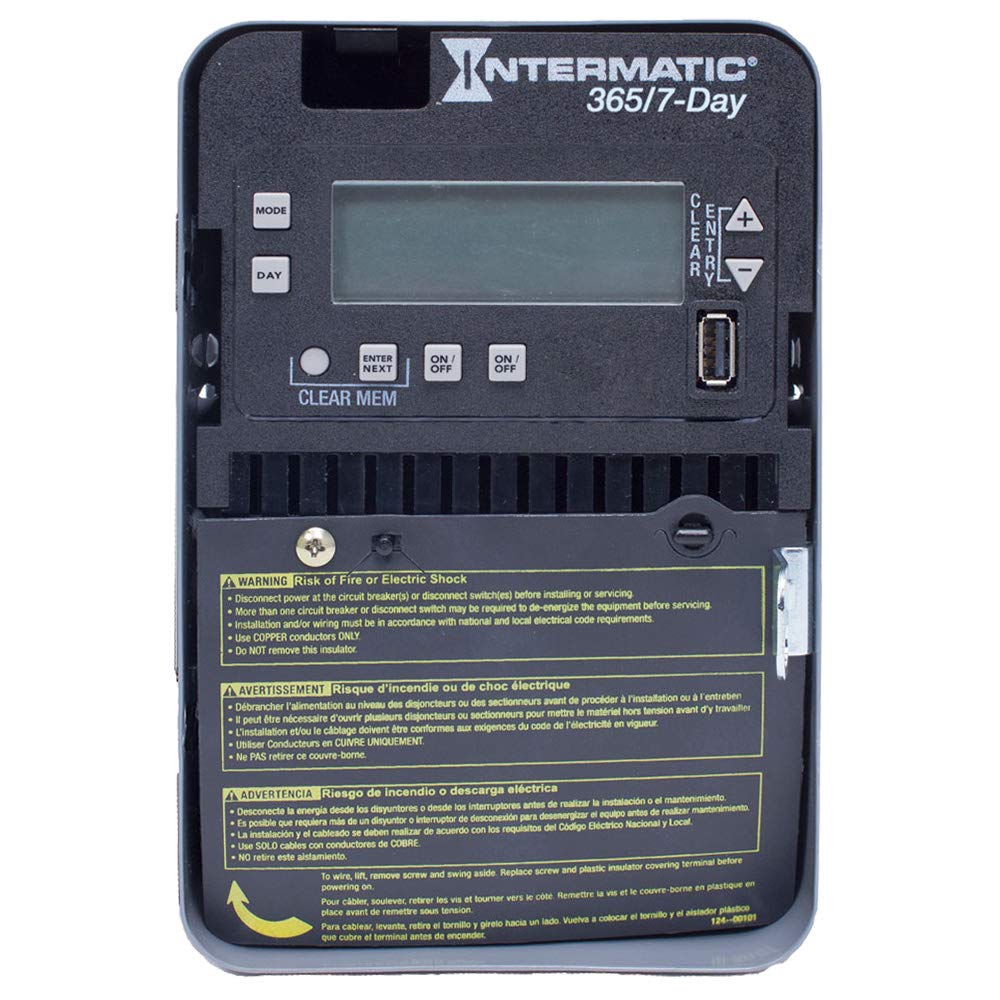
Figure 1: Front panel of the Intermatic ET2725C Electronic Timer, showing the display, control buttons (MODE, DAY, ENTER/NEXT, ON/OFF, CLEAR/ENTRY, +, -), and multi-language safety warnings at the bottom.
4. Instalace a zapojení
Proper installation is crucial for the safe and reliable operation of the ET2725C timer. Ensure all safety precautions are followed.
4.1 Montáž
Mount the timer securely in a suitable enclosure or location, ensuring it is protected from environmental elements and accessible for programming and maintenance. Refer to local electrical codes for specific mounting requirements.
4.2 Pokyny pro zapojení
- Odpojit napájení: Before beginning any wiring, ensure that power to the circuit is completely disconnected at the main circuit breaker or disconnect switch. Verify with a voltage tester.
- Access Terminals: To access the wiring terminals, lift the terminal cover, remove the retaining screw, and swing the cover aside.
- Připojení kabeláže: Connect the appropriate copper conductors to the timer terminals as per the wiring diagram provided with the unit and local electrical codes. The timer supports 120 to 277 Vac, 60 Hz.
- Zabezpečená připojení: Ujistěte se, že všechny kabelové spoje jsou těsné a bezpečné.
- Replace Insulator: Before restoring power, replace the plastic insulator covering the terminals and secure the terminal cover with its screw. This is critical for safety.
- Obnovit napájení: Jakmile je veškeré zapojení dokončeno a ověřeno, obnovte napájení obvodu.
5. Obsluha a programování
The ET2725C timer features a user-friendly interface for setting time, date, and programming events. The display and buttons (MODE, DAY, ENTER/NEXT, ON/OFF, CLEAR/ENTRY, +, -) are used for navigation and input.
5.1 Initial Setup (Setting Time and Date)
- Při prvním zapnutí nebo po delším výpadku napájenítage (beyond 100 hours), the display may show default settings or require time/date input.
- Stiskněte tlačítko MODE tlačítko pro vstup do nabídky nastavení.
- Použijte + or - buttons to adjust the current time (hour and minute).
- Stiskněte DEN pro nastavení aktuálního dne v týdnu.
- Stiskněte ENTER/DALŠÍ to confirm settings and move to the next parameter.
- Continue adjusting year, month, and day as prompted until the current date and time are correctly set.
5.2 Programování událostí ZAP/VYP
The timer allows for up to 96 ON/OFF events. Each event can be programmed for specific times and days.
- Stiskněte MODE repeatedly until "PROG" or "EVENT" mode is displayed.
- Použití ENTER/DALŠÍ to select an event number (e.g., P1 ON).
- Použití + or - to set the desired ON time for the event.
- Stiskněte DEN to select the days of the week for this event (e.g., Mon-Fri, Daily, Weekends, or individual days).
- Stiskněte ENTER/DALŠÍ to move to the OFF time for the same event (e.g., P1 OFF).
- Repeat steps 3-4 for the OFF time.
- Pokračujte s ENTER/DALŠÍ to program additional events or exit programming mode.
5.3 Programování svátků
The ET2725C supports up to 50 holiday blocks, allowing for temporary schedule overrides for specific dates.
- Access the holiday programming mode (refer to the on-screen prompts or specific button combinations).
- Select a holiday block.
- Nastavte datum začátku a konce prázdnin.
- Define the desired ON/OFF state or program a specific schedule for the holiday period.
- Confirm and save the holiday block.
5.4 Ruční ovládání
The ON/OFF buttons can be used for manual overrides. In a specific mode, these buttons can provide a 2-hour override function, temporarily changing the load state without affecting the programmed schedule.
- Stiskněte tlačítko ON/OFF button to manually switch the load ON or OFF.
- In override mode, a single press may activate a 2-hour override. Consult the display for confirmation.
5.5 Clearing Memory
To clear all programmed events and reset the timer to factory defaults (excluding current time/date), use the CLEAR MEM function. This typically involves pressing and holding the CLEAR MEM button for a few seconds until the display confirms the reset.
6. Údržba
The Intermatic ET2725C timer is designed for long-term, reliable operation with minimal maintenance.
- Čištění: Periodically wipe the exterior of the timer with a soft, dry cloth. Do not use abrasive cleaners or solvents.
- Spojení: Annually, or as required by local codes, inspect wiring connections to ensure they remain tight and free from corrosion. Always disconnect power before inspecting connections.
- Superkondenzátor: The internal supercapacitor provides backup power for up to 100 hours. No user maintenance or replacement is required for this component.
7. Řešení problémů
If you encounter issues with your ET2725C timer, refer to the following common troubleshooting steps:
| Problém | Možná příčina | Řešení |
|---|---|---|
| Displej časovače je prázdný. | Jednotka není napájena; vypnul se jistič. | Check circuit breaker and ensure power is supplied to the timer. Verify wiring connections. |
| Programy neběží. | Incorrect time/date setting; program not enabled; manual override active. | Verify current time and date. Ensure programs are correctly set and enabled. Check for active manual overrides. |
| Load does not switch ON/OFF. | Incorrect wiring; faulty load; timer malfunction. | Verify wiring connections (power off first). Test the load independently. If issues persist, contact Intermatic support. |
| Čas/datum se resetuje po výpadku napájenítage. | Napájenítage exceeded 100-hour supercapacitor backup. | Reset the current time and date manually. This is normal behavior if the outage je prodloužené. |
If troubleshooting steps do not resolve the issue, please contact Intermatic customer support.
8. Specifikace
| Funkce | Detail |
|---|---|
| Číslo modelu | ET2725C |
| svtage | 120 to 277 Vac, 60 Hz (Automatic Selection) |
| Ampvymazat | 30 Amps |
| Provozní režim | 7/365 dní |
| Počet kanálů | 2 |
| Programové akce | Až 96 událostí ZAP/VYP |
| Holiday Blocks | Up to 50 with independent scheduling |
| Záložní napájení | 100-hour supercapacitor (no batteries required) |
| Materiál | Plast |
| Rozměry produktu | 7 cm H x 7 cm Š x 7 cm V (přibližně) |
| Hmotnost položky | 0.01 Ounces (approximate) |
9. Záruka a podpora
For warranty information, technical support, or service inquiries regarding your Intermatic ET2725C Electronic Timer, please contact Intermatic customer service directly. Refer to the official Intermatic webNejnovější kontaktní údaje a záruční podmínky naleznete na webu nebo na obalu produktu.
Výrobce: Intermatic
Datum první dostupnosti: 13. května 2019


