1. Úvod
This manual provides comprehensive instructions for the operation and maintenance of your Fetcus Universal Remote Control, designed for various Hitachi Air Conditioner models. Please read this manual thoroughly before using the remote control to ensure proper function and longevity.
This remote control is a direct replacement or compatible alternative for original Hitachi air conditioner remote models including RAS-D10EX, RAR-5E1, RAS-10XH1, RAR-5E2, RAR-5E3, RAR-5E4, RAR-5E5, RAR-5E6, and RAS-D14EX2.
2. Vlastnosti produktu
- Univerzální kompatibilita: Designed to work with a wide range of Hitachi air conditioner models.
- Infračervené připojení: Utilizes standard infrared signals for reliable communication with your AC unit.
- Dedicated AC Functions: Includes specific buttons for common air conditioner operations such as power, mode selection, temperature adjustment, fan speed, and more.
- Kompaktní design: Ergonomický a snadno ovladatelný.
- No App Support: Operates independently without the need for a smartphone application.
- Frekvence: Operates at 433 MHz for signal transmission.
3. Nastavení
3.1 Instalace baterie
The remote control requires appropriate batteries for operation. Follow these steps to install or replace batteries:
- Najděte přihrádku na baterie na zadní straně dálkového ovladače.
- Posuňte kryt přihrádky na baterie dolů nebo jej otevřete stisknutím západky.
- Insert new batteries, ensuring the positive (+) and negative (-) terminals align correctly with the markings inside the compartment. Typically, two AAA batteries are required, though specific battery type should be confirmed by checking the compartment markings.
- Kryt přihrádky na baterie bezpečně zavřete, dokud nezacvakne na místo.

Obrázek 3.1: Zadní view of the Fetcus remote control with the battery compartment open, revealing the two battery slots and a label with battery safety warnings. This image illustrates the correct orientation for battery insertion.
Důležité: Pokud dálkový ovladač nebudete delší dobu používat, vyjměte baterie, abyste zabránili vytečení baterií a poškození.
4. Návod k obsluze
Familiarize yourself with the buttons on your remote control. The remote features a main display and various control buttons for your air conditioner.
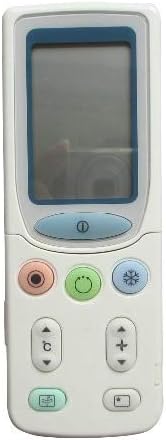
Obrázek 4.1: Přední view of the Fetcus remote control, highlighting the LCD screen and the primary control buttons for power, mode, and temperature adjustment.
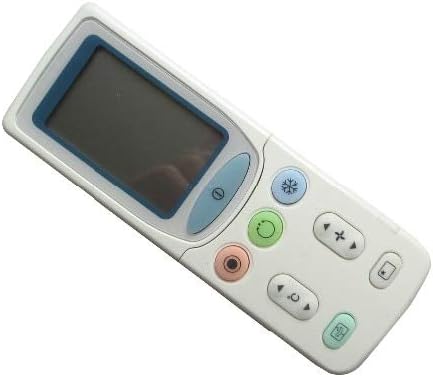
Obrázek 4.2: Úhlové view of the Fetcus remote control, showing the main display and primary function buttons including power, mode, and fan speed controls.
4.1 Základní funkce
- Tlačítko napájení (①): Stiskněte pro zapnutí nebo vypnutí klimatizace.
- Tlačítko režimu (↻): Press repeatedly to cycle through operating modes: Auto, Cool, Dry, Fan, Heat (if applicable to your AC unit).
- Tlačítka pro nastavení teploty (+ / -): Press to increase or decrease the desired temperature setting.
- Tlačítko rychlosti ventilátoru (❄): Press to adjust the fan speed (e.g., Auto, Low, Medium, High).
4.2 Advanced Functions (Under Sliding Cover)
Some advanced functions are accessible by sliding down the cover on the remote control. This reveals additional buttons for more specific controls.

Obrázek 4.3: Úhlové view of the Fetcus remote control with the sliding cover open, exposing additional advanced function buttons beneath the main display.
- Ovládání otáčení/žaluzií: Adjusts the direction of the airflow (vertical or horizontal swing).
- Timer/Sleep Mode: Sets a timer for the AC unit to turn on or off, or activates a sleep-friendly operating mode.
- C/F Switch (℃): Přepíná zobrazení teploty mezi stupni Celsia a Fahrenheita.
- Resetovací tlačítko: Used to reset the remote control settings or clear certain functions. Consult your AC unit's manual for specific reset procedures if needed.
- Other Specific Buttons: Depending on your specific Hitachi AC model, other buttons may control functions like Quiet mode, Turbo mode, or Health functions. Refer to your AC unit's original manual for detailed explanations of these specific icons.
5. Údržba
- Čištění: Dálkový ovladač otírejte měkkým, suchým hadříkem. Nepoužívejte tekuté čisticí prostředky ani abrazivní materiály, protože by mohly poškodit povrch nebo vnitřní součásti.
- Výměna baterie: Replace batteries when the remote's range decreases or the display becomes dim. Always replace all batteries at the same time with new ones of the same type.
- Skladování: Dálkový ovladač skladujte na chladném a suchém místě mimo přímé sluneční světlo a extrémní teploty.
6. Řešení problémů
| Problém | Možná příčina | Řešení |
|---|---|---|
| Dálkový ovladač nereaguje. | Vybité nebo nesprávně vložené baterie. | Vyměňte baterie a dbejte na správnou polaritu (+/-). |
| Dosah dálkového ovládání je špatný. | Slabé baterie; Překážka mezi dálkovým ovladačem a klimatizační jednotkou. | Replace batteries. Ensure a clear line of sight to the AC unit's infrared receiver. |
| Klimatizační jednotka nereaguje na určité funkce. | Remote not fully compatible with all AC unit features; AC unit does not support the function. | Verify the function exists on your specific AC model. This remote is a universal replacement and may not support all obscure functions of every original remote. |
| Displej je tmavý nebo prázdný. | Nízká kapacita baterie. | Vyměňte baterie. |
7. Specifikace
| Funkce | Detail |
|---|---|
| Značka | plešatá místa |
| Číslo modelu (interní) | CLS-D41D8CD98F00B204E9800998ECF8427E |
| Kompatibilní zařízení | Air Conditioner (Hitachi RAS-D10EX, RAR-5E1, RAS-10XH1, RAR-5E2, RAR-5E3, RAR-5E4, RAR-5E5, RAR-5E6, RAS-D14EX2) |
| Technologie připojení | Infračervený |
| Frekvence | 433 MHz |
| Maximální počet podporovaných zařízení | 1 |
| Materiál | Other (Durable Plastic) |
| Popis baterie | Lithium (Typically uses AAA batteries, please check compartment) |
| Speciální funkce | Universal, Wireless |
| Položka Množství v balení | 1 |
| Datum první dostupnosti | 8. května 2019 |
8. Záruka a podpora
This Fetcus Remote Control comes with a 90denní záruka od data nákupu. Tato záruka se vztahuje na výrobní vady a zajišťuje, že výrobek bude při běžném používání fungovat dle určení.
For warranty claims or technical support, please contact your retailer or the manufacturer with your purchase details. Please retain your proof of purchase for warranty validation.


