1. Úvod
This manual provides detailed instructions for the assembly, operation, and maintenance of your One For All WM7471 Universal TV Tripod Stand. Please read this manual thoroughly before installation and retain it for future reference. This stand is designed to securely hold televisions ranging from 32 to 65 inches with VESA mounting patterns between 200x100mm and 400x400mm.
2. Bezpečnostní informace
VAROVÁNÍ: Failure to read and follow these instructions can result in serious personal injury, property damage, or voiding of your warranty. If you have any questions, please contact customer support.
- Před montáží se ujistěte, že jsou všechny součásti přítomny a nepoškozené. Nepoužívejte poškozené díly.
- Do not exceed the maximum weight capacity or screen size specified in the specifications section.
- Always assemble the stand on a flat, stable surface.
- Ensure the TV is securely attached to the mounting brackets and the stand is stable before releasintelevizor.
- Během montáže držte děti a domácí zvířata v dostatečné vzdálenosti. Malé části mohou představovat nebezpečí udušení.
- Do not attempt to modify the stand.
- Pravidelně kontrolujte všechny šrouby a spoje, abyste se ujistili, že jsou pevně utažené a bezpečné.
3. Obsah balení
Verify that all parts listed below are included in your package. If any parts are missing or damaged, do not proceed with assembly and contact customer support.
- Tripod Base Assembly (Wooden legs, central column)
- TV Mounting Brackets (Horizontal bars)
- Vertical Support Bar
- Cable Management Strap (Leather)
- Universal Soundbar Attachment
- Hardware Kit (Screws, washers, spacers for TV mounting)
- Návod k použití (tento dokument)

4. Nastavení a montáž
Follow these steps carefully to assemble your TV tripod stand. It is recommended to have a second person assist with mounting the television.
- Sestavení základny stativu:
Carefully attach the three wooden legs to the central column. Ensure they are securely fastened according to the provided diagrams in the separate assembly guide (if applicable). The design allows for tool-free or minimal tool assembly.

Figure 2: Detail of the central connection point of the tripod stand, showing the secure attachment of the wooden legs to the main column. - Attach TV Mounting Brackets to TV:
Identify the VESA mounting holes on the back of your television. Select the appropriate screws, washers, and spacers from the hardware kit that match your TV's specifications. Attach the horizontal TV mounting brackets to the back of your TV. Ensure they are level and securely tightened.

Figure 3: The VESA mounting bar, illustrating the multiple hole patterns for compatibility with various TV models. - Upevnění televizoru na stojan:
With assistance, carefully lift the television and hook the attached mounting brackets onto the vertical support bar of the tripod stand. Ensure the TV is centered and level. Secure the TV to the stand using the provided safety mechanisms, such as locking screws or clips, to prevent accidental dislodgement.

Obrázek 4: Podrobný view of the TV mounting bracket securely fastened to the stand's central column, also showing the integrated cable management clip. - Správa kabelů:
Utilize the integrated cable management strap and clips to route and conceal TV and accessory cables along the central column and down one of the legs. This helps maintain a tidy appearance and prevents tripping hazards.

Obrázek 5: Example of cable management, showing a cable neatly routed along one of the wooden tripod legs. - Soundbar Attachment (Optional):
If using a soundbar, attach the universal soundbar attachment to the TV mounting brackets as per its specific instructions. This allows the soundbar to move with the TV when adjusted.
5. Návod k obsluze (Úpravy)
The One For All WM7471 stand offers flexibility in TV positioning.
- Nastavení výšky:
The TV can be adjusted vertically along the central column. Loosen the height adjustment mechanism (refer to the assembly guide for specific details), slide the TV to the desired height, and then securely tighten the mechanism. Always ensure the TV is level after adjustment.
- Otočení o 360°:
The entire TV and mounting assembly can be rotated 360 degrees around the central column. Gently rotate the TV to achieve the optimal viewing angle. Ensure no cables are snagged or strained during rotation.
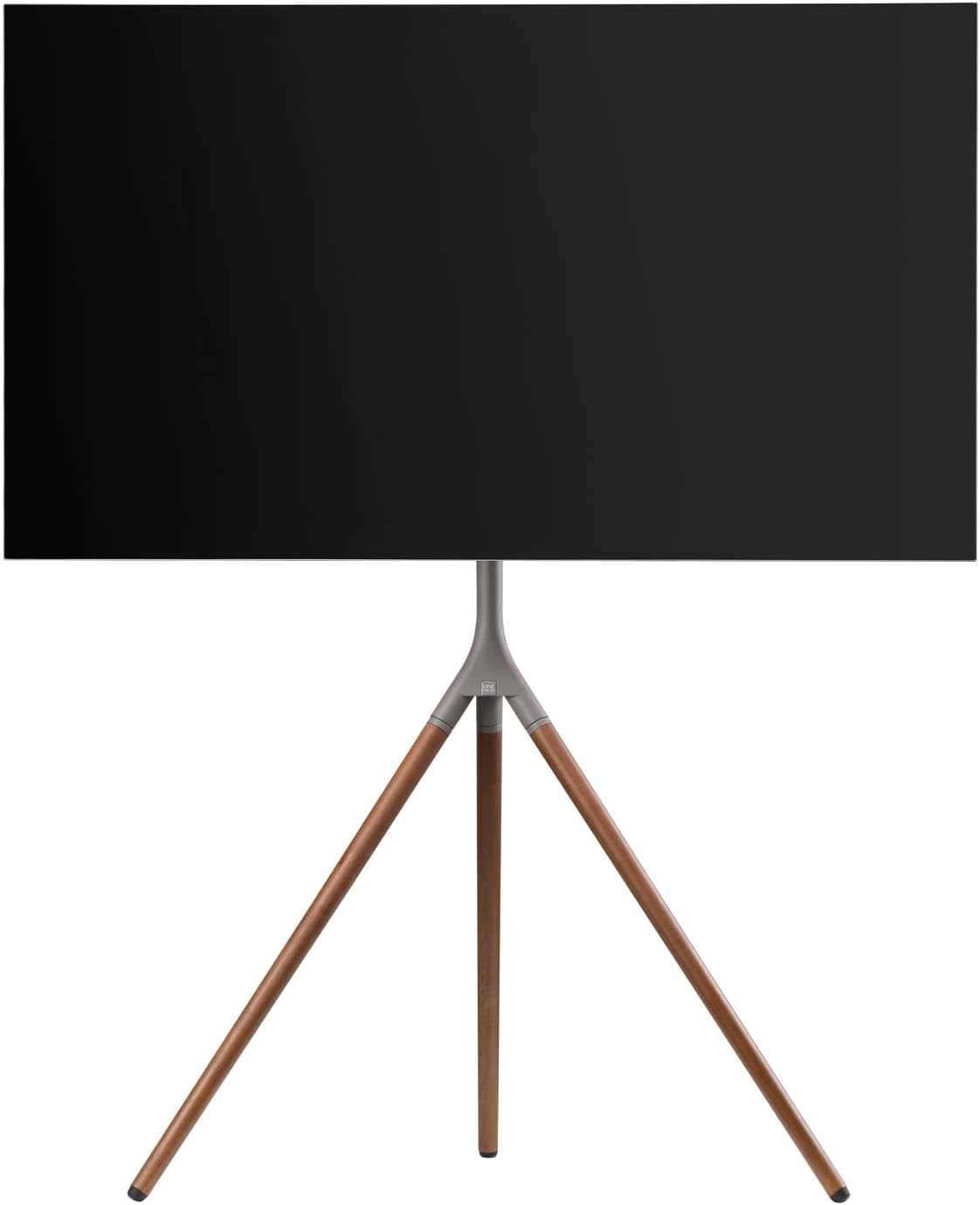
Obrázek 6: Boční profíkfile of the stand with a TV, demonstrating the potential for swivel and height adjustments.
6. Údržba
Pravidelná údržba zajistí dlouhou životnost a bezpečný provoz vašeho televizního stolku.
- Čištění: K otření stojanu použijte měkký, suchý hadřík. V případě odolných skvrn použijte lehceamp Lze použít hadřík s jemným mýdlem a ihned osušit. Nepoužívejte abrazivní čisticí prostředky ani rozpouštědla.
- Inspekce: Periodically check all screws, bolts, and connections for tightness. Re-tighten if necessary.
- Správa kabelů: Ensure cables remain neatly organized and are not pinched or strained.
7. Řešení problémů
Pokud narazíte na problémy s televizním stolkem, podívejte se na následující běžné problémy a jejich řešení:
| Problém | Možná příčina | Řešení |
|---|---|---|
| Stojan se zdá být nestabilní. | Loose connections; uneven floor; TV too heavy/large. | Ensure all screws are tightened. Move stand to a level surface. Verify TV weight and size are within specifications. |
| Televizor není v rovině. | Mounting brackets unevenly attached; stand not level. | Re-adjust TV mounting brackets. Ensure stand is on a level surface. |
| Obtížné nastavení výšky nebo otáčení. | Adjustment mechanism is too tight or obstructed. | Loosen adjustment mechanism slightly. Check for cable obstructions. Do not force movement. |
If the problem persists, please contact One For All customer support.
8. Specifikace
| Funkce | Detail |
|---|---|
| Číslo modelu | WM7471 |
| Značka | Jeden za všechny |
| Kompatibilní velikosti obrazovky | 32 - 65 palce |
| Kompatibilita VESA | 200x100mm až 400x400mm |
| Typ pohybu | 360° Swivel, Height Adjustable |
| Materiál | Wood (Walnut), Metal (Gunmetal/Chrome) |
| Barva | Walnut & Gunmetal |
| Zahrnuté komponenty | Tripod stand, TV mounting hardware, cable management strap, universal soundbar attachment |
9. Záruka a podpora
For warranty information and customer support, please refer to the documentation included with your purchase or visit the official One For All webwebu. Konkrétní záruční podmínky se mohou lišit v závislosti na regionu a prodejci.
Výrobce: Jeden za všechny
Země původu: Čína


