1. Úvod
Thank you for choosing the ORIA Indoor Outdoor Thermometer. This device provides accurate temperature and humidity readings for both indoor and up to three outdoor locations simultaneously, helping you monitor environmental conditions in your home, office, or other spaces. Its large LCD display with backlight ensures clear readability, day or night.
This manual provides detailed instructions on how to set up, operate, and maintain your thermometer to ensure optimal performance and longevity.

The ORIA thermometer is versatile for use in various indoor and outdoor environments.
2. Obsah balení
Zkontrolujte prosím balení, zda jsou přítomny všechny komponenty:
- 1 x Main Base Station
- 3 x bezdrátové dálkové senzory
- 1 x Uživatelská příručka
3. Konec produktuview
The ORIA Indoor Outdoor Thermometer system consists of a main base station and three wireless remote sensors. The base station displays indoor temperature and humidity, along with the readings from the three remote sensors. It features a large LCD screen for easy viewing and a backlight for low-light conditions.
Main Base Station Features:
- Zobrazení vnitřní teploty a vlhkosti
- Outdoor Temperature and Humidity Display for 3 Channels
- MAX/MIN Record for Temperature and Humidity
- Indikátor trendu teploty
- Humidity Expression (WET, COM, DRY)
- Switchable Temperature Units (°C/°F)
- Podsvícení LCD
Wireless Remote Sensor Features:
- Measures Temperature and Humidity
- Wireless Transmission up to 100 meters (328 feet) in open air
- Channel Selector (1, 2, 3)

Detailní view of the main base station's LCD display and its various indicators.

The display indicates comfort levels based on humidity.
4. Nastavení
4.1 Instalace baterie
Main Base Station:
- Otevřete kryt přihrádky na baterie na zadní straně hlavní jednotky.
- Vložte 3 baterie AAA (nejsou součástí balení) dle vyznačené polarity (+/-).
- Zavřete kryt prostoru pro baterie.
Bezdrátové dálkové senzory:
- Otevřete kryt přihrádky na baterie na zadní straně každého senzoru.
- Insert 2 AAA batteries (not included) into each sensor according to the polarity markings (+/-).
- Before closing the cover, select a channel (1, 2, or 3) for each sensor using the small switch inside the battery compartment. Ensure each sensor is set to a unique channel.
- Zavřete kryt prostoru pro baterie.

The main unit and three wireless sensors require battery installation.
4.2 Párování senzorů
Once batteries are installed in both the main unit and sensors, the main unit will automatically search for and connect to the sensors. Ensure the sensors are within range of the main unit during initial setup. The main unit will display the readings for each connected channel.
4.3 Pokyny pro umístění
Main Base Station:
- Place the main unit indoors, away from direct sunlight, heat sources, or drafts that could affect its readings.
- It can be placed on a tabletop using its integrated stand or mounted on a wall using the hang hole.
Bezdrátové dálkové senzory:
- Place the outdoor sensors in desired locations within the 100-meter (328 feet) wireless range.
- Důležitá poznámka: The remote sensors are není vodotěsný. To protect them from rain and direct sunlight, place them under an eave, in a sheltered area, or inside a weather-resistant enclosure. Do not expose them directly to rainwater.
- Avoid placing sensors near large metal objects, thick walls, or other electronic devices that could interfere with the wireless signal.

The main unit offers both tabletop and wall-mount options for flexible placement.

Strategically place the three sensors to monitor different outdoor areas.
5. Provoz
5.1 Zobrazené hodnoty
Velký LCD displej zobrazuje následující informace:
- Vnitřní teplota a vlhkost: Shown at the top of the display.
- Venkovní teplota a vlhkost: Readings from the three wireless sensors are displayed in separate sections (Channel 1, Channel 2, Channel 3) below the indoor readings.
- Temperature/Humidity Trend Indicators: Arrows indicate whether the temperature or humidity is rising, falling, or remaining stable.
- Humidity Expression: Icons indicate the comfort level based on humidity: MOKRÝ (humidity ≥ 65%), COM (45% ≤ humidity ≤ 65%), SCHNOUT (humidity ≤ 45%).

Simultaneous display of indoor and three outdoor measuring data.
5.2 Výběr teplotní jednotky (°C/°F)
Chcete-li přepínat mezi stupni Celsia (°C) a Fahrenheita (°F), stiskněte tlačítko ° C / ° F button located on the back of the main unit.
5.3 MAX/MIN Record
The thermometer records the maximum and minimum temperature and humidity values for both indoor and outdoor channels. To view tyto záznamy:
- Stiskněte tlačítko MIN / MAX Jedním stisknutím tlačítka zobrazíte maximální zaznamenané hodnoty.
- Stiskněte tlačítko MIN / MAX button again to display the minimum recorded values.
- To clear the recorded MAX/MIN values, press and hold the MIN / MAX button for approximately 3 seconds. The values will reset to the current readings.
5.4 Funkce podsvícení
The main unit features a backlight for improved visibility in low-light conditions:
- Stiskněte tlačítko SVĚTLO button on the top of the main unit to activate the backlight.
- The backlight will automatically turn off after 10 seconds if no further operation is performed.
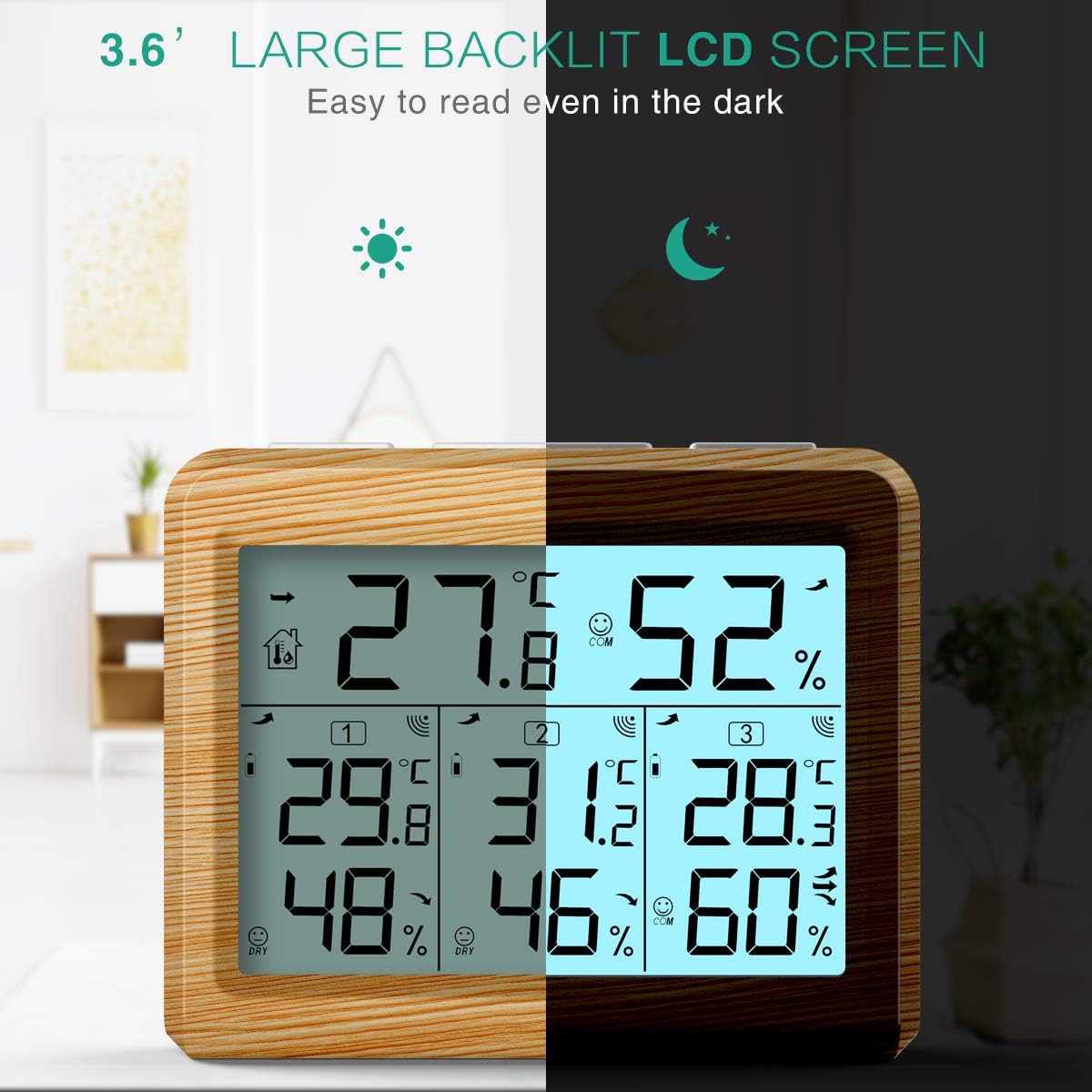
The large backlit LCD screen ensures easy readability even in the dark.

Stiskněte tlačítko „LIGHT“ pro rozsvícení displeje.
6. Údržba
6.1 Výměna baterie
When the low battery icon appears on the display for either the main unit or a specific sensor, it indicates that the batteries need to be replaced. Replace all batteries in the affected unit with new ones of the same type (AAA). Ensure correct polarity during installation.
6.2 Čištění
Clean the main unit and sensors with a soft, damp hadříkem. Nepoužívejte abrazivní čisticí prostředky ani rozpouštědla, protože by mohly poškodit plastové součásti nebo LCD obrazovku.
6.3 Skladování
If the device will not be used for an extended period, remove all batteries from both the main unit and the sensors to prevent leakage and corrosion. Store the device in a cool, dry place, away from direct sunlight and extreme temperatures.
7. Řešení problémů
If you encounter issues with your ORIA Indoor Outdoor Thermometer, please refer to the following table for common problems and solutions:
| Problém | Možná příčina | Řešení |
|---|---|---|
| Žádné zobrazení na hlavní jednotce ani na senzoru. | Baterie jsou vybité nebo nesprávně nainstalované. | Check battery polarity and replace with new batteries. |
| Outdoor sensor readings are not displayed or show "--". | Sensor is out of range, interference, or battery issue. | Move sensor closer to the main unit. Check for sources of interference. Replace sensor batteries. Ensure sensor channel is unique. |
| Nepřesné údaje. | Zařízení umístěné v blízkosti zdrojů tepla/chladu nebo na přímém slunečním záření. | Relocate the main unit and sensors to a more appropriate environment, away from direct sunlight, heat, or drafts. |
| Podsvícení nefunguje. | Slabé baterie nebo porucha tlačítek. | Vyměňte baterie hlavní jednotky. Pokud problém přetrvává, kontaktujte podporu. |
| Wireless signal drops frequently. | Obstructions or distance. | Reduce distance between main unit and sensors. Minimize obstructions like thick walls or large metal objects. |
8. Specifikace
Below are the technical specifications for the ORIA Indoor Outdoor Thermometer:
| Funkce | Specifikace |
|---|---|
| Číslo modelu | OUSF-WA54Y |
| Rozsah vnitřní teploty | 0 °C až 60 °C (32 °F až 140 °F) |
| Rozsah venkovních teplot | -40 °C až 60 °C (-40 °F až 140 °F) |
| rozsah vlhkosti | 10 % až 99 % RH |
| Přesnost teploty | ±1 °C (±1.8 °F) |
| Přesnost vlhkosti | ±5 % RH |
| Dosah bezdrátového přenosu | 100 meters (328 feet) in open air |
| Napájení hlavní jednotky | 3 x AAA baterie (nejsou součástí balení) |
| Napájení senzoru | 2 x AAA Batteries per sensor (not included) |
| Typ zobrazení | LCD s podsvícením |
| Typ montáže | Nástěnný nebo stolní stojan |
| Hmotnost položky | 8.4 unce |
| Rozměry balení | 5.71 x 3.5 x 3.03 palce |
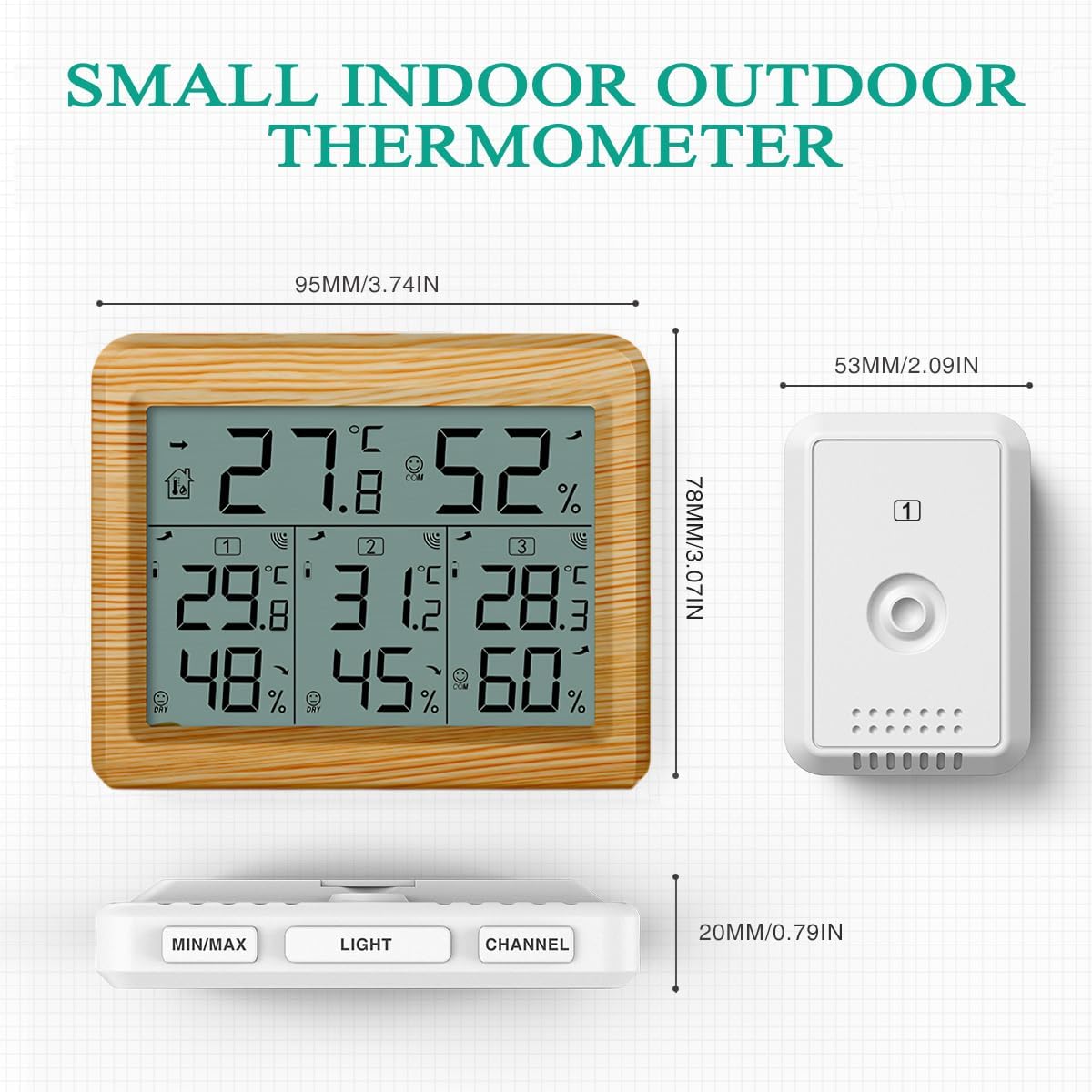
Dimensions of the main unit and wireless sensors.
9. Záruka a podpora
ORIA products are designed for reliability and performance. For any questions, technical support, or warranty inquiries, please contact ORIA customer service through the retailer's platform or the official ORIA website. Please have your model number (OUSF-WA54Y) and purchase information ready when contacting support.
Zavázali jsme se poskytovat vysoce kvalitní produkty a vynikající zákaznický servis.


