1. Úvod
This manual provides essential instructions for the installation, operation, and maintenance of your FSP iFP600 Uninterruptible Power Supply (UPS). Please read this manual thoroughly before installing or operating the unit to ensure proper function and safety. The FSP iFP600 is designed to provide reliable power backup and surge protection for your electronic devices.

Obrázek 1.1: Přední strana view of the FSP iFP600 UPS, showcasing its compact design and integrated LCD display.
2. Bezpečnostní pokyny
Please adhere to these important safety guidelines during installation, operation, and maintenance of the UPS:
- Neotevírejte UPS casing. Uvnitř nejsou žádné součásti, které by mohl uživatel opravit. Veškerý servis svěřte kvalifikovanému servisnímu personálu.
- Do not connect appliances that could overload the UPS, such as laser printers, vacuum cleaners, or heaters.
- Ujistěte se, že je UPS připojena k uzemněné zásuvce střídavého proudu.
- Neumísťujte UPS na přímé sluneční světlo, do blízkosti zdrojů tepla nebo do prostředí s nadměrnou prašností, vlhkostí nebo korozivními látkami.
- Position the UPS in a well-ventilated area to prevent overheating.
- In case of fire, use a dry chemical extinguisher. Water can be hazardous.
- Baterii uvnitř UPS nemůže uživatel vyměnit. Výměnu baterie by měl provádět pouze kvalifikovaný personál.
3. Konec produktuview
The FSP iFP600 UPS provides reliable power protection for your critical electronics. It features a compact design and an intuitive LCD display for monitoring status.
3.1 Obsah balení
Po otevření balení se prosím ujistěte, že jsou všechny součásti přítomny a nepoškozené:
- FSP iFP600 UPS Unit
- Uživatelská příručka (tento dokument)
- Napájecí kabel
- USB komunikační kabel
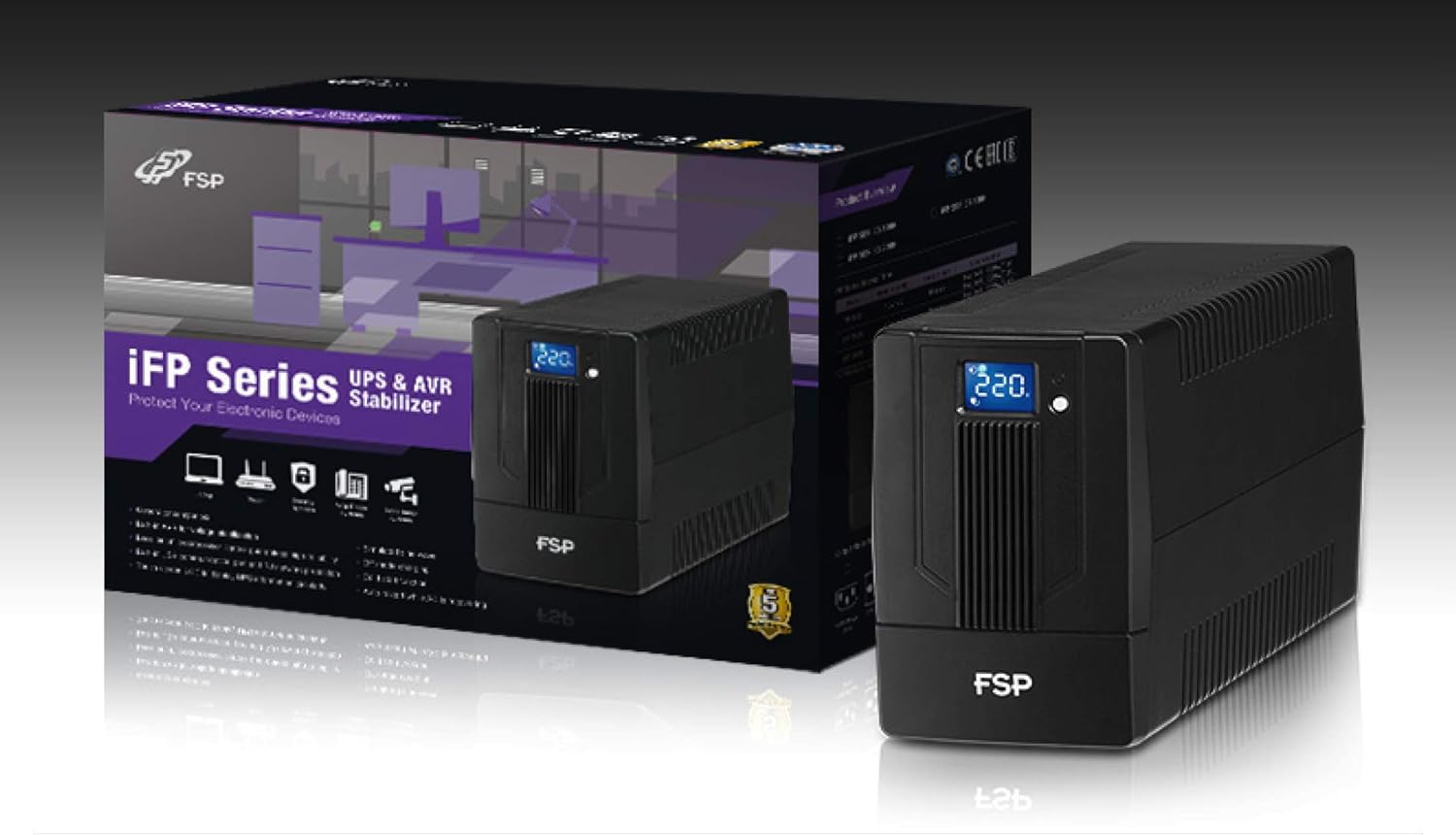
Image 3.1: The FSP iFP600 UPS shown alongside its retail packaging, illustrating the product's presentation.
3.2 Součásti zadního panelu
Familiarize yourself with the connections on the rear panel of the UPS:

Obrázek 3.2: Detailní view of the FSP iFP600 UPS rear panel, highlighting connection points.
- Prodejny: Two SCHUKO type outlets for connecting protected equipment.
- AC vstup: Connects the UPS to the main utility power.
- Fuse/Breaker: Nadproudová ochrana pro UPS.
- Komunikace přes USB: Port for connecting to a computer for monitoring and management.
- Combo RJ11/RJ45 Surge Protection: Provides surge protection for telephone/network lines.
4. Nastavení a instalace
Follow these steps to set up your FSP iFP600 UPS:
- Rozbalení: Opatrně vyjměte UPS z obalu. Zkontrolujte, zda při přepravě nedošlo k poškození.
- Umístění: Place the UPS on a flat, stable surface in a clean, cool, and well-ventilated area. Ensure adequate clearance around the unit for airflow.
- Počáteční nabíjení: Connect the UPS to a standard grounded AC outlet using the provided power cord. Allow the unit to charge for at least 4-6 hours before initial use to ensure optimal battery performance. The UPS will charge whether it is turned on or off.
- Spojovací zařízení: Plug your computer, monitor, and other critical electronic devices into the UPS outlets (A). Do not connect surge suppressors or power strips to the UPS outlets.
- USB Communication (Optional): Connect the USB cable from the UPS USB port (D) to your computer's USB port to enable power management software features (software not included, typically downloaded from manufacturer's webstránky).
- RJ11/RJ45 Protection (Optional): For surge protection of your telephone or network line, connect the incoming line to the 'IN' port of the Combo RJ11/RJ45 (E) and connect the 'OUT' port to your device.
5. Návod k obsluze
5.1 Zapnutí/vypnutí
- Zapnutí: Stiskněte a podržte tlačítko napájení na předním panelu přibližně 2 sekundy, dokud neuslyšíte pípnutí a nerozsvítí se LCD displej.
- Vypnutí: Stiskněte a podržte tlačítko napájení přibližně 2 sekundy, dokud neuslyšíte pípnutí a LCD displej se nevypne.
5.2 Informace na LCD displeji
The FSP iFP600 features an LCD display that provides real-time status information. The display is touch-sensitive for navigating information.

Image 5.1: The LCD display of the FSP iFP600 UPS, indicating voltage output and its touch-screen functionality.
The LCD display typically shows:
- Vstupní objemtage
- Výstupní objemtage
- Úroveň nabití baterie
- Úroveň zatížení
- Operating Mode (e.g., AC mode, Battery mode)
- Warning/Fault Indicators
5.3 Battery Mode Operation
When the utility power fails or fluctuates outside acceptable limits, the UPS will automatically switch to battery mode. During battery mode, the UPS will provide power to connected equipment from its internal battery. An audible alarm will sound to indicate battery operation.
6. Údržba
Proper maintenance ensures the longevity and reliability of your UPS.
- Čištění: K čištění vnější strany UPS používejte měkký, suchý hadřík. Nepoužívejte tekuté ani aerosolové čisticí prostředky.
- Péče o baterie: To maximize battery life, ensure the UPS is connected to AC power and fully charged. If the UPS is stored for an extended period, recharge it every three months to prevent battery degradation.
- Výměna baterie: The internal battery (12V / 7Ah x1) is not user-serviceable. Battery replacement should only be performed by FSP-certified service personnel or a qualified technician. Incorrect battery replacement can pose a risk of explosion or injury.
- Skladování: Store the UPS in a cool, dry place with adequate ventilation. Ensure the battery is fully charged before storage.
7. Řešení problémů
Refer to the following table for common issues and their solutions. If the problem persists, contact FSP support.
| Příznak | Zvukový alarm | Možná příčina | Řešení |
|---|---|---|---|
| UPS operating on battery power | Pípnutí každých 10 sekund | Utility power failure or fluctuation | Save work and shut down equipment if power outage is prolonged. UPS will return to AC mode when power is restored. |
| Upozornění na vybitou baterii | Pípne každou sekundu | Nabití baterie je kriticky nízké | Immediately save work and shut down connected equipment. |
| Stav přetížení | Pípne každou 0.5 sekundu | Připojené zařízení překračuje kapacitu UPS | Disconnect non-essential equipment until the alarm stops. Ensure total load is within UPS capacity. |
| Porucha UPS | Nepřetržité pípání | Vnitřní porucha nebo porucha | Turn off the UPS and disconnect it from the AC outlet. Contact FSP technical support. |
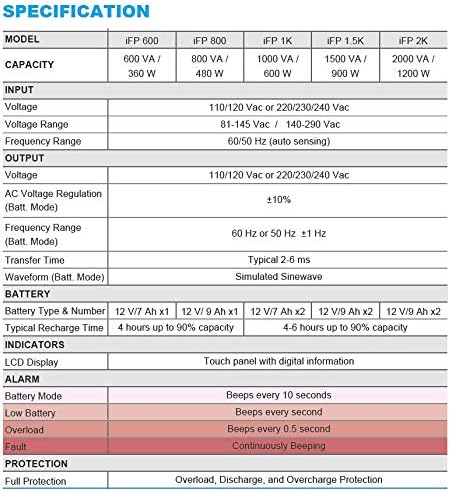
Image 7.1: Excerpt from the FSP iFP series specification table, detailing alarm indicators and their meanings.
8. Specifikace
Detailed technical specifications for the FSP iFP600 UPS:
| Funkce | Specifikace |
|---|---|
| Model | iFP 600 |
| Kapacita | 600 VA / 360 W |
| Vstupní objemtage | 110/120 Vac or 220/230/240 Vac |
| Vstupní objemtage Dosah | 81-145 Vac / 140-290 Vac |
| Vstupní frekvenční rozsah | 60/50 Hz (automatické snímání) |
| Výstupní objemtage | 110/120 Vac or 220/230/240 Vac |
| AC svtage Regulace (Batt. Mode) | ±10 % |
| Output Frequency Range (Batt. Mode) | 60 Hz or 50 Hz ±1 Hz |
| Doba přenosu | Typicky 2-6 ms |
| Křivka (Batt. Mode) | Simulovaná sinusová vlna |
| Typ a číslo baterie | 12V / 7Ah x1 |
| Typická doba nabíjení | 4 hodiny až do 90% kapacity |
| Ukazatele | LCD Display (Touch panel with digital information) |
| Ochrana | Overload, Discharge, and Overcharge Protection |
| Hmotnost položky | 9.24 libry (4.2 kg) |
| Rozměry produktu (DxŠxV) | 11.81 x 3.98 x 5.59 palce |
| Barva | Černý |
| Materiál | Kov |
9. Záruka a podpora
FSP products are designed for reliability and performance. For warranty information, please refer to the warranty card included with your product or visit the official FSP website. For technical support, troubleshooting assistance, or service inquiries, please contact FSP customer service through their official channels.
Více informací a podpůrných zdrojů naleznete na FSP Store on Amazon.


