Zavedení
Thank you for choosing the Black+Decker BES610K-QS 650W Corded Jigsaw. This manual provides important information regarding the safe operation, setup, maintenance, and troubleshooting of your new tool. Please read this manual thoroughly before use and keep it for future reference.
The Black+Decker BES610K-QS is a 650W corded pendulum jigsaw designed for various cutting tasks. It offers a speed of 3100 strokes per minute and can cut up to 90mm in wood, 15mm in aluminum, and 8mm in metal. Key features include 3 pendulum settings, variable speed control, a dust extraction port, and an integrated LED light for improved visibility.
Všeobecné bezpečnostní pokyny
VAROVÁNÍ: Přečtěte si všechna bezpečnostní varování, pokyny, ilustrace a specifikace dodávané s tímto elektrickým nářadím. Nedodržení všech níže uvedených pokynů může vést k úrazu elektrickým proudem, požáru a/nebo vážnému zranění.
Bezpečnost pracovního prostoru
- Udržujte pracovní prostor čistý a dobře osvětlený. Nepořádek nebo tmavé prostory vedou k nehodám.
- Nepracujte s elektrickým nářadím ve výbušném prostředí, například v přítomnosti hořlavých kapalin, plynů nebo prachu. Elektrické nářadí vytváří jiskry, které mohou zapálit prach nebo výpary.
- Při práci s elektrickým nářadím držte děti a přihlížející mimo dosah. Rozptylování může způsobit ztrátu kontroly.
Elektrická bezpečnost
- Zástrčky elektrického nářadí musí odpovídat zásuvce. Nikdy zástrčku žádným způsobem neupravujte. S uzemněným elektrickým nářadím nepoužívejte žádné adaptérové zástrčky. Neupravené zástrčky a odpovídající zásuvky sníží riziko úrazu elektrickým proudem.
- Vyvarujte se tělesného kontaktu s uzemněnými povrchy, jako jsou potrubí, radiátory, sporáky a chladničky. Pokud je vaše tělo uzemněno, existuje zvýšené riziko úrazu elektrickým proudem.
- Nevystavujte elektrické nářadí dešti nebo mokru. Voda vnikající do elektrického nářadí zvyšuje riziko úrazu elektrickým proudem.
- Nezneužívejte kabel. Nikdy nepoužívejte kabel k přenášení, tahání nebo odpojování elektrického nářadí. Udržujte kabel mimo dosah tepla, oleje, ostrých hran nebo pohyblivých částí. Poškozené nebo zamotané kabely zvyšují riziko úrazu elektrickým proudem.
Osobní bezpečnost
- Vždy používejte ochranu očí. Používejte ochranné brýle, ochranné brýle nebo štít na obličej.
- V případě potřeby používejte vhodné osobní ochranné prostředky (OOP), jako jsou protiprachové masky, protiskluzová bezpečnostní obuv, ochranná přilba nebo ochrana sluchu.
- Správně se oblečte. Nenoste volné oblečení nebo šperky. Udržujte své vlasy a oděv mimo pohyblivé části.
- Nepřesahujte. Vždy udržujte správný postoj a rovnováhu. To umožňuje lepší kontrolu nad elektrickým nářadím v neočekávaných situacích.
- Před prováděním jakýchkoli úprav, výměnou příslušenství nebo uložením elektrického nářadí vždy odpojte zástrčku od zdroje napájení.
Konec produktuview
The Black+Decker BES610K-QS Jigsaw is a versatile tool designed for precision cutting in various materials. Familiarize yourself with its components before operation.

Figure 1: Black+Decker BES610K-QS Jigsaw main view.
This image shows the overall design of the Black+Decker BES610K-QS Jigsaw, highlighting its ergonomic handle and control layout.
Klíčové vlastnosti:
- 650W motor: Poskytuje ampmalý výkon pro různé řezné úkoly.
- Ergonomický design: Slim grip handle for optimized control and comfort.
- Port pro odsávání prachu: Removable adapter for easy connection to a vacuum cleaner, keeping the work area clean.
- Rychlá výměna příslušenství: Facilitates fast and easy blade changes.
- Integrované LED světlo: Enhances visibility of the cutting line.
- Variable Speed (0-3100 SPM): Allows adjustment for different materials and cutting requirements.
- Kapacita řezání: 90mm in wood, 15mm in aluminum, 8mm in metal.
- 3 Pendulum Settings: For optimized cutting performance in various materials.
- Beveled Metal Base: Pro šikmé řezy.
Nastavení a montáž
Vybalování
Carefully remove the jigsaw and all accessories from the packaging. Ensure all components are present and undamaged. The package typically includes the jigsaw, a standard blade, a guide blade, and a storage case.

Figure 2: Jigsaw with included storage case and blade.
This image displays the jigsaw along with its protective storage case and one of the included blades, ready for use.
Instalace čepele
- Ujistěte se, že je nástroj odpojen od zdroje napájení.
- Vyhledejte čepel clamp mechanism, usually near the front of the tool.
- Otevřete čepel třamp (refer to Figure 3 for visual guidance).
- Vložte čepel do třamp with the teeth facing forward. Ensure the back edge of the blade fits into the blade guide roller.
- Zavřete čepel třamp securely. Tug gently on the blade to ensure it is firmly seated.

Figure 3: Proper blade installation into the jigsaw.
This image illustrates the process of inserting a blade into the jigsaw's quick-change mechanism, ensuring it is correctly aligned and secured.
Adjusting the Base Plate for Bevel Cuts
The jigsaw's base plate can be adjusted for angled cuts (bevel cuts).
- Odpojte nástroj.
- Loosen the screws that secure the base plate.
- Tilt the base plate to the desired angle (e.g., 15°, 30°, 45°). The tool has 3 pre-selected bevel angles.
- Tighten the screws firmly to secure the base plate in position.
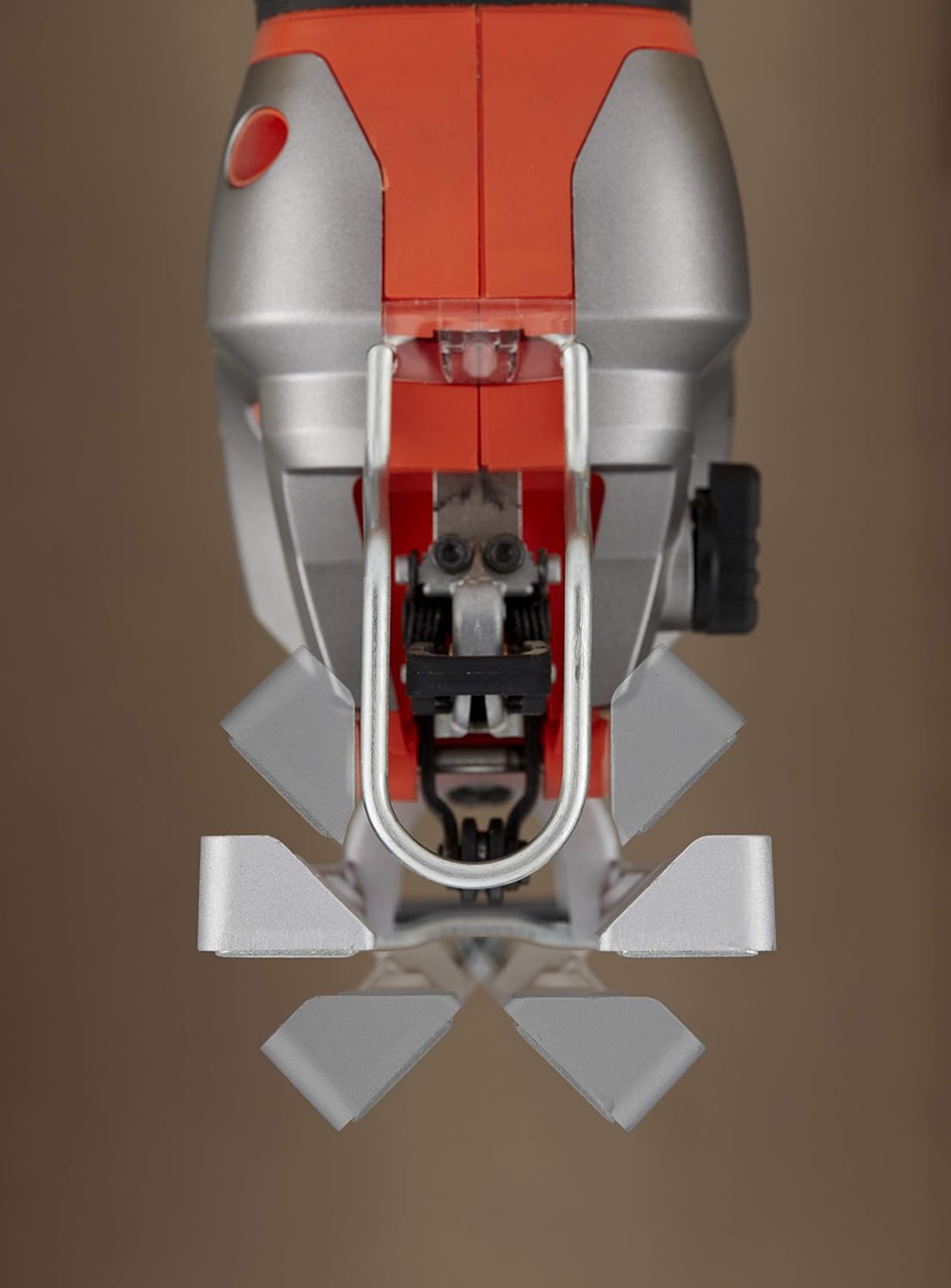
Figure 4: Jigsaw base plate set for an angled cut.
This image shows the jigsaw's base plate tilted to an angle, demonstrating its capability for making bevel cuts in a workpiece.
Připojení k odsávání prachu
Pro čistší pracovní prostředí připojte vysavač k otvoru pro odsávání prachu.
- Attach the removable adapter to the dust extraction port on the jigsaw.
- Connect the hose of a suitable vacuum cleaner to the adapter.
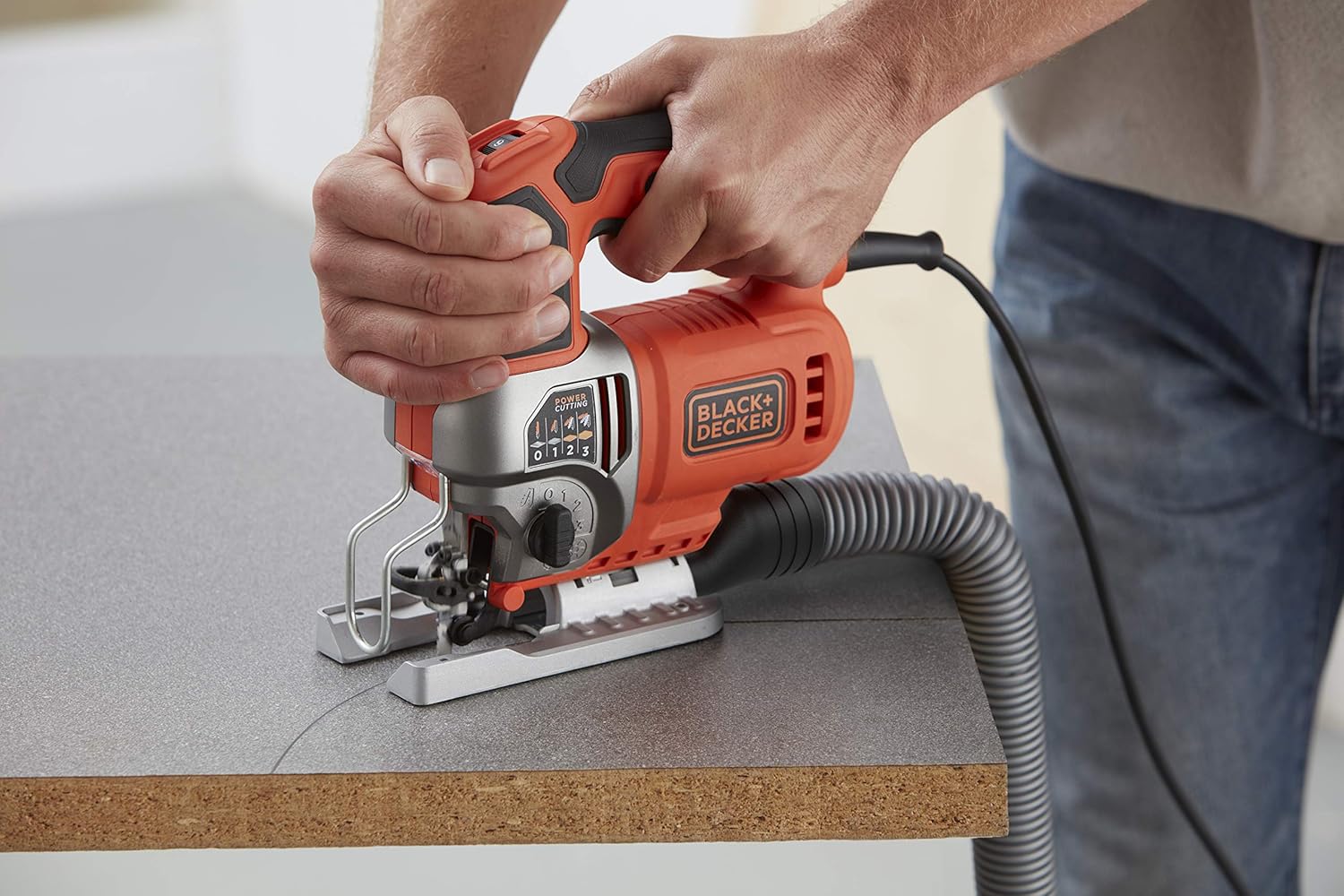
Figure 5: Jigsaw connected to a dust extraction system.
This image shows the jigsaw in operation with a vacuum hose attached to its dust extraction port, illustrating how to maintain a clean work area.
Návod k obsluze
Zapnutí/vypnutí
- Chcete-li zapnout přímočarou pilu, stiskněte spouštěcí spínač.
- Pro vypnutí uvolněte spouštěcí spínač.
Variabilní ovládání rychlosti
The jigsaw features a variable speed control dial, allowing you to adjust the cutting speed for different materials and applications.
- Locate the variable speed dial, typically on the top or side of the handle.
- Rotate the dial to select the desired speed. Lower speeds are suitable for harder materials or intricate cuts, while higher speeds are for softer materials and faster cutting.

Figure 6: Adjusting the variable speed dial on the jigsaw.
This image shows a hand adjusting the speed dial on the jigsaw, indicating the control over strokes per minute for different cutting needs.
Pendulum Action Adjustment
The pendulum action (orbital action) allows the blade to move in an elliptical motion, providing faster cutting in softer materials. The BES610K-QS has 3 pendulum settings.
- Locate the pendulum action selector switch, usually on the side of the tool.
- Select setting '0' for straight cuts or fine finishes.
- Select settings '1', '2', or '3' for increasingly aggressive cuts in wood or other soft materials. Higher settings provide faster cutting but may result in a rougher finish.
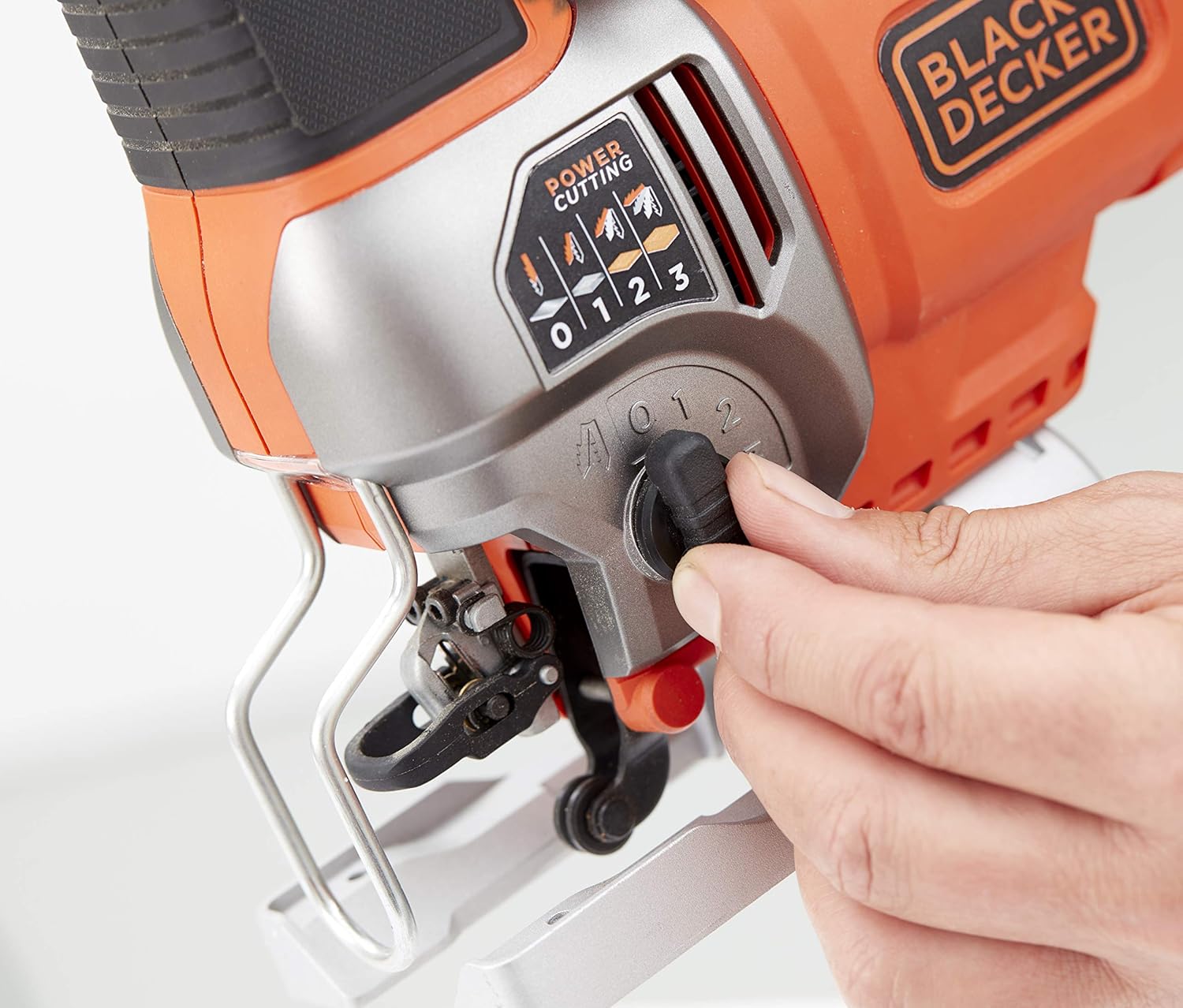
Figure 7: Adjusting the pendulum action setting on the jigsaw.
This image demonstrates how to adjust the pendulum action selector, which controls the aggressiveness of the blade's orbital motion for various materials.
Provádění řezu
- Obrobek pevně upevněte, aby se během řezání nepohyboval.
- Place the front edge of the jigsaw's base plate flat on the workpiece, ensuring the blade is clear of the material.
- Start the tool and allow it to reach full speed before engaging the blade with the material.
- Veďte kmitací pilu podél linie řezu stálým a rovnoměrným tlakem. Netlačte na nástroj silou.
- The integrated LED light will illuminate the cutting area for better visibility.

Figure 8: User operating the jigsaw to cut a wooden board.
This image shows a user holding the jigsaw firmly and guiding it along a wooden workpiece to make a cut.

Figure 9: Jigsaw being used to cut a piece of trim.
This image depicts the jigsaw being used for a more delicate cut on a piece of trim, demonstrating its versatility.

Figure 10: Close-up of the jigsaw's LED light illuminating the cutting path.
This close-up image highlights the integrated LED light, which brightens the cutting line for enhanced accuracy and visibility.

Figure 11: Jigsaw cutting a metal pipe.
This image shows the jigsaw effectively cutting through a metal pipe, demonstrating its capability with different materials.

Figure 12: Jigsaw cutting a corrugated sheet.
This image illustrates the jigsaw cutting a corrugated sheet, showcasing its ability to handle various material shapes and textures.

Figure 13: Jigsaw cutting wood from the underside.
This image shows the jigsaw being used to cut a wooden piece from the underside, a technique often used to minimize splintering on the visible surface.
Údržba
Pravidelná údržba zajišťuje dlouhou životnost a optimální výkon vaší přímočaré pily.
Čištění
- Před čištěním nástroj vždy odpojte.
- Use a soft brush or compressed air to clean dust and debris from the ventilation openings and around the blade clamp plocha.
- Otřete kryt nástroje čističemamp tkanina. Nepoužívejte agresivní chemikálie nebo abrazivní čisticí prostředky.
Péče o čepel
- Replace dull or damaged blades immediately. Using worn blades can lead to poor cutting performance and increased strain on the tool.
- Čepele skladujte na suchém místě, abyste zabránili korozi.
Generální inspekce
- Periodically check the power cord for any signs of damage. If damaged, have it replaced by a qualified service technician.
- Ujistěte se, že všechny šrouby a upevňovací prvky jsou pevně utažené.
Odstraňování problémů
Tato část se zabývá běžnými problémy, se kterými se můžete setkat při používání přímočaré pily.
| Problém | Možná příčina | Řešení |
|---|---|---|
| Nástroj se nespustí. | Žádné napájení. Poškozený napájecí kabel. | Zkontrolujte zásuvku a jistič. Inspect cord for damage; have it replaced by a professional if necessary. |
| Poor cutting performance / Rough cuts. | Tupá nebo nesprávná čepel. Incorrect speed or pendulum setting. Forcing the tool. | Replace blade; ensure it's suitable for the material. Adjust speed and pendulum action according to material. Allow the tool to work at its own pace. |
| Nadměrné vibrace. | Loose blade. Poškozená čepel. Opotřebované vnitřní součásti. | Ujistěte se, že je čepel bezpečně upevněnaampvyd. Vyměňte čepel. Pro kontrolu kontaktujte zákaznický servis. |
| Blade gets stuck. | Forcing the tool. Incorrect blade for material thickness. | Reduce feed pressure. Use a blade appropriate for the material and thickness. |
If you encounter problems not listed here or if the suggested solutions do not resolve the issue, please contact Black+Decker customer service.
Specifikace
Technical data for the Black+Decker BES610K-QS Jigsaw:
| Funkce | Hodnota |
|---|---|
| Výrobce | ČERNÁ+DECKER |
| Číslo modelu | BES610K-QS |
| Moc | 650 wattů |
| svtage | 230 voltů |
| Rychlost | 3100 strokes/min (variable) |
| Zdroj napájení | Elektrický kabel |
| Řezná kapacita (dřevo) | 90 mm |
| Cutting Capacity (Aluminum) | 15 mm |
| Řezná kapacita (kov) | 8 mm |
| Speciální funkce | Bevel Capacity, LED Light, Dust Extraction |
| Rozměry produktu (D x Š x V) | 31 x 11 x 30.5 cm |
| Hmotnost | 3.05 kg |
| Zahrnuté komponenty | Jigsaw, 2 blades (as per product variant), Storage Case |
Záruka a podpora
Black+Decker products are manufactured to high-quality standards and are guaranteed against defects in materials and workmanship. This product comes with a limited warranty.
For specific warranty terms and conditions, or if you require technical assistance, spare parts, or repair service, please refer to the warranty card included with your product or visit the official Black+Decker website. You can also contact Black+Decker customer support directly.
Online podpora: Návštěva www.blackanddecker.com informace o produktech, nejčastější dotazy a umístění servisních středisek.


