Zavedení
This manual provides comprehensive instructions for the setup, operation, and maintenance of your Calvas AXD7622 Replacement Remote Control. This remote is designed to be compatible with various Pioneer AV Receiver models, including VSX-521, AXD7660, VSX-422-K, and AXD7662. Please read this manual thoroughly before using the remote control to ensure optimal performance and longevity.
Konec produktuview
The Calvas AXD7622 is an infrared (IR) replacement remote control, offering a direct functional substitute for the original remote controls of compatible Pioneer AV receivers. It operates on a 433 MHz frequency for signal transmission.

Obrázek 1: Přední view of the Calvas AXD7622 replacement remote control. This image displays the full layout of the remote's buttons, including power, input selection, volume, navigation, and various function keys, all clearly labeled.
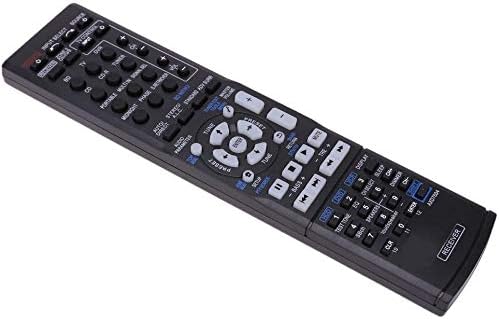
Obrázek 2: Úhlové view of the Calvas AXD7622 replacement remote control. This perspective showcases the remote's ergonomic shape and button arrangement, providing a better understanding of its physical form.
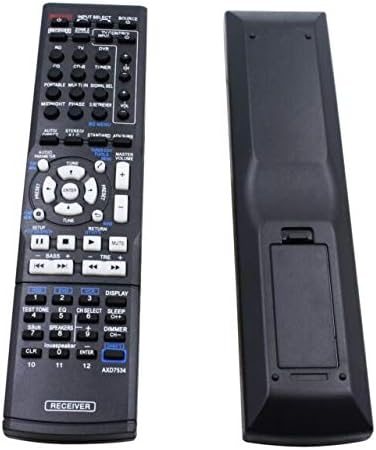
Obrázek 3: Přední a zadní view of the Calvas AXD7622 replacement remote control. This image provides a clear view of both sides of the remote, including the battery compartment cover on the rear.
Nastavení
1. Instalace baterie
- Locate the battery compartment on the back of the remote control. Refer to Image 3 for assistance.
- Posuňte kryt přihrádky na baterie dolů nebo ve směru šipky, abyste jej otevřeli.
- Vložte dvě (2) baterie typu AAA a ujistěte se, že kladný (+) a záporný (-) pól správně odpovídají označením uvnitř přihrádky.
- Zavřete kryt prostoru pro baterie jeho zasunutím zpět na místo, dokud bezpečně nezacvakne.
Poznámka: Batteries are not included with the remote control. Always use new batteries and replace both batteries at the same time.
2. Kompatibilita
This remote control is pre-programmed and designed for direct use with the following Pioneer AV Receiver models:
- Pioneer VSX-521
- Pioneer AXD7660
- Pioneer VSX-422-K
- Pioneer AXD7662
No additional programming or setup is required. Simply install the batteries, and the remote is ready for use with your compatible Pioneer AV receiver.
Návod k obsluze
Point the remote control directly at the infrared sensor on your Pioneer AV receiver. Ensure there are no obstructions between the remote and the receiver.
Key Functions (Refer to Image 1 for button layout):
- POWER (On/Standby): Turns the AV receiver on or off (standby mode).
- INPUT SELECT / SOURCE: Cycles through available input sources (e.g., BD, CD, TV, DVR, Tuner).
- OBJEM (+/-): Adjusts the master volume level of the AV receiver.
- ZTLUMIT: Temporarily silences the audio output. Press again to restore sound.
- NAVIGATION (Up/Down/Left/Right/ENTER): Used to navigate menus and confirm selections on the AV receiver's display.
- ZALOŽIT: Accesses the receiver's main setup menu.
- NÁVRAT: Vrátí se do předchozí nabídky nebo obrazovky.
- TUNER (Up/Down): For radio tuning functions.
- AUDIO PARAMETER: Adjusts various audio settings.
- LISTED SOURCE BUTTONS (BD, CD, TV, DVR, etc.): Directly selects the corresponding input source.
- PLAYBACK CONTROLS (Play, Pause, Stop, Skip, Fast Forward/Rewind): Controls playback of connected media devices.
- ZOBRAZIT: Changes the information displayed on the receiver's front panel.
- STMÍVÁNÍ: Upravuje jas displeje přijímače.
- NUMBER BUTTONS (0-9, CLR, ENTER): Used for direct input, such as channel numbers or menu selections.
For detailed functionality of specific buttons and advanced features, please refer to the original user manual of your Pioneer AV receiver model.
Údržba
Výměna baterie
If the remote control's range decreases or it becomes unresponsive, the batteries may need to be replaced. Follow the battery installation steps outlined in the "Setup" section. Always replace both AAA batteries simultaneously with new ones.
Čištění
Pro čištění dálkového ovladače jemně otřete jeho povrch měkkým, suchým hadříkem. V případě odolných nečistot lehceampOtřete hadřík vodou nebo jemným neabrazivním čisticím prostředkem. Nepoužívejte agresivní chemikálie, rozpouštědla nebo abrazivní materiály, protože by mohly poškodit povrchovou úpravu dálkového ovladače nebo vnitřní součásti.
Skladování
Dálkový ovladač skladujte na chladném a suchém místě mimo dosah přímého slunečního záření, extrémních teplot a vysoké vlhkosti. Pokud dálkový ovladač nebudete delší dobu používat, doporučuje se vyjmout baterie, aby nedošlo k jejich vytečení a možnému poškození.
Odstraňování problémů
| Problém | Možná příčina | Řešení |
|---|---|---|
| Dálkové ovládání nereaguje. |
|
|
| Remote functions intermittently. |
|
|
| Specific buttons do not work. |
|
|
Specifikace
| Funkce | Detail |
|---|---|
| Číslo modelu | AXD7622 |
| Značka | plešatá místa |
| Kompatibilita | Pioneer VSX-521, AXD7660, VSX-422-K, AXD7662 AV Receivers |
| Bezdrátová komunikace | Infračervený (IR) |
| Frekvence | 433 MHz |
| Zdroj napájení | 2 x AAA baterie (nejsou součástí balení) |
| Materiál | ABS |
| Rozměry (D x Š x V) | 5.51 x 1.57 x 0.39 palce (14 x 4 x 1 cm) |
| Speciální funkce | Ergonomický design |
Limited Guarantee and Support
All Calvas merchandise is subject to quality examination before shipment to ensure functionality. In the event of workmanship or material defects, please contact the seller directly for assistance. The seller aims to provide solutions such as exchanges or other resolutions to address product issues.
For further support or inquiries, please refer to your purchase documentation or contact the retailer from whom the product was acquired.