Zavedení
This manual provides detailed instructions for the IPEGA PG-9068 Bluetooth Wireless Game Controller Gamepad. It covers setup, operation, maintenance, and troubleshooting to ensure optimal performance and longevity of your device. This gamepad is designed for use with Android, iOS, and PC systems, as well as Smart TVs and set-top boxes.
Konec produktuview

Obrázek 1: Přední strana view of the IPEGA PG-9068 Bluetooth Wireless Game Controller, showing the dual analog sticks, D-pad, action buttons (A, B, X, Y), and central function buttons.

Obrázek 2: Úhlové view of the IPEGA PG-9068, highlighting the ergonomic grip and shoulder buttons.
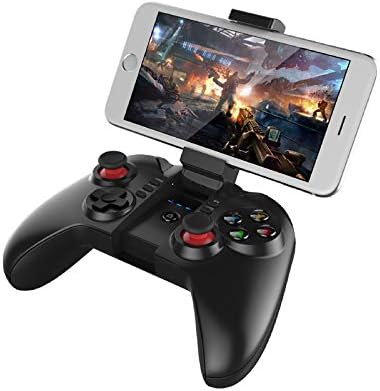
Figure 3: The IPEGA PG-9068 with a smartphone securely mounted in its integrated holder, demonstrating its mobile gaming capability.
Nastavení a připojení
Nabíjení gamepadu
Before initial use, fully charge the gamepad. Connect the provided USB charging cable to the gamepad's charging port and to a DC5V power source (e.g., computer USB port, USB wall adapter). The charging indicator light will show the charging status.
- Nabíjecí svtage/Aktuální: DC 5V/500mA
- Kapacita baterie: 350 XNUMX mAh
- Nepřetržité používání: Approximately 10 hours on a full charge
- Pohotovostní doba: Up to 30 days when fully charged
Pokyny pro párování Bluetooth
The PG-9068 supports various connection modes for different devices. Ensure the gamepad is sufficiently charged before attempting to pair.
- Zapnutí: Stiskněte a podržte DOMOV button for 3 seconds to power on the gamepad.
- Vstupte do režimu párování:
- Standardní režim Android: Stiskněte a podržte X + DOMŮ until the indicator light flashes rapidly.
- iOS Standard Mode: Stiskněte a podržte Y + DOMŮ until the indicator light flashes rapidly.
- PC/Direct Play Mode: Stiskněte a podržte A + DOMŮ until the indicator light flashes rapidly.
- Activate Bluetooth on Device: On your smartphone, tablet, or PC, go to Bluetooth settings and enable Bluetooth.
- Hledat Zařízení: Scan for available Bluetooth devices. The gamepad will appear as "PG-9068" or "IPEGA-9068".
- Připojit: Select "PG-9068" to pair. Once connected, the indicator light on the gamepad will become solid.
- Pracovní svtage: DC 3.7V
- Přenosová vzdálenost Bluetooth: ≤ 8 metrů
If pairing fails, turn off the gamepad, disable Bluetooth on your device, and repeat the steps. For PC connection, a Bluetooth adapter may be required if your PC does not have built-in Bluetooth.
Návod k obsluze
Game Modes and Compatibility
The IPEGA PG-9068 supports various gaming platforms and modes:
- Android: Compatible with most Android smartphones, tablets, Smart TVs, and set-top boxes. Supports games that have native gamepad support.
- iOS: Compatible with iOS devices (iPhone, iPad). Supports MFi (Made For iPhone/iPad) games and other games with gamepad compatibility.
- PC: Supports Windows and Mac OS X systems. May require specific drivers or software for certain games, though many modern games support XInput or DirectInput controllers natively.
Rozložení a funkce tlačítek
Familiarize yourself with the gamepad's button layout:
| Button/Component | Funkce |
|---|---|
| Levá analogová páka | Movement, camera control (game dependent) |
| Pravá analogová páka | Camera control, aiming (game dependent) |
| D-Pad (směrový ovladač) | Directional input, menu navigation |
| Tlačítka A, B, X, Y | Action buttons (jump, attack, interact, etc.) |
| L1/R1 (Ramenní knoflíky) | Commonly used for actions like shooting, aiming, or menu navigation |
| L2/R2 (spouštěče) | Analog input for acceleration, braking, or precise actions |
| SELECT/BACK Button | Menu, map, or specific game functions |
| Tlačítko START | Pause, start game, confirm actions |
| Tlačítko HOME | Power on/off, return to home screen (device dependent), pairing mode activation |
| Tlačítko TURBO | Enables rapid fire for selected action buttons. Press TURBO + Action Button to activate/deactivate. |
Údržba a péče
Proper maintenance ensures the longevity and optimal performance of your IPEGA PG-9068 gamepad.
- Čištění: K otření povrchu gamepadu použijte měkký, suchý hadřík. V případě odolné nečistoty lehceamphadřík opláchněte vodou. Nepoužívejte agresivní chemikálie, rozpouštědla ani abrazivní čisticí prostředky.
- Skladování: Gamepad skladujte na chladném a suchém místě mimo dosah přímého slunečního záření, extrémních teplot a vysoké vlhkosti.
- Péče o baterie:
- Vyhněte se častému úplnému vybíjení baterie.
- If storing for extended periods, charge the battery to about 50% to prevent deep discharge.
- Nevystavujte baterii ohni nebo extrémnímu teplu.
- Zacházení: Avoid dropping the gamepad or subjecting it to strong impacts. Do not attempt to disassemble the gamepad, as this will void the warranty.
Odstraňování problémů
If you encounter issues with your IPEGA PG-9068, refer to the following common problems and solutions:
| Problém | Možná příčina | Řešení |
|---|---|---|
| Gamepad does not power on. | Slabá baterie. | Charge the gamepad fully. |
| Nelze spárovat se zařízením. | Incorrect pairing mode; Bluetooth off on device; interference. | Ensure correct pairing mode (X+HOME for Android, Y+HOME for iOS, A+HOME for PC). Verify Bluetooth is enabled on your device. Move closer to the device. Restart both gamepad and device. |
| Gamepad disconnects frequently. | Slabá baterie; příliš daleko od zařízení; rušení. | Recharge the gamepad. Stay within 8 meters of the connected device. Reduce wireless interference from other devices. |
| Buttons/sticks are unresponsive. | Softwarová závada; fyzické poškození. | Restart the gamepad and the connected device. Test in a different game or application. If problem persists, contact customer support. |
| Gamepad nebyl počítačem rozpoznán. | Missing Bluetooth adapter/drivers; incorrect mode. | Ensure PC has Bluetooth and drivers are installed. Try A+HOME pairing mode. Some games may require specific controller emulation software. |
Technické specifikace
| Parametr | Hodnota |
|---|---|
| Model | PG-9068 |
| Značka | Ipega |
| Konektivita | Bezdrátové Bluetooth |
| Pracovní svtage | DC 3.7V |
| Pracovní proud | <10 mA |
| Doba nepřetržitého používání | Přibl. 10 hodin |
| Spící proud | <10uA |
| Charge Voltage/Aktuální | DC 5V/500mA |
| Přenosová vzdálenost Bluetooth | ≤ 8 metrů |
| Kapacita baterie | 350 XNUMX mAh |
| Pohotovostní doba | Up to 30 days (full power) |
| Kompatibilní systémy | Android, iOS, Windows, Mac OS X |
| Kompatibilní zařízení | Smartphones, Tablets, Smart TVs, Set-top Boxes, PC Computers |
Záruka a podpora
For warranty information or technical support, please refer to the documentation provided with your purchase or visit the official Ipega webUschovejte si doklad o koupi pro případ reklamace.


