Zavedení
The HyperX QuadCast is an all-inclusive standalone microphone designed for streamers, podcasters, and gamers seeking impressive sound quality. It features an anti-vibration shock mount to reduce handling noise, a built-in pop filter for clearer voice, and an LED indicator for mic status. With four selectable polar patterns and a gain control knob, it offers versatile audio capture. Compatible with PC, PS4, PS5, and Mac, the QuadCast delivers clear audio for various broadcasting needs.

Figure 1: HyperX QuadCast Microphone Overview
Co je v krabici
Ověřte, zda jsou v balení přítomny všechny součásti:
- Microphone with Stand
- Mini USB to USB Cable (3M)
- Mic Arm Adapter

Obrázek 2: Zahrnuté součásti
Nastavení
The HyperX QuadCast is designed for easy plug-and-play setup across multiple platforms.
- Připojte mikrofon: Plug the Mini USB end of the provided 3-meter cable into the microphone's port.
- Připojit k zařízení: Plug the standard USB end of the cable into an available USB port on your PC (Windows 10, 8.1, 8, 7), PS4, PS5, or Mac.
- Automatické rozpoznání: Your operating system should automatically detect and install the necessary drivers for the microphone.
- Ověřit připojení: The microphone's red LED lighting will illuminate upon successful connection, indicating it is active.

Obrázek 3: Připojení USB
Návod k obsluze
Polární vzory
The QuadCast offers four selectable polar patterns to optimize your audio capture for different scenarios:
- Stereo: Ideal for vocals and instruments, capturing a wide soundstage.
- Všesměrový: Picks up sound equally from all directions, suitable for multi-person podcasts or conference calls.
- Kardioidní: Focuses on sound directly in front of the microphone, best for podcasts, streaming, and voiceovers.
- Obousměrný: Captures sound from the front and rear, perfect for face-to-face interviews.

Figure 4: Understanding Polar Patterns
Adjust the polar pattern using the dial located on the back of the microphone.

Figure 5: Polar Pattern Dial
Gain Control
The gain control knob at the bottom of the QuadCast allows you to easily adjust the microphone's sensitivity. Turn the dial to increase or decrease the input level to suit your environment and voice volume.

Figure 6: Gain Control Knob
Tap-to-Mute Sensor with LED Indicator
Quickly mute or unmute the microphone by tapping the top of the unit. The integrated LED indicator provides instant visual confirmation of your mic status: red light indicates active, no light indicates muted.

Figure 7: Tap-to-Mute Feature
Anti-Vibration Shock Mount & Pop Filter
The built-in anti-vibration shock mount isolates the microphone and suppresses the sound of unintentional rumbles and bumps. An internal pop filter further reduces plosive sounds for clearer audio quality.
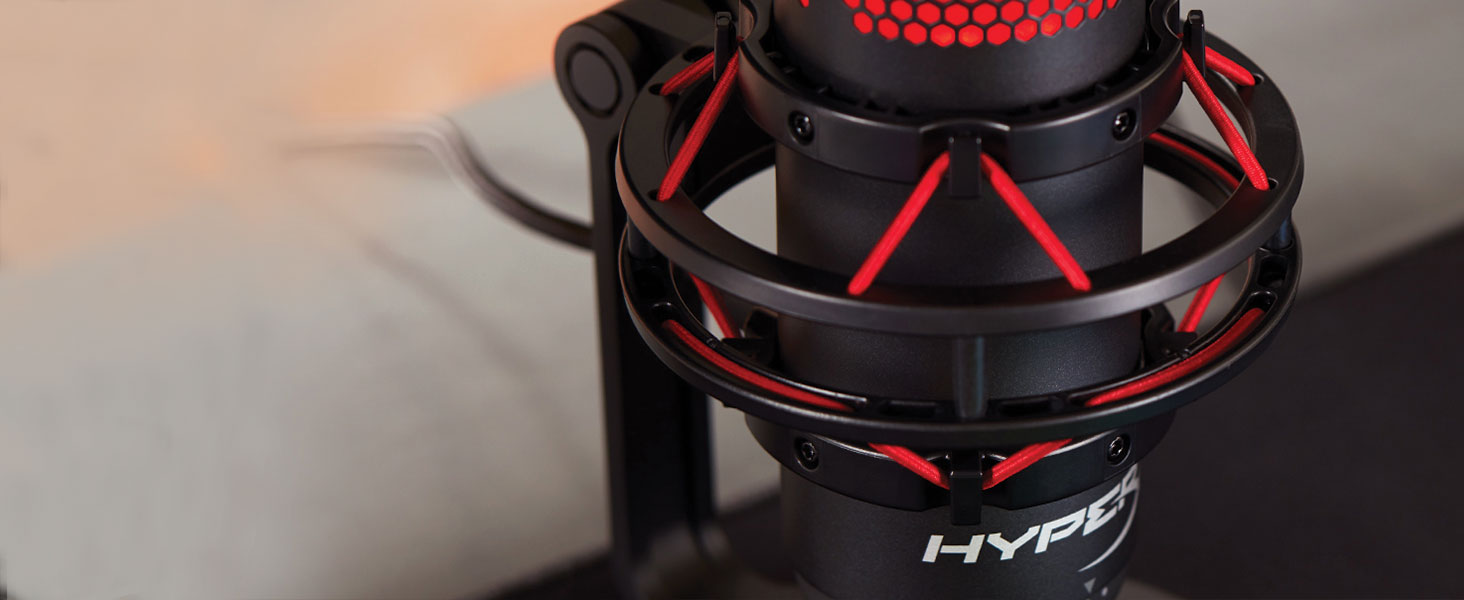
Figure 8: Shock Mount Detail
Údržba
To ensure the longevity and optimal performance of your HyperX QuadCast microphone, follow these simple maintenance guidelines:
- Čištění: Use a soft, dry cloth to gently wipe the exterior of the microphone. Avoid using harsh chemicals, solvents, or abrasive cleaners, as these can damage the finish or internal components.
- Skladování: Pokud mikrofon nepoužíváte, skladujte jej na čistém a suchém místě mimo dosah extrémních teplot, vlhkosti a přímého slunečního záření.
- Zacházení: Handle the microphone with care. Avoid dropping it or subjecting it to strong impacts, which can damage the internal components or the shock mount.
- Péče o kabely: Neohýbejte ani netahejte za kabel USB. Uskladněte jej úhledně, abyste zabránili jeho zamotání a poškození.
Odstraňování problémů
If you encounter issues with your HyperX QuadCast, try the following troubleshooting steps:
- Žádný zvuk/není detekován mikrofon:
- Ujistěte se, že je kabel USB bezpečně připojen k mikrofonu i k zařízení.
- Try plugging the microphone into a different USB port on your computer or console.
- Verify that the microphone is not muted (check the LED indicator on top).
- Check your device's sound settings to ensure the HyperX QuadCast is selected as the default input device.
- Low Volume/Distorted Audio:
- Adjust the gain control knob at the bottom of the microphone.
- Check your device's sound settings for microphone input levels and adjust as needed.
- Ensure you are speaking directly into the front of the microphone, especially when using Cardioid polar pattern.
- Experiment with different polar patterns to find the best setting for your environment.
- Nadměrný hluk na pozadí:
- Ensure the anti-vibration shock mount is properly installed.
- Use the Cardioid polar pattern to minimize sound pickup from the sides and rear.
- Reduce ambient noise in your recording environment.
Specifikace
Detailed technical specifications for the HyperX QuadCast microphone:
| Funkce | Detail |
|---|---|
| Mikrofonní prvek | Elektretový kondenzátorový mikrofon |
| Typ kondenzátoru | Tři 14mm kondenzátory |
| Polární vzory | Stereo, všesměrové, kardioidní, obousměrné |
| Frekvenční odezva | 20Hz – 20kHz |
| Citlivost | -36dB (1V/Pa při 1kHz) |
| Sample/bitová rychlost | 48Hz/16-bit |
| Délka kabelu | 3m |
| Hmotnost mikrofonu | 254 g (0.56 lb) |
| Total Weight (with stand & cable) | 710 g (1.56 lb) |
| Výstupní impedance sluchátek | 32 ohmů |
| Headphone Output Max Power | 7 mW |
| Kompatibilita | PC (Windows 10, 8.1, 8, 7), PS4, PS5, Mac |

Obrázek 9: Rozměry a hmotnost produktu
Záruka a podpora
For detailed warranty information and further technical support, please refer to the official HyperX website or the full user manual available at: HyperX QuadCast User Manual (PDF).
Uschovejte si prosím doklad o koupi pro uplatnění záruky.


