1. Úvod a konecview
The Foseal FO-01 OBD2 Code Reader is a professional diagnostic scan tool designed for automotive use. It allows users to quickly read and clear trouble codes, view live data, and perform various diagnostic tests on OBDII protocol compliant vehicles manufactured since 1996 (US-based) and 2000 (EU-based and Asian cars).
This device features a classic handheld design, ensuring ease of use for both professionals and beginners. Its large LCD display provides clear readability of test results.
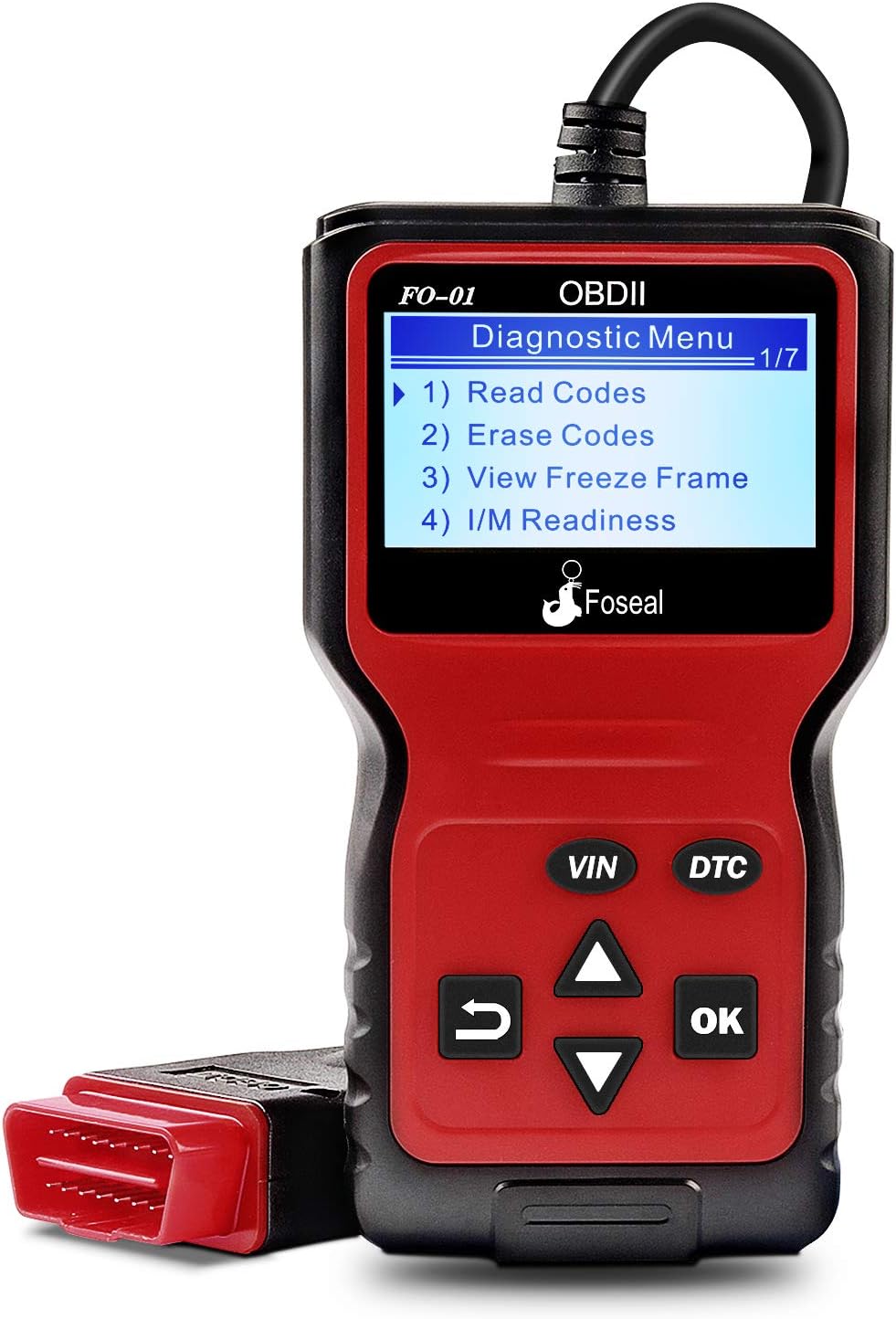
Figure 1: Foseal FO-01 OBD2 Code Reader displaying the diagnostic menu.
2. Vlastnosti produktu
- Classic Handheld Design: Plug and play operation for quick scanning and clearing of trouble codes.
- Komplexní diagnostické funkce: Reads and clears engine trouble codes, turns off Check Engine Light, performs I/M monitor readiness tests, views freeze frame data, and monitors engine coolant temperature.
- Široká kompatibilita s vozidly: Works with most 1996 US-Based cars, SUVs, Light Trucks, and 2000 EU-Based and Asian cars supporting OBD2 protocols (CAN, ISO9141, J1850 VPW, J1850 PWM, KWP2000).
- Jasný displej: Built-in 128 x 64 pixel LCD display with white backlight and contrast adjustment for direct reading of test results.
- Vyhledávání DTC: Provides definitions for diagnostic trouble codes directly.
- Podpora více jazyků: Podporuje 6 jazyků.

Obrázek 2: Přesview of the Foseal FO-01's key functions.

Figure 3: Physical dimensions and labeled components of the Foseal FO-01.
3. Nastavení a připojení
The Foseal FO-01 OBD2 Code Reader is designed for simple plug-and-play operation. No batteries or external power supply are required as the device draws power directly from the vehicle's OBDII port.
3.1 Umístění portu OBDII
The OBDII (On-Board Diagnostics II) port is typically located under the dashboard on the driver's side of the vehicle. It is a 16-pin trapezoidal connector.
3.2 Postup připojení
- Ujistěte se, že je zapalování vozidla v poloze „VYPNUTO“.
- Locate the vehicle's 16-pin OBDII Data Link Connector (DLC).
- Firmly plug the Foseal FO-01's OBDII connector into the vehicle's DLC.
- Turn the vehicle's ignition to the "ON" position (engine can be off or running, depending on the test). The scanner will automatically power on and establish communication with the vehicle's ECU.

Figure 4: The Foseal FO-01 connected to a vehicle's OBDII port, displaying live data.
4. Návod k obsluze
Once connected, the Foseal FO-01 will automatically power on and display the main diagnostic menu. Use the navigation buttons (UP/DOWN arrows, OK, RETURN) to navigate through the menus and select functions.
4.1 Čtení diagnostických chybových kódů (DTC)
- From the main menu, select "Read Codes" and press "OK".
- The scanner will display any stored DTCs (Pending, Confirmed, Permanent) along with their descriptions.
- Use the UP/DOWN arrows to scroll through multiple codes if present.

Figure 5: The FO-01 displaying a Diagnostic Trouble Code (DTC) and its corresponding definition.
4.2 erasinDiagnostické chybové kódy (DTC)
Warning: Clearing DTCs will also clear the Freeze Frame data and reset the I/M Readiness Monitor Status. Ensure any underlying issues are resolved before clearing codes.
- From the main menu, select "Erase Codes" and press "OK".
- Po zobrazení výzvy potvrďte svůj výběr.
- The scanner will attempt to clear all stored DTCs and turn off the Check Engine Light.
4.3 Viewzmrazení dat snímku
Freeze Frame Data records the vehicle's operating conditions at the moment a Diagnostic Trouble Code (DTC) is set. This information can help in diagnosing the cause of the fault.
- From the main menu, select "View Freeze Frame" and press "OK".
- The scanner will display various parameters such as engine RPM, vehicle speed, coolant temperature, fuel system status, etc., recorded at the time of the fault.
4.4 Stav monitoru připravenosti I/M
I/M Readiness Monitors are tests performed by the vehicle's onboard computer to ensure emissions-related components are functioning correctly. This function indicates if the monitors have run and completed their diagnostic testing.
- From the main menu, select "I/M Readiness" and press "OK".
- The display will show the status of various monitors (e.g., Misfire Monitor, Fuel System Monitor, Comprehensive Component Monitor) as "OK" (completed) or "INC" (incomplete).

Figure 6: The FO-01 displaying I/M Readiness status and a real-time data curve example.
4.5 Živý datový tok
Funkce Živý datový stream vám umožňuje view real-time sensor data from the vehicle's engine control unit (ECU). This can be crucial for diagnosing intermittent problems or verifying repairs.
- From the main menu, select "Data Stream" (or similar option) and press "OK".
- The scanner will display a list of available live data parameters. Select the ones you wish to view.
- Parameters may include engine RPM, vehicle speed, coolant temperature, oxygen sensor readings, fuel pressure, etc.
4.6 Vyhledávání DTC
The built-in DTC Lookup feature provides direct definitions for generic and manufacturer-specific diagnostic trouble codes, eliminating the need to consult external resources.
- From the main menu, select "DTC Lookup" and press "OK".
- Enter the DTC code using the navigation buttons.
- The scanner will display the definition of the entered code.
5. Údržba
The Foseal FO-01 OBD2 Code Reader requires minimal maintenance to ensure its longevity and proper functioning.
- Čištění: Use a soft, dry cloth to clean the device. Avoid using abrasive cleaners or solvents that could damage the casing nebo obrazovka.
- Skladování: Store the scanner in a clean, dry environment, away from extreme temperatures, direct sunlight, and excessive moisture.
- Péče o kabely: Do not bend or crimp the OBDII cable excessively. Always grasp the connector when plugging or unplugging, not the cable itself.
- Aktualizace softwaru: Zkontrolujte výrobce website periodically for any available firmware updates to ensure optimal performance and compatibility with newer vehicles.
6. Řešení problémů
If you encounter issues while using your Foseal FO-01 OBD2 Code Reader, refer to the following common troubleshooting steps:
| Problém | Možná příčina | Řešení |
|---|---|---|
| Skener se nezapne. |
|
|
| Zpráva „Chyba spojení“ nebo „Chyba komunikace“. |
|
|
| Nelze vymazat kódy. |
|
|

Figure 7: The FO-01 assisting in diagnosing vehicle system status.
7. Specifikace
| Funkce | Detail |
|---|---|
| Číslo modelu | FO-01 |
| Zobrazit | 128 x 64 pixel LCD with backlight |
| Provozní svtage | 9-16V (via vehicle OBDII port) |
| Podporované protokoly | CAN, ISO9141, J1850 VPW, J1850 PWM, KWP2000 |
| Rozměry (přibližně) | 8.03 x 5.16 x 1.73 palce (rozměry balení) |
| Hmotnost položky | 10.6 unce |
| Délka kabelu | 2.5 stop (přibližně 0.76 metry) |
| Podporované jazyky | English, French, Spanish, Italian, Dutch, German |

Figure 8: The FO-01 supports multiple languages for global usability.
8. Záruka a podpora
Foseal provides an 18-month quality insurance for the FO-01 OBD2 Code Reader. For any problems or inquiries, please contact Foseal customer support through the official channels or the retailer where the product was purchased.
For further assistance, you may refer to the official Foseal webnebo kontaktujte jejich oddělení zákaznických služeb.


