1. Úvod
This manual provides essential information for the safe and effective operation of your Rothenberger ROSCOPE Mini Inspection Camera. Please read these instructions carefully before using the device and retain them for future reference. The ROSCOPE Mini is a compact, portable inspection camera designed for visual inspection in hard-to-reach areas.
2. Bezpečnostní informace
Vždy dodržujte následující bezpečnostní opatření, abyste předešli zranění a poškození zařízení:
- Do not immerse the main unit in water. Only the camera head is waterproof.
- Ujistěte se, že jsou baterie vloženy správně podle vyznačené polarity.
- Nepokoušejte se zařízení otevírat ani upravovat. Veškerý servis svěřte kvalifikovanému personálu.
- Chraňte zařízení před extrémními teplotami, přímým slunečním zářením a korozivními látkami.
- Tento výrobek obsahuje chemikálie, o kterých je ve státě Kalifornie známo, že způsobují rakovinu a vrozené vady nebo jiné poškození reprodukce. Po manipulaci si umyjte ruce.
3. Obsah balení
Ověřte, zda jsou v balení přítomny všechny položky:
- ROSCOPE Mini Inspection Camera (main unit with integrated camera cable)
- 4 AA baterie

Obrázek 3.1: The ROSCOPE Mini Inspection Camera shown in its retail packaging, alongside the four included AA batteries.

Obrázek 3.2: Bližší fronta view of the ROSCOPE Mini within its packaging, highlighting the device and the batteries.
4. Konec produktuview
The Rothenberger ROSCOPE Mini is a compact inspection camera featuring a flexible camera with 4x digital zoom and a waterproof camera head. It is designed for easy handling and storage.

Obrázek 4.1: The Rothenberger ROSCOPE Mini Inspection Camera, displaying its main unit and the flexible camera probe with an illuminated tip.

Obrázek 4.2: The ROSCOPE Mini with its camera cable fully extended, demonstrating its flexibility for various inspection tasks.
Klíčové vlastnosti:
- Waterproof camera head for use in wet environments.
- Flexible camera with 4x digital zoom for detailed inspection.
- Kompaktní design pro snadné přenášení a skladování.
- On-board storage for up to 30 images.
- Integrated belt clip for convenient carrying.
5. Nastavení
5.1 Instalace baterie
- Locate the battery compartment on the back of the ROSCOPE Mini.
- Otevřete kryt bateriového prostoru.
- Vložte 4 baterií typu AA a dbejte na správnou polaritu (+/-) vyznačenou uvnitř přihrádky.
- Bezpečně zavřete kryt bateriového prostoru.

Obrázek 5.1: Zadní část view of the ROSCOPE Mini, showing the battery compartment and product specification label.
5.2 Připojení příslušenství (volitelné)
If your inspection requires a different viewing angle or retrieval, you may attach optional accessories to the camera head.

Obrázek 5.2: Bývalýample of a mirror attachment, which can be affixed to the camera head for side viewIng.

Obrázek 5.3: Bývalýample of a hook attachment, useful for retrieving small objects during inspection.
6. Návod k obsluze
6.1 Zapnutí/vypnutí
- To power on: Press and hold the power button (usually marked with a circle and a vertical line) until the screen illuminates.
- To power off: Press and hold the power button again until the screen turns off.
6.2 Performing an Inspection
- Once powered on, the live video feed from the camera head will appear on the display.
- Carefully guide the flexible camera probe into the area you wish to inspect. The waterproof camera head allows for use in damp nebo vlhké podmínky.
- Use the navigation buttons (often marked with arrows or zoom icons) to adjust the 4x digital zoom for a clearer view of specific details.
- The camera head is equipped with adjustable lighting. Use the light button (often marked with a light bulb icon) to increase or decrease illumination as needed.
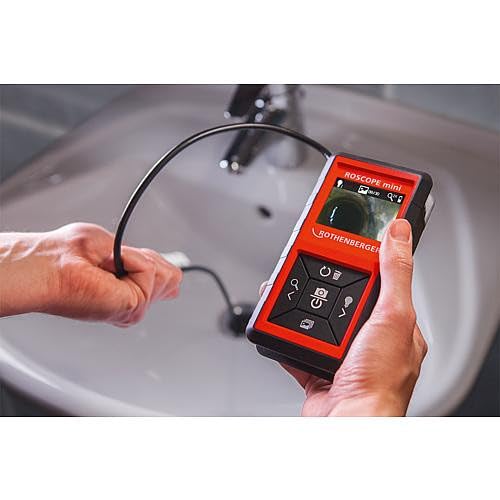
Obrázek 6.1: A user demonstrating the ROSCOPE Mini in action, guiding the camera probe into a sink drain for inspection.
6.3 Pořizování snímků
The ROSCOPE Mini can save up to 30 images on its internal storage.
- To capture an image: Press the camera button (often marked with a camera icon) while viewing the live feed. The image will be saved automatically.
- Na review images: Navigate to the gallery mode (refer to on-screen icons for specific button).
- To delete images: In gallery mode, select the image and press the delete button (often marked with a trash can icon).
7. Údržba
7.1 Čištění
- Hlava kamery: After use, especially in dirty or wet conditions, gently wipe the waterproof camera head with a soft, damp cloth. Ensure no debris obstructs the lens or LED lights.
- Hlavní jednotka: Clean the main unit with a dry, soft cloth. Do not use abrasive cleaners or solvents.
7.2 Výměna baterie
Replace all 4 AA batteries when the low battery indicator appears on the display or when the device fails to power on. Refer to Section 5.1 for battery installation instructions.
7.3 Skladování
Store the ROSCOPE Mini in a cool, dry place, away from direct sunlight and extreme temperatures. The cable inlets are designed for perfect storage of the flexible probe.
8. Řešení problémů
If you encounter issues with your ROSCOPE Mini, consult the following table:
| Problém | Možná příčina | Řešení |
|---|---|---|
| Zařízení se nezapne. | Vybité nebo nesprávně vložené baterie. | Vyměňte baterie za nové AA baterie a dbejte na správnou polaritu. |
| Poor image quality / Insufficient lighting. | Camera lens is dirty; insufficient LED illumination; object too far/close. | Clean the camera lens. Adjust the LED brightness. Adjust the distance to the object. |
| Nelze ukládat obrázky. | Internal storage is full. | Delete unnecessary images from the device's memory. |
| Obrazovka je zamrzlá. | Dočasná softwarová závada. | Vyjměte a znovu vložte baterie pro provedení tvrdého resetu. |
If the problem persists after attempting these solutions, please contact Rothenberger customer support.
9. Specifikace
| Funkce | Specifikace |
|---|---|
| Číslo modelu | 10000002268 |
| Rozměry produktu | 3.54 x 1.57 x 6.1 palce |
| Hmotnost | 1.01 libry |
| Baterie | 4 AA baterie (součástí balení) |
| Typ řízení expozice | Automatický |
| Rozlišení záznamu videa | 480p |
| Typ zoomu | Digitální zoom (4x) |
| Úroveň odolnosti proti vodě | Waterproof (camera head only) |
| Ukládání obrázků | Up to 30 images (on-board) |
10. Záruka a podpora
Rothenberger products are manufactured to high-quality standards. For information regarding warranty coverage and terms, please refer to the warranty card included with your product or visit the official Rothenberger webmísto.
For technical support, service, or to inquire about replacement parts, please contact Rothenberger customer service. Contact details can typically be found on the manufacturer's webmístě nebo na obalu produktu.
Můžete také navštívit Rothenberger Store on Amazon pro více informací o produktu.


