Zavedení
The Atomi AT1238 Plate Power Mini Swivel Wall Outlet (2 Pack) is designed to expand your existing wall outlets, providing additional AC power receptacles and USB charging ports. Its unique swivel design allows for optimal positioning, making it ideal for tight spaces or to accommodate larger plugs without blocking other outlets. This product transforms a standard wall outlet into a versatile power hub, complete with surge protection.
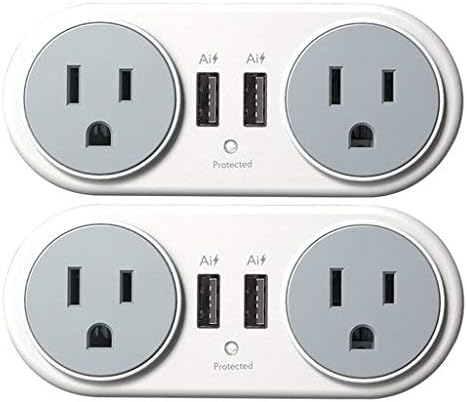
This image displays two Atomi Plate Power Mini Swivel Wall Outlets. Each unit features two standard three-prong AC power outlets and two USB charging ports. A small 'Protected' indicator light is visible below the USB ports, signifying active surge protection. The units are designed to swivel, allowing flexible positioning when plugged into a wall outlet.
Pokyny pro nastavení
Follow these steps to properly set up your Atomi Plate Power Mini Swivel Wall Outlet:
- Identify a Wall Outlet: Locate a standard grounded 125V AC wall outlet where you wish to add additional power and USB ports.
- Plug In the Unit: Insert the Atomi Plate Power Mini Swivel Wall Outlet directly into the top receptacle of the chosen wall outlet. Ensure it is firmly seated and flush against the wall.
- Adjust Swivel Position: Rotate the unit to your desired angle. The unit can swivel 360 degrees and locks into four distinct positions to best suit your space and plug configurations.
- Ověření ochrany: Confirm that the green 'Protected' indicator light on the unit is illuminated. This light signifies that the surge protection feature is active and functioning correctly.
Návod k obsluze
Once set up, the Atomi Plate Power Mini Swivel Wall Outlet is ready for use:
- Používání zásuvek střídavého proudu: Insert standard 2-prong or 3-prong plugs into the AC receptacles. The swivel feature allows you to orient the outlets to prevent bulky adapters from obstructing adjacent outlets or furniture.
- Používání nabíjecích portů USB: Connect your USB-powered devices (e.g., smartphones, tablets, smartwatches) to the USB ports using their respective charging cables. The 'Ai' (Adaptive Intelligence) ports are designed to automatically detect your device's power requirements and deliver the optimal charging current for efficient and safe charging.
- Chráněný indikátor: The green light labeled 'Protected' indicates that the surge protection feature is active and functioning. If this light is off, the surge protection may have been compromised by a power surge, and the unit should be replaced to ensure continued protection for your devices.
Údržba
To ensure the longevity and proper functioning of your Atomi Plate Power Mini Swivel Wall Outlet, follow these simple maintenance guidelines:
- Čištění: Keep the unit clean by wiping it with a dry, soft cloth. Do not use liquid cleaners, aerosol cleaners, or harsh chemicals, as these can damage the unit or pose an electrical hazard.
- Před čištěním odpojte: Always unplug the unit from the wall outlet before attempting any cleaning.
- Podmínky prostředí: Avoid exposing the unit to moisture, excessive humidity, or extreme temperatures. Do not use it outdoors or in wet environments.
- Inspekce: Periodically inspect the unit for any signs of damage, such as frayed cords (if applicable), cracked casing, or loose connections. If damage is found, discontinue use and replace the unit.
Odstraňování problémů
If you encounter issues with your Atomi Plate Power Mini Swivel Wall Outlet, refer to the following common problems and solutions:
- No Power from Outlets or USB Ports:
- Ensure the Atomi Plate Power Mini Swivel Wall Outlet is firmly plugged into a live wall outlet.
- Check if the 'Protected' indicator light is on. If it is off, the surge protection may have been compromised, or the wall outlet itself may not be live. Test the wall outlet with another known working device.
- If the 'Protected' light is off, the unit's surge protection may have absorbed a significant power surge and is no longer active. For continued protection, the unit should be replaced.
- Zařízení USB se nenabíjejí:
- Ensure the USB cable is securely connected to both your device and the Atomi unit.
- Try a different USB cable or device to rule out issues with the cable or the device itself.
- Confirm that the 'Protected' indicator light on the Atomi unit is illuminated, indicating proper power supply.
- Unit Does Not Swivel Smoothly:
- Ensure there are no obstructions around the unit or the wall outlet that might impede its rotation.
- Do not force the swivel mechanism if it feels stiff; ensure it is properly aligned with the locking positions.
Technické specifikace
| Funkce | Specifikace |
|---|---|
| Výrobce | Atomi |
| Číslo modelu | AT1238 |
| Hmotnost položky | 12.8 unce (pro balení po 2 kusech) |
| Rozměry produktu | 13 x 9.2 x 2 palce (pro balení po 2 kusech) |
| svtage | 125 voltů |
| AC zásuvky | 2 per unit (4 total for 2-pack) |
| USB nabíjecí porty | 2 per unit (4 total for 2-pack) |
| Typ montáže | Držák na zeď |
| Baterie jsou součástí dodávky? | Žádný |
| Jsou vyžadovány baterie? | Žádný |
| Technologie připojení | USB |
| Ochrana proti přepětí | Yes (indicated by 'Protected' light) |
Záruka a podpora
This manual does not contain specific warranty information. For details regarding warranty coverage, product support, or technical assistance, please refer to the official Atomi website or contact Atomi customer service directly. Keep your purchase receipt for warranty claims.
Nejnovější informace a zdroje podpory naleznete na Atomi Store on Amazon or the official Atomi webmísto.


