Zavedení
The ASUS RT-AC86U Wi-Fi Dual-band Gigabit Wireless Router is designed to provide ultrafast Wi-Fi performance, especially for demanding applications like online gaming and 4K UHD streaming. Featuring NitroQAM (1024-QAM) technology, it delivers combined speeds of up to 2917Mbps. With MU-MIMO technology, multiple devices can connect simultaneously at full speed without network slowdowns. This router also includes Adaptive QoS for prioritizing gaming traffic and ASUS AiProtection, a commercial-grade network security system powered by Trend Micro Smart Home Network. Connectivity options include four Gigabit LAN ports, a USB 2.0 port, and a USB 3.0 (USB 3.1 Gen 1) port, allowing for versatile connections to smart TVs, game consoles, NAS storage, and more.
Klíčové vlastnosti
- Dual-band (2.4 plus 5 GHz) AC2900 wireless router with the latest 802. 11AC MU-MIMO technology for data transfer speeds up to 2900 Mbps.
- 1.8GHz 32bit dual-core processor optimizes network traffic and connectivity speeds from the USB 3. 1 Gen1 and 4x Gigabit LAN ports.
- Designed for lag-free online gaming and flawless 4K UHD streaming with WTFast game Accelerator and adaptive QoS.
- AiProtection powered by Trend Micro provides built-in 24/7 protection from external attacks and threats, neutralizing them before they reach your network or connected devices.
- Manage your network with the ASUS router app – setup your network, manage usage and parental controls, and get instant notifications about important network-based events.
Co je v krabici
Než začnete, ujistěte se, že balení obsahuje všechny komponenty:

Image: Contents of the ASUS RT-AC86U router box. Includes the RT-AC86U Wireless AC2900 Router, WAN Ethernet Cable (RJ45), Power Adapter, and various manuals (Manual, Quick Start Guide, VIP Membership Warranty Notice).
- ASUS RT-AC86U Wireless AC2900 Router
- WAN Ethernet Cable (RJ45)
- Napájecí adaptér
- Quick Start Guide and other documentation
Průvodce nastavením
- Rozbalte router: Carefully remove the router and all accessories from the box.
- Připojte antény: Ensure the three external antennas are securely attached to the router.
- Umístění routeru: Place the router in a central location in your home or office, away from obstructions and other electronic devices that might cause interference.
- Připojení k napájení: Plug the power adapter into the router's DC-IN socket and then into a power outlet. Turn on the router using the power button.
- Připojení k modemu: Use the provided Ethernet cable to connect your modem's LAN port to the router's Internet (WAN) port.
- Připojte své zařízení:
- Kabelové připojení: Připojte počítač k jednomu z LAN portů routeru pomocí ethernetového kabelu.
- Bezdrátové připojení: Find the default Wi-Fi network name (SSID) and password on the label on the bottom of the router. Connect your wireless device to this network.
- Přístup k Web Rozhraní: Otevřete a web browser on your connected device and type router.asus.com or 192.168.1.1 into the address bar. Follow the on-screen instructions to complete the initial setup, including setting up your new Wi-Fi network name and password, and admin login credentials.

Obrázek: Zadní view of the ASUS RT-AC86U router. Labels indicate the Reset button, Power button, DC-IN socket, USB2.0 port, USB3.1 Gen1 port, Internet (WAN) port, LAN 1-4 ports, LED on/off button, and Fancy LOGO lens.
Návod k obsluze
Once your router is set up, you can manage and optimize your network using the web interface or the ASUS Router App.
- Připojovací zařízení: Connect new devices to your Wi-Fi network using the SSID and password you configured during setup. For wired connections, simply plug an Ethernet cable into an available LAN port.
- Changing Wi-Fi Settings: Přihlaste se do web interface to change your Wi-Fi network name (SSID), password, security type, or enable/disable guest networks.
- Aktualizace firmwaru: Pravidelně kontrolujte a instalujte aktualizace firmwaru prostřednictvím web interface. This ensures optimal performance, security, and access to new features.
- Ochrana umělé inteligence: Access the AiProtection section in the web interface to monitor network security, block malicious sites, and manage parental controls.
- Adaptivní QoS: Utilize Adaptive QoS to prioritize network traffic for specific applications, such as gaming or streaming, ensuring a smooth experience.
- Aplikace ASUS Router: Download the ASUS Router App from your mobile app store for convenient network management from your smartphone or tablet.

Image: Customize Your Network. A tablet displays the ASUS router's web interface with options like Network Map, Adaptive QoS, Traffic Monitor, Roaming Assist, Guest Network, Parental Control, VPN Server & Client, MAC/Keyword/URL Filter, AiCloud, Download Master, Printer Server, Media Server, and Mac OS Backup Support.
Údržba
- Udržujte firmware aktualizovaný: Regularly check for and apply the latest firmware updates to ensure optimal performance, security, and compatibility.
- Pravidelné restarty: Periodically reboot your router (e.g., once a month) to clear its memory and refresh network connections, which can improve stability.
- Správné větrání: Ensure the router is placed in a well-ventilated area to prevent overheating, which can affect performance and lifespan.
- Čistota: Keep the router free from dust accumulation, especially around ventilation openings, to maintain proper airflow.
Odstraňování problémů
- Žádné internetové připojení:
- Check if the WAN cable is securely connected to both the router and the modem.
- Reboot both your modem and router by unplugging them for 30 seconds and then plugging them back in.
- Ověřte, zda váš poskytovatel internetových služeb (ISP) nemá problém s výpadkemtage.
- Pomalé rychlosti Wi-Fi:
- Ensure your devices are connected to the 5GHz band for faster speeds, if supported.
- Reduce interference by moving the router away from other electronics or large metal objects.
- Zkontrolujte aktualizace firmwaru.
- Use Adaptive QoS to prioritize critical traffic.
- Odpojení od Wi-Fi:
- Try changing your Wi-Fi channel in the router settings to avoid crowded channels.
- Ujistěte se, že firmware vašeho routeru je aktuální.
- Check the distance between your device and the router; consider a Wi-Fi extender if needed.
- Cannot Access Router Admin Page:
- Ujistěte se, že je vaše zařízení připojeno k routeru (drátově nebo bezdrátově).
- Zkuste vymazat mezipaměť prohlížeče nebo použít jiný prohlížeč.
- Ověřte, zda používáte správnou IP adresu (192.168.1.1) nebo doména (router.asus.com).
- If you forgot your password, you may need to perform a factory reset (refer to the setup guide for reset button location).
Specifikace
| Funkce | Detail |
|---|---|
| Rozměry produktu | 6.2 x 3.3 x 8.66 palce |
| Hmotnost položky | 1 libry |
| Výrobce | ASUS Computer International Direct |
| Číslo modelu položky | RT_AC86U |
| Datum první dostupnosti | 31. října 2018 |
| Značka | ASUS |
| Název modelu | Asus AC2900 |
| Speciální funkce | QoS, WPS |
| Třída frekvenčního pásma | Dvoupásmový |
| Standard bezdrátové komunikace | 802.11ac |
| Kompatibilní zařízení | Gaming Console, Smart Television |
| Frekvence | 5 GHz |
| Doporučená použití pro produkt | Hraní |
| Technologie připojení | Wi-Fi |
| Barva | Černý |
Konec produktuview
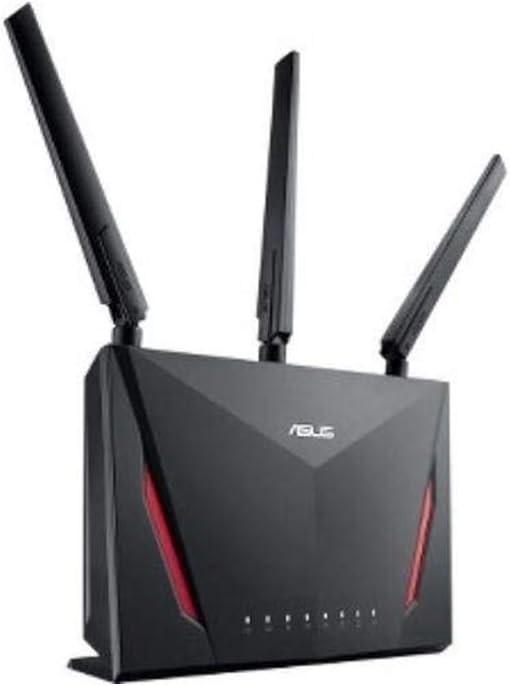
Image: The ASUS RT-AC86U router, showcasing its sleek black design with red accents and three prominent antennas, indicating its powerful wireless capabilities.

Image: Award Winning Wireless Performance. This diagram highlights the router's 802.11ac Dual-Band AC2900 WiFi with MU-MIMO & NitroQAM Technology, showing separate 2.4GHz and 5GHz signals supporting multiple users simultaneously.

Image: Double Gaming Boost. This graphic illustrates the router's built-in WTFast Game Accelerator and Adaptive QoS, designed to prioritize gaming packets and optimize network bandwidth for a smoother gaming experience, powered by a 1.8 GHz Dual-Core Processor and 2900 Mbps Data Transfer Speeds.

Image: Built In Protection. This image details the exclusive ASUS AiProtection for 24/7 Security powered by Trend Micro, including protection against attacks, blocking access to malicious websites, no subscription fee, and infection detection and blocking.
Záruka a podpora
This ASUS RT-AC86U router comes with a standard manufacturer's warranty. For specific warranty terms, duration, and conditions, please refer to the warranty card included in your product packaging or visit the official ASUS support webmísto.
For technical support, troubleshooting assistance, driver downloads, and frequently asked questions, please visit the ASUS support portal:
Please have your product model number (RT-AC86U) and serial number ready when contacting support.


