1. Úvod
Thank you for choosing the LECLSTAR Motion Sensor Closet Light. This manual provides essential information for the safe and effective use of your new lighting product. Please read these instructions carefully before installation and operation, and retain them for future reference.
This wireless, battery-operated light features 51 LEDs, motion sensing capabilities, and is designed for various indoor applications such as closets, cabinets, kitchens, and stairs.
2. Bezpečnostní informace
- Nevystavujte zařízení vodě ani nadměrné vlhkosti.
- Do not attempt to disassemble, repair, or modify the light. This will void the warranty and may cause damage or injury.
- K nabíjení používejte pouze dodaný USB kabel.
- Avoid direct eye exposure to the LED light, as it can be very bright.
- Uchovávejte mimo dosah dětí.
3. Obsah balení
Zkontrolujte prosím balení, zda jsou všechny položky přítomny:
- 1 x LECLSTAR Motion Sensor Closet Light
- 1 x Magnetic Plastic Bracket
- 2 x 3M lepicí podložky
- 4 x montážní šrouby
- 1 x USB nabíjecí kabel
- 1 x Uživatelská příručka
4. Konec produktuview
Familiarize yourself with the components of your LECLSTAR Motion Sensor Closet Light.

Obrázek 1: Product Components. This diagram illustrates the various parts of the light, including the USB charging port, magnetic strip for mounting, LED light board, durable aluminum alloy casing, ON/OFF switch, infrared motion sensor receiver, and protective ABS cover.
- USB port: Pro nabíjení interní baterie.
- Magnetický proužek: Allows for easy attachment to magnetic surfaces or the included bracket.
- LED Light Board: Contains 51 bright LEDs for illumination.
- Materiál hliníkové slitiny: Provides a durable and lightweight housing.
- Tlačítko ON/OFF: Controls the power and operating modes.
- Infračervený přijímač: Detects signals from the remote control (if applicable).
- ABS Cover: Protects the LEDs and diffuses light.
5. Nastavení a instalace
The LECLSTAR Motion Sensor Closet Light offers flexible installation options.
5.1 Charging Before First Use
Before installation, fully charge the light. Refer to Section 6 for detailed charging instructions.
5.2 Možnosti montáže
You can install the light using the magnetic plastic bracket with 3M adhesive or screws.
- Magnetická adheze: Peel off the protective film from the 3M adhesive pads and attach them to the magnetic plastic bracket. Press the bracket firmly onto a clean, dry surface where you wish to install the light. The light can then be magnetically attached to the bracket.
- Šroubová montáž: Use the provided screws to secure the magnetic plastic bracket to a desired surface. Once the bracket is securely mounted, attach the light magnetically.

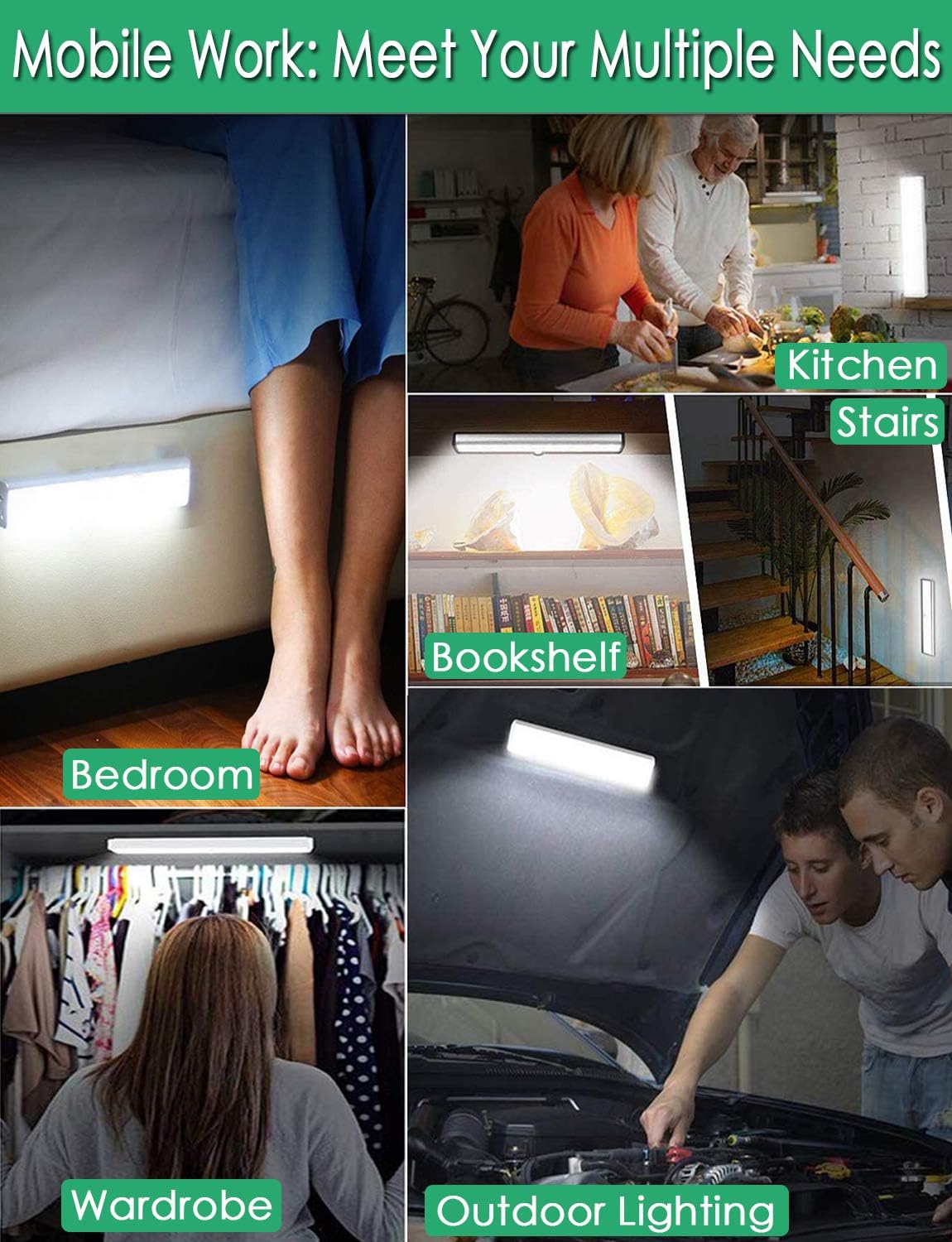
Obrázek 2: Versatile Installation. This image illustrates the light's adaptability, showing it mounted under a bed, in a kitchen, on a bookshelf, along stairs, inside a wardrobe, and providing illumination for outdoor tasks, highlighting its ease of placement in diverse environments.
5.3 Aspekty umístění
- For optimal motion detection, position the sensor ball to face the direction of expected movement.
- When using multiple motion sensor lights, avoid placing them too close together in motion-sensing mode, as they may interfere with each other's sensitivity.
- Ensure the installation surface is clean and dry for secure adhesion.
6. Pokyny pro nabíjení
The LECLSTAR Motion Sensor Closet Light is equipped with a built-in 2400mAh lithium battery.
- Connect the provided USB charging cable to the light's USB port.
- Druhý konec kabelu USB zapojte do standardního napájecího adaptéru USB (není součástí balení) nebo do portu USB počítače.
- During charging, the indicator light on the device will be modrý.
- Po plném nabití se kontrolka rozsvítí červený.
- Plné nabití obvykle trvá přibližně 4 hodiny.
Obrázek 3: Charging Status. This image demonstrates the charging process, showing the light connected to a power source. The indicator light is red when charging and turns blue when the battery is fully charged, indicating its status clearly.
7. Návod k obsluze
The light features multiple operating modes and can be controlled via its ON/OFF button or an optional remote control.
7.1 Mode Selection (ON/OFF Button)
Locate the ON/OFF button on the side of the light. Toggle the switch to select the desired mode:
- OFF: Světlo je úplně vypnuté.
- NA: Světlo svítí nepřetržitě.
- AUTO (Režim pohybového senzoru): Světlo se automaticky rozsvítí, když je v tmavém prostředí detekován pohyb. Vypne se přibližně 30 sekund poté, co není detekován žádný pohyb.

Obrázek 4: Motion Sensor Operation. This image demonstrates how the motion sensor works: the light remains off in bright environments, automatically turns on when movement is detected in the dark within a 3-meter, 120-degree range, and then automatically turns off after 30 seconds of inactivity.
7.2 Motion Sensor Details
- Detekční úhel: 120 stupňů.
- Detekční vzdálenost: Up to 3 meters (approximately 10 feet).
- The sensor is designed to activate only in low-light conditions to conserve battery life.
7.3 Remote Control Functions (Optional)
If your model includes a remote control, you can access additional features:

Obrázek 5: Remote Control Functions. This image displays the remote control, highlighting its various buttons: ON/OFF for power, 'S' for sensor mode, '1', '2', '3' for different light modes or brightness levels, '+' and '-' for adjusting brightness, and '15', '30', '60', '120' for setting a timer.
- ON/OFF: Zapíná nebo vypíná světlo.
- S (Sensor Mode): Activates the motion sensor mode.
- 1, 2, 3 (Light Modes): Selects different light modes or brightness levels.
- 50%, 100%, +, - (Adjustable Brightness): Upravuje intenzitu světla.
- 15, 30, 60, 120 (Timer Function): Sets the light to turn off automatically after a specified duration.
8. Údržba
- Čištění: Otřete světlo měkkým, suchým hadříkem. Nepoužívejte abrazivní čisticí prostředky ani rozpouštědla.
- Péče o baterie: To prolong battery life, avoid fully discharging the battery frequently. Charge the light regularly, especially if it will not be used for an extended period.
9. Řešení problémů
- Světlo se nerozsvítí:
- Ujistěte se, že je baterie nabitá.
- Check that the light is switched to the 'ON' or 'AUTO' mode.
- Nefunkční senzor pohybu:
- Ensure the light is in 'AUTO' mode.
- Ověřte, zda je okolní světlo dostatečně tmavé, aby se senzor aktivoval.
- Check that the sensor is not obstructed and is facing the area of expected movement.
- If multiple motion sensor lights are nearby, they might interfere with each other. Try repositioning them.
- Světlo nečekaně bliká nebo ztlumuje:
- The battery level may be low. Recharge the light.
10. Specifikace
| Model | B07JRBSJDR |
| Světlá barva | Pure White (6000K) |
| Množství LED | 51 LED diod |
| Lumen výstup | 240lm |
| Motion Detecting Angle | 120 stupňů |
| Motion Detecting Distance | Až 3 metrů (10 stop) |
| Životnost LED | Více než 80,000 hodin |
| Typ baterie | Lithiová baterie 2400mAh |
| Doba nabíjení USB | Přibližně 4 hodiny |
| Provozní svtage | 4.2V |
| Wattage | 3W |
| Rozměry | 15.3 x 0.8 x 0.8 palce |
| Materiál | Kov, Plast |
| Zdroj napájení | Napájení z baterie |
| Speciální funkce | Okamžité zapnutí |
11. Záruka a podpora
LECLSTAR provides a lifetime warranty for this product. If you encounter any issues or have questions regarding your Motion Sensor Closet Light, please contact the LECLSTAR service team for assistance. Our dedicated support team is ready to help you.
For warranty claims or technical support, please refer to the contact information provided on the product packaging or the official LECLSTAR webmísto.

