1. Úvod
This manual provides detailed instructions for the installation, operation, and maintenance of your EBTOOLS 12V/24V 50A Solar Charge Controller. This intelligent regulator is designed to manage power flow from your solar panel to your battery and load, ensuring efficient and safe charging. It features dual USB ports, PWM/MPPT auto-parameter adjustment, and an LCD display for monitoring system status.
2. Bezpečnostní informace
Please read all instructions carefully before installation and operation. Failure to follow these instructions may result in damage to the controller, battery, or other components, and may cause personal injury.
- Před připojením napájení se ujistěte, že jsou všechna připojení správná a bezpečná.
- Nejprve připojte baterii, poté solární panel a nakonec zátěž. Odpojte v opačném pořadí.
- Do not connect the solar panel to the AC power supply.
- Regulátor je určen pro použití v interiéru. Nevystavujte jej přímému slunečnímu záření, vysokým teplotám a vlhkosti.
- Zajistěte dostatečné větrání kolem regulátoru.
- Pro všechna připojení používejte vodiče vhodného průřezu, abyste zabránili přehřátí.
- Toto zařízení není hračka. Uchovávejte mimo dosah dětí.
3. Konec produktuview
The EBTOOLS Solar Charge Controller integrates advanced charging technology to optimize battery life and system performance. Key components include the LCD display, control buttons, connection terminals, and USB output ports.
3.1 Přední panel
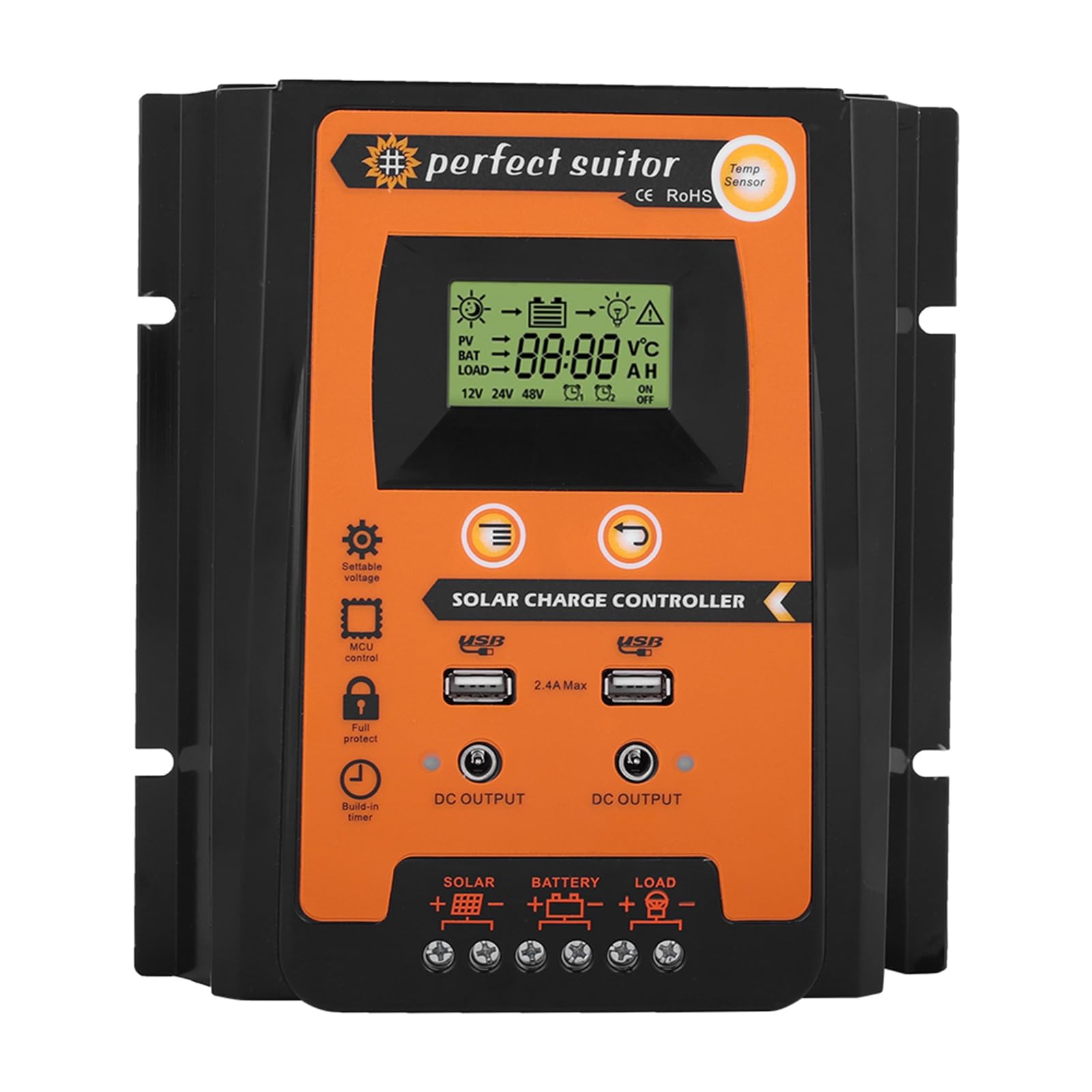
Obrázek 3.1: Přední strana view of the EBTOOLS Solar Charge Controller. This image displays the LCD screen, control buttons, dual USB output ports, and indicators for solar, battery, and load connections.
3.2 Zadní panel

Obrázek 3.2: Zadní view of the EBTOOLS Solar Charge Controller. The rear panel features heat sink fins for efficient heat dissipation.
3.3 Rozměry

Figure 3.3: Dimensions of the EBTOOLS Solar Charge Controller. The unit measures approximately 21cm (8.3 inches) in length, 19.2cm (7.6 inches) in width, and 5.5cm (2.2 inches) in height.
4. Nastavení a instalace
Follow these steps for proper installation of the solar charge controller. Ensure all power sources are disconnected before making any connections.
4.1 Pořadí připojení
- Připojte baterii: Connect the battery to the controller's battery terminals (+ and -). The LCD display will light up.
- Připojte solární panel: Připojte solární panel ke svorkám solárního panelu (+ a -) na regulátoru.
- Připojení zátěže: Připojte zátěž ke svorkám zátěže (+ a -) regulátoru.
Důležité: Vždy nejdříve připojte baterii, poté solární panel a nakonec zátěž. Odpojujte v opačném pořadí: zátěž, poté solární panel a nakonec baterii.

Figure 4.1: Controller Connection Method. This diagram illustrates the correct wiring sequence from the solar panel to the controller, then to the battery, and finally to the load.
4.2 Montáž
Mount the controller on a vertical surface in a well-ventilated area, away from direct sunlight, high temperatures, and moisture. Ensure there is sufficient space around the controller for air circulation.
5. Návod k obsluze
The controller automatically detects 12V or 24V system voltage. The LCD display provides real-time information about your solar system.
LCD displej 5.1
LCD displej zobrazuje různé parametry včetně nabití baterietage, solární panel svtage, load current, battery charge status, and error codes.
5.2 Ovládací tlačítka
- Tlačítko nabídky: Press to cycle through display modes and enter setting menus.
- Tlačítka nahoru/dolů: Used to adjust parameters within the setting menus.
- Tlačítko Enter: Potvrzuje výběr a ukládá nastavení.
5.3 USB výstup
The dual USB ports provide a 5V/2.4A output for charging mobile devices. These ports are active when the controller is powered.
6. Údržba
Pravidelná údržba zajišťuje optimální výkon a dlouhou životnost vašeho solárního regulátoru nabíjení.
- Zkontrolujte připojení: Pravidelně kontrolujte všechna kabelová spojení, zda nejsou pevně utažená a zda nejsou korozivá.
- Čistý ovladač: Udržujte ovladač čistý a bez prachu a nečistot. K čištění používejte suchý hadřík.
- Větrání: Ujistěte se, že větrací otvory nejsou zablokované.
- Kontrola baterie: Regularly check the battery terminals for corrosion and ensure the battery is in good condition.
7. Řešení problémů
Tato část se zabývá běžnými problémy, se kterými se můžete setkat u regulátoru solárního nabíjení.
| Problém | Možná příčina | Řešení |
|---|---|---|
| LCD displej je vypnutý | Baterie není připojena nebo je nízkátage | Check battery connections; charge battery if voltage je příliš nízké. |
| Baterie se nenabíjí | Solar panel not connected, insufficient sunlight, or faulty panel/wiring | Check solar panel connections; ensure adequate sunlight; test solar panel output. |
| Zatížení nefunguje | Load not connected, overload, or battery low voltage ochrana | Check load connections; reduce load; charge battery. |
| Voltage ochrana | Baterie voltage příliš vysoká | Controller will automatically stop charging. Check battery health. |
8. Specifikace
Technical specifications for the EBTOOLS 12V/24V 50A Solar Charge Controller.
| Funkce | Detail |
|---|---|
| Model | PVSC50A |
| System Voltage | 12V/24V Automatické snímání |
| Jmenovitý nabíjecí proud | 50A |
| Jmenovitý vybíjecí proud | 50A |
| Max. Solární vstup | Méně než 50V |
| USB výstup | Dual USB 5V/2.4A (Max) |
| Materiál | Plast |
| Rozměry produktu | 6.89 x 5.51 x 1.57 palce (17.5 x 14 x 4 cm) |
| Hmotnost položky | 1.06 libry (0.48 kg) |
9. Záruka a podpora
EBTOOLS products are designed for reliability and performance. For warranty information or technical support, please refer to the documentation provided with your purchase or contact your retailer. Keep your purchase receipt for warranty claims.
