1. Úvod
The Korg CM-300 Contact Microphone is designed to enhance and expand the sound of your musical instrument. Utilizing a piezo element, it directly transmits vibrations from your instrument to a tuner, facilitating high-precision tuning even in environments with high ambient sound. This microphone is versatile and can be applied to various instruments including trumpets, trombones, saxophones, violins, guitars, and ukuleles.
2. Vlastnosti
- Sound Transmission: Specifically designed for tuning instruments in loud ensembles by directly capturing instrument vibrations.
- Stabilní nástavec: Features an internal rubber grip within the clip for secure attachment to various instruments.
- Zvýšená odolnost: The cable design includes updated strain-relief slits where it joins the clip, reducing wire stress for increased longevity.
- Široká kompatibilita: Suitable for a wide range of instruments including trumpet, trombone, saxophone, violin, guitar, and ukulele.
- Clip Mechanism: The clip opens to a maximum of 1.2 inches (30mm) and connects via a 1/4-inch TS Plug to a tuner.
3. Obsah balení
- Korg CM-300 Contact Microphone (Black)
4. Nastavení
To set up your Korg CM-300 Contact Microphone, follow these steps:
- Určete bod připojení: Choose a suitable location on your instrument for the clip. Recommended points include the bell of a brass instrument, the bridge of a violin, or the headstock of a guitar or ukulele.
- Připojte klip: Gently open the clip (it can open up to 1.2 inches or 30mm) and securely attach it to the chosen part of your instrument. Ensure the internal rubber material makes firm contact to prevent slippage and optimize vibration transmission.
- Connect to Tuner: Insert the 1/4-inch TS plug of the microphone cable into the input jack of your compatible electronic tuner.
- Pozice kabelu: Route the cable in a way that does not interfere with your playing or instrument movement, and avoids excessive strain on the cable or connector.

Image: Korg CM-300 Contact Microphone attached to a clarinet. The clip securely holds the microphone to the instrument, ready for tuning.
5. Návod k obsluze
Once the Korg CM-300 is properly set up and connected to your tuner, operating it is straightforward:
- Power On Tuner: Turn on your electronic tuner.
- Play Instrument: Play a note on your instrument as you normally would. The CM-300's piezo element will detect the vibrations directly from the instrument's body.
- Observe Tuner Display: The vibrations are converted into an electrical signal and sent to the tuner, which will then display the detected pitch.
- Tune Instrument: Adjust your instrument's tuning based on the feedback provided by your tuner. The direct vibration transmission ensures accurate tuning even in noisy environments.
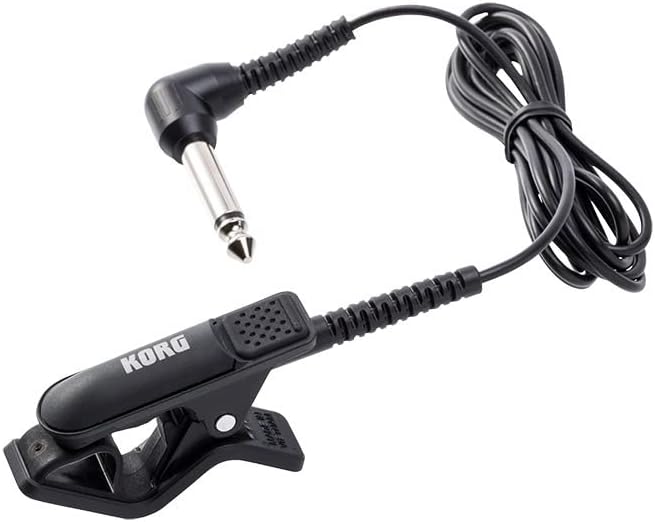
Image: The Korg CM-300 Contact Microphone, showing its clip, cable, and 1/4-inch TS plug. This plug connects directly to a compatible tuner.
6. Údržba
Proper maintenance will ensure the longevity and optimal performance of your Korg CM-300 Contact Microphone:
- Čištění: Wipe the microphone body and cable with a soft, dry cloth. Avoid using abrasive cleaners, solvents, or excessive moisture, as these can damage the rubber and electronic components.
- Skladování: When not in use, store the microphone in a clean, dry place away from extreme temperatures and direct sunlight. Avoid tightly coiling the cable to prevent kinks and damage.
- Péče o kabely: Handle the cable gently. Do not pull on the cable to disconnect the plug from the tuner. Always grasp the plug itself. The updated strain-relief slits are designed to reduce stress, but proper handling is still crucial.
- Kontrola klipů: Periodically check the clip and its internal rubber grip for any signs of wear or damage. A damaged clip may not provide secure attachment or optimal vibration transfer.
7. Řešení problémů
If you encounter issues with your Korg CM-300, consider the following:
- No Signal on Tuner:
- Ensure the 1/4-inch TS plug is fully inserted into the tuner's input jack.
- Verify that the tuner is powered on and functioning correctly (test with another input source if possible).
- Check the microphone cable for any visible damage or kinks.
- Ensure the clip is securely attached to the instrument and making good contact.
- Inaccurate Tuning/Interference:
- Confirm the microphone is attached to a part of the instrument that vibrates strongly and clearly (e.g., bell, bridge, headstock).
- Minimize external noise sources if possible, although the CM-300 is designed for noisy environments, extreme noise can still affect performance.
- Ensure the tuner's settings are appropriate for the instrument being tuned.
- Loose Clip:
- Re-position the clip to a more secure location on the instrument.
- Check the internal rubber grip for wear; if worn, the grip may be compromised.
8. Specifikace
| Funkce | Detail |
|---|---|
| Název modelu | CM-300 |
| Značka | Korg |
| Technologie připojení | XLR (Note: Product description states 1/4-inch TS Plug, this specification might be a general category or error in source data. Please refer to product description for actual connector type.) |
| Typ konektoru | XLR (Note: Product description states 1/4-inch TS Plug, this specification might be a general category or error in source data. Please refer to product description for actual connector type.) |
| Speciální funkce | Připínací design |
| Kompatibilní zařízení | Amplifier, Audio Interface, Tuners |
| Barva | Černý |
| Materiál | Pryž |
| Hmotnost položky | 0.01 uncí |
| Rozměry produktu | 9.1 x 9.1 x 9.1 palce |
| Tvarový faktor mikrofonu | Klopový (připínací) |
| Zdroj napájení | Elektrický kabel |
| Odstup signálu od šumu | 76 dB |
| Počet kanálů | 1 |
| Polární vzor | Jednosměrný |
| UPC | 663701771404 |
| Výrobce | Korg |
| Datum první dostupnosti | 9. října 2018 |
Note: Some specifications like "Connectivity Technology" and "Connector Type" are listed as XLR in the provided data, but the product description clearly states "1/4-inch TS Plug". Please rely on the product description for the correct connector type.
9. Záruka a podpora
For warranty information and technical support regarding your Korg CM-300 Contact Microphone, please refer to the official Korg website or contact Korg customer service directly. Keep your proof of purchase for any warranty claims.
Pro další pomoc můžete navštívit Korg Store on Amazon.


