1. Úvod
The Leitz IQ Office Pro P5+ Shredder is designed for secure and efficient document destruction in office environments. Featuring advanced micro-cut technology, it ensures a high level of security for your confidential information. This manual provides essential information for the safe and effective operation, maintenance, and troubleshooting of your shredder.

Obrázek: Přední strana view of the Leitz IQ Office Pro P5+ Shredder, showing its sleek design and the waste bin filled with shredded paper.
2. Bezpečnostní informace
Obecná bezpečnostní opatření
- Před použitím si přečtěte všechny pokyny.
- Keep hands, hair, loose clothing, and ties away from the paper entry slot.
- Udržujte děti a domácí zvířata mimo dosah drtiče.
- Do not insert more sheets than specified (7-8 sheets A4, 70-80 gsm).
- Do not shred metal objects, plastic cards, or adhesive labels unless explicitly stated as compatible. This shredder is designed for paper, staples, and paper clips.
- Empty the waste bin regularly to prevent jams.
Elektrická bezpečnost
- Ujistěte se, že zásuvka odpovídá voltage requirements of the shredder.
- Nepoužívejte skartovačku, pokud je napájecí kabel poškozený.
- Unplug the shredder before moving, cleaning, or performing maintenance.
- Avoid placing the shredder near water or in damp prostředí.
3. Konec produktuview
Klíčové vlastnosti
- Micro Cut Security (DIN P5+): Shreds documents into tiny 2x5mm particles for enhanced security.
- Vysoká kapacita: Shreds up to 7-8 sheets of A4 paper (70-80 gsm) per pass.
- Large Waste Bin: 30-liter removable bin holds up to 350 shredded sheets.
- Anti-Jam Technology: Automatically reverses if too much paper is inserted, preventing jams.
- Tichý provoz: Designed for a calm working environment.
- Prodloužená doba běhu: Operates continuously for up to 4 hours (240 minutes).
- Intuitivní dotykové ovládání: Easy-to-use interface for simple operation.

Obrázek: Detail view of the shredder's control panel with touch buttons and the fine micro-cut shredded paper in the bin.
4. Nastavení
Vybalování
- Opatrně vyjměte skartovač z obalu.
- Remove any protective materials or plastic bags.
- Ensure all components are present, including the shredder unit and waste bin.

Image: The Leitz IQ Office Pro P5+ Shredder next to its instruction manual, indicating the contents of the package.
Umístění
- Umístěte drtič na rovný a stabilní povrch.
- Ensure there is adequate space around the shredder for ventilation and easy access to the waste bin.
- Position the shredder near a power outlet.
Připojení napájení
- Insert the waste bin securely into the shredder unit.
- Zapojte napájecí kabel do uzemněné elektrické zásuvky.
- The shredder is now ready for operation.
5. Návod k obsluze
Skartace dokumentů
- Ujistěte se, že je drtič zapojen do zásuvky a že je odpadkový koš správně vložen.
- Turn on the shredder using the power button on the control panel.
- Insert up to 7-8 sheets of A4 paper (70-80 gsm) into the paper entry slot. The shredder will automatically start shredding.
- The shredder can also handle small staples and paper clips.
- For optimal performance and quiet operation, consider using Leitz pre-lubricated paper.

Image: The shredder with visual indicators for its 7-sheet capacity and 30-liter waste bin, highlighting its efficiency.
Technologie Anti-Jam
The Leitz IQ Office Pro P5+ Shredder features advanced anti-jam technology. If too much paper is inserted, the shredder will automatically reverse to clear the jam. Remove the excess paper and re-insert a smaller quantity.

Image: Graphic illustrating the Anti-Jam feature and the 2+1 year guarantee offered with the shredder.
Vyprázdnění odpadkového koše
- When the waste bin is full, the shredder will stop operating.
- Pull out the removable waste bin from the front of the shredder.
- Dispose of the shredded paper.
- Reinsert the waste bin firmly until it clicks into place. The shredder will then be ready for use again.
6. Údržba
Čištění
- Před čištěním vždy odpojte drtič ze zásuvky.
- Vnější povrch skartovačky otřete měkkým, suchým hadříkem. Nepoužívejte abrazivní čisticí prostředky ani rozpouštědla.
- Periodically clean the paper entry area to remove any paper dust or debris.
Mazání
To maintain optimal performance and extend the life of your shredder, it is recommended to lubricate the cutting blades regularly. Use shredder oil or lubrication sheets specifically designed for paper shredders. Follow the instructions provided with the lubrication product.
7. Řešení problémů
| Problém | Možná příčina | Řešení |
|---|---|---|
| Skartovačka se nezapne. | Not plugged in; Waste bin not fully inserted; Overheat protection activated. | Check power connection; Ensure bin is correctly seated; Allow shredder to cool down for 30-60 minutes. |
| Zaseknutý papír. | Too much paper inserted; Paper not inserted straight. | Use the reverse function to clear the jam; Remove excess paper; Insert fewer sheets straight into the slot. |
| Drtič se během provozu zastaví. | Waste bin is full; Overheat protection activated. | Empty the waste bin; Allow shredder to cool down. |
| Drtič je hlučný. | Vyžaduje mazání. | Lubricate the cutting blades with shredder oil. |
8. Specifikace
| Funkce | Detail |
|---|---|
| Číslo modelu | 80040000 |
| Značka | Leitz |
| Typ řezu | Micro Cut |
| Úroveň zabezpečení | DIN P5+ |
| Velikost Shred | 2x5mm |
| Kapacita listu | 7-8 sheets (A4, 70-80 gsm) |
| Kapacita odpadkového koše | 30 litrů |
| Nepřetržitá doba chodu | 240 minut (4 hodiny) |
| Kompatibilní materiály | Paper documents, staples, paper clips |
| Rozměry (VxŠxP) | 58.9 x 40.6 x 32 cm |
| Hmotnost | 22 kg |
| Materiál | Plast |
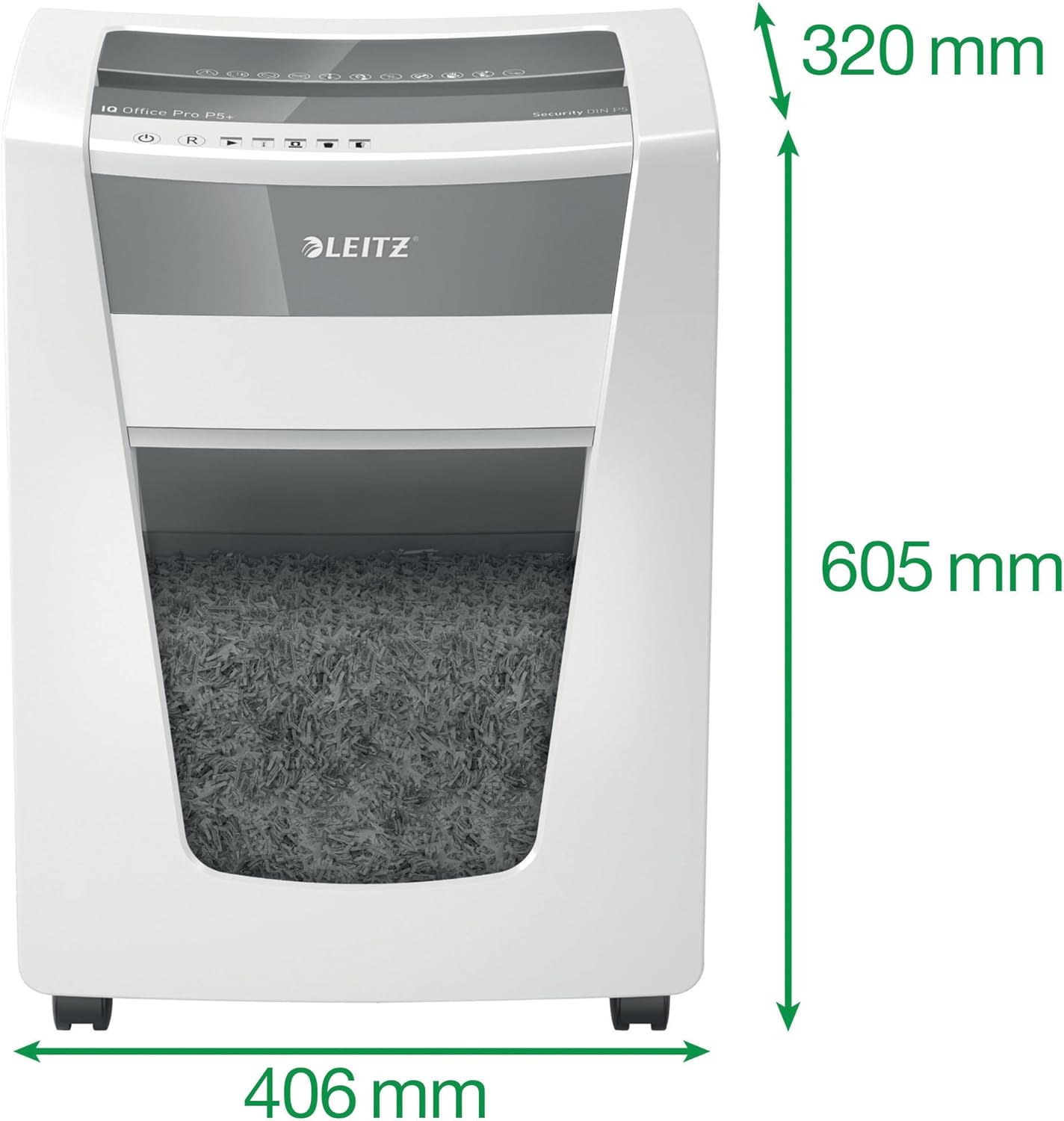
Image: The shredder with its key dimensions (height, width, depth) clearly marked.
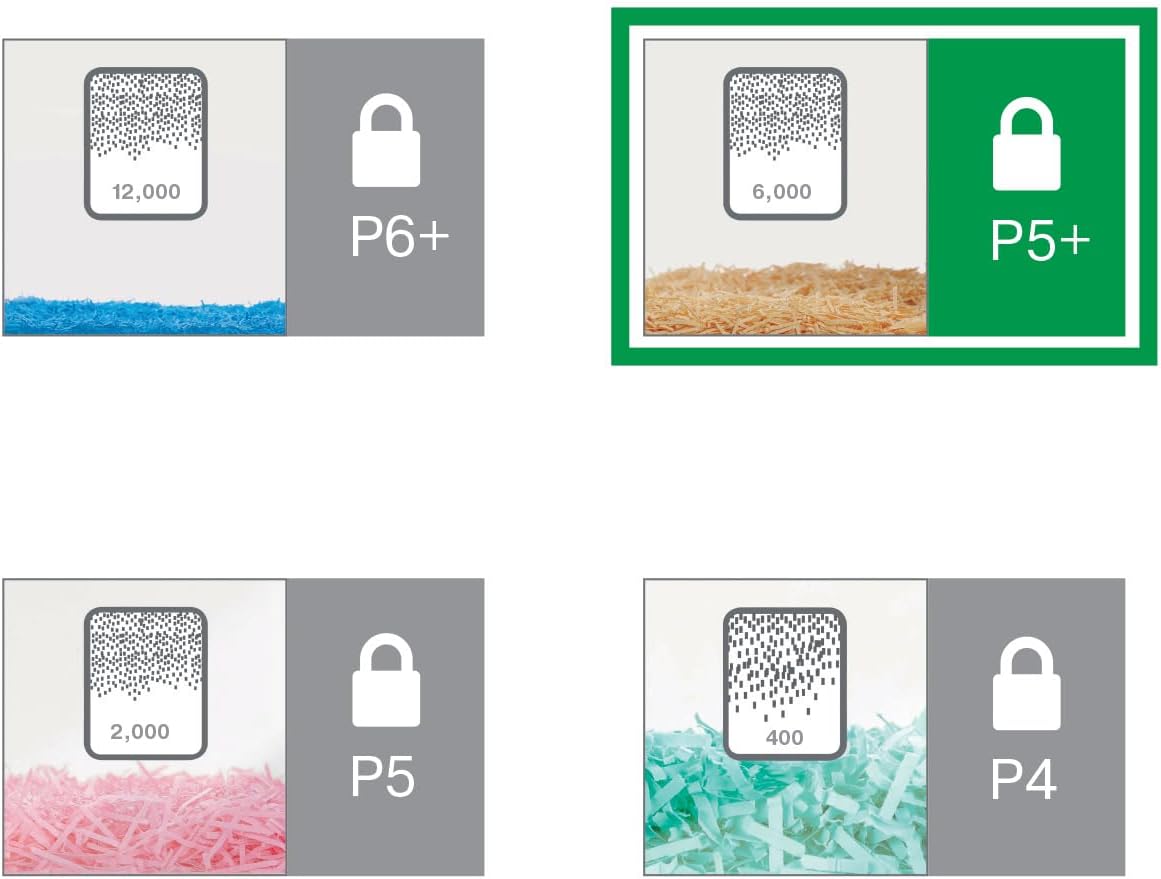
Image: A visual comparison of different DIN security levels (P4, P5, P5+, P6+), illustrating the decreasing particle size for higher security.
9. Záruka a podpora
Informace o záruce
This Leitz IQ Office Pro P5+ Shredder comes with a 2-year warranty. An additional 1-year warranty (total 3 years) can be obtained upon product registration. Please refer to the warranty card included with your product for detailed terms and conditions, or visit the official Leitz webstránky pro registraci.
Zákaznická podpora
For technical assistance, spare parts, or any inquiries regarding your Leitz shredder, please contact Leitz customer support. Contact information can typically be found on the official Leitz webmístě nebo na obalu produktu.
Můžete také navštívit Leitz official webmísto další informace a zdroje podpory.


