Zavedení
This manual provides detailed instructions for the installation, setup, and operation of your JVC KD-X260BT Digital Media Receiver. This unit is designed to provide high-quality audio playback and hands-free communication in your vehicle, featuring Bluetooth connectivity, USB input, and a 13-band equalizer. Please note, this unit does not play CDs. Read this manual thoroughly before use to ensure proper operation and to prevent damage.

Obrázek: Přední strana view of the JVC KD-X260BT Digital Media Receiver, showing the display and control buttons.
Bezpečnostní informace
- Do not operate the unit in a way that distracts you from driving. Always keep your attention on the road.
- Ensure proper wiring connections to prevent short circuits or damage to the vehicle's electrical system.
- Nevystavujte jednotku vlhkosti nebo extrémním teplotám.
- Nepokoušejte se jednotku rozebírat ani upravovat. Veškerý servis svěřte kvalifikovanému personálu.
- Use only accessories specified by JVC.
Obsah balení
Ověřte, zda jsou v balení přítomny všechny položky:
- Přijímač digitálních médií JVC KD-X260BT
- Kabelový svazek
- External Wired Microphone
- Montážní hardware
- Návod k použití (tento dokument)
Instalace
Professional installation is recommended for this product. Incorrect installation can lead to damage to the unit or vehicle. The KD-X260BT features a short body design, which facilitates easier installation in various vehicle dashboards.
Připojení kabeláže:
- Connect the wiring harness according to your vehicle's wiring diagram.
- Ujistěte se, že všechny spoje jsou bezpečné a izolované, aby se zabránilo zkratům.
- Connect the external microphone to the designated input for hands-free calling. Position the microphone in a location that provides clear voice pickup.
- Připojte kabel antény.
- Pokud používáte externí amplifiers, connect the 2.5V preamp outputs (rear/subwoofer selectable).
Montáž:
- Nainstalujte montážní pouzdro do otvoru v palubní desce.
- Slide the receiver into the mounting sleeve until it locks into place.
- Připevněte ozdobný kroužek.
Nastavení
Počáteční zapnutí:
After installation, turn on your vehicle's ignition. The unit should power on. Follow any on-screen prompts for initial setup, such as language selection.
Bluetooth párování:
The KD-X260BT supports Bluetooth 3.0+EDR and allows for two phones to be connected full-time. This enables receiving calls from either phone with a push of a key.
- On the receiver, navigate to the Bluetooth menu.
- Vyberte „Párování“ nebo „Vyhledávání zařízení“.
- Na smartphonu povolte Bluetooth a vyhledejte dostupná zařízení.
- Select "KD-X260BT" from the list on your phone.
- Pokud budete vyzváni, potvrďte párovací kód na obou zařízeních.
- Once paired, the unit will display a confirmation.
The unit supports Bluetooth profiles HFP (Hands-Free Profile 1.6 for wideband speech), HSP (Headset Profile), PBAP (Phone Book Access Profile), A2DP (Advanced Audio Distribution Profile) a AVRCP (Audio/Video Remote Control Profile 1.5).
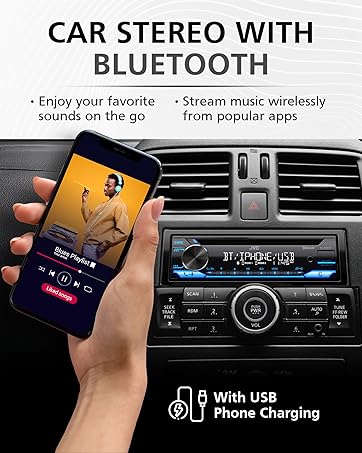
Image: JVC KD-X260BT display indicating Bluetooth connection, with a smartphone showing music playback, illustrating wireless audio streaming.
JVC Remote App:
Download the "JVC Remote" app (available for iOS and Android) to control the receiver's source directly from your smartphone using simple finger gestures.
Návod k obsluze
Základní ovládání:
- Vypínač: Stiskněte pro zapnutí/vypnutí jednotky.
- Knoflík hlasitosti: Rotate to adjust the volume level. Press to access menu options.
- Tlačítko zdroje: Press to cycle through available audio sources (Tuner, USB, Bluetooth Audio, AUX).
- Tlačítko zobrazení: Changes display information (e.g., clock, track title).
Rádiový tuner:
- Press the Source button to select "Tuner" (AM/FM).
- Use the seek buttons to find radio stations.
- Press and hold a preset button (1-6) to store a station.
USB přehrávání:
Connect a USB device to the front USB port. The unit supports MP3/WMA/WAV/FLAC playback. The USB port also provides high current 1.5A charging for smartphones.
- Insert the USB device. The unit will automatically switch to USB source and begin playback.
- Use the track buttons to skip tracks.
- Use the folder buttons to navigate through folders.
- MP3 ID3 Tag Display (title/artist/album) is supported.
- Android music playback (AOA 2.0) is supported for Android phones (version 4.1 or later).
Streamování zvuku přes Bluetooth:
Once a Bluetooth device is paired, select "Bluetooth Audio" as the source to stream music wirelessly. Use the receiver's controls or the paired device to manage playback (play, pause, skip, search via AVRCP 1.5).
Hands-free volání:
When a call comes in on a paired phone, the unit will display the caller ID. Press the call button to answer, and the end call button to hang up. The external microphone ensures clear communication.
Audio Settings (Equalizer):
The unit features a 13-Band Graphic Equalizer with 10 preset EQ settings and 1 user-customizable setting. Access the audio menu to adjust:
- Ekvalizér: Select from preset curves or customize your own.
- Zesílení basů: Enhances low frequencies.
- Hlasitost: Compensates for perceived loss of bass and treble at low volumes.
- Vyvážení/Fader: Adjusts sound distribution between left/right and front/rear speakers.
- Ovládání subwooferu: Adjust subwoofer output level and frequency if connected.
Internet Radio/Digital Radio Control:
Control Pandora, iHeartRadio, and Spotify directly from the receiver when connected to a compatible Android device via Bluetooth.
Steering Wheel Remote Control:
Factory steering wheel control functions can be retained with a third-party adapter (sold separately).
Údržba
- Čištění jednotky: Use a soft, dry cloth to wipe the front panel. Do not use abrasive cleaners or solvents.
- USB port: Udržujte USB port bez prachu a nečistot.
- Aktualizace firmwaru: Check the JVC webpravidelně kontrolujte webové stránky, zda nejsou k dispozici aktualizace firmwaru pro lepší výkon a funkce.
Odstraňování problémů
| Problém | Řešení |
|---|---|
| Žádná síla | Check vehicle's fuse. Ensure wiring harness is correctly connected. |
| Žádný zvuk | Check speaker connections. Verify volume level. Ensure correct source is selected. |
| Bluetooth se nepřipojuje | Ensure Bluetooth is enabled on both devices. Delete previous pairing and re-pair. Move devices closer. |
| Zařízení USB nebylo rozpoznáno | Ensure USB device is formatted correctly (FAT16/32). Check for compatible file typy. Zkuste jiné zařízení USB. |
| Špatný příjem rádia | Zkontrolujte připojení antény. Ujistěte se, že je anténa plně vysunutá (pokud je k dispozici). |
Specifikace
| Funkce | Detail |
|---|---|
| Číslo modelu | KD-X260BT |
| Výstupní výkon (špičkový) | 50 Wattů x 4 kanály |
| Výstupní výkon (RMS) | 22 Wattů x 4 kanály |
| Zobrazit | VA LCD Display, Spanish Text Display |
| Vstup USB | Front USB, 1.5A Charging, MP3/WMA/WAV/FLAC Playback, Android AOA 2.0 |
| Pomocný vstup | 3.5mm Front Audio Auxiliary Input |
| Verze Bluetooth | 3.0+EDR Certified |
| Bluetooth Profiles | HFP 1.6, HSP, PBAP, A2DP, AVRCP 1.5 |
| Ekvalizér | 13-Band Graphic Equalizer (10 Preset x 1 User) |
| Předamp Výstupy | 1 Set of 2.5V (Rear/Subwoofer Selectable) |
| Internet Radio Control | Pandora, Spotify, iHeartRadio (for Android) |
| Rozměry (produkt) | 4 x 9 x 8 palce |
| Hmotnost položky | 1.79 libry |
Záruka a podpora
This JVC KD-X260BT Digital Media Receiver comes with a 1-Year Manufacturer's Warranty. For warranty claims, technical support, or service inquiries, please contact JVC customer support or visit the official JVC webwebu. Uschovejte si doklad o koupi pro ověření záruky.
JVC Customer Support: Refer to the contact information provided with your product packaging or on the official JVC webmísto.


